I just saved $180 a year on my Google AI plan without losing my Drive storage – here’s how


I just saved $180 a year on my Google AI plan without losing my Drive storage - here's how

Elyse Betters Picaro / ZDNET

Follow ZDNET: Add us as a preferred source on Google.


ZDNET’s key takeaways

  • Google AI Plus now includes 400GB of storage for $4.99 a month.
  • Downgrading from AI Pro to AI Plus could save $180 a year.
  • Google One plans can be changed from the web or mobile app.

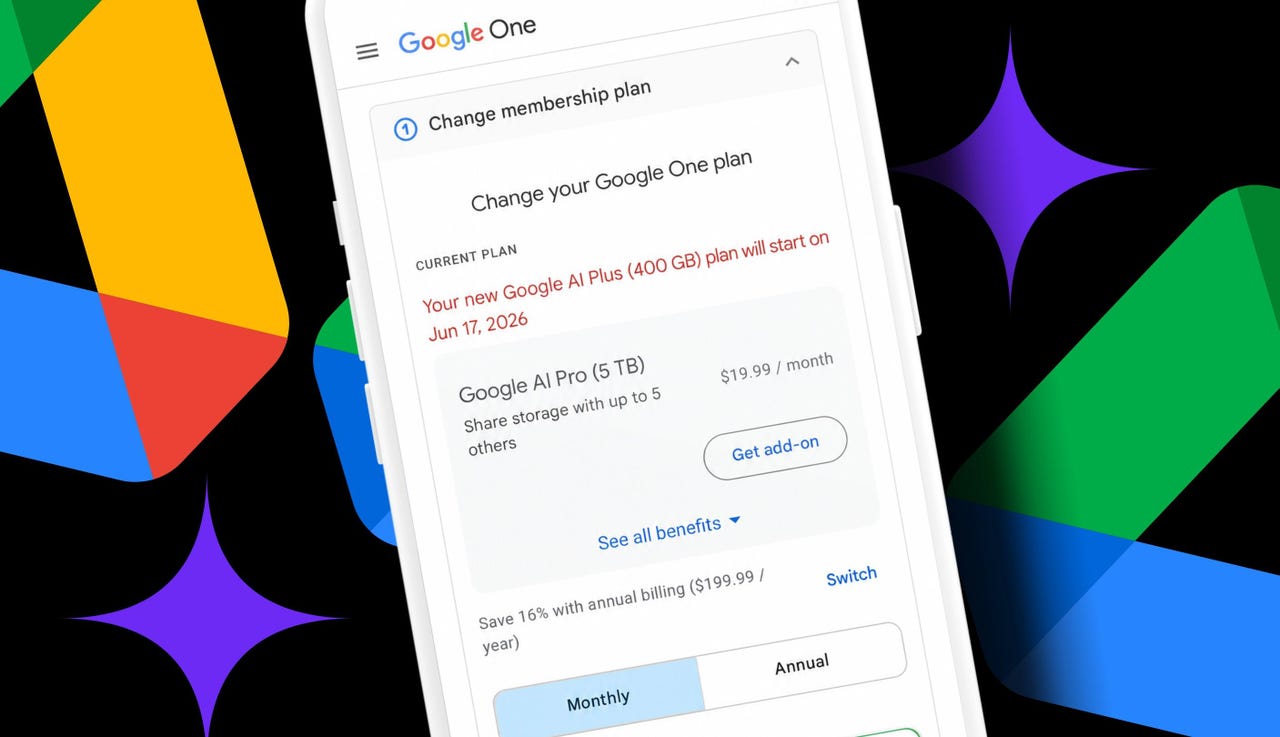
I don’t love paying for Google Drive. But after 14 years of using Docs, Sheets, Slides, Photos, and uploading random files, I now have about 340GB of digital junk sitting in Google storage. That’s far beyond the free 15GB given to every account. So, I need to shell out $20 a month for Google AI Pro, which gives me 5TB of storage and access to the Gemini 3 Pro model in the Gemini app.

The issue? I want to whittle down my subscriptions, and I barely use Gemini enough to justify the AI part of the bill. I need storage.

Also: I tried Google Drive’s new AI cleanup tool to fix 14 years of clutter

So, when Google dropped its AI Plus plan to $4.99 a month and bumped the included storage to 400GB, my cheap little ears perked up. Suddenly, Google had a plan that covered my current storage needs, with Gemini access included, if I wanted it.

There are heavier usage limits, but Google said they’re “twice as high” as the free tier. The plan also includes access to NotebookLM, Proofread and AI Inbox in Gmail, and more. The choice here is obvious for a person trying to save money.

How to switch Google One plans

What you’ll need: A Google account with a Google One plan (which some people call a “Google AI” plan because several of the options include Gemini) and access to your Google One membership settings either on the web or via the mobile app.

Before changing anything, go to the Google One dashboard in a browser or open the Google One app on a phone. Make sure the Google account tied to the paid storage plan is signed in. From there, look for the storage breakdown.

  • On the web, Google shows the current plan up top and then how much space is being used across Drive, Gmail, and Photos.
  • In the mobile app, storage appears at the top of the Home screen, and the current plan appears at the bottom.

In my case, I’m using 6% of the 5TB given to me in the AI Pro plan. So, the 400GB AI Plus plan would cover me.

Also: I tested ChatGPT Plus vs. Gemini Pro to see which is better


Show more

Check current Google storage

Elyse Betters Picaro / ZDNET
Manage Google One plan

Elyse Betters Picaro / ZDNET

While managing a Google One plan, it may be necessary to click or tap “See more plans” to view the AI Plus options, especially when planning to downgrade. I had to, because they were hidden for me. Be sure to expand all the benefit details and read through each plan carefully to see what would be lost by switching to a cheaper option.

Google now has seven options, ranging from Basic (with 100GB of storage and no AI) to Google AI Ultra (with 20TB and Gemini Pro). I also noticed Google has another $9.99 option for AI Plus. It has all the same benefits, but with 2TB of storage. Tempting.

When ready to choose, just click or tap the button on the plan to downgrade, upgrade, or subscribe.

Also: Everything we saw at Google I/0 2026

For me, by downgrading to AI Plus with 400GB, I’d lose higher Gemini AI usage limits and access to the 3 Pro model. I’d also lose YouTube Premium Lite Individual, Google Home Premium, and Google Health Premium. But I don’t really use them now. I would get to keep NotebookLM and Google Flow, plus the 400GB of Drive, Photos, and Gmail storage to share across five family accounts.


Show more

Change Google One plan

Elyse Betters Picaro / ZDNET

How much I’ll save by downgrading

Honestly, before now, Google AI Plus was easy to ignore. It cost $7.99 a month at launch and only included 200GB of storage. That’s nothing. Today, it’s $4.99 a month and comes with double the storage. It’s something I can consider, as a longtime Workspace user.

If I were to move from my current AI Pro plan with 5TB of storage to AI Plus with 400GB of storage, I would have only about 60GB of space left. That’s not much when factoring in Gmail attachments, Drive uploads, and Photos backups that keep piling up over time.

Also: Google’s AI features just got more confusing

I looked it up, and if my account should ever go over its quota, Google said I might lose the ability to upload files to Drive, back up photos and videos, create new Google Workspace docs, and use Gmail normally. Still, I do have room to spare. The math is easy.

Dropping from AI Pro at $19.99 a month to AI Plus at $4.99 a month would save me $180 a year. And don’t forget, AI Plus also has a 2TB option for $9.99. That would save me $120 a year. Even that’s a real subscription cost cut, if you ask me.

Hey, in this economy, every little bit helps.


Source link

Leave a Reply

Subscribe to Our Newsletter

Get our latest articles delivered straight to your inbox. No spam, we promise.

Recent Reviews


When your car needs service, you’re probably going to turn to the place that’s most convenient, most trustworthy, and most affordable. Everybody has their favorites, but more often than not, people tend to end up at one of the popular auto shop chains on every corner. Two of the most recognizable are Firestone and Pep Boys. These chains have built reputations for dependable service across hundreds of locations coast to coast.

But while both brands do business in similar industries, they don’t have a whole lot in common beyond that. From their business models to their ownership structures to their customer offerings, these two auto shop chains have plenty of differences drivers need to know about. Their tires, their warranties, their in-store selection… Firestone and Pep Boys are far from identical. Looking at the biggest differences between the two might just influence your decision on where to take your car the next time you’re in a bind.

Pep Boys used to be an auto parts retailer and a service center

What makes Pep Boys unique is the fact that it used to double as both a retailer and a service center. It was like an AutoZone and a Firestone combined. This two-part approach meant customers could either buy the parts and do the repair themselves or have them installed on-site. It was a shop that appealed to both DIY car owners and those who’d rather have a professional do it instead. Alas, the company has all but shut down its retail side in recent years to focus on the more lucrative part of the business, which is the service center.

Firestone has never had that kind of flexibility. It’s always been an auto shop and an auto shop alone. There’s no retail component like Pep Boys used to have, where customers can walk into any location and browse a wide range of automotive parts and accessories without needing to commit to service. You won’t get that at Firestone.

Firestone is owned by Bridgestone

You can learn a lot about a company by looking at who owns it. In fact, it’s a big reason why Firestone is so different from Pep Boys: it’s owned by Bridgestone, one of the best tire brands in the world. This ownership shapes nearly every aspect of its business, from its product offerings to its service priorities. Funny enough, Bridgestone also tried to buy Pep Boys in 2015 but ended up being outbid.

For one, it tells you the auto shop chain puts a lot more emphasis on its tire-related services than Pep Boys. It also means that Firestone shops are more beholden to Bridgestone’s product ecosystem than other auto shop chains. (More on that next.) Its Bridgestone ownership also influences how Firestone positions itself in the market. Rather than trying to be multiple things like Pep Boys, Firestone leans more into its identity as a knowledgeable service provider instead.

Pep Boys has more tire variety

Because Pep Boys isn’t owned by a top tire brand, it’s able to offer a much wider variety of tire options to their customers. Firestone, by comparison, puts a lot more focus on parent company Bridgestone’s tires and its in-house exclusive brands. You might not find much else beyond that, except maybe a select few tire brands it just so happens to have in stock. Pep Boys is different: The company has all the top tire brands, from Cooper to Pirelli to Michelin to Goodyear and beyond.

Yeah, that’s convenient, but it also helps you understand what kind of deal you’re getting. When a major tire service company pushes its own tires on you, it can be hard to know if you’re paying a fair price because you can’t make a proper comparison. Because Pep Boys has multiple brands available in one place, you can see your options side-by-side and decide from there, though availability can vary by location. Firestone tires are still quality, but Pep Boys gives you more of a choice.

Firestone has better warranties

One last point: Firestone has a lot more generous warranties than Pep Boys has to offer. Many parts and services are covered for 12 months or 12,000 miles, whichever comes first. Pep Boys, by comparison, only has a 90-day or 3,000-mile warranty on parts and services installed. That’s a pretty stark difference, which means Firestone definitely has the advantage here.

Keep in mind, though: Bridgestone’s limited warranty doesn’t apply to tires, batteries, wheels, or anything bought through the Firestone Off-Road Shop program. Specific tire warranties will vary from brand to brand, but all Bridgestone or Firestone tires come with a 90-day “Buy & Try Guarantee.” If you aren’t happy with your purchase, you can take them back and get credit for different tires instead. Another note: Pep Boys also has an extended warranty available for purchase. This extends things to 12 months with no mileage limit.


Source link