
Follow ZDNET: Add us as a preferred source on Google.
ZDNET’s key takeaways
- Elive has a new beta out, and it’s fantastic.
- Some of the announced features aren’t ready.
- You can test the beta now for free.
There’s a lot to love about Linux, including its flexibility. No matter the distribution, you can tweak and customize it to perfectly fit your needs and aesthetic. I learned this back in the late ’90s, when I discovered the Enlightenment desktop.
I spent hours upon hours on customization, and always found myself in awe at what it could do.
Also: The best Linux distros for beginners
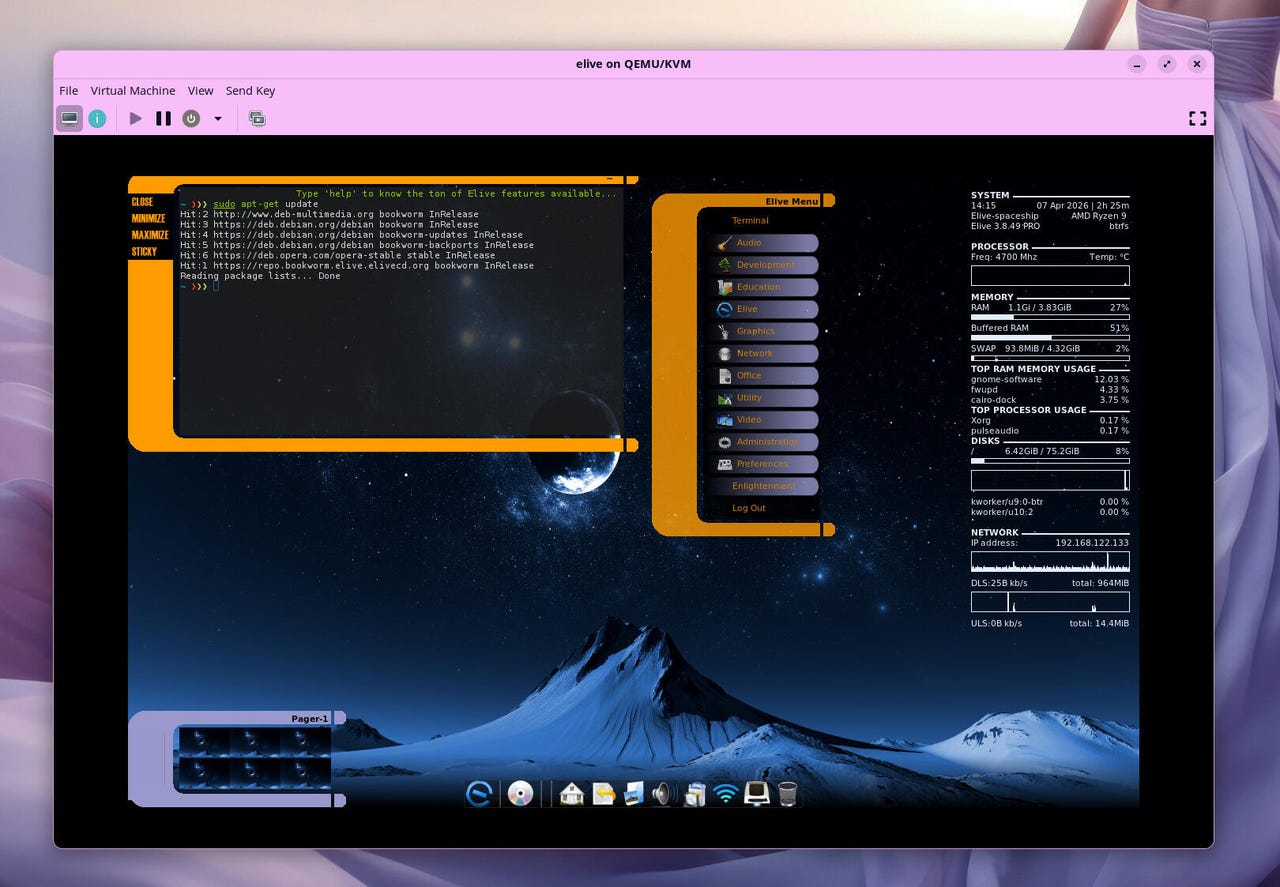
Although Enlightenment (also called E) doesn’t enjoy nearly the popularity it once had, it’s still available, thanks to distributions such as Elive. Elive is based on Debian, so it inherits the rock-solid reliability from the “Mother of all distributions.” Elive is also configured, out of the box, to be one very cool-looking desktop OS.
There’s a new beta of the upcoming release of Elive, and it promises to be something special. In this latest release, you’ll find new features/improvements, such as:
- OpenRC: An alternative init system available during installation.
- Synthwave Player: An impressive new music player.
- Voice Control: An extremely-light application for hands-free interaction with zero AI integration.
- Desktop Clock: A simple, lightweight desktop clock.
- Enlightenment 27: A preview of the latest version of the Enlightenment desktop.
- Debian 12 base: This is the last build of Elive that will be based on Debian 12.
Also: How to choose the right Linux desktop distribution for you
There are also the usual features that come with Enlightenment, such as my favorite, window shading (double-click on a window’s title bar and the window rolls up, so all you see is the title bar), which makes for an amazing multi-tasking desktop.
There’s also the desktop menus. Left-click any blank spot on the desktop to bring up the main menu. Right-click on the desktop to bring up the Settings menu.
You also get Conky, the Elive Center (where you can customize the look, configuration, and settings of your desktop), and so much more. After installing the latest beta, I found myself poking around to experience what the developer has done with the Enlightenment desktop, and I was all smiles.
Also: My 11 favorite Linux distributions of all time, ranked
There’s also another feature that might be of interest to some: voice control. This is a brand new feature, still in beta, that allows you to control the desktop with your voice. The developer has released a nice demo video for this feature, which you can view on his Patreon site.
Upon installing the latest beta of Elive, I found myself excited about trying this new feature out. After scanning through the desktop menus, I was unable to locate a way to enable and/or start voice control. I jumped on the Elive Libera.Chat server to see if anyone could help me out, and, surprisingly, there was no help to be found.
Unfortunately, no help was forthcoming, so I had to miss out on testing the voice control in the beta release. However, the video above gives you a good idea of how the feature will work (and it’s pretty exciting).
What I love about Elive
First and foremost, it’s all about Enlightenment, and what is there not to love about that window manager? It retains everything I’ve always enjoyed about Enlightenment (desktop menus, window shading, theming, smooth and unique animations, desktop sounds, etc), while also giving it a slightly more modern look.
The default Elive theme, showing the desktop menu.
Jack Wallen/ZDNET
Yes, when you use Enlightenment, you know you’re working with a throwback to the earlier days of Linux, but that doesn’t take away from its usability or beauty.
There’s one thing about Enlightenment that never fails to put a smile on my face. No matter how much I know about the E window manager, I’m always finding something new. For example, just today I realized that I could right-click the pager modules (near the bottom left of the screen) to minimize them. I love this feature because I tend to like a more minimal desktop, but still want the ability to work with the pager.
I’ve left one pager open, so you can see where they live (and what they look like when minimized).
Jack Wallen/ZDNET
For those who don’t know, the pager is an old-school approach to switching between virtual desktops.
Oh, and there’s the LCARS theme, which any Trekkie will love.
What I don’t love about Elive
Honestly, there’s not much to criticize about Elive. Obviously, I wish I could have tested the voice control feature, but that wasn’t in the cards (yet).
Also: 5 reasons to switch to an immutable Linux distro today – and which to try first
So, if I’m really picking at nits here, I wish I could move the minimized applications. With Enlightenment, applications don’t minimize to a panel; instead, they minimize to a thumbnail on the desktop. I would love to be able to move them to, say, the left edge of the display.
Is Elive for you?
Elive is best suited for those who are tired of the same old desktop metaphor of panel, system tray, launchers, blah, blah, bity blah. This old-school desktop environment is and has always been one of my favorites, partially because it’s just so interesting and entertaining.
If you’re tired of using a desktop interface that tries to be either Windows or MacOS, then Elive might be a great option. Sure, it has a slight learning curve, but once you get the hang of it, I’m confident that you’ll love it as much as I do. And because Elive does such a great job with Enlightenment, I can’t think of a better Linux distribution to use for this smile-inducing desktop.
I would have liked to try the voice control to see how much it adds to the experience, but I can say that it could be an amazing feature for anyone with accessibility issues and wants to work with a desktop that shrugs off the usual boring UI.
If you’d like to give Elive a try, check out the download page, grab an ISO, burn it to a USB drive, boot up, and install.