Chrome Enterprise adds agent-like AI to automate work tasks.
New “Skills” let workers save and reuse AI workflows instantly.
IT has visibility and controls to help manage AI security risks.
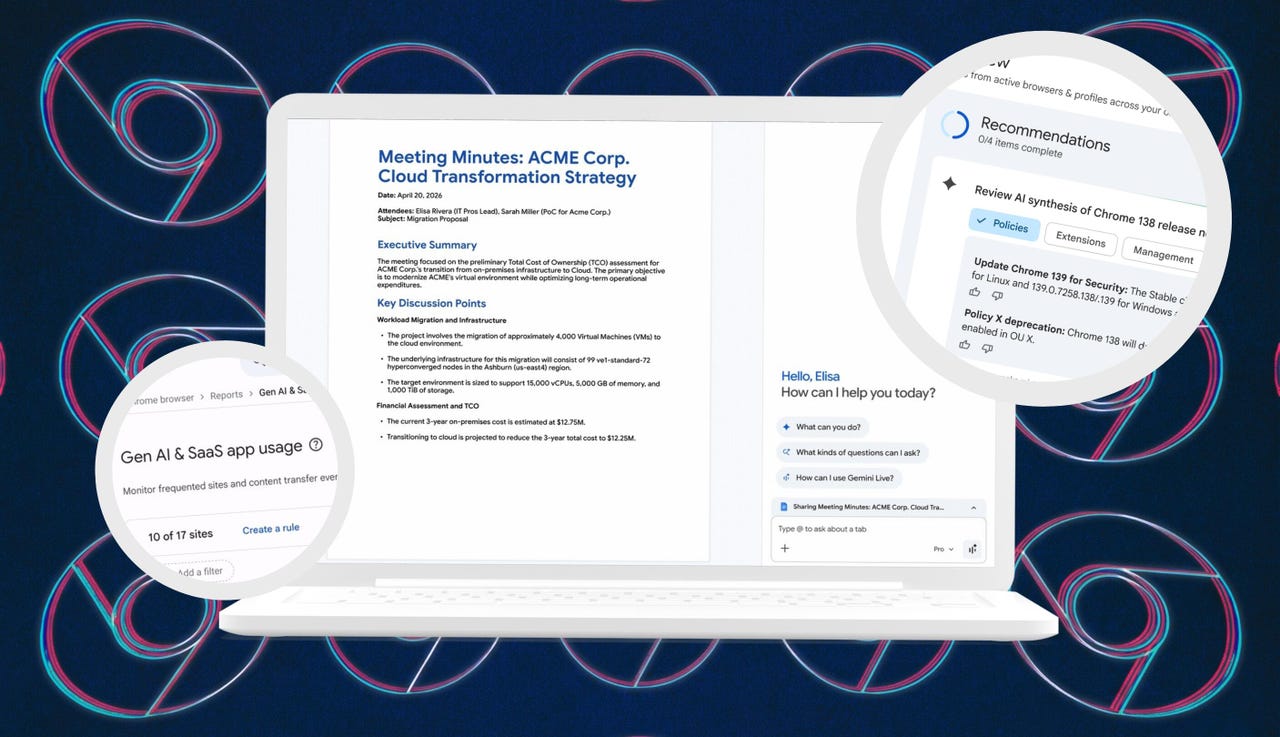
Google has announced new Chrome features specifically for companies. The update brings AI capabilities to workers while giving IT teams greater control over which AI tools are used across the workplace. Chrome Enterprise is now a place where work gets done, AI operates inline, and administrators can enforce security, all within the browser.
One of the biggest changes coming to Google’s workplace browser, Chrome Enterprise, is a Gemini feature called Auto Browse. I already tested Auto Browse in the consumer version of Chrome, but now it’s available to Workspace users in the US. It adds autonomous, agent-like capabilities that can take action on your behalf based on what’s open in your browser.
In practice, that means if you’re working in a Google Doc, browsing a company site, and using a CRM, you can ask Gemini in Chrome Enterprise to complete a task across your open tabs. Google said it could turn the content in your Google Doc into a new sales opportunity by pulling in all relevant details, creating contacts, and setting everything up in the CRM for you.
You still need to review and approve actions before they are executed.
Google / Elyse Betters Picaro / ZDNET
2. Skills
Google is also bringing “Skills” to Chrome Enterprise, letting you save and reuse AI workflows. This one-click feature launched recently for consumers in Chrome, but is now coming to Workspace. The idea is, if you find yourself asking Gemini the same thing throughout the workday, you can save that prompt as a Skill and run it instantly on any page in your browser.
Just type / in the Gemini side panel, select your Skill, and it runs immediately on the page you’re viewing. Over time, you can build a library of repeatable tasks customized to how you or your team works. As a safeguard, most Skills require confirmation before running.
Google said Workspace prompts are not used to train its AI models.
Google / Elyse Betters Picaro / ZDNET
3. Gemini Summary
Since employees may already be using AI tools on their own, Google is flagging a “Shadow AI” risk where sensitive data could be shared with unmonitored tools. To address this, Chrome Enterprise now gives IT teams visibility into AI usage across the workplace, including which tools employees access, unusual behavior from extensions or agents, and unapproved tools.
Google said its GenAI and SaaS report will flag sanctioned and unsanctioned tools, while Chrome Enterprise’s extension telemetry will help IT administrators detect suspicious activity. That data can feed into platforms like SecOps and other SIEM tools. Admins can block risky extensions using third-party risk scores, restrict them by category, and remotely uninstall them.
Google is also adding a “Gemini Summary” module to the admin dashboard. It uses AI to summarize updates, highlight changes, and suggest actions for IT administrators in a condensed overview.
Meanwhile, integrations with platforms like Okta add another layer of security. In fact, Google and Okta added new features to reduce session hijacking by binding authentication sessions to a device’s secure hardware, “rendering stolen cookies unusable,” Google said. IT teams will also be able to remotely clear Chrome browsing data, such as cookies, on compromised devices.
The McCarthy Road opened as a passage to the greatest copper strike the world has ever known. More than one billion pounds of copper once traveled down this corridor from the Kennecott Mines to the coast. Today, travelers head the opposite direction—up the road—to experience staggering scenery, deep wilderness, and some of Alaska’s most authentic adventures inside America’s largest national park.
The road is as notorious as it is remote, with some sources recommending satellite phones as routine safety gear. We’re here to share not only what we learned firsthand from driving the McCarthy Road ourselves, but also insights from Neil Darish, McCarthy’s outspoken statesman and longtime steward of the area. He told us that from the 1970s until about 2006 McCarthy Road was a real struggle for most people. It’s simply not like that anymore but the old stories abound. We wanted to find out for ourselves.
Wilderness adventures always carry some level of risk. But understanding what you’re getting into—and how to prepare—can turn the McCarthy Road from an intimidating unknown into one of Alaska’s most rewarding journeys.
How Long Is the McCarthy Road?
Photo Credit: Jenn Coleman.
The McCarthy Road runs 59.4 miles from the State Wayside in Chitina (pronounced “Chit-na”) to the McCarthy Footbridge across the Kennicott River. It follows the route of the former 196-mile Copper River & Northwestern Railway, which once connected the mines to the port of Cordova.
When the mines closed in 1938, much of the track was salvaged for scrap. Floods, earthquakes, and time itself took out many bridges, leaving Kennecott and McCarthy isolated—preserved in a kind of remote time capsule that still defines the experience today.
Is the McCarthy Road Paved?
Photo Credit: Jenn Coleman.
Mostly, no.
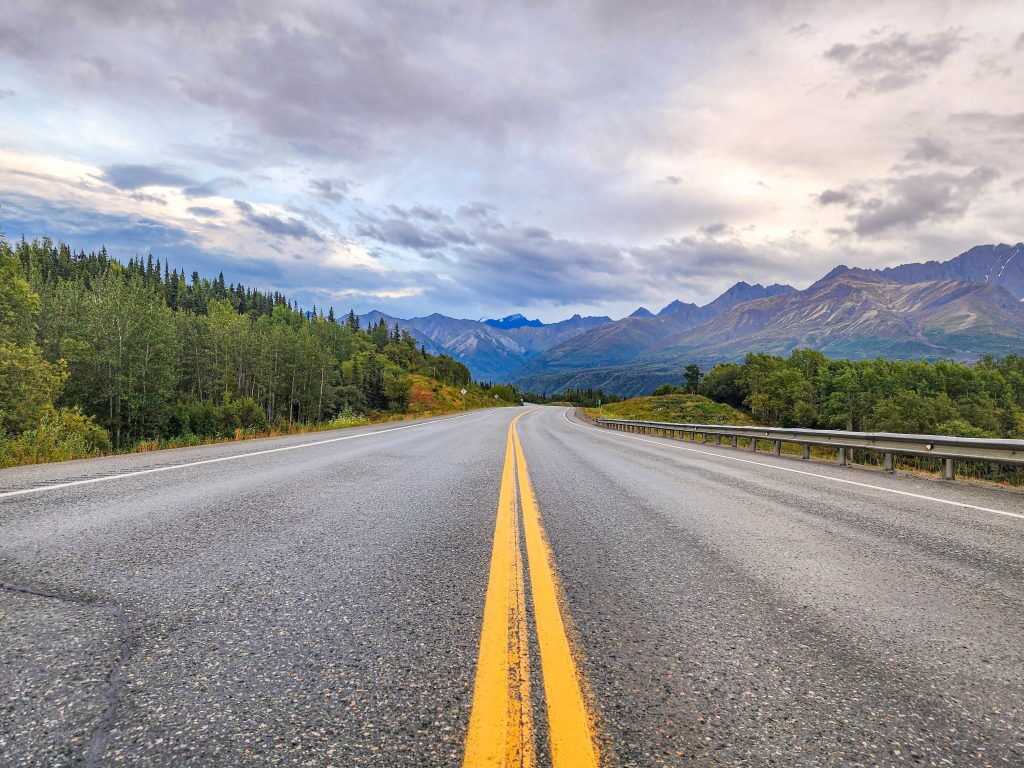
The McCarthy Road is primarily gravel, but for travelers willing to leave the pavement behind, it provides access to some of the most dramatic natural and historic landscapes in Wrangell–St. Elias National Park, including McCarthy and Kennecott.
Reconstruction began in earnest in the 1970s, when modern steel and concrete bridges replaced their wooden predecessors and fresh gravel was laid atop the old rail bed. What remains is rough but intentional, functional enough to reach the end, and wild enough to remind you where you are.
What Are the Road Conditions Like?
Photo Credit: Jenn Coleman.
The McCarthy Road is narrow and winding but relatively flat. The first few miles from Chitina toward the Copper River are paved, with occasional paved sections on steeper grades to reduce rutting.
Ironically, some of the worst potholes appear in those paved stretches, while the gravel sections are often smoother—albeit dusty and washboarded. According to the National Park Service, “under normal summer conditions, most passenger vehicles can make the trip.” That said, conditions can change quickly with weather.
How Long Does It Take to Get to McCarthy?
Photo Credit: Jenn Coleman.
Plan on 2–3 hours to drive from Chitina to the McCarthy Footbridge if you’re moving steadily and traffic is light. Summer weekends, especially around the Fourth of July, bring heavier traffic. It’s not gridlock, but passing opportunities are limited, and you’ll often move at the pace of the slowest vehicle.
Our advice? Drive patiently. Leave space. And when the dust gets thick, it’s often better to pull over for a photo than to white-knuckle it behind a convoy.
From Anchorage, it’s about 4.5 hours to Chitina without stops, but you’ll want to fuel up before committing to McCarthy Road. Once you park at the footbridge, it’s about a 20-minute walk into McCarthy proper.
What Is the Closest Gas Station?
Photo Credit: Jenn Coleman.
The closest gas station to McCarthy is in Chitina. It’s a 24-hour, credit-card-only pump with no additional services.
There is a full service station in Kenny Lake, about 90 miles from McCarthy (180 miles round trip), which offers a more comfortable fuel buffer for most vehicles. Glennallen is the last full-service town, but at 250 miles round trip, it leaves little margin unless you plan carefully, or only use it as one of the mandatory gas stops.
Can I Take a Rental Car on McCarthy Road?
Photo Credit: Jenn Coleman.
Most national rental car companies prohibit driving to McCarthy altogether. We rented from Alaska 4×4 at the Anchorage airport and had no issues.
Not only was it permitted, but we ended up with a sweet Bronco that had excellent clearance and fresh tires. We never needed four-wheel drive, but it was reassuring to have a vehicle built for roads like this. It also made the washboard roll on the gentle cycle.
Darrish said that his guests at McCarthy Lodge Resort get scared by the warning signs at the start of McCarthy Road, but their fear isn’t justified. He said in 2006 the state DOT removed the railroad spikes by using a magnetized trailer behind a grader. When you see or read stories about taking extra tires, it’s based on 2006 and before information.
Also he said, when you see the warning sign at the beginning of McCarthy Road, telling you to take emergency equipment with you; and warning you not to travel this road because it’s “not advised” it’s important to note that’s a winter based sign!! not relevant for summer visitors!!
Is There Cell Service Along the Road?
Photo Credit: Jenn Coleman.
Officially, coverage is “very limited.” Some sources go so far as to recommend carrying a satellite phone.
In practice, we had surprisingly usable Verizon service during our fall 2025 drive, though we wouldn’t count on it being consistent—or available in an emergency. Treat any cell signal as a bonus, not a plan and pay heed to the sections on car and wilderness emergency kits. Also, be sure to notify somebody you trust that you’re heading out into the wilderness, be it for hiking or driving the McCarthy Road. Darish confirmed that he finds that Verizon works on most of McCarthy Road.
What Can You See Along the Way?
Photo Credit: Jenn Coleman.
The McCarthy Road isn’t something to endure on the way to a destination—it is the destination.
Almost immediately after leaving Chitina, you pass through the Rock Cut, a former rail tunnel that’s now open to the sky which feels like a threshold between civilization and something wilder. At first, the road hugs the Copper and Chitina Rivers with expansive views, culminating at the Copper River Bridge.
Next, you’ll pass a chain of small lakes before reaching the single-lane Kuskulana River Bridge, often the most nerve-wracking moment for first-time drivers as you pass 238 feet above the raging Kushkulana River. The Chokosna, Gilahina, and Lakina Rivers are especially photogenic, with remnants of historic railroad trestles near the Gilihina Bridge. Long Lake lives up to its name, stretching alongside the road for more than two miles before you get your first views of the rocky Kennicott Glacier.
Darish gave us his best pro tip to truly enjoy McCarthy Road. Leaving the population centers like Anchorage Denali or Fairbanks while everyone is still asleep is a total Alaska Travel pro-tip. You’re far more likely to see wildlife along the way when the roads are empty. In addition, you’ll arrive on the McCarthy Road around 11am instead of 4pm- there’s less traffic – and you’re less likely to be behind another vehicle, even in peak July traffic.
What Services Are Available?
Photo Credit: Jenn Coleman.
There are no service stations along the McCarthy Road, so self-sufficiency is key.
A small trading post in Chokosna sells limited snacks and drinks about halfway through the drive. Once you reach the end of the road, you’ll find espresso, food, and parking before the Kennicott River. Along the way, wayside pullouts appear roughly every 10 miles, offering parking, picnic tables, and vault toilets.
What Should You Pack in a Car Emergency Kit?
Photo Credit: Jenn Coleman.
The best emergency plan is prevention: drive slowly, check fluids, inspect tires, and make sure you have enough gas and windshield washer fluid to handle 120 dusty miles.
At minimum, you should carry:
A full-size spare tire
A working jack
Knowledge of how to change a tire
Phone charger
If you’re traveling Alaska backroads regularly, an expanded kit is wise:
What Should You Pack in a Wilderness Survival Kit?
Photo Credit: Jenn Coleman.
With regular summer traffic, a true breakdown shouldn’t leave you stranded more than 24 hours, but preparation still matters.
Essentials include:
One gallon of water (for you or the vehicle)
Warm clothing and blankets (do not idle your car for heat)
No unsecured food—bear safety matters even in your vehicle (a good idea for parking too)
If you’re unsure about how to keep food safe from bears, it’s best to err on the side of no food at all.
Is There an Interactive Map?
Photo Credit: Jenn Coleman.
We’re unapologetic map geeks at Coleman Concierge, so we built a custom McCarthy Road map with every stop mentioned here, and then some. We used native Google pins whenever possible for better metadata and crowd-sourced photos.
For next-level planning, open it in Google Earth to explore the terrain in 3D or drop into Street View for snapshots of the road from years past. On your phone, it works as a live navigation companion. Pair it with the National Park Service audio tour for an even deeper experience: https://www.nps.gov/wrst/learn/photosmultimedia/audio-tours.htm
How Do You Get Into McCarthy?
Photo Credit: Jenn Coleman.
First: Google Maps lies.
You cannot drive directly into McCarthy proper unless you have access to a private bridge. Park at the end of the McCarthy Road and cross the footbridge on foot.
Paid parking is available at Base Camp Kennicott and McCarthy River Tours. McCarthy River Tours is slightly cheaper but farther away. Pro tip: drop passengers and luggage at the bridge first, then park. Carts are available to move bags across the bridge.
Shuttles operate from the far side of the bridge to McCarthy and Kennecott. Some activities include transportation and sometimes parking such as flightseeing with Wrangell Mountain Air, some wilderness adventures with St. Elias Alpine Guides, and stays at the Kennicott Glacier Lodge. McCarthy Lodge offers shuttle service for a fee on a per ride or per day basis. You can also walk the scenic ¾-mile road into town.
How Long Should You Stay?
Photo Credit: Jenn Coleman.
Our rule of thumb: stay at least as long as it takes to get there.
From Anchorage, that’s a full day each way, so plan for at least two nights in McCarthy. Fortunately, there’s more than enough to fill that time.
Two days allows for a flightseeing tour paired with rafting or hiking one day, and a glacier hike plus the Kennecott Mill tour the next. Leave time to wander Kennecott, soak up the history, and experience the Golden Saloon, the only saloon located inside a national park.
You can learn more about what to do in McCarthy from our practical guide or our photo heavy inspiration piece. You can even read both. We double dog dare you.
Are There Alternatives to Driving?
Photo Credit: Jenn Coleman.
If the McCarthy Road still doesn’t feel right, you have options.
Flying is the easiest—scheduled service runs from Gulkana and Chitina, with charter flights available from Anchorage. It’s also the most expensive and comes with weight limits. While scenic, it doesn’t replace the experience of a dedicated flightseeing tour.
Shuttles from Chitina are another option and cost less than flying, though you still need to reach Chitina. Still, for travelers willing to leave the pavement behind, driving the McCarthy Road offers the best value—and one of Alaska’s most memorable journeys. It doesn’t just take you somewhere wild. It asks you to meet Alaska on its terms.
Disclosure: A big thank you to Alaska 4×4 for providing our awesome rental! For more Alaska 4×4 travel inspiration, check out their Instagram and Facebook accounts.
As always, the views and opinions expressed are entirely our own, and we only recommend brands and destinations that we 100% stand behind.
Ready to Book Your Trip? These Links Will Make It Easy:
Safeguard your digital information by using a VPN. We love NordVPN as it is superfast for streaming Netflix
Stay safe on the go and stay connected with an eSim card through AloSIM
OurPacking Favs:
We LOVE Matador Equipment for their innovative products and sustainability focus. Their SEG45 is a game changer when you need large capacity while packing light.
Travel in style with a suitcase, carry-on, backpack, or handbag from Knack Bags
Packing cubes make organized packing a breeze! We love these from Eagle Creek
Like it? Pin it for later on Pinterest!
Hi! We are Jenn and Ed Coleman aka Coleman Concierge. In a nutshell, we are a Huntsville-based Gen X couple sharing our stories of amazing adventures through activity-driven transformational and experiential travel.
To provide the best experiences, we use technologies like cookies to store and/or access device information. Consenting to these technologies will allow us to process data such as browsing behavior or unique IDs on this site. Not consenting or withdrawing consent, may adversely affect certain features and functions.
Functional
Always active
The technical storage or access is strictly necessary for the legitimate purpose of enabling the use of a specific service explicitly requested by the subscriber or user, or for the sole purpose of carrying out the transmission of a communication over an electronic communications network.
Preferences
The technical storage or access is necessary for the legitimate purpose of storing preferences that are not requested by the subscriber or user.
Statistics
The technical storage or access that is used exclusively for statistical purposes.The technical storage or access that is used exclusively for anonymous statistical purposes. Without a subpoena, voluntary compliance on the part of your Internet Service Provider, or additional records from a third party, information stored or retrieved for this purpose alone cannot usually be used to identify you.
Marketing
The technical storage or access is required to create user profiles to send advertising, or to track the user on a website or across several websites for similar marketing purposes.