Topping D900 DAC Review – Trusted Reviews


Verdict

The D900 takes all the things that Topping is very good at and evolves them to their logical conclusion. This is truly state of the art decoding and performance that very few brands can get anywhere near. This is the best device of its kind anywhere near the price

  • Sounds incredible

  • Good connectivity

  • Very well made and attractive

  • No RCA outs

  • Can be little reluctant to connect

  • Remote is a bit clunky

Key Features

  • Source

    USB Audio, i2S, coax, optical, AES and Bluetooth

  • Audio quality

    Supports PCM to 768kHz and DSD512

  • Connectivity

    XLR outputs

Introduction

In the space of a few years, Topping has gone from being completely unheard of to a mainstay of affordable hi-fi.

From not much over £100, the company offers a range of deeply capable digital to analogue convertors and headphone amplifiers. They have an unerring habit of doing more for less than most of their key rivals and they have a determinedly loyal following as a result.

What you see here is different to almost anything that Topping has built before. Sure, it’s still a DAC (and just a DAC, I’ll come to that in due course) but the manner in which it does digital to analogue decoding is something pointedly different to almost anything else.

Advertisement

The overwhelming majority of devices on the market make use of off the shelf components from two producers; ESS and AKM. There are then a smattering of smaller concerns; Texas Instruments, Wolfson and Crystal but the result is the same; the actual business of conversion is handled by a fixed piece of silicone.

The D900 joins a tiny number of devices where there this isn’t the case. The manner in which it turns a digital signal into an analogue one is bespoke and designed to maximise the areas of performance that Topping feels is important. This is not without risk; Topping has a formidable reputation built on great implementations of ESS and AKM DACs.

The D900 is at once an argument that there might be a bit more to the business of decoding being made to people who seem quite settled with what there is and a step outside Topping’s own comfort zone of expertise. How does it fare?

Pricing

In the UK, the D900 is available from a selection of retailers for £1799. It can be ordered online from some authorised retailers and there should be no issue securing one from any location in the UK. In the USA the D900 is available for $1799, reflecting a larger market and different sales model. In Australia it is available for $3099.

It is possible at the time of writing to find online locations shipping the D900 direct from the Far East, usually with a reduction over the UK retail. These units will not have a UK warranty however so it would be best to be careful about doing so.

Advertisement

Design

  • Solid and understated
  • Small but informative display
  • Remote control
  • Matching headphone amp
  • Some gremlins connecting up

The D900 is a three quarter width design at 330mm. It is perfectly possible when you unbox it from the (really well thought out) packaging that you might find it slightly underwhelming but I suspect that feeling should pass pretty quickly.

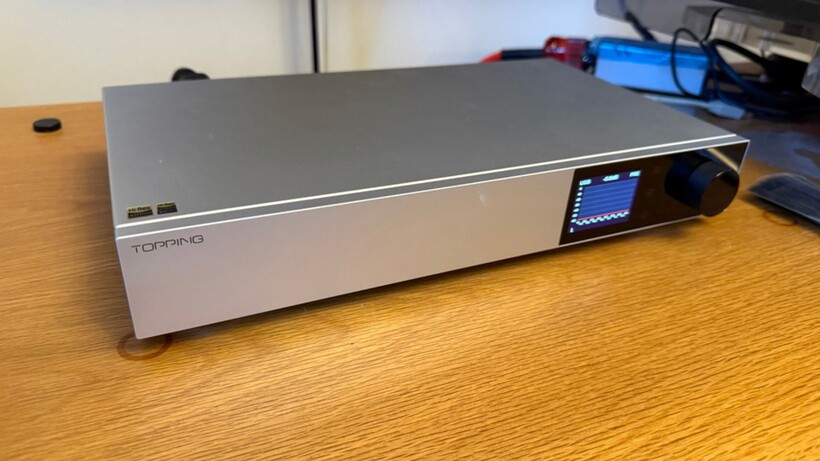
The D900 arrives looking sober to the point of minimalist. I have to say I feel this is the right approach and I really like it. The D900 has a quiet seriousness to it that should sit in most systems very effectively. The standard of build is excellent and it whispers rather than shouts a level of quality. It is exclusively available in silver.

Topping D900 design
Image Credit (Trusted Reviews)

The main focal point on the front panel is a small display. This can show input and incoming sample rate information as well as settings menus and both an old fashioned output VU meter and more modern graphic equaliser style interface. The display isn’t terribly large and can’t be read at a huge distance but it’s useful to have when setting the D900 up.

There is a small but no less sturdy remote handset too. This has been a bit of a mixed bag for me in use; there have been points where it hasn’t been responsive at all, but it’s useful to have; particularly if you intend to use the D900 as a preamp in your system. The remote also combines with the display to simplify settings menu access although the menu tree for this is not as intuitive as it could be.

Advertisement

As hinted at earlier, the D900 is a DAC and not a DAC headphone amp (and this is why the D900 is a ‘D’ and not a ‘DX’). If you want to go all in, Topping makes the entirely analogue A900 to partner the D900 and this is a formidable looking device with sockets for any occasion.

Topping D900 build quality
Image Credit (Trusted Reviews)

It does mean that the D900 isn’t as all singing and dancing as some of its more affordable brethren but allows it to focus on a smaller range of tasks. How much of an issue this will be to you is almost certainly going to depend on what equipment you have kicking around already.

Getting the D900 up and running wasn’t completely straightforward.  It would not connect at all to the Chord Electronics 2Go/2Yu streaming head unit over USB and fought me for some time to connect to the usually viceless Eversolo T8.

First it didn’t want to be seen and then, once it was, it proceeded to lock incorrectly, resulting in garbled, high speed sound. Once it was sorted, it stayed sorted but I had to put the effort in.

Specification

  • Wholly bespoke digital to analogue decoding
  • Wide selection of digital inputs…
  • …but slightly more limited outputs
  • On board EQ
  • Preamp functionality

Advertisement

The principle focus of the D900 is its decoding. It isn’t the first time Topping has implemented this system; that was the D90 III Discrete which uses a simplified version but the D900 takes it to its logical conclusion.

The system is called PSRM which stands for Precision Stream Reconstruction Matrix. It is a ‘1 bit’ system (a notional ideal that dates back to the early days of CD where, so long as the signal is handled correctly before it reaches the actual decoder, it boasts the scope for excellent measured performance) and incorporates discrete 1-bit modules that convert digital audio streams into analogue voltage by turning each audio sample into a very fast train of 1-bit pulses.

Topping D900 connections
Image Credit (Trusted Reviews)

The waveform is in turn defined by the density of the pulses and it’s shaped by an analogue reconstruction filter. This is the same as an off the shelf  Delta Sigma DAC but Topping controls the entire process rather than buying in a chip that gets on with it. Where the D90 III had 16 of these modules, the D900 has 32 of them.

These modules are powered by a bespoke power supply that employs a voltage-reference power supply that is purely resistive. It uses digital switching logic operating at the nanosecond level for maximum performance.

The business of turning this signal into a usable output is undertaken by a new, proprietary I/V conversion circuit composed of low distortion integrated op-amps and ultra-low-noise discrete components carefully selected after repeated testing.

Advertisement

Topping D900 remote control
Image Credit (Trusted Reviews)

If this all makes your eyes glaze over, you can focus on the fact that the claimed measurements (that the D900 has achieved when independently measured) are state of the art.

This formidable hardware is made available to an extensive selection of inputs. There are seven wired connections; two optical, two coax, one AES, one USB (on both USB-C and B connections) and an i2S connection; a very high performance option derived from pro audio.

These are augmented by Topping’s excellent Bluetooth implementation. Sample rate handling via USB and i2S is PCM to 768kHz and DSD to 512 with other connections having lower overall sample rate handling.

The situation with regards outputs is a little less comprehensive though. Output is exclusively via XLR with both fixed and variable level examples fitted. Topping says it’s perfectly ok to use XLR to RCA adapters should you need to but you’ll need to budget for those if that’s the way you want to go.

Topping D900 chassis
Image Credit (Trusted Reviews)

Advertisement

Something you do get is Topping Tune. This allows you to adjust a ten band EQ to tweak the output of the Topping to better suit the output relative to the room. What’s quite interesting about this software is that Topping has elected to make it desktop software that can be adjusted on a screen you can actually see without squinting.

From there, adjustments are communicated over USB to the device itself.  I’ve found Topping Tune a bit tricky to actually uninstall from a Mac but, if you own the D900 rather than have it turn up for review, this should be less of an issue.

In keeping with most Topping devices, the D900 has a volume control and can be used as a preamp. If you have no further interest in an analogue source, it can be used directly into a power amp or active speakers to streamline your system.

Performance

  • Truly outstanding levels of detail
  • Immaculate soundstage and three dimensionality
  • Surprisingly tolerant of poor recordings
  • Ensures you can’t hear the cleverness

Topping’s priority in their circuit design is low distortion and the best signal to noise ration they can manage; in this case a claimed harmonic distortion below -140dB and a signal-to-noise ratio of 131dB.

This is great in an abstract sense but what does it mean? When you listen to the sublime Fink Meets the Royal Concetgebouw Orchestra on the D900, the effect is subtly but noticeably different to how it often sounds. The opening Berlin Sunrise builds from silence… but on the Topping it’s not silent. In the seven seconds before the orchestra actually starts, the D900 finds the tiniest rustling and stirring of 100 plus people getting ready to perform. It’s buried in the noise floor of the recording… but the D900 finds it.

Advertisement

It’s not simply about these random artefacts either. As the this track builds and builds, there is a logic and order to the orchestra that makes it sound like a believable body of musicians. Different instruments play out from different sections and you can discern individual musicians rather than single body of’ strings’ or ‘brass.’  It’s the difference between a reproduction and a performance and the Topping excels at it.

Topping D900 hi-fi rack
Image Credit (Trusted Reviews)

It doesn’t have to be an orchestra either. Listen to the pounding and dramatic GO! on Santigold’s Master of my Make-Believe and the Topping doesn’t unpick the dense levels of production but it ensures that the whole performance is just that little more intelligible and orderly than it was before.

It does this with astonishing consistency too. Mid-seventies Trojan Records outing that sounds like it was saved to a tape and then left at the bottom of the sea? Not a problem. Absolute perfection from Blue Note? Delivered as intended. The Topping doesn’t alter or even tweak what you hear, it simply delivers more of it.

What I have found most impressive about this is how well it handles less than perfect recordings. You can give the D900 ii by Meat Puppets; a brilliantly entertaining and hugely influential album but one that is in no way shape or form hi-fi and the D900 does its work at opening it out and finding detail but the chaos and energy of the album is left intact.

Topping D900 angled view
Image Credit (Trusted Reviews)

Advertisement

This isn’t a ‘save for best’ style DAC, it’s a genuinely engaging and listenable device with all the things you choose to play on it.

The single most important thing is that you can’t hear the technology at work when you listen to the D900. For some of you reading this, this might sound anticlimactic; why go to all the effort? It reflects that the hardware is a means to an end rather than the end in itself.

It’s also worth noting that to achieve this as early on in the development of the technology is notable. Companies like Chord Electronics and dCS who also use bespoke decoding took rather longer to achieve the same feat and it represents a considerable technical achievement on Topping’s part.

Should you buy it?

The Topping represents the state of the art in digital decoding and it does so at price where almost everything else uses off the shelf decoding options. This is a taste of the truly exotic; a part of the digital market that has, at times, been in danger of pricing itself out of existence, at a price that isn’t too crazy. It combines this with a useful and comprehensive spec too

Detail aspects of the D900 aren’t as easy to live with as some key rivals. The slightly reluctant remote, reluctance to connect the first time and the absence of RCA connections make for a device that is fractionally more demanding than some rivals and that might need a bit of extra work on your part to get up and running.

Final Thoughts

There is some mild but genuine jeopardy to Topping building the D900. There will always be a subset of people who feel it represents Topping somehow ‘selling out’ and building something that, even if it does measure better, was a contradiction to the affordable brilliance of what the company has been doing so far.
 
If it wasn’t actually better, it would have looked pointless; a device that wasn’t any improvement over its more conventional brethren. The fact that the company was willing to take the risk and build it should be commended.

Advertisement

How We Test

We test every DAC we review thoroughly over an extended period of time. We use industry standard tests to compare features properly. We’ll always tell you what we find.

We never, ever, accept money to review a product.

Find out more about how we test in our ethics policy.

  • Tested for several days
  • Tested with real world use

FAQs

Does the Topping D900 DAC support Bluetooth?

This model does come with built-in Bluetooth 5.1 support with LDAC streaming.

Full Specs

  Topping D900 DAC Review
Manufacturer
Size (Dimensions) 330 x 210 x 57 MM
Release Date 2025
Resolution x
Connectivity Bluetooth 5.1
Audio Formats Up to 32-bit/768kHz PCM, DSD512, LDAC Bluetooth, SBC, AAC, aptX, aptX Adaptive
Bluetooth Yes
Inputs USB-C, USB-B, two optical, two coaxial, AES, IIS-LVDS
Outputs XLR pre, XLR line
Total Harmonic Distortion + Noise -140 dB


Source link

Leave a Reply

Subscribe to Our Newsletter

Get our latest articles delivered straight to your inbox. No spam, we promise.

Recent Reviews


gettyimages-2237093321

Moor Studio/Getty Images

Follow ZDNET: Add us as a preferred source on Google.


ZDNET’s key takeaways

  • Spyware can track you, record calls, and steal phone data.
  • Watch for odd behavior, data spikes, unknown apps, and battery drain.
  • Use antivirus software, update regularly, and avoid untrusted app sources.

Spyware is one of the biggest threats to your mobile security and can severely impact your phone’s performance if you are unlucky enough to become infected. It is a type of malware that typically lands on your iPhone or Android phone through malicious mobile apps or through phishing links, emails, and messages.

While appearing to be a legitimate software package or useful utility, spyware will operate quietly in the background to monitor your movements, spy on your activities, and may also record your conversations, whether they are phone calls or social media threads. You may find your actions screenshotted, your call records logged, and even your physical location tracked via GPS. 

Also: 7 ways to lock down your phone’s security – before it’s too late

This information is then sent to a remote server and into the hands of someone else without your permission.

Similarly, a remote monitoring app promoted for parental use or work purposes could be abused and become a privacy invader rather than a legitimate service. 

Let’s explore the different types of spyware you might encounter, the warning signs of infection, and how to quickly remove it from your smartphone.

Spyware explained

It’s helpful to know the basic differences among types of spyware before you tackle infections on your handset.

Nuisanceware is bundled with mobile apps. It interrupts your web browsing with pop-ups, changes your homepage or search engine settings, may try to force you to watch videos, and may collect your browsing data to sell to ad agencies and networks. Although considered malvertising, it is generally not dangerous, as it focuses on generating illicit revenue by forcing ad views or clicks.

Also: As ransomware recedes, a new more dangerous digital parasite rises

There’s also generic mobile spyware. It steals operating system data, clipboard data, and anything of value, such as cryptocurrency wallet data or account credentials. Spyware isn’t always targeted and may be used in spray-and-pray phishing attacks.

Spyware may land on your device through phishing, malicious email attachments, social media links, fraudulent SMS messages, or physical device tampering.

Advanced spyware, sometimes also classified as stalkerware, is a step up from basic spyware. This malware is unethical and dangerous. It is sometimes found on desktop systems but is now more commonly installed on handsets. Stalkerware is typically used to spy on an individual and monitor what they do, say, and where they go, and is often linked to cases of domestic abuse.

Spyware and stalkerware may be used to:

  • Monitor emails, SMS, MMS messages, and other forms of communication sent and received, including Facebook and WhatsApp.
  • Intercept live cellular calls or Voice over IP (VoIP) applications.
  • Hijack camera functions to take photos and videos.
  • Screenshot mobile device screens and send them to a controller.
  • Track victims via GPS.
  • Conduct keylogging, account compromise, and data theft.

Finally, there’s government-grade commercial spyware, with Pegasus among the best-known variants. Unless you’re part of a group of specific interest to ethically challenged governments, it’s unlikely that it will impact you due to the expense of targeting victims.

Spyware warning signs

There aren’t always indicators of an infection attempt in real time, but the following scenarios could be warning signs that you are being targeted:

  • Receiving odd or unusual SMS messages, social media messages, or emails.
  • Strange permission, download, or software installation requests appear on your handset.
  • If your phone goes missing or is out of your possession for a period of time and then reappears with settings or changes you do not recognize, this may indicate that your device has been tampered with.
  • When it comes to stalkerware, initial infection messages may be more personal and tailored to the victim. Physical access to a handset may be necessary.

Also: I clicked on four sneaky online scams on purpose – to show you how they work

There are also signs you can watch for that may indicate your phone has been compromised. The most common are:

  • Power: You may experience unexpected handset battery drain, overheating, or sluggish performance.
  • Behavior: Strange behavior, such as GPS or camera functions turning themselves on and off without your input, or random reboots and unexplained crashes.
  • Pop-ups: If you are being bombarded with pop-ups, it’s likely that some form of adware is hidden on your handset. You may also find that your preferred search engine has been changed.
  • Increased cellular data usage: Information exfiltrated from your smartphone or hidden, active remote connections will use data.
  • Distortion: You may hear unusual noises or distortion during phone calls. Although this could simply be due to poor reception, it may also be a sign of interception.
  • On and off: You may also have trouble completely turning off your device, as more advanced spyware might prevent you from doing so.
  • Financial transactions: If spyware has obtained sufficient permissions, it may have signed you up for services or premium SMS plans you didn’t ask for.

Android

One telltale sign on an Android device is a setting that allows apps to be downloaded and installed outside of the official Google Play Store. If this setting is enabled, it may indicate tampering or jailbreaking without your consent. Not every form of spyware and stalkerware requires a jailbroken device, however.

Also: Your Android phone’s most powerful security feature is off by default and hidden – turn it on now

This setting is found in most modern Android builds in Settings > Security > Allow unknown sources. (This varies depending on the device and vendor.) You can also check Apps > Menu > Special Access > Install unknown apps to see if anything is unfamiliar.

Some forms of spyware also use generic names and icons to avoid detection. For example, they may appear to be useful utility apps such as calendars, calculators, utilities, or currency converters.

iOS

iOS devices that aren’t jailbroken are generally harder to infect with malware than Android handsets, unless a spyware developer is exploiting an unpatched vulnerability.

Also: How to lock down your iPhone to the extreme – so even the FBI can’t get in

However, the same principles apply. With the right tool, exploit, or software, your device could be compromised either with physical access or remotely. You may be more susceptible to infection if you have not updated your iPhone’s firmware to the latest version and you do not run frequent antivirus scans.

How to remove spyware from your smartphone

Spyware is often hard to detect and can be difficult to remove. It is not impossible in most cases, but it may take some drastic steps on your part.

When spyware, especially stalkerware, is removed, operators may receive an alert indicating that the victim’s device has been cleaned. Should the flow of your information suddenly stop, this would be another clear sign to the attacker that the malicious software has been removed. Do not tamper with your device if doing so would risk your physical safety.

Also: How to turn ChatGPT into a scam detector using the new Malwarebytes integration – for free

Instead, reach out to law enforcement and supporting agencies. Otherwise, here are some removal options:

  • Run a malware scan: There are mobile antivirus solutions available that can detect and remove spyware. This is the easiest solution available, but it may not be effective in every case. Cybersecurity vendors, including Malwarebytes.
  • Use a dedicated spyware removal tool: You can also use software specifically designed to detect and remove spyware. However, be careful to download tools only from reputable firms and official sources, as one of the most common ways to distribute malware is to disguise it as antivirus software. Check out the spyware removal apps offered by Bitdefender, Avast, and Malwarebytes.
  • Delete suspicious apps: Examine the list of installed apps on your handset and remove any you don’t recognize.
  • Check device administration controls: In advanced security settings, you can see if any suspicious apps have admin permissions. If so, you can try removing them, although this may require restoring your handset to factory settings.
  • Reboot in Safe mode: Restarting your smartphone in Safe mode prevents third-party software from running. On Android handsets, you can usually do this by long-pressing the power-off button and selecting Safe mode. This can allow you to safely uninstall apps — but it is not a failsafe solution against advanced spyware variants.
  • Update your operating system: It may seem obvious, but when an operating system releases a new version, which often includes security patches and upgrades, it can — if you’re lucky — cause conflicts and problems with spyware. Keep it updated.

Also: Rebooting your phone daily is your best defense against zero-click attacks – here’s why

If you have found suspicious software on your handset, consider changing your passwords and enabling biometrics.

If you suspect account compromise, change the passwords for every important account you have. Many of us have one or two central “hub” accounts, such as an email address linked to all of our other services. Remove access to any such hub services you use from a compromised device. 

For added security, consider changing your account passwords on a PC, forcing a logout on other devices, and enabling biometric authentication to prevent physical handset tampering.

An important point to mention is that sometimes spyware or other forms of malicious software might end up on your device via an initially benign app. There have been cases of developers releasing a genuine, useful app in official repositories, such as a currency converter or weather app, and then, after a large user base has been gathered, the developers twist the app’s functions into a Trojan through a software update.

If you recently downloaded a mobile app and now your phone is displaying odd behavior, consider removing it and running a malware scan.

Keeping spyware and stalkerware off your device

Unfortunately, no mobile device is completely protected against the scourge of spyware. However, we have provided some tips below to mitigate the risk of future infections:

  • Protect your device physically: Your first line of defense is to maintain adequate physical controls. Modern smartphones let you set PIN codes and patterns or use biometrics such as fingerprints or retina scans to prevent your handset from being physically tampered with.
  • Update your operating system: Install OS updates as soon as they are available. They contain security fixes and patches and are one of the most important lines of defense against malware.
  • Use antivirus software: Mobile antivirus solutions can detect and remove spyware. Running frequent scans will help protect your handset.
  • Only download apps from official sources: Most spyware and malware are found outside Google Play and the App Store, so be cautious about installing apps from third-party websites. Sometimes, malicious apps still slip through the net, so check reviews and app descriptions before installing anything new.
  • Enable app security: Enable built-in scanners that check any new app installs. On Android, you can find this setting in Security and privacy > App security.
  • Check permissions: You should monitor what permissions have been issued to which apps and when. If you haven’t used an app with extensive permissions for a while, consider deleting it. If any apps appear more intrusive than necessary, remove them and refuse to provide permissions on install.
  • Watch out for malicious links: Mobile malware is often spread through phishing and malicious links. These links may urge you to download apps from outside Google Play or the App Store and may be disguised as everything from antivirus software to streaming services.
  • Do not jailbreak your device: Jailbreaking not only voids your warranty but can also allow malicious apps and software to gain a deep foothold in your operating system, making removal extremely difficult.
  • Enable multi-factor authentication (MFA): When account activity and logins require further consent from a mobile device, this can also help protect individual accounts. (However, spyware may intercept the codes sent during 2FA protocols.)

If all else fails: Factory reset

Performing a factory reset and clean install on the device you believe is compromised may help eradicate some forms of persistent spyware. Make sure to back up important content first, as this process can’t be reversed. 

  • On Android platforms, the reset option is usually found under Settings > General Management > Reset > Factory Data Reset. 
  • On iOS, go to Settings > General > Transfer or Reset Phone.

Google’s guide to factory resetting your device can be found here, and Apple has also provided instructions on its support website.

Unfortunately, some malware may survive factory resets. Failing that, consider restoring to factory settings and then disposing of your device.

Parental control or employee monitoring apps: spyware?

There are cyberthreats around every corner, and while children often want a smartphone and to be on social media at a young age, parents want to monitor what they are viewing and who they are interacting with online in order to protect them.

This is a responsible position to take, but at their core, parental control apps are designed for surveillance — as are many “employee productivity” apps.

The main issue is the potential for abuse, turning what may have been a product developed with good intentions into invasive software used for purposes beyond protecting a minor or ensuring employee time is used wisely.

Also: The best employee monitoring software of 2026: Expert tested

A balance between a right to privacy and protection has to be maintained. With this in mind, both Apple and Google have introduced parental controls for their devices. These features focus on restricting screen time, locking and unlocking devices, managing permissions lists, restricting web content and app downloads, and approving purchases.

Regarding employee monitoring apps, don’t install them on your personal handset. If your employer insists on using them, then it should issue you a work laptop and phone.

Most common consumer monitoring apps

As we mentioned earlier, many apps may be advertised as parental control monitors or simple trackers, but their use can be unethical. Other app developers freely market their products for full device control and surveillance. 

Also: 5 ways to avoid spyware disguised as legit apps – before it’s too late

Apps often use the phrases ‘spy,’ ‘monitor,’ or ‘parental control,’ but they may also disguise themselves on a device as a utility, a game, or otherwise as an innocent piece of software.

Are Google and Apple protecting devices from spyware?

Google and Apple are generally quick to remove malicious apps that manage to evade the privacy and security protections in their respective official app stores. When individuals are considered particularly at risk, you can enroll in Google’s Advanced Protection Program, which provides additional security for your Android device.

Google has also banned spyware and stalkerware ads, and the firm’s Threat Analysis Group is constantly publishing research on new commercial spyware strains and their potential targets.

Apple has cracked down on parental control apps, citing privacy-invading functions as the reason for removal. The company offers its own parental device control service called Screen Time for parents who want to limit their child’s device usage.

Furthermore, the company does not allow sideloading — that is, installing third-party apps from sources other than Apple’s App Store — and is quick to remove any iOS apps that exhibit privacy-eroding functionality.

Apple also provides Lockdown Mode, an optional setting you can enable on your iOS device for extreme security. However, unless you don’t mind a heavily restricted smartphone, you should only consider this option if you are worried about commercial-grade spyware.


Consider checking out ways to remove yourself from the internet and ZDNET’s recommended data brokers of 2026.


Source link