Move Over Paris! 5 Uncrowded France Destinations Chosen By A Local


Share The Article

Love it or hate it, Paris is the world’s most visited city.

Cliché or not, crowds swarm Place du Trocadéro for Eiffel selfies, Seine cruises past elegant façades, and lamp-lit Montmartre strolls under the shadow of Basilique du Sacré-Cœur’s soaring dome—and listen, I get it.

Never dreamed I’d ditch my previous cozy London nook for the cheese-munching surrender-monkey heartland, yet five years on, here I am: rooted, sounding Frenchier by the day (read: endless complaining and eye-rolls at clueless tourists).

Crowds and scams aside, I can’t imagine living elsewhere, but real talk?

Paris is far from being my top romantic French escape, at least not in this weather.

Lucky for this adopted Parisian (and you), France is huge, and the crumbling Haussmann-designed capital I call home base is just the entrée.

Craving old-school France, minus beret-wearing TikTokers, metro pickpockets emptying your wallet before you blink, and strikes every other weekend? Here are 5 underrated French gems you should stop sleeping on:

(PLUS: We’ve built an interactive quiz for you at the end of this article to find your perfect match!)

Quimper
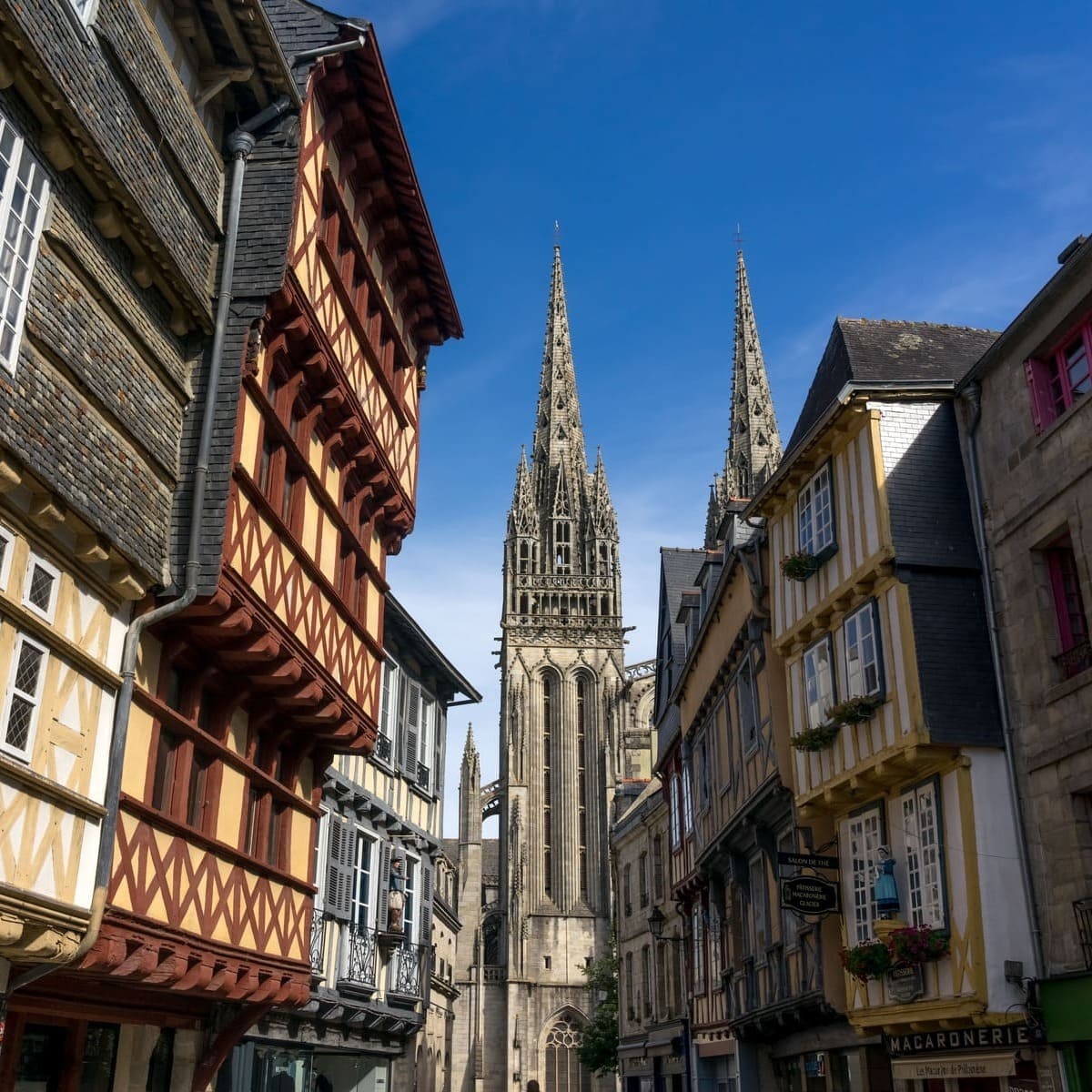
Quimper Old Town, Brittany, France

To me, nothing screams timeless Celtic France quite like Brittany, its Celtic heartland full of picturesque coastal towns where time seems to stand at a standstill, countryside castles, and family-owned crêperies.

When it comes to weekend getaways in the region, Saint-Malo usually takes the crown due to its proximity to Mont Saint-Michel, the most visited monument in France after the Eiffel Tower, and the Channel Islands, but if you’re asking me, Brittany’s true unspoiled charm is found in Quimper.

A small city in the heart of Brittany, it is best known for its timeless Old Town, criss-crossed by narrow cobbled lanes.

They’re lined by half-timbered houses and boutique shops, and if you ever find yourself at a crossroads, you’ll likely end up in a stunning historic square, whether you take the left or right turn.
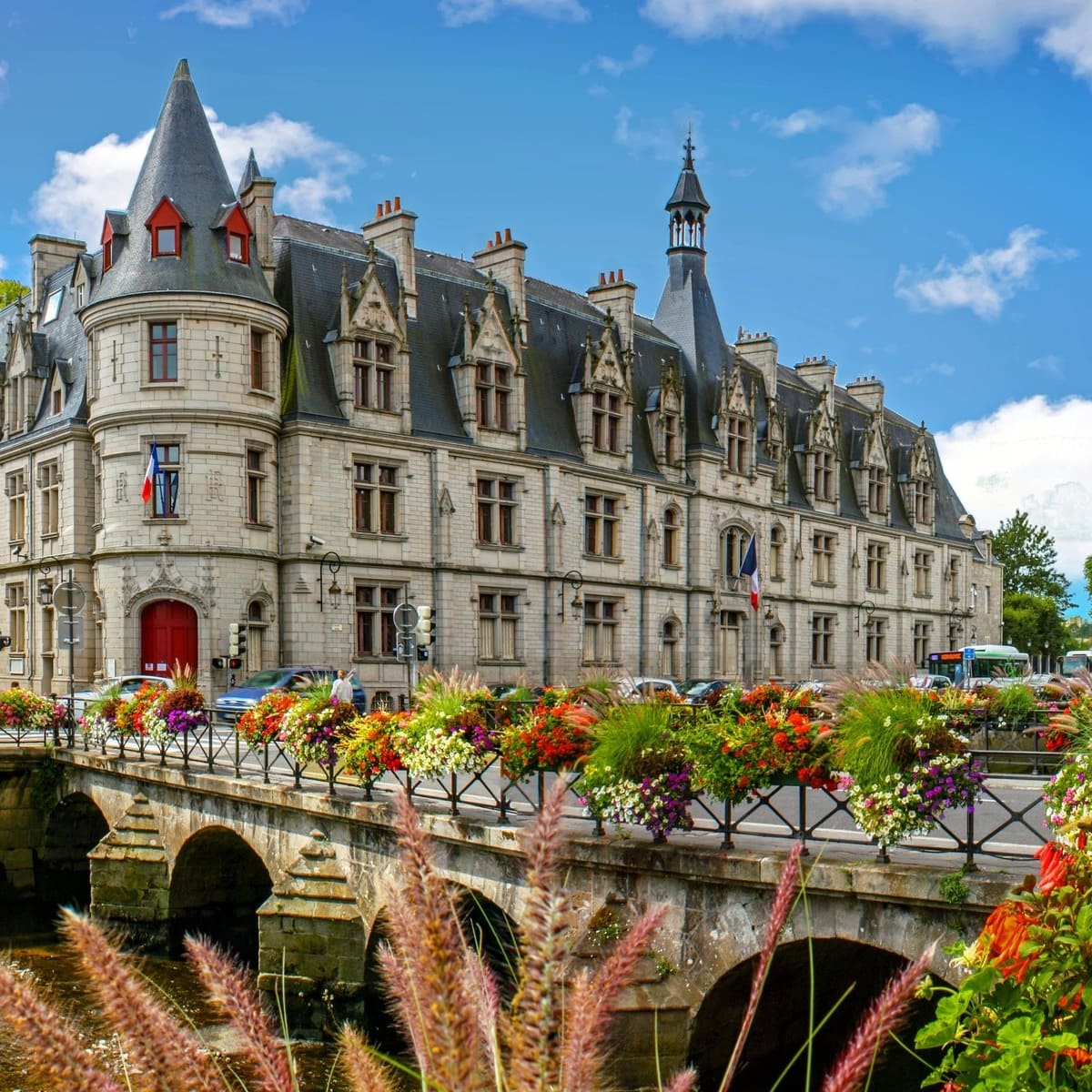
Beautiful Building In Quimper Old Town, Brittany, France

Other medieval French cities like Carcassonne and Rouen are pretty, alright, but they’re packed with foreign tourists. Quimper is France’s little Breton secret, and its 15th-century architecture gives it a real storybook vibe.

Also, let’s be real: Saint-Corentin, rising above the slate roofs of the Old Town with its soaring Gothic spires, is one of the prettiest cathedrals in the country. Crazy-detailed stained glass, hauntingly-beautiful vaulted ceilings, and serene riverside setting.

The cathedral alone is good-enough reason to get me packing my bags, but failing that, I’d travel as many miles as necessary just to have another forkful of Aux Vieux Quimper’s iconic square crêpes.

Europe is changing its entry requirements for Americans. Make sure you know the travel rules that apply at the time of departure here.

Arles

View of Arles, a city on the Rhône River in the Provence region of southern France

The region of Provence is perhaps the second most popular French destination after Paris, but beyond the award-winning Gordes wineries and the endless lavender fields, there’s a whole forgotten Roman world to discover that most tourists are sleeping on.

One of my favorite towns to explore in Provence is Arles, a picture-perfect riverside gem with an insane ancient heritage, strong artistic vein, and laid-back southern vibe without the Aix crowds.

I’m a big History buff myself, and having been to a fair few Roman arenas in my time, I have to say Arles’ Roman Amphitheater features among the most-impressive ones. It’s perfectly-preserved, with an intact elliptical arena, marble seats, and monumental arcades.

Arles, Southern France, Southern Europe

In summer, you can even catch live gigs as it still hosts live entertainment to this day.

The town of Arles itself is a Post-Impressionist dreamscape, with jaune stone buildings and their signature Southern European shutters, and a golden-hour atmosphere that will make you feel like you’ve stepped into a 19th-century painting.

Speaking of which, Arles just happens to be the spot where Van Gogh painted a ton of his most famous works.

From Yellow House, to Café Terrace, to Starry Night over the Rhône, it’s just the coolest thing to see these paintings come to life, almost exactly as the tortured Dutch genius left them.

Aigues-Mortes

Medieval City By A Pink Lake In Aigues-Mortes, Camargues, France

France is the land of fairytale castles and châteaux, but certainly an entirely-walled medieval town with imposing ramparts, and a bubblegum-pink lake for backdrop has to be some sort of AI fever dream?

That’s what I used to think, too, until I drove past Aigues-Mortes on my way to the much more hyped Montpellier, located a 35-minute drive away, and my heart just stopped short of exploding. To be quite frank, it felt like I was dreaming.

Even just pulling up to the town’s gates, where the main car park is, staring along the imposing towers and ramparts, and full of empty moats, will steal your breath away. If you know what I mean, the fortifications surrounding the Old Town are Dubrovnik-level of pretty.

The coolest part?

Medieval Town Of Aigues-Mortes In The Camargues Region Of Southern France, Southern Europe

You can actually walk on them on a loop around the entire perimeter, with views of Aigues-Mortes’ centuries-old tiled-roofs and grid-like townscape on one side, and its glistening pink lake on the other. Up stone steps and down ladders, and onto windswept battlements, it’s a 45-minute stroll of pure Old World magic.

Oh, and if you’re wondering why on top of it there’s a pink lake in the scene, Aigues-Mortes is located in Camargue, France’s heavyweight for sea salt production.

Not to get too technical here as you’re probably here for the vibes, like me, but the pink is due to a mixture of extremely salty water + a microorganism called Dunaliella salina.

You can go around the lake, and visit the salt marshes on a little cute tourist train leaving from Salin d’Aigues-Mortes, and if it’s that vivid pink color you’re hoping for, like the pictures, July or August are the best months to visit because both sunlight and salinity are highest.

Reims

Tram In Reims, France

Speaking of cathedrals, what if I told you France’s most important medieval cathedral is not Paris’ iconic Notre-Dame, though you can visit it easily at only a short one-hour TGV ride away? Does the fact that barely any international tourists come here sound appealing enough to you?

Welcome to Reims, the proud home of Notre-Dame de Reims, the quintessential Gothic edifice to crown them all.

In a sense, this is France’s Westminster Abbey: it’s where, from c. 816 to 1825, almost all French kings were crowned, starting with Louis the Pious, one of the very first Christian monarchs, and ending with Charles X.

Reims Abbey In France

The building itself is simply a marvel to look at, with its three portals richly-decorated with biblical sculptures and figures of saints, a rose window surrounded by elaborate tracery, and flying buttresses that seem to touch the sky.

That’s the main reason why the odd wandering tourists would take a day trip here from Paris, before making the gross mistake on hopping on the train back right away. Don’t.

Reims’s Basilique de Saint-Remi is just as impressive, if not more: a Romanesque-Gothic hybrid, it has the most spectacular display of stained glasswork I’ve seen in my life, and the low-light, ethereal interior is mesmerizing.

My top Reims hidden gem, though? Porte de Mars, a virtually intact 3rd-century Roman triumphal arch, with clearly visible carvings and reliefs. Sorry, the history-obsessed male in me can’t resist the Roman Empire obsession.

Bastia (Corsica)
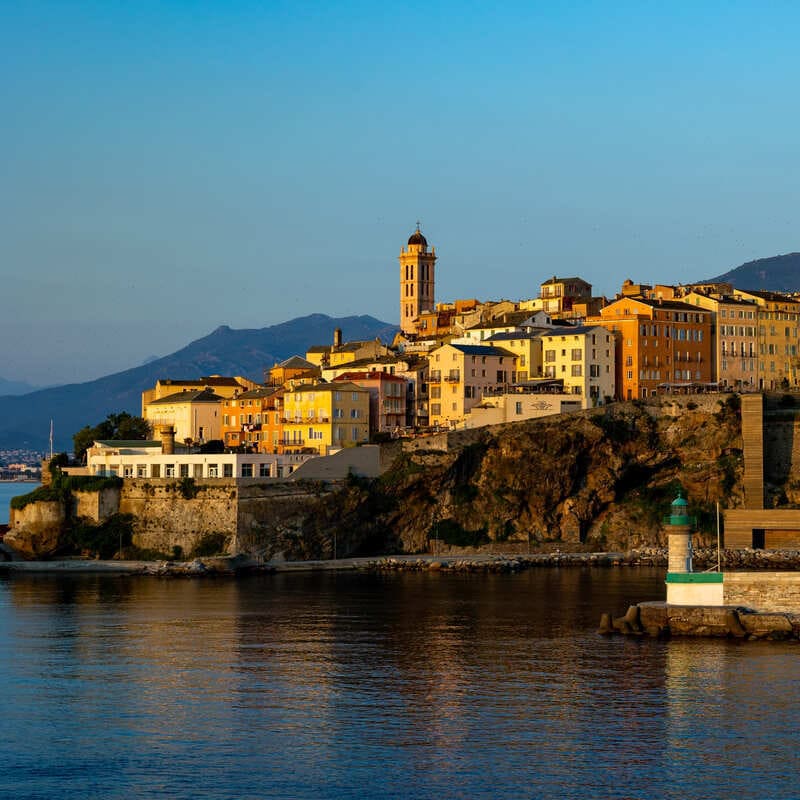
View Of Bastia Citadel, Corsica, France

On the quieter side of Corsica, away from the busy international airports and crowded beach bars of the southern coast, Bastia straddles the sparsely populated northeastern coast of the island, and in a way, it feels less like a tourist spectacle and more like a window of authentic island life.

It has a bustling port, local markets, lively back streets, and that Southern European grit: you know, that lived-in, urban feel.

With its pastel-hue townhouses, fishing boats, charming Italian-style cafés, and glittering waterfront, the Viex Port, or Old Port, is my coup de cœur—that’s just a French word for a major highlight you absolutely cannot miss.

What can I say? I have a soft spot for that slow, salty, Mediterranean lifestyle.
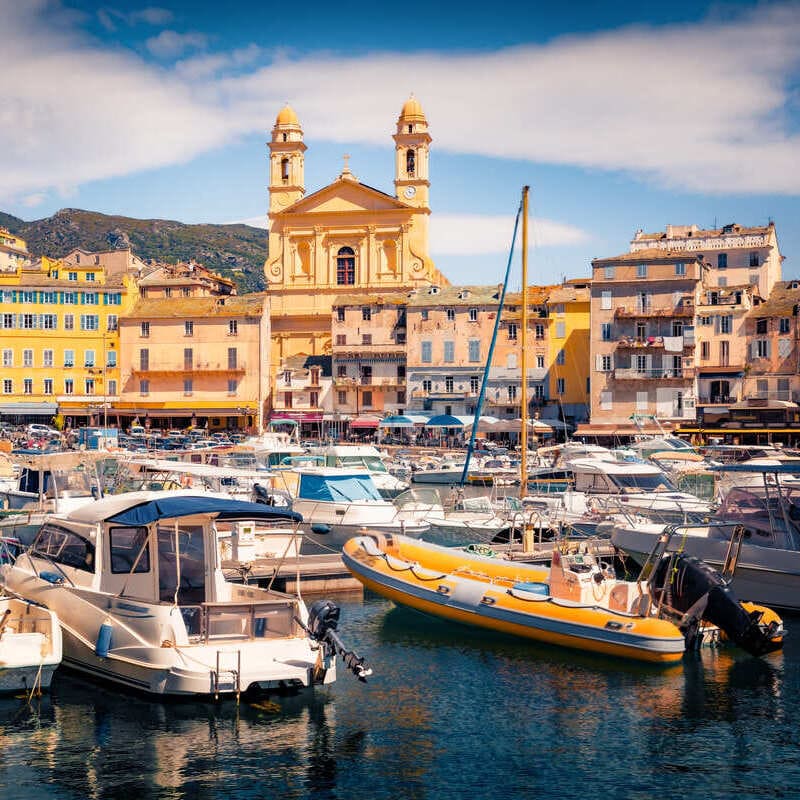
Bastia Waterfront In Corsica, France

Overlooking the port, at the end of the long lungomare, the Citadelle de Bastia is a must-see hilltop fort-turned-residential district. The ocher-colored apartment buildings are literally built within the castle walls, and the views from up the ramparts are just breathtaking.

If you’re anything like me, half of the reason why you’re flying out to Corsica this summer is their amazing seafood and local cheeses. In that case, you might want to swing by Place du Marché, especially on Saturday mornings, when local farmers and traders set up their stalls.

Great spot to sample Corsican flavors, like panini corse, a distant cousin of the Italian panini served with prosciutto and brocciu cheese, from the island’s rugged mountains, and fiadone, the flagship Corsican dessert: a cheesecake made (again) from brocciu, eggs, sugar, and lemon zest.

The only applicable French word here is magnifique.


Now take this quiz to find out which French Gem is perfect for you!

Question 1 of 3

What’s your ideal travel ‘vibe’?


Question 2 of 3

What are you most excited to see?


Final Question

Pick a lunchtime treat:


🎻

Quimper

The Breton Secret

The Vibe: Timeless Celtic heartland with half-timbered houses and Gothic spires.

Don’t Miss: A forkful of iconic square crêpes at “Aux Vieux Quimper” in the heart of the Old Town.

🎨

Arles

The Artist’s Dreamscape

The Vibe: A perfectly-preserved Roman heritage mixed with Van Gogh’s golden-hour paintings.

Don’t Miss: The Roman Amphitheater and the specific spots that inspired “Starry Night over the Rhône.”

🦩

Aigues-Mortes

The Walled Wonder

The Vibe: Imposing medieval ramparts set against a glistening bubblegum-pink salt lake.

Don’t Miss: A 45-minute stroll along the town’s perimeter for views of the salt marshes.

Reims

The Royal Coronation City

The Vibe: Gothic mastery where French kings were crowned, minus the Parisian crowds.

Don’t Miss: The Porte de Mars, a virtually intact 3rd-century Roman triumphal arch.

Bastia

The Authentic Island Port

The Vibe: Lived-in Mediterranean grit with pastel townhouses and a glittering Vieux Port.

Don’t Miss: The Place du Marché on Saturday mornings for Corsican panini and fiadone cheesecake.


Source link

Leave a Reply

Subscribe to Our Newsletter

Get our latest articles delivered straight to your inbox. No spam, we promise.

Recent Reviews


There are a ton of laptops on the market at any given moment and almost all of those models are available in multiple configurations to match your performance and budget needs. If you’re feeling overwhelmed with options when looking for a new laptop, it’s understandable. To help simplify things for you, here are the main things you should consider when you start looking.

Price

The search for a new laptop for most people starts with price. If the statistics that chipmaker Intel and PC manufacturers hurl at us are correct, you’ll be holding onto your next laptop for at least three years. If you can afford to stretch your budget a little to get better specs, do it. That stands whether you’re spending $500 or more than $1,000. In the past, you could get away with spending less upfront with an eye toward upgrading memory and storage in the future. Laptop makers are increasingly moving away from making components easily upgradable, so again, it’s best to get as much laptop as you can afford from the start.

Generally speaking, the more you spend, the better the laptop. That could mean better components for faster performance, a nicer display, sturdier build quality, a smaller or lighter design from higher-end materials or even a more comfortable keyboard. All of these things add to the cost of a laptop. I’d love to say $500 will get you a powerful gaming laptop, for example, but that’s not the case. Right now, the sweet spot for a reliable laptop that handles average work, home office or school tasks is between $700 and $800 and a reasonable model for creative work or gaming is upward of about $1,000. The key is to look for discounts on models in all price ranges so you can get more laptop capabilities for less.

Operating system

Choosing an operating system is part personal preference and part budget. For the most part, Microsoft Windows and Apple MacOS do the same things (save for gaming, where Windows is the winner), but they do them differently. Unless there’s an OS-specific application you need, get the one you feel most comfortable using. If you’re not sure which that is, head to an Apple store or a local electronics store and test them out. Or ask friends or family to let you test theirs for a bit. If you have an iPhone or iPad and like it, chances are you’ll like MacOS, too.

In price and variety (and PC gaming), Windows laptops win. If you want MacOS, you’re getting a MacBook. Apple’s MacBooks regularly top our best lists, the least expensive one is the M1 MacBook Air for $999. It is regularly discounted to $750 or $800, but if you want a cheaper MacBook, you’ll have to consider older refurbished ones.

Windows laptops can be found for as little as a couple of hundred dollars and come in all manner of sizes and designs. Granted, we’d be hard-pressed to find a $200 laptop we’d give a full-throated recommendation to but if you need a laptop for online shopping, email and word processing, they exist.

If you are on a tight budget, consider a Chromebook. ChromeOS is a different experience than Windows; make sure the applications you need have a Chrome, Android or Linux app before making the leap. If you spend most of your time roaming the web, writing, streaming video or using cloud-gaming services, they’re a good fit.

Size

Remember to consider whether having a lighter, thinner laptop or a touchscreen laptop with a good battery life will be important to you in the future. Size is primarily determined by the screen — hello, laws of physics — which in turn factors into battery size, laptop thickness, weight and price. Keep in mind other physics-related characteristics, such as an ultrathin laptop isn’t necessarily lighter than a thick one, you can’t expect a wide array of connections on a small or ultrathin model and so on.

Screen

When deciding on a screen, there are a myriad number of considerations, like how much you need to display (which is surprisingly more about resolution than screen size), what types of content you’ll be looking at and whether you’ll be using it for gaming or creative work.

You really want to optimize pixel density; that is, the number of pixels per inch the screen can display. Although other factors contribute to sharpness, a higher pixel density usually means a sharper rendering of text and interface elements. (You can easily calculate the pixel density of any screen at DPI Calculator if you don’t feel like doing the math, and you can also find out what math you need to do there.) I recommend a dot pitch of at least 100 pixels per inch as a rule of thumb.

Because of the way Windows and MacOS scale for the display, you’re frequently better off with a higher resolution than you’d think. You can always make things bigger on a high-resolution screen, but you can never make them smaller — to fit more content in the view — on a low-resolution screen. This is why a 4K, 14-inch screen may sound like unnecessary overkill but may not be if you need to, say, view a wide spreadsheet.

If you need a laptop with relatively accurate color that displays the most colors possible or that supports HDR, you can’t simply trust the specs — not because manufacturers lie, but because they usually fail to provide the necessary context to understand what the specs they quote mean. You can find a ton of detail about considerations for different types of screen uses in our monitor buying guides for general purpose monitors, creators, gamers and HDR viewing.

Processor

The processor, aka the CPU, is the brains of a laptop. Intel and AMD are the main CPU makers for Windows laptops, with Qualcomm as a new third option with its Arm-based Snapdragon X processors. Both Intel and AMD offer a staggering selection of mobile processors. Making things trickier, both manufacturers have chips designed for different laptop styles, like power-saving chips for ultraportables or faster processors for gaming laptops. Their naming conventions will let you know what type is used. You can head over to Intel or AMD for explanations so you get the performance you want. Generally speaking, the faster the processor speed and the more cores it has, the better the performance will be.

Apple makes its own chips for MacBooks, which makes things slightly more straightforward. Like Intel and AMD, you’ll still want to pay attention to the naming conventions to know what kind of performance to expect. Apple uses its M-series chipsets in Macs. The entry-level MacBook Air uses an M1 chip with an eight-core CPU and seven-core GPU. The current models have M2-series silicon that starts with an eight-core CPU and 10-core GPU and goes up to the M2 Max with a 12-core CPU and a 38-core GPU. Again, generally speaking, the more cores it has, the better the performance.

Battery life has less to do with the number of cores and more to do with CPU architecture, Arm versus x86. Apple’s Arm-based MacBooks and the first Arm-based Copilot Plus PCs we’ve tested offer better battery life than laptops based on x86 processors from Intel and AMD.

Graphics

The graphics processor handles all the work of driving the screen and generating what gets displayed, as well as speeding up a lot of graphics-related (and increasingly, AI-related) operations. For Windows laptops, there are two types of GPUs: integrated (iGPU) or discrete (dGPU). As the names imply, an iGPU is part of the CPU package, while a dGPU is a separate chip with dedicated memory (VRAM) that it communicates with directly, making it faster than sharing memory with the CPU.

Because the iGPU splits space, memory and power with the CPU, it’s constrained by the limits of those. It allows for smaller, lighter laptops, but doesn’t perform nearly as well as a dGPU. There are some games and creative software that won’t run unless they detect a dGPU or sufficient VRAM. Most productivity software, video streaming, web browsing and other nonspecialized apps will run fine on an iGPU.

For more power-hungry graphics needs, like video editing, gaming and streaming, design and so on, you’ll need a dGPU; there are only two real companies that make them, Nvidia and AMD, with Intel offering some based on the Xe-branded (or the older UHD Graphics branding) iGPU technology in its CPUs.

Memory

For memory, I highly recommend 16GB of RAM (8GB absolute minimum). RAM is where the operating system stores all the data for running applications and it can fill up fast. After that, it starts swapping between RAM and SSD, which is slower. A lot of sub-$500 laptops have 4GB or 8GB, which in conjunction with a slower disk can make for a frustratingly slow Windows laptop experience. Also, many laptops now have the memory soldered onto the motherboard. Most manufacturers disclose this but if the RAM type is LPDDR, assume it’s soldered and can’t be upgraded.

Some PC makers will solder memory on and also leave an empty internal slot for adding a stick of RAM. You may need to contact the laptop manufacturer or find the laptop’s full specs online to confirm. Check the web for user experiences because the slot may still be hard to get to, it may require nonstandard or hard-to-get memory or other pitfalls.

Storage

You’ll still find cheaper hard drives in budget laptops and larger hard drives in gaming laptops. Faster solid-state drives have all but replaced hard drives in laptops and can make a big difference in performance. Not all SSDs are equally speedy, and cheaper laptops typically have slower drives. If the laptop only comes with 4GB or 8GB of RAM, it may end up swapping to that drive and the system may slow down quickly while you’re working.

Get what you can afford and if you need to go with a smaller drive, you can always add an external drive or two down the road or use cloud storage to bolster a small internal drive. The exception is gaming laptops: I don’t recommend going with less than a 512GB SSD unless you really like uninstalling games every time you want to play a new game.


Source link