

Pros
- Excellent big, bright micro OLED displays
- Surprisingly strong sound
- Deep controls to adjust picture size and position
- Dimmable lenses
- Works with a variety of USB-C ready devices
Cons
- Glasses still feel a bit bulky
- Lacks built-in eye-prescription diopter that other models have
Editor’s Note: Viture Beast glasses impressed me with the quality and resolution of its micro OLED displays, audio quality, picture settings and comfort. They’re also less expensive than my previous favorite display glasses, the Xreal One Pro. For all of these reasons, they’ve received CNET’s Editor’s Choice Award in 2026. The full review is below.
Maybe you’ve never considered putting a monitor on your face. Maybe you don’t consider the concept to be very interesting. My question is, have you ever tried it? A whole category of plug-in display glasses has suddenly gotten really, really good, though whether you actually need a pair is a whole other matter. The newest pair I’ve been wearing, Viture Beast, truly wowed me. Next to Xreal’s One Pro glasses, these glasses are the best ones I’ve ever tried. In some ways, Viture’s glasses do things better than Xreal’s.
A year ago, as I was reviewing the Xreal One and One Pro, I was in love with how good the display quality and customization felt on the glasses — displays in crisp, bright micro OLED, ones that could be pinned in space, widescreen modes that could turn your laptop into a bigger-screen experience on the go. The Beast glasses match the tested Xreal’s latest nearly feature for feature, and they deliver an extremely big, bright and vivid display upgrade to boot, better than Xreal’s glasses and produce impressive onboard Harman-powered sound.
Viture Beast has won me over. They manage to edge out the Xreal One Pro in some key ways.
At $549, Viture’s glasses are also $50 less than the newly price-dropped $599 Xreal One Pro. While working on my MacBook Air, playing games on my Steam Deck and Switch 2 (with a separately sold Switch battery pack dock adapter) and watching movies on my iPhone, I’ve fallen in love with these a lot more than I did with Viture’s Luma series glasses. The Beast is worth the upgrade if you’re into wearable displays.
I’ve been testing with separately sold prescription inserts inside, provided by Viture. The experience is pretty fantastic, no matter how I’ve used them.
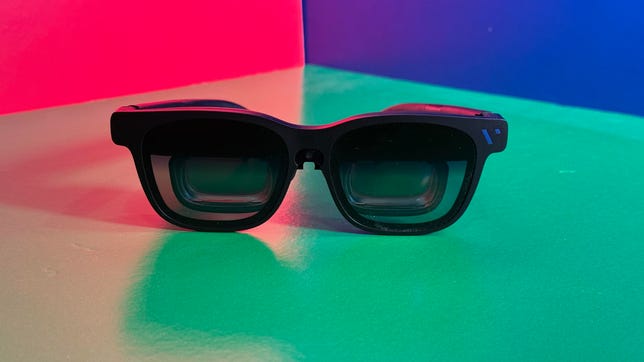
Much like other display glasses, Viture’s are compact but still on the slightly chunky side. They need to be tethered via USB-C, too.
Where they wow
Compared to the Xreal One and One Pro, Viture’s new glasses close the gap on just about every feature I loved. Viture has stacked lots of display settings into these glasses, adding settings I found on Xreal’s that I used and loved. They’re not frivolous settings — they’re very useful.
And just like the Xreal Ones, the Beast can “pin” displays in place, using tracking with three degrees of freedom. That means the virtual monitor can hang in one position, letting your head turn freely while the monitor seems to stay put. This mode is what I use all the time with laptops (even when gaming) because it lets me focus on parts of the display without feeling like it’s glued to my face.
The other features I loved in Xreals can be found in the Beast too: The glasses have dimmable lenses that tint to varying levels, acting like sunglasses, to help see the display better against bright light. It doesn’t block light fully, but it does a decent job.
Viture’s micro-OLED displays are also exceptionally bright, hitting 1,500 nits. At top brightness, they’re so vivid that I have to actually turn it down a bit for comfort. It makes video game graphics look vibrant; movies look great, too. And the extra-bright screen helps overcome the lens tint limits.
A peek through a lens at Avatar: Fire and Ash. It’s hard to show, but things look good on these displays.
These display glasses have autotransparency mode, which turns the lenses back to transparent when you tilt your head away from a pinned-in-place display. It’s a great everyday mode for watching something, then still being able to quickly check your phone in your lap or turn to chat with someone next to you (or to address a flight attendant on a plane).
The glasses can adjust the display size up to something that feels like it stretches across the room or down several sizes. The glasses can also adjust perceived distance. Color temperature can be adjusted, too, for movie-watching or eye-comfort modes. A set of several buttons on both arms adjust all the features as needed, sometimes in complicated click sequences. But once I learned them, it was great how many little adjustments I could make on the fly.
The micro-OLEDs in the Beast are the best I’ve seen, both in brightness, resolution and field of view. When it comes to field of view, these hit 58 degrees, a hair above Xreal One Pros. They are also far brighter: 1,500 nits versus 700 nits on the Pros. Xreal’s One Pro has a maximum resolution of 1,900 by 1,080 pixels per eye, while the Viture Beast is 1,920 by 1,200. Movies like Avatar: Fire and Ash, The Elephant Man and David Cronenberg’s The Shrouds looked fantastic, even at 1080p. It’s a great personal cinema. But the extra resolution bump pays off for extending laptop displays and playing games, too.
Connected to a laptop (Mac or PC), these glasses can do a widescreen mode like Xreal’s One series. It’s great.
The frames also feature a widescreen mode, which, similar to Xreal, can make a larger monitor for your laptop or tablet. It means moving your head around to see it all since the display field of view can’t fit it all, but it can be useful for laying out multiple apps while working.
Both the Beast and the One Pro use similar lens systems, with a flatter prism-type lens that reduces reflections compared to lower-end display glasses. I also like that, just like in the Xreal One Pro, prescription inserts lie flush against the inner lenses instead of angling at a distance. Prescription inserts, sold separately, attach by a clip-on close to where the adjustable nose piece snaps in. (Several nose piece sizes come included.)
Connected to a Steam Deck or Windows handheld via USB-C cable, Viture Beast is a stellar gaming display on the go. (The Switch and Switch 2 need a separately sold battery pack dock adapter).
What could be better?
For all I like about Viture Beast, it’s still a weirdly clunky proposition. These types of display glasses have a chunkier look than regular glasses and are something you’re meant to wear for a while when working, watching movies or playing games. Then you take them off, tucking them into an included glasses case. They’re a bit thicker and heavier than the Xreal One Pros, and I can feel the weight on my face.
Like all display glasses, they need to be tethered to your device with a cable. They work by using DisplayPort-compatible USB-C cables, but plugging in always feels a little weird compared to the rest of my otherwise pretty wireless life. The Beast glasses use a standard USB-C port in one arm of the glasses, as opposed to the magnetic pin connection on previous Viture glasses, which needed its own included custom charge cable. A standard port is more convenient (Xreal does this, too), but I did like the magnetic system before.
It’s true of all these types of display glasses, but needing to use a USB-C cable can get clunky. Also, I have prescription insert lenses added, which I need since they don’t fit over regular glasses.
These glasses also ditch an automatic eye-adjustment diopter system that was available on previous models, which could fit eye prescriptions in a certain range. My higher-myopia eyes never made the cut to make that work, so I don’t miss it.
Also, the electrochromic tinting on the glasses’ lenses that dims the world around you while watching movies doesn’t get as dark as I’d like. There’s still real-world light bleed, like sunglasses would have. A separately sold over-glasses light blocker helps black things out better. At least the extra-bright 1,500-nit display can overpower most ambient light in everyday settings.
A small camera in the bridge of the glasses can also allow full motion in a room (six degrees of freedom), potentially for augmented reality experiences. But that only works via an Android-based phone app called Spacewalker.
On iOS, Spacewalker attempts a sort of widescreen phone extension desktop where your phone can act as a pointer to aim at apps and click on them as they hover in front of you, like a remote control. Spacewalker can browse your photos and videos and even convert them to 3D, but links to Nvidia GeForce Now, Xbox Game Pass and Netflix require browser-like logins. I’m not going to do that on a third-party app — I’ll use the apps I already have.
The included carrying case keeps the glasses protected and has room in the top for the USB-C cable it needs.
No, these aren’t AI glasses
Just to be clear: Plug-in display glasses like Viture and Xreal offer aren’t AI glasses. They don’t connect with AI services, and they generally don’t take photos of people. (Xreal does take photos, but only with a separate plug-in camera.) If you’re worried about creep factor or privacy, these types of glasses don’t factor in. They’re really just wearable monitor-headphones for your face in glasses form.
That’s not to say glasses like these couldn’t eventually work with AI. Viture’s ambitions extend into augmented reality and spatial computing, and with some of the company’s fringier accessories and apps, they could go there soon. But they’re not wireless, and they’re made to be tethered with your phone or other devices as an extended display for what you’re already using there.
I do expect AI glasses and display glasses to converge in the next few years, but we’re not at that point yet. Maybe that’s a relief to you, or maybe it’s a frustration. I find it a little comforting, though it also means these types of glasses aren’t truly in what I think will be their final form.
For a hint at the bridges that are coming, Xreal’s Project Aura — a pair of upcoming display glasses that also connect to a processor dock to run a full suite of Google apps, Gemini, and Android XR — is coming later this year for a yet-to-be-announced price. Viture has its own experimental AR glasses forms, too, including its own AR-focused Luma Ultra model. The Beast is more focused on being a killer AV device, and it succeeds at that.
Plugged into an iPad (Air M4 here), display glasses can float a second display. It makes things surprisingly productive.
The best for now
So yeah, Viture Beast is the pair of glasses that wins out in 2026. It doesn’t mean I still don’t love Xreal’s glasses, but I’d rather wear Beast right now. And for the price, these glasses are remarkable — even if they’re still probably something most people don’t need or want to spend money on.
Just keep in mind: If the glasses landscape keeps moving as fast as it is right now, displays and features on similar glasses could keep regularly improving.

Stephan is the sports journalist for the Maple Grove Report.