
pros and cons
- Compact form factor
- Key-specific shortcuts
- Keyboard supports cursor
- Five years of OS and security updates
- High-capacity silicon carbon battery
- White and orange keys are hard to read
- Cameras aren’t the best
- No water resistance
Follow ZDNET: Add us as a preferred source on Google.
I’ve been reviewing Unihertz phones since the Atom came out in 2018, and I’ve always enjoyed its affordable, if niche, devices. For the past few weeks, I’ve been testing its latest model: the Unihertz Titan 2 Elite, and can confidently say it’s the best phone Unihertz has ever made.
One of the biggest reasons is the physical keyboard. Unihertz seems to be capitalizing on the excitement surrounding a return to keys — highlighted by the Clicks Communicator, first shown at CES in January (but still not available).
Also: The best Android phones you can buy
The second is the Titan 2 Elite’s sleek form factor. Unlike past Unihertz phones, which tended to be bulkier than the competition, the Titan 2 Elite is much thinner: about the same width as an iPhone 17 but about three-fourths as long.
You can back the phone on Kickstarter, with the campaign doing extremely well with about two weeks remaining. The Titan 2 Elite will have an MSRP of $489, but can be purchased through the Kickstarter campaign for $389. As always, you should shop with caution when it comes to any Kickstarter project, no matter the brand’s reputation.
Best mobile deals of the week
Deals are selected by the CNET Group commerce team, and may be unrelated to this article.
What’s old is new again
Last year’s Unihertz Titan 2 was positioned as a BlackBerry Passport alternative, albeit much bulkier with its more rugged design. By contrast, the Titan Elite 2 is more of a successor to the BlackBerry Classic, but utilizes the keyboard as a trackpad.
The Titan 2 Elite is much thicker than BlackBerry devices, but with this thickness comes a better display, faster processor, and larger capacity battery. Powered by the latest Android operating system and selling at just under $400, the Titan 2 Elite continues where BlackBerry left off.
Also: Why I recommend this $450 Samsung phone over competing models by Google and OnePlus
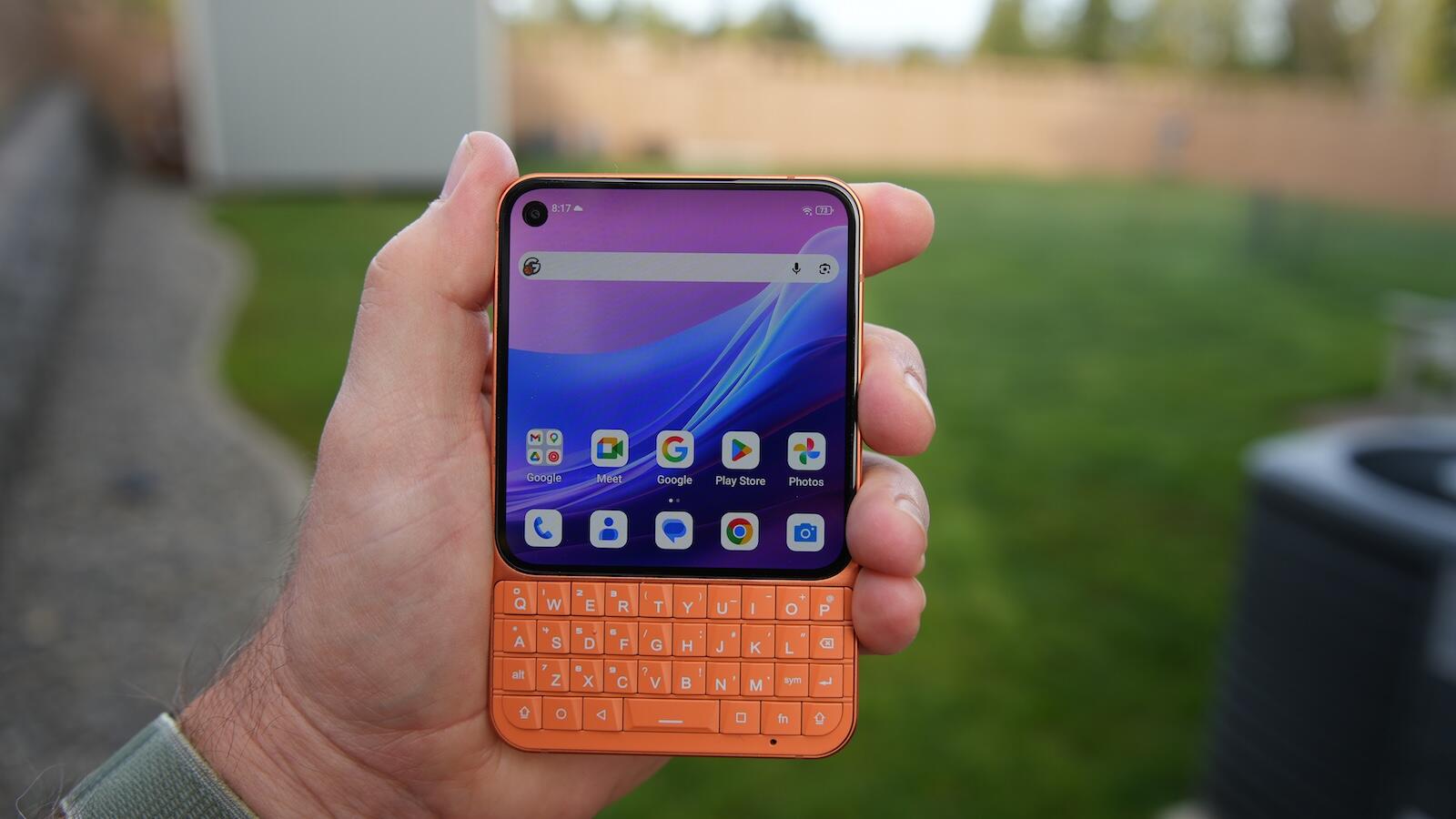
The Titan’s four-row hardware keyboard under the 4.03-inch AMOLED display is well-designed with decent-sized keys and an angled cutout for left- and right-thumb action. Tactile feedback is excellent, but the keys are a bit tight for my thumbs, resulting in occasional mis-types.
My biggest disappointment with the keyboard is the white-colored letters on an orange phone. The backlight, enabled by swiping across the keyboard, helps me see the letters better. However, white letters on an orange background create a tough contrast for my aging eyes. The black model with white keys would likely provide better letter visibility.
I love the fact that Unihertz allows you to set custom shortcuts, both long- and short-press actions, for every letter from A to Z. I have C for Chrome, D to text my wife Dayna, G for Gmail, K for Keep Notes, and several others that I can remember easily.
You can also enable the scroll assistant and swipe across the keyboard to move up, down, left, and right without touching the display. This capability is handy for reading websites, long emails, or documents. There is also a cursor assistant mode, so when editing text, you can swipe on the keyboard to move the mouse cursor on the display.
Communication first
The Titan 2 Elite is powered by a MediaTek Dimensity 7400 processor, 12GB of RAM and 256GB of internal storage. This chip supports 5G networks, and after visiting my local T-Mobile store, I now have a physical SIM in the Titan 2 Elite with a solid 5G signal and speeds.
Navigation around the device has been responsive, and I haven’t observed any lagging. I haven’t played games or watched movies for an extended period, however, as the display isn’t optimized for media — it’s communications-focused. When I did test it out, playback was fairly smooth, and audio was noticeably clear and loud.
Also: My search for the ultimate MagSafe accessory is over: This keyboard checks all the boxes
The Titan 2 Elite has a 4050mAh silicon-carbon battery, and its endurance has been solid so far. The only other phone I’ve tested with this newer technology is the OnePlus 13, and that was a battery champ. In addition, this device supports 33W fast charging, which is just fast enough to make a 30-minute top-up helpful.
Software improvements
Software updates and patches have always been a weaker element of the Unihertz brand, so I was pleased to see the Titan 2 Elite launch with Android 16 and a commitment to upgrade the phone all the way to Android 20 with security updates until 2031. This development is significant for Unihertz and shows the company is committed to making competitive, affordable products.
The Unihertz Titan 2 Elite runs a fairly stock version of Android with no bloatware installed out of the box. There is an app for FM radio and for the phone’s infrared remote control. A handy Toolbox application provides several utilities, including a bubble level, a height measurement, an alarm, a magnifier, and a protractor.
In addition to creating custom shortcuts for every letter on the keyboard, 11 other keys can be customized for your optimal keyboard experience. The Func1 key is a red key located on the right side, below the side power/fingerprint sensor button. Short-press, long-press, and double-press options are available, with my shortcuts set to Keep Notes, Camera, and Screenshot.
Also: How to easily encrypt files on an Android phone – and the free app I use to do it
I just installed the Niagara Launcher on the phone since that is what the Clicks Communicator uses to provide a minimalist, focused experience. With a phone primarily for communication and keyboard text entry, this launcher may be perfect for reducing time wasted on internet rabbit holes.
ZDNET’s buying advice
Unihertz does a good job of launching unique phones at reasonable prices. The Titan 2 Elite is a phone I recommend to anyone looking for a straightforward device with a physical keyboard. The display is large, the keys are a joy to type on, there is a ton of customization, and the battery easily lasts for a couple of days.
That said, it’s not a phone to serve as your primary camera in all situations, nor does it excel at watching media. But it’s a great summer phone that slides into your shorts pockets and helps you stay in touch with family and friends.