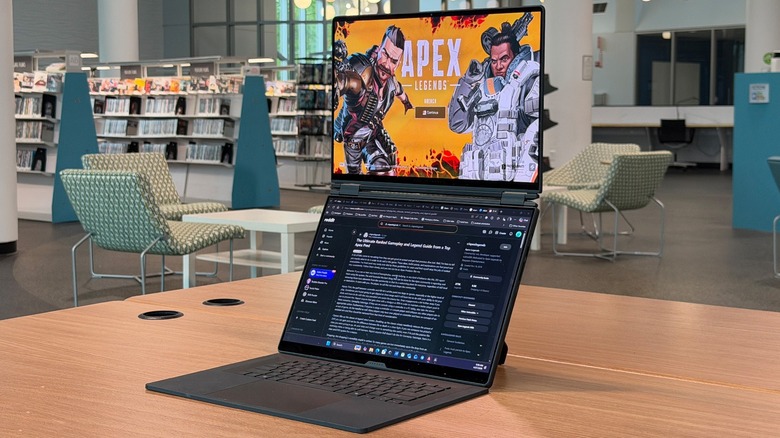
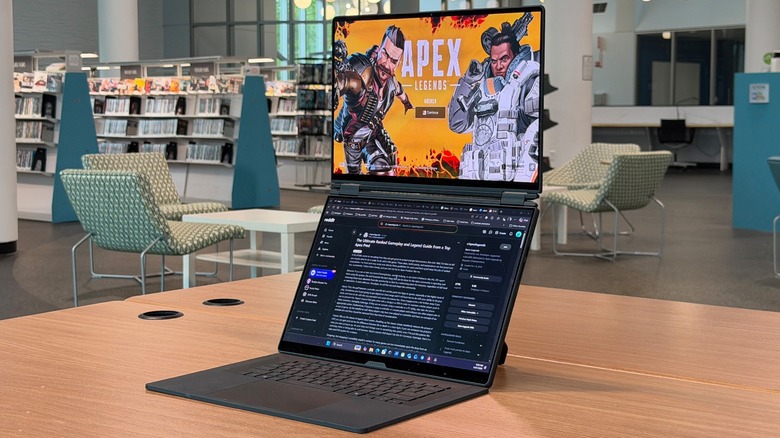
2 Giant Screens Make 1 Massive Gaming Laptop


One thing that has become clear to me is as a reviewer is I’m a sucker for dual-screened laptops. There’s just something lovely about opening up a laptop and being greeted by two huge screens staring back at you. At home, I have a triple monitor setup — though I’ve been considering eliminating one of them lately. Multiple monitors are an integral part of my workflow, whether I’m editing other articles or writing my own.

So, when Asus asked if I wanted to review the Zephyrus Duo, of course I said yes, but I’m not sure I really knew what I was getting into. Because a separate part of my job involves being mobile. I work in a lot of different places, which is why a dual-screen laptop is attractive. But this is the ASUS ROG Zephyrus Duo — it’s a dual-screen gaming laptop

Typical traits of gaming laptops involve lots of power and quirky design, both of which are delightful. But they also tend to be big, heavy, and pretty hard on the battery. I’m both pleased and saddened that the Asus ROG Zephyrus Duo embodies all of these traits — unapologetically. I’ve been using an Asus ROG Zephyrus Duo review sample, provided by Asus for just under a week, including lugging it on a trip across the country and back, and these are my thoughts.

It’s huge
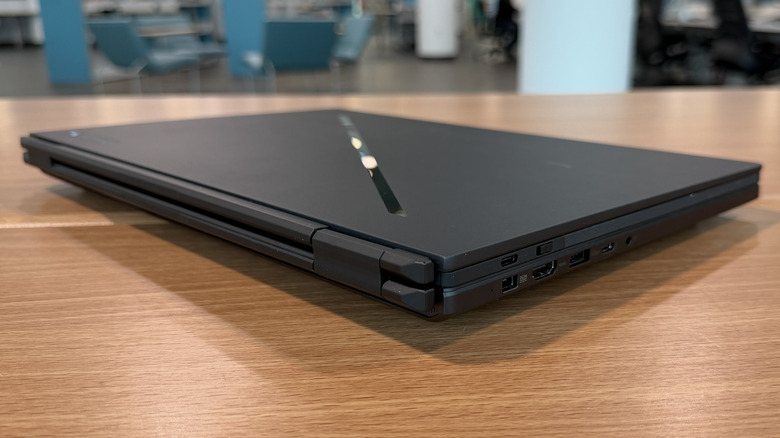
Make no mistake, this laptop is gargantuan. When I first unboxed it, I hearkened back to the beastly laptops that my wife used to have issued to her at work in the early 2000s. I’m talking about those kinds of beasts. More recently, around 2020 I was in the market for a PC that I could use to edit videos, and I landed on a gaming laptop from a different manufacturer. Gaming laptops haven’t gotten much thinner since then, but this laptop is almost a full inch thick when closed.

Compare that to some other laptops that I’ve reviewed recently, and it’s shocking. The last few laptops I had on my desk include the ThinkPad X13 Gen 6, and the MSI Prestige 13, one of the adorable pieces of tech I took to MWC. Even more recently, I’ve worked with the Asus ZenBook A16 and the Samsung Galaxy Book6 Pro, both of which are large, 16-inch laptops that are no thicker than half an inch and weigh around 2.5 pounds.

By contrast, the Zephyrus Duo checks in at almost three times that weight — 6.17 pounds. In case you’re not keeping score, let me spell it out for you — this is not a subtle laptop, by any stretch of the imagination. But that’s okay; it’s a gaming PC.

Gaming design
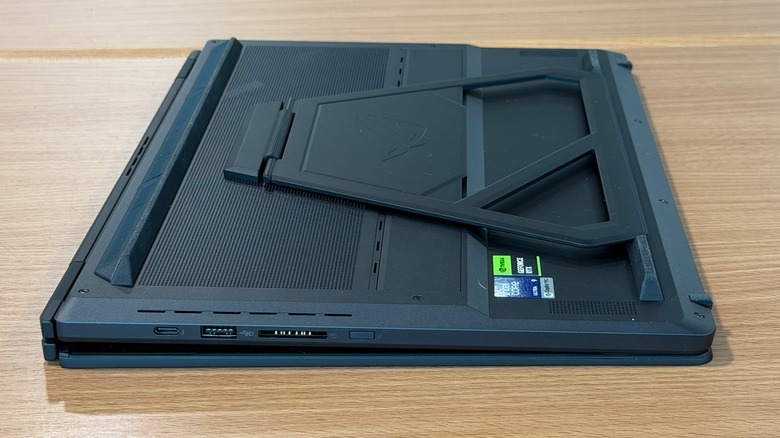
I always have a soft spot for gaming laptops, despite their ridiculous size. The features on them that make them gaming laptops are always so refreshing and delightful. The Zephyrus Duo has Asus’s trademark LED slash across the lid that lights up when the laptop is working. The keyboard, which like its non-gaming cousin is removable and easily sandwiches in between the screens, has fully customizable RGB backlighting.

Even the wallpaper on the home screen is animated in a delightful way when you first bot up the laptop, or when you switch it from “laptop mode” to dual screen mode. The kickstand on the back that allows you to prop up the screens is built in, and it works in both landscape and portrait, which is a lovely bonus.

There is ample space for cooling, with vents wrapped all around the chassis. Even the charging brick is massive and uses a proprietary jack, though the laptop can charge (slowly) with USB power delivery. All of these combine to give the Asus Zephyrus Duo a slightly understated (there are certainly more ostentatious gaming laptops) but undeniable gamers aesthetic that is just plain fun.

Power to spare
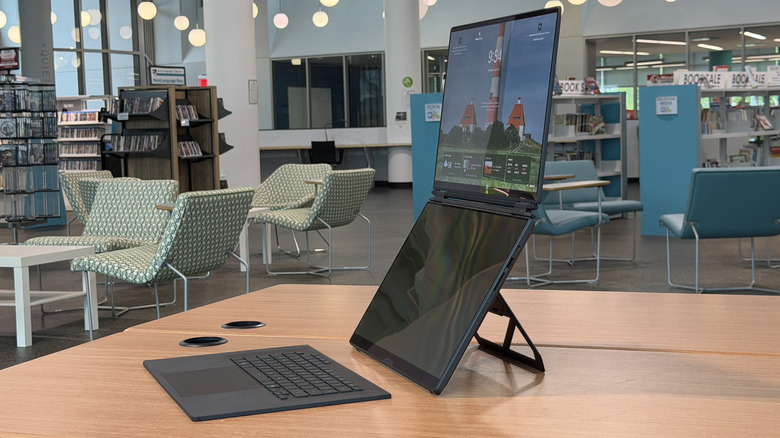
Underneath the hood, this laptop has everything you could possibly want in a gaming laptop, let alone a dual-screen gaming laptop. As reviewed, it’s powered by an Intel Core Ultra 9 386H processor, with an Nvidia RTX5090 GPU with 24GB of VRAM. The laptop also has 32GB of RAM and 1 TB of storage.

The displays are 16-inch “Nebula HDR” displays with 120Hz refresh rates and go up to 1,100 nits of brightness. The front-facing webcam camera is a 1080P IR camera that supports Windows Hello. There is no fingerprint reader, I’m sad to report. The kickstand is built into the bottom of the laptop and adds to the overall bulk.

Meanwhile, in terms of I/O, the laptop has two Thunderbolt 4 ports with DisplayPort and Power delivery capability. There are also two USB 3.2 Type-A ports, a microSD card reader, a 3.5 mm audio jack, and an HDMI 2.1 port. The laptop also supports Wi-Fi 7 and Bluetooth 6.0. It’s equipped with a 90 Wh battery should you ever decide to unplug it, and you probably shouldn’t.

Keyboards aplenty
The Asus Zephyrus Duo comes with a physical keyboard sandwiched between the two screens. When you open the lid, the machine works just like a 16-inch laptop. The keyboard attaches to the bottom screen magnetically and connects with pogo pins to charge. You can also charge the keyboard with USB-C if you prefer.
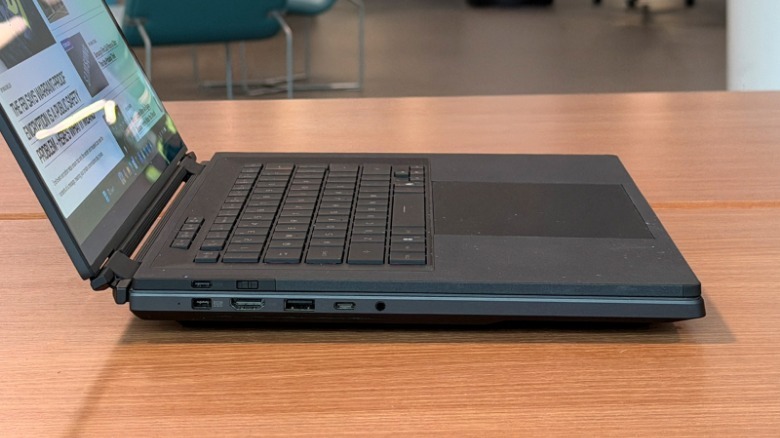
The keyboard itself is very thin and feels really nice. There’s a soft-touch coating around the outside that feels great to rest your palms on. The keys are nicely separated with great pitch and a little more travel than I’d normally prefer, but that’s subjective. The keyboard tends to slide around on slippery table surfaces, so bear that in mind.

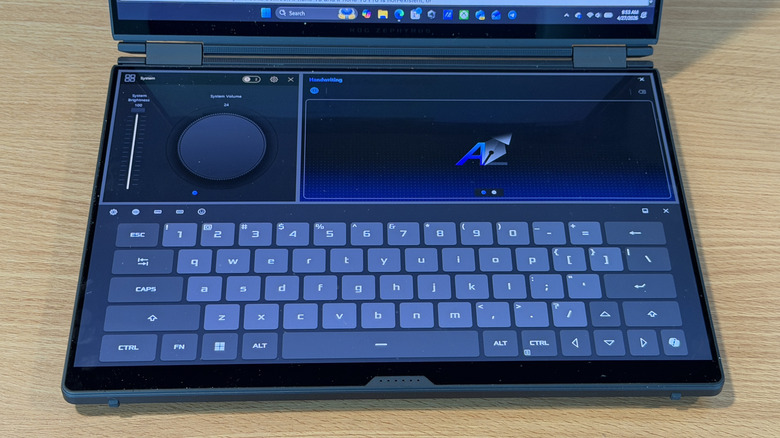
There’s also a virtual keyboard if you want to use one. If you tap on the screen with three fingers on both hands, you can summon and dismiss it. You can also drag with six fingers down to move the keyboard down. That opens up some extra widgets that allow you to use handwriting and adjust system controls like brightness and volume.

Powerful and power-sucking
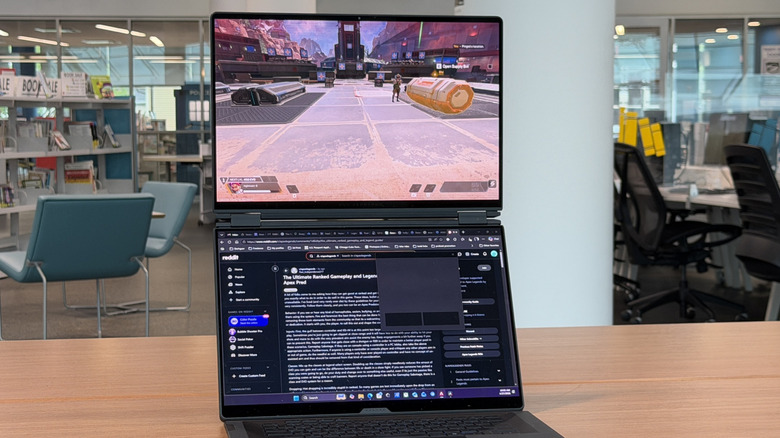
As for performance and battery, they behave exactly like you’d want a gaming laptop to behave. It’s ridiculously powerful, and it drinks battery accordingly. It’s already tough enough to power a laptop with dual screens, but when you add a power processor, discreet GPU, and fancy lighting into the mix and you’ve got a recipe for short battery life (if you’re ever unplugged, that is to say).

I haven’t used the laptop as much as I would like to determine a fair average battery life off-charger, but in the few days I’ve used it under a normal workload, it has lasted around four to five hours. That includes a couple of dozen browser tabs and a couple of messaging apps, all running at around 50% brightness with music streaming in the background for good measure. All told, that’s not bad for a gaming PC.

As for performance, I tested out a couple of features. I played a bit of “Apex Legends” after I paired the laptop up with a Razer Pro Click V2 gaming mouse. I also built and edited a short video (in 1080p) with the laptop, and both performed very well. As for numbers, it clocked Geekbench 6 at 2,889/16,902 single and multi-core scores, which are both very respectable numbers in the category.

Asus ROG Zephyrus Duo price, availability, and verdict
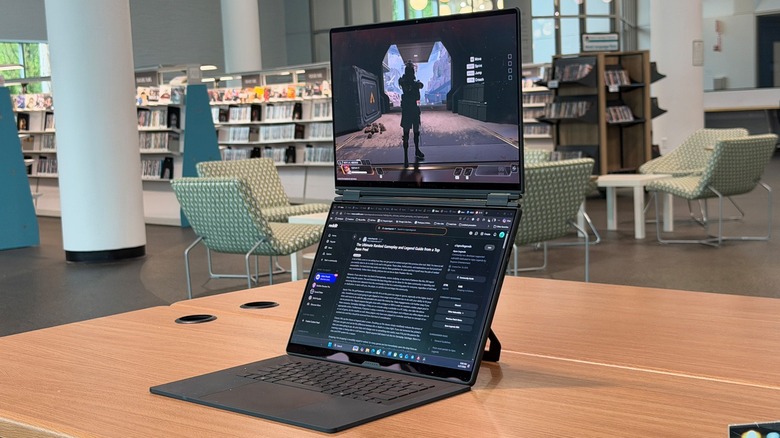
This laptop as reviewed checks in at a no-nonsense price of approximately $5,500 and you can pre-order it from Asus directly or from its retail partners starting today.

Overall, this is a fun, but bulky machine to carry around, but I keep coming back to the fact that it’s a gaming laptop. It’s also pretty expensive, but again, it’s a gaming laptop. By their very nature, gaming laptops are top-of-the-line machines built to get every frame per second you can out of it. That comes at a cost, especially in this day and age. It’s definitely at the top end of the price spectrum, but it’s a special machine.

The Zephyrus Duo is not for me — I tend to favor much thinner and much lighter laptops because of my job and because of the fact that I’m really not much of a gamer. But if you are, and you like the idea of playing a game on the top screen while you stream on the bottom, or have a map open, or something similar, this is a very tempting device to pick up. But it’s going to cost you — both in your wallet, and on your back. So, if you want to explore this device, be very, very sure you want everything it will give you, because you’re going to pay a lot to get it.


Source link

Leave a Reply

Subscribe to Our Newsletter

Get our latest articles delivered straight to your inbox. No spam, we promise.

Recent Reviews


We may receive a commission on purchases made from links.

For TV owners, High-Definition Multimedia Interface (HDMI) technology is the gateway to accessing endless content and maximizing your viewing experience. Whether it’s watching films from physical media, streaming content via your preferred subscription platform, or playing games, there are plenty of gadgets you can connect for the perfect entertainment setup in your home.

Apart from investing in the right HDMI cable, choosing the right port makes all the difference. Depending on how old your TV is, you can expect anything from the legacy HDMI 1.0 to even the most recent HDMI 2.2. However, while there’s a big jump in terms of quality between HDMI 2.1 and 2.0, there are plenty of gadgets that can still work perfectly with your HDMI 2.0 port. This is great news if you aren’t so particular about getting the best picture possible. In fact, unless you’re a hardcore gamer or have a TV made for high resolution, it’s likely you’ll be able to get the most out of what you already have without HDMI 2.1 or 2.2 ports.

To help you get the most out of your existing HDMI 2.0 port, we’ve listed broad categories of gadgets that work with it. Next, we share specific models that either maximize the port’s capabilities or still offer a great viewing experience despite the bandwidth limits. To learn how we selected the models that work well with HDMI 2.0 ports, you can skip to our methodology at the end.

1. Streaming sticks

If you own an older TV model but don’t want to trash it yet, streaming sticks are among the most affordable ways to access modern entertainment options on a budget. In fact, the HDMI 2.0 port will already let you maximize the performance of even newer streaming sticks, like the Fire TV Stick HD, which supports 1080p Full HD. So, if your TV can’t do 4K anyway, you don’t really need to get a more expensive model. An Amazon’s Choice product, the Amazon Fire TV Stick HD has an average rating of 4.7 stars from more than 62,000 reviewers.

While many newer smart TVs have built-in streaming capabilities, there are still many benefits to using a streaming device, such as regular security updates. These days, many streaming sticks are marketed as 4K-capable, like the Amazon Fire TV Stick 4K. While we’ve recommended plugging it into an HDMI 2.1 port for the best experience, an HDMI 2.0 port is also perfectly fine for most modern 4K movies and shows. If you have the extra budget, it can be an investment for future upgrades. As of March 2026, over 75,000 Amazon users have rated the Fire TV Stick 4K Max an average of 4.6 stars. However, you can also consider options like the Roku Express 4K, Apple TV 4K, and Google TV Streamer 4K.

2. Sync boxes

There’s something incredibly dramatic about having the lights match the scenes on your TV, and you can do that with a sync box. Whether you’re watching a movie, playing games, or listening to music, sync boxes help elevate your entertainment experience. While many of the latest sync boxes are designed for HDMI 2.1 ports, these are generally backwards compatible with HDMI 2.0 ports, so you can still enjoy them with their reduced capacity, such as the Philips Hue Play HDMI Sync Box 8K, which generated an average rating of 4.2 stars from more than 230 Amazon customers.

Priced at $384.99, you can connect up to 4 input devices. Unless you buy a kit, there’s also the price of the lights, which will vary depending on your screen size. The Philips Hue Play Gradient Smart TV Light Strip is available in three sizes: 55-inch ($274.99), 65-inch ($296.99), and 75-inch ($329.99). In general, many people seem quite satisfied with it, as over 2,000 Amazon users rated it 4.3 stars. 

Lastly, you will need to factor in the cost of the Philips Hue Bridge, which lets you enjoy its integration with smart home ecosystems, like Amazon’s Alexa, Google Home, and Apple HomeKit. With over 11,200 Amazon reviews, it has generated a pretty positive 4.5-star rating. Given that it tops our list of smart lighting brands, it can be a great investment if you’re already using other Philips smart lights in your home.

3. DVD and Blu-ray players

Although many people have turned to streaming to optimize their content viewing, there are still people who like owning physical media. Whether you’re a film buff, a parent of young children, an elderly person, or just someone who doesn’t want to deal with subscriptions, owning a DVD or Blu-ray player can keep all your favorite TV shows and films within reach, without the need for internet connectivity. For many old DVDs and some Blu-ray discs, they don’t max out HD resolution anyway, so you’re likely to get the most out of their content with even the older HDMI 2.0 port. In fact, even premium 4K Ultra HD Blu-ray players run flawlessly on HDMI 2.0.

On Amazon, the #1 Best Seller in its DVD category is the ELECTCOM PRO DVD Player, with over 40,300 customers rating it 4.2 stars on average. With prices starting at $41.99, it comes in different set variations that include HDMI and RCA cables, and even remote controls with large buttons designed for the comfort of seniors. But take note, this model doesn’t support Blu-ray discs. Alternatively, there’s the Panasonic Blu-ray player that retails for $89.95.An Amazon’s Choice product, more than 2,100 users gave it an average rating of 4.4 stars. Apart from playing Blu-ray discs, it can also work with CDs, DVDs, and even compatible files on your thumb drive, such as photos and videos. You may even find similar media players in secondhand or vintage stores if you’re on a tighter budget.

4. Gaming consoles

For gamers who get a little overstimulated with the latest releases, the HDMI 2.0 port already lets you experience games that run on 4K at 60 fps. So, if you’re one of those people who still enjoy older-generation consoles, like the PlayStation 4 Pro or Xbox One S, you’ll be happy to know it’s built to work perfectly with the HDMI 2.0 port. These days, you can still get secondhand models of the PlayStation 4 Slim 1TB ($199.99) or the PlayStation Pro 1TB ($240.95) from the official PlayStation store on Amazon. Despite being released years ago, both models still enjoy an average rating of at least 4.6 stars from more than 12,000 Amazon customers.

Among the devices that should always be plugged into an HDMI 2.1 port, many newer gaming consoles can benefit most from high resolution and 120Hz frame rates. But, since HDMI 2.0 supports 4K resolution at 60 frames per second, a powerful console like the Sony PlayStation 5 will still run massive, modern AAA games flawlessly in stunning ultra-high definition. Despite its price tag, it boasts a ton of satisfied customers with 2,400+ Amazon users rating the PlayStation 5 Pro around 4.6 stars.

5. HDMI switch

If you find yourself attaching several devices to your TV via the HDMI port, you may need to use an HDMI switch to free up space, like the UGREEN HDMI Switch. An Amazon’s Choice Product, it boasts a positive 4.3-star rating from 5,200 customers. Available in two colors, the switch comes in black or grey with discounts for Amazon Prime customers. With 5 input ports, you can connect all kinds of devices, such as the ones above: PCs and laptops, streaming sticks, and TV boxes. To switch devices, you can either press the buttons on the unit or use the remote, which is powered by two AAA batteries. The unit itself has an LED indicator that shows which device is active. On the other hand, its single output port is compatible with displays such as TV screens, monitors, and projectors.

But, if you’re on a budget and only really need one extra slot, the Anker HDMI Switch might be better for you. An Amazon Overall Pick product, the Anker HDMI Switch has an average rating of 4.5 stars from more than 4,000 customers. Priced at $15.99, this HDMI switch measures just 2.17 inches by 2.17 inches by 0.57 inches, so you can easily take it with you when you’re traveling, too. It comes with a pair of input ports and a single output port for displays. Unlike the UGREEN model, this doesn’t need an external power supply.

Methodology

To help you understand what your HDMI 2.0 port can do, we’ve highlighted gadgets that either maximize its capabilities or provide a great experience despite the port’s bandwidth limits. We selected devices that have averaged at least four stars from more than 200 reviewers, indicating a general trend of user satisfaction. While it didn’t affect their inclusion on the list, we also noted whether they are top-selling products in their respective categories and mentioned additional features you may enjoy beyond their primary functions.


Source link