5 Fairytale Medieval Towns In Europe With Cheap Prices & Zero Crowds


Share The Article

Not to be the bragacious one in the room, but I’m the guy all my friends come to when planning their yearly Eurotrip.

With 40+ European countries under my belt—that’s virtually all of them, mind you—and 100+ cities, it’s fair to say I know the Old Continent like the back of my hand: from the westernmost reaches of Portugal, through the alpine peaks of Central Europe, all the way East to Russia.

Yep, even the bad guy in the class.

Lately, though, I’ve been noticing a growing trend among my mates: they’re after smaller, quieter towns. Not the biggest, flashiest, most vibrant city breaks, where dinners out don’t cost an arm and a leg, and the social media crowds have yet to flood.

Fairytale Medieval Towns In Europe With Cheap Prices & Zero Crowds

Well, they’re definitely not gonna find that in a now-ruined Dubrovnik, or even Ksamil, Albania, I’ll tell you that much, but there’s plenty more gorgeous European gems, still tucked away from the Instagram-influenced hordes’ prying gaze.

Mainstream travel brochures will continue flogging these names to death, even to the point of calling Marseille a hidden gem, but I’m Travel Off Path alumni, baby. This isn’t your usual tourist fodder.

To my online friends, and fellow Europe explorers, here are 5 gorgeous fairytale towns where prices are cheap, and crowds are effectively… nonexistent.

PLUS: We’ve built an interactive quiz for you at the end of this article to find out which one is your perfect match!

Bardejov, Slovakia
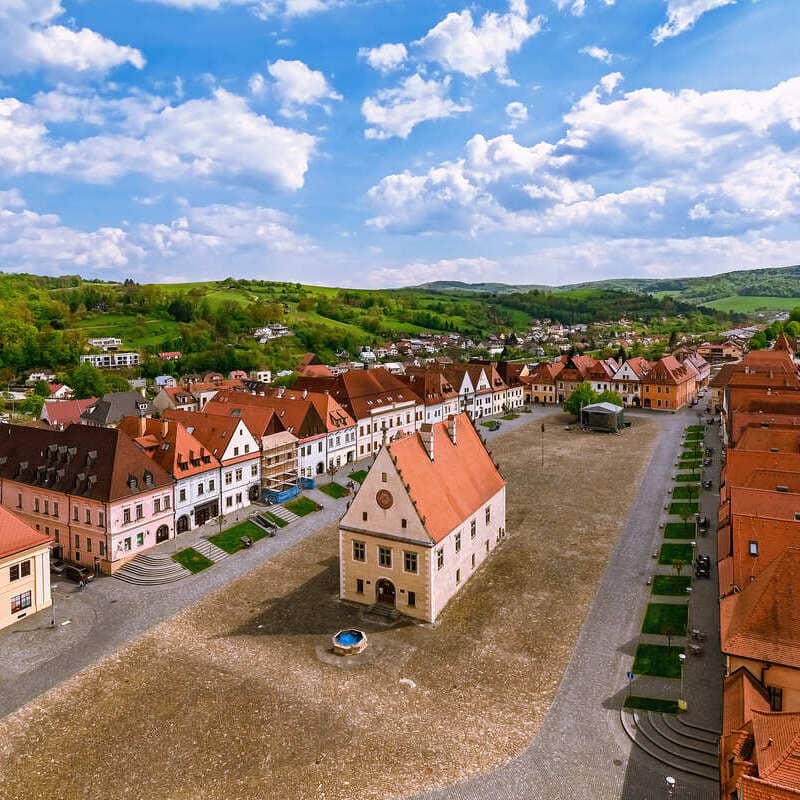
Historic Old Town Square In Bardejov, Slovakia

A small town in northeastern Slovakia, you won’t find easily in your Insta-friendly travel itinerary, Bardejov is nothing short of fairytale material. It also feels that much more magical when you’re not elbowing your way through a crowd of selfie-takers in your sightseeing venture.

Picture cobbled streets that have barely seen the passing of time since, I don’t know, the 15th century perhaps, colorful townhouses with tiled roofs that look like as if they’ve been sketched by Walt Disney himself, and a stunning main square.

The square in question is the main reason why you’d go out of your way from Bratislava to visit, and believe me when I say, pictures just don’t do it justice.

Colorful Row Of Houses In Bardejov, Slovakia

That prominent building you see in the middle is the Renaissance Town Hall, and on the north side of the square, the big Gothic church is the Basilica of St. Giles. If the tower is open, make sure you go upstairs for that classic bird’s eye view of the Old Town.

Average Prices In Bardejov, Slovakia
  • Cheap local sit-down meal: $14–$18
  • 3-course meal in town center (1 person): $20–$28
  • Average museum entry fee: $6–$12
  • 3-star hotel rate (per night): $50–$95
How Safe Is Slovakia Right Now?

Travelers voting on our Safety Index currently rank Slovakia at 89/100. Been recently? Help other travelers by voting below:

Vic, Spain

Placa Major In Vic, Catalonia, Spain

Millions of tourists flock to Barcelona from all over the world for $15 sangrias down by Barceloneta, and insane Rambla crowds, but very few know that, only a 1h bus ride from the Catalonian metropolis, they can visit Vic, the much-smaller, more quaint, untouristy alternative.

A well-preserved medieval town where busy thoroughfares give way to narrow pedestrianized lanes, and high-rises are nowhere to be seen, this is one of Spain’s best-kept secrets, and one I still hesitate to share. God forbid it’s swarmed by the Instagram hordes.

If you think Barcelona’s Gothic Quarter is impressive, wait until you see Vic’s Plaça Major:

Ringed by arcades and cozy cafes, it’s the heart of town and the prime spot for soaking up that medieval flair.

The Roman Temple Of Vic, Catalonia, Spain

Within short walking distance, the centuries-old cathedral has a richly-decorated interior, with murals provided by local artist Josep Maria Sert, and… wait for it…

This is not exactly Middle Ages-coded, but one of the best-preserved ancient pagan temples in Spain is right here! The Roman Temple of Vic dates back to the 2nd century, and it’s living proof of the bygone empire’s long-standing influence.

Before you fly to Spain this summer, make sure you check the latest Entry Requirements in place. Big changes coming for Europe-bound travelers, from mandatory fingerprinting, to Travel Authorizations.

Average Prices In Vic, Spain
  • Cheap local sit-down meal: $14–$18
  • 3-course meal in town center (1 person): $20–$28
  • Average museum entry fee: $6–$12
  • 3-star hotel rate (per night): $50–$95
How Safe Is Spain Right Now?

Travelers voting on our Safety Index currently rank Spain at 95/100. Been recently? Help other travelers by voting below:

Tempio Pausania, Sardinia—Italy

Historic Old Houses In Tempio Pausania, Sardinia

Correct me if I’m wrong, but chances are you probably know Sardinia for the powdered-sugar white sands and turquoise seas… and only that.

While Costa Smeralda is indeed paradise on earth—and rest assured, I’ll be beach-hopping in the area myself this July—you can also catch me wandering the peaceful streets in Tempio Pausania, simply one of the quaintest, most adorable, most unique medieval treasures on the island.

The entire town is built from locally harvested gray granite: every public building, every skinny house tucked into every winding alley, every palace and church.

They call it the “Granite Temple,” and as aesthetic as it is, especially with the rainbow-colored cobblestones, I love it most for how lived-in it feels.

Colorful Pavements Of Tempio Pausania, Sardinia, Italy

Sardinia largely attracts the beach-bum crowd, so tourists who do take the inland (and uphill) detour here are coming for authentic Sardinian small-town life, and trust me, there’s plenty of that here.

From the nonne spending their day at Piazza Faber, to every-Sunday Mass at the soaring Cattedrale di San Pietro Apostolo, to the family-owned trattorie dishing out the best pasta you’ll ever try.

Average Prices In Tempio Pausania, Sardinia—Italy
  • Cheap local sit-down meal: $13–$18
  • 3-course meal in/near town center (1 person): $22–$32
  • Average museum entry fee: $5–$10
  • 3-star hotel rate (per night): $60–$100
How Safe Is Italy Right Now?

Travelers voting on our Safety Index currently rank Italy at 90/100. Been recently? Help other travelers by voting below:

Sibiu, Romania

Historic Houses With Eye-Shaped Dormers In Sibiu, Transylvania, Romania

My favorite pit stop on my month-long tour of Romania some four Earth spins ago, Sibiu is that Saxon gem in the heart of Transylvania I can’t seem to shake off all these years later. How could I, when its thousand eyes burned a hole through me?

No joke.

The dormers on the houses here have windows shaped like eyes, and they seem to follow you around as you explore the timeless cobble-paved lanes and interconnected town squares. Haunting, sure, but then again, when is Transylvania ever not a little eerie?

This area of Romania was originally populated by Saxon settlers all the way back in the Middle Ages, so it’s no wonder the motif-covered, pastel-hued buildings in the Old Town look like your average fairy-tale German village.
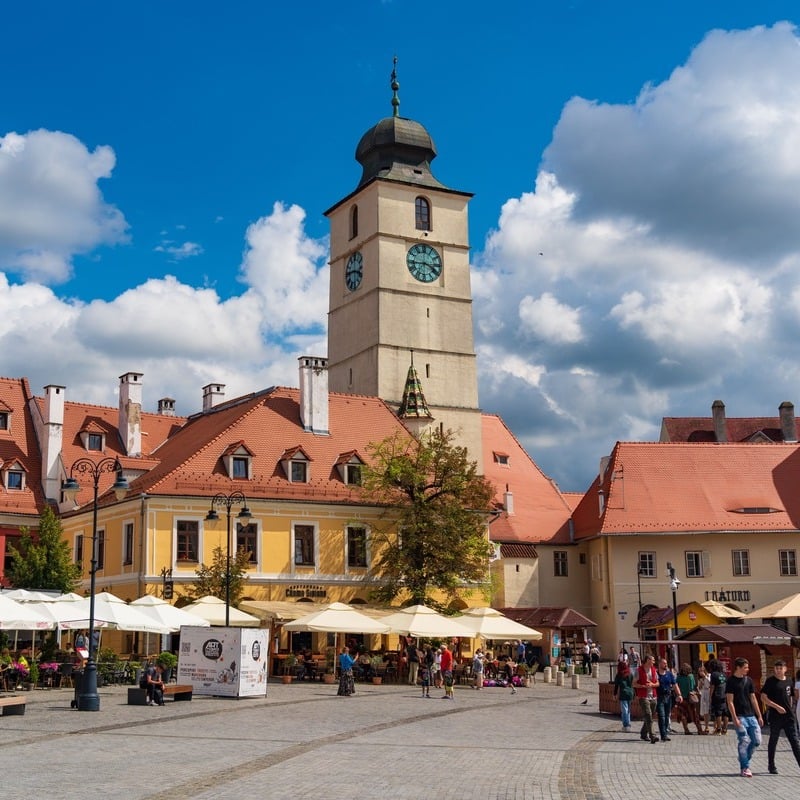
Sibiu, Transylvania, Romania

Big difference? The Chinese tour buses have yet to storm the city gates like they did in Rothenburg ob der Tauber.

Don’t miss the imposing medieval walls that still encircle most of the Historic Center, with its defensive towers and fortified ramparts, and the gorgeous Evangelical Cathedral, best known for the centuries-old gravestones set into and lining its walls.

Average Prices In Sibiu, Romania
  • Cheap local sit‑down meal: $8–$14
  • 3‑course meal in/near town center (1 person): $18–$30
  • Average museum entry fee: $6–$10
  • 3‑star hotel rate (per night): $40–$90
How Safe Is Romania Right Now?

Travelers voting on our Safety Index currently rank Romania at 85/100. Been recently? Help other travelers by voting below:

Kazimierz Dolny, Poland

Tucked away in eastern Poland, some 31 miles northwest of Lublin, Kazimierz Dolny is that quintessential storybook town with the stone-laden streets, the scenic riverside, and the hilltop castle to top it off.

It’s quite tiny, so it’s not really somewhere you’d spend more than an overnight in, but that gorgeous central square, flanked by Renaissance-era merchant houses, or that ornate Parish Church, with its ently-arched ceiling and Baroque altars, might just tempt you to.

As with most medieval gems in Europe that have yet to succumb to overtourism, the best way to get around is wandering the maze-like grid. You’ll probably stumble upon some incredibly photogenic corner, or hidden spot I failed to notice myself.

Kazimierz Dolny In Poland

If you’re coming from a sprawling concrete jungle like Warsaw, this will be perfect to escape the hectic traffic and busy city life for a day.

Oh, and to my fellow pierogi fans out there, Plebanka Bistro in the heart of the Old Town has quite the creative take on Poland’s beloved half-moon dumpling. If you’re not exactly opposed to trying new flavors other than the usual potato and pork, save this address: Plebanka 2A, 24‑120.

Average Prices In Kazimiers Dolny, Poland
  • Cheap local sit‑down meal: $8–$14
  • 3‑course meal in/near town center (1 person): $18–$30
  • Average museum entry fee: $6–$10
  • 3‑star hotel rate (per night): $40–$90
How Safe Is Poland Right Now?

Travelers voting on our Safety Index currently rank Poland at 94/100. Been recently? Help other travelers by voting below:

Heading to other European countries not featured in this article? Check the latest Safety Advice that applies to your destination of choice here.


Now take this quiz to find out which destination is your perfect match!

Question 1 of 4

Favorite Scenery Style?


Question 2 of 4

Ideal Atmosphere?


Question 3 of 4

Top Unique Feature?


Final Question

Your Daily Budget?


🇸🇰

Bardejov, Slovakia

The Renaissance Gem

Why: You love standard-setting architecture and quiet value.

Pro Tip: Visit the Basilica of St. Giles tower for the best view in the country.

🇪🇸

Vic, Spain

The Secret Catalan Outpost

Why: You want historic depth near a major hub without the madness.

Pro Tip: The Roman Temple is a 2nd-century masterpiece hidden in plain sight.

🇮🇹

Tempio Pausania, Italy

The Granite Temple

Why: You crave authentic island life and rugged, stone-built charm.

Pro Tip: Spend your afternoon at Piazza Faber to see real Sardinian life unfold.

🇷🇴

Sibiu, Romania

The Gothic Saxon Town

Why: You are drawn to eerily beautiful streets and budget-friendly gothic vibes.

Pro Tip: Look up—the “watching eyes” on the rooftops are the city’s trademark.

🇵🇱

Kazimierz Dolny, Poland

The Artistic Riverside

Why: You want a storybook atmosphere with castle ruins and creative local food.

Pro Tip: Grab some creative dumplings at Plebanka Bistro after hiking to the castle.

The Travel Off Path Advantage: Your Travel Toolkit

Subscribe To Our Latest Posts

Enter your email address to subscribe to Travel Off Path’s latest breaking travel news, straight to your inbox.


Source link

Leave a Reply

Subscribe to Our Newsletter

Get our latest articles delivered straight to your inbox. No spam, we promise.

Recent Reviews


For many small business owners, QuickBooks is the first accounting software they turn to when starting out. It’s affordable, user-friendly, and handles basic bookkeeping needs well. 

However, these early benefits can transform into frustrating limitations as businesses grow—especially those in manufacturing or inventory-heavy industries.

If your company feels constrained by QuickBooks—juggling spreadsheets, add-on tools, or workarounds—it might be time to consider a cloud-based Enterprise Resource Planning (ERP) system. Unlike standalone accounting software, a cloud ERP integrates all your business operations in one place: accounting, inventory, sales, customer management, and more.

Let’s explore the five key reasons small businesses are making the switch from QuickBooks to cloud ERP systems and how you can make this transition smoothly.

1. Too Many Separate Tools (No All-in-One System)

The QuickBooks Pain

QuickBooks focuses primarily on bookkeeping, forcing companies to rely on separate systems or spreadsheets for other critical functions:

  • Inventory tracking
  • Order management
  • Customer relationship management (CRM)
  • Project management
  • Human resources

This disjointed approach means data gets re-entered multiple times in different places—a major productivity killer. Teams often export data from QuickBooks into Excel for analysis or to manage tasks that QuickBooks can’t handle. Unfortunately, this manual patchwork leads to errors, from duplicate entries to missed updates.

Why Cloud ERP Helps

An all-in-one cloud ERP connects your entire business in a single system, eliminating the need for multiple applications. Your accounting, sales, customer information, inventory, and even HR can live in one platform.

When a sale is made in an integrated ERP, the inventory is automatically updated and accounting records are adjusted in real-time—no more exporting and re-keying data between separate software. 

This not only saves effort but also improves the accuracy and consistency of information.

Real-World Example

One small distributor that left QuickBooks for a cloud ERP was able to combine their core business processes in one system and saw their sales conversion rate increase by 200%. 

2. Limited Inventory Management (Especially for Manufacturers)

The QuickBooks Pain

QuickBooks was not designed for complex inventory or manufacturing needs. It can manage simple product lists and stock counts but lacks advanced inventory features that growing manufacturers and distributors need:

To compensate, businesses end up using separate inventory software or manual methods to track these details, which is cumbersome and error-prone.

Additionally, forecasting demand or managing supply chain complexity is beyond QuickBooks’ scope. Many companies try to plug the gaps by layering on third-party inventory tools or add-ons, but without proper integration, this creates more problems than it solves.

Why Cloud ERP Helps

Cloud ERP systems like Striven are built with robust inventory and manufacturing management capabilities out of the box. For example, modern ERPs provide tools for:

  • Complete inventory control across multiple locations
  • Warehouse management with real-time updates
  • Multi-level bills of materials (BOMs)
  • Work order creation and production tracking
  • Lot and serial number traceability
  • Supply chain management
  • Automated low-stock alerts

Inventory-related tasks that were tedious become much more manageable. 

Need to know the exact quantity on hand, allocated to orders, and on order from suppliers? An ERP can show it in one dashboard. 

Want automatic alerts when stock is low or when production is delayed? ERP can automate that.

Real-World Example

Imagine a small electronics manufacturer using QuickBooks: they might list parts in QuickBooks but manage assembly instructions and component tracking in spreadsheets. This often leads to confusion over which parts are used in which product version.

After moving to an ERP, that manufacturer can store their bill of materials and production steps directly in the system, ensuring everyone from purchasing to production is working from the same information.

3. Hitting Limits as Your Business Grows (Scalability Issues)

The QuickBooks Pain

QuickBooks works well for small transaction volumes and a few users, but many businesses eventually hit the ceiling of what it can handle. You might experience:

  • Sluggish performance
  • File size warnings
  • System crashes as your data grows
  • User limitations (often capping out around 30 users in Enterprise)
  • Slow report generation
  • Risk of file corruption with large data sets

Multi-location businesses or those expanding into new product lines also struggle, as QuickBooks lacks support for multi-entity consolidation or advanced multi-warehouse operations. And while QuickBooks Online lifts the physical file size issue by being cloud-based, it introduces its own limitations.

Another growth-related limitation is user permissions and controls. QuickBooks offers only basic user roles, which can cause security or compliance concerns as your team expands.

Why Cloud ERP Helps

Modern cloud ERP systems are built on enterprise-grade databases that can handle much larger transaction volumes, datasets, and concurrent users. There’s no heavy local data file to maintain, and you won’t need to “close the year” or truncate data to keep the system running smoothly.

Cloud ERPs support unlimited users (with appropriate pricing plans) without a hard cap like QuickBooks has, so you can add new team members as your company expands. 

The cloud infrastructure also means you get global access: whether your team grows into multiple offices or remote work, everyone can use the ERP in real-time from anywhere.

In terms of raw capacity, an ERP can manage hundreds of thousands of inventory items or transactions without performance issues. This scalability ensures you won’t outgrow the system in a few years—a key point since migrating software is an investment and you want a long-term solution.

Real-World Example

A family-run manufacturing business had five users on QuickBooks to start, but as they grew to 20+ users across accounting, sales, and warehouse teams, they constantly ran into user lockouts and slow performance. 

They switched to a cloud ERP, allowing everyone to work concurrently without downtime. They noticed that tasks like monthly financial closes and inventory valuation (which used to strain QuickBooks and take days) were completed in a fraction of the time.

4. Lack of Real-Time Visibility and Reporting

The QuickBooks Pain

QuickBooks provides standard reports (P&L, balance sheet, basic sales reports, etc.), but offers little flexibility or real-time insight beyond the basics. 

It doesn’t have custom dashboards to monitor key performance indicators (KPIs) live, so you’re often stuck exporting data to Excel or running separate reports and combining them to get the information you need.

If you want to see a combined view of data—say, financial metrics alongside inventory levels or sales pipeline information—QuickBooks alone can’t do that, because it doesn’t manage those other areas fully. Many businesses find themselves making decisions on outdated or incomplete data.

Drilling down into data or generating specific custom reports (e.g., profitability by product line or sales by region and industry) is cumbersome in QuickBooks. You often have to export and manually manipulate data, which is time-consuming and prone to errors.

Why Cloud ERP Helps

Cloud ERP systems excel at providing a holistic, real-time picture of your business. Because an ERP ties together different functions, you can get combined reports and live dashboards that show data from across the company.

ERP reporting tools are usually more powerful, with the ability to slice and dice data by various dimensions (by product, by department, by customer, etc.). Rather than being limited to canned reports, you can get answers to specific questions.

Another benefit is real-time data access. With cloud ERP, that information is visible in reports as soon as an invoice is posted or a production batch is completed. No end-of-day sync is required between systems. This immediacy means you’re always looking at current data, not last week’s numbers.

Real-World Example

A small wholesale firm using QuickBooks had to wait until the end of each month to truly understand its profitability and inventory status because its accountant would finalize the books, and then management would review the reports.

By adopting an ERP, they moved to continuous reporting—managers could check dashboard metrics daily to see if they were on track. They set up alerts (such as if weekly sales drop below a threshold or if any invoice is overdue by 30 days) so they could act immediately.

5. Manual Work, Errors, and Lack of Automation

The QuickBooks Pain

Because QuickBooks handles only part of your operations, there’s often a lot of manual work and duplicate data entry involved in running the business. Consider the process of fulfilling an order: an employee might take an order in a CRM or via email, then manually create an invoice in QuickBooks, then separately update a stock spreadsheet. Each manual step is an opportunity for errors.

QuickBooks has minimal workflow automation. It can automate recurring invoices or bills, but it can’t do things like:

  • Automatically routing a purchase order for approval
  • Triggering a production job when an order is entered
  • Generating pick lists for the warehouse
  • Enforcing proper approval workflows

Businesses end up developing workarounds, such as using email to ask a manager to approve expenses or maintaining checklists to ensure steps are followed. This adds to management overhead, and sometimes, things slip through the cracks.

Lack of internal controls is another facet—QuickBooks’ simplicity means it doesn’t enforce the separation of duties well. Any user with enough permission can backdate or edit transactions without a clear audit trail, which can be problematic for catching errors or fraud.

Why Cloud ERP Helps

A good ERP allows you to automate and streamline many processes, reducing manual intervention. You can set up workflow rules:

  • When a sales order is entered, the system automatically creates a pick list for the warehouse
  • When inventory falls below a threshold, it can auto-generate a purchase order draft or send an alert
  • When a bill is entered over a certain amount, it can be forwarded to a manager for approval before payment

These automations ensure nothing is forgotten and employees don’t have to remember every little step—the system guides them.

Another advantage is role-based controls and audit trails. In most ERPs, every transaction can be tied to a user and you can see a log of changes. Permissions can be finely tuned so that, for example, one person can create a purchase order, but it requires a separate person to approve it, enforcing a checks-and-balances system.

By automating routine tasks and removing manual double-entry, your team can focus on more valuable activities—like serving customers or improving products—instead of administrative busywork.

Real-World Example

A services company using QuickBooks was manually tracking project hours in a spreadsheet and then entering summary invoices into QuickBooks. They switched to an ERP that had time tracking and project management built-in.

Now, consultants log hours directly into the ERP, and invoices are generated with one click from those hours, eliminating multiple manual steps. 

They also set up an approval workflow for timesheets and expense reports in the ERP—replacing a clunky email-based process—which ensured nothing got paid without the right checks.

How to Switch from QuickBooks to Cloud ERP Successfully

Transitioning to a cloud ERP doesn’t have to be overwhelming. Once you have done your research and selected your best fit from the leading ERP systems. Follow these streamlined steps:

1. Plan and Prepare

Identify your key requirements and pain points with your team. Set a realistic timeline that avoids your busiest periods. Assign an internal project lead and work with your vendor’s implementation team.

2. Clean Your Data

Before migration, remove duplicate entries, archive inactive records, and standardize your data formats. Don’t bring years of accumulated junk data into your new system.

3. Migrate Strategically

Import in stages: master records first (customers, vendors, items), then open transactions, and finally, essential historical data. Test with small batches before full migration and always back up your QuickBooks data.

4. Train Your Team

Provide hands-on training in a test environment, focusing on demonstrating the benefits and efficiency gains. Create simple procedure guides and identify internal champions who can support their colleagues. Schedule training sessions with your vendor or use online tutorials (Striven, for example, has the “Striven University” resources for new users transitioning from QuickBooks). 

5. Go Live and Refine

Launch at the start of a financial period with support ready. Expect a learning curve and work closely with your ERP’s support team. Once stable, gradually explore advanced features and continue optimizing the system to match your evolving needs.

Final Thoughts: A Strategic Decision for Growth

Making the jump from QuickBooks to a cloud ERP is a significant move for a small business, but it comes with significant benefits. You’ll be able to run your business with far greater efficiency, accuracy, and insight than before—whether it’s knowing exactly what your inventory levels are, automating routine tasks, or getting financial reports at the click of a button.

The five reasons above are the most common drivers: businesses crave an integrated system, more robust features, scalability, better information, and automated workflows. 

Cloud ERPs deliver on those needs, helping even small companies operate with the sophistication of a much larger enterprise. With a careful, well-planned implementation, you can make the transition without disrupting your operations. 

In the end, moving to an ERP isn’t just an IT upgrade—it’s a strategic decision to upgrade how your business works.

About the author: Christina is the founder and executive director of Top10erp.org, with over 20 years of experience in online technology platforms. After five years as general manager for prominent accounting software research platforms, she recognized manufacturers needed specialized resources for their complex ERP needs. In 2008, she founded Top10erp.org to streamline the challenging ERP selection process for manufacturers through advanced product indexing and comparison technologies.

The post 5 Reasons Small Businesses Switch from QuickBooks to Cloud ERP appeared first on Striven.


Source link