

pros and cons
- Neat, well-made, and portable.
- Has a large, active support and development community.
- Very competitively priced.
- Quite a steep learning curve.
- Doesn’t compare to a Raspberry Pi or Flipper Zero.
Follow ZDNET: Add us as a preferred source on Google.
Mention a computer you can fit into your pocket, and people seem to have one of two reactions:
They either say “So, it’s like a Raspberry Pi!” Or they say “Ahhh, it’s more like a Flipper Zero!”
Also: The Flipper One may be the ultimate Linux PC for hackers in 2026 – and I’m excited
When talking about the M5stack Cardputer Adv, it’s actually like both. But also, neither. What the M5Stack is for certain, however, is a interesting bit of kit for anyone who wants to get their hands dirty.
So, what is it?
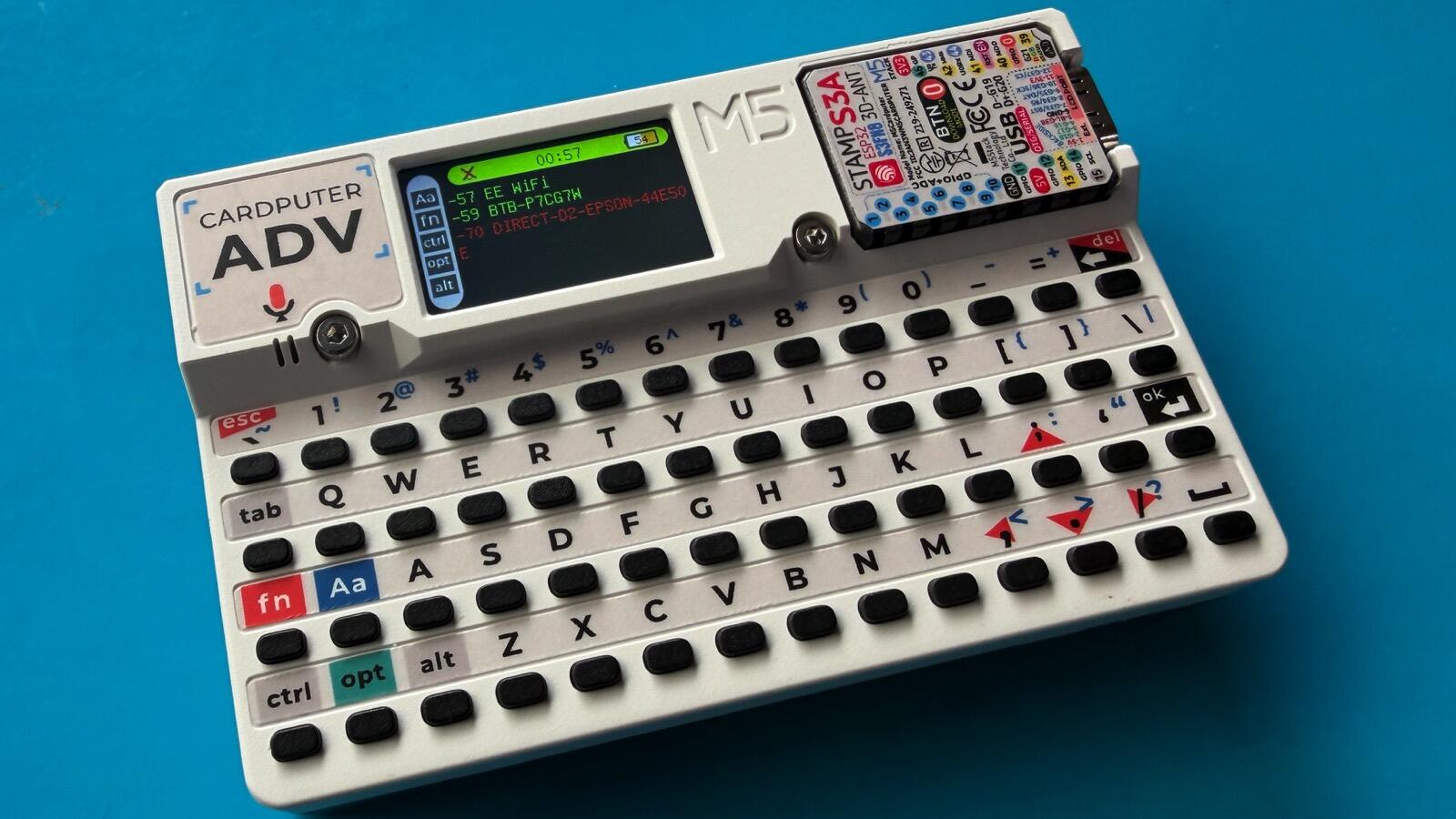
Hardware-wise, the Cardputer Adv is a pocket computer that’s the size of a stack of credit cards (over twenty cards, so we’re talking a Warren Buffett stack here) that comes complete with a keyboard and a teeny-tiny display.
The Cardputer Adv is as thick as a stack of credit cards.
Adrian Kingsley-Hughes/ZDNET
It’s a system that’s built to handle rapid prototyping, industrial control, and home control, and is built around a module called an M5Stack Stamp-S3A core; a low-power, dual-core, Wi-Fi and Bluetooth 5.0 low-energy capable system-on-a-chip. That means that if we wanted to compare the Cardputer Adv to anything, it would be the Raspberry Pi 400/500 systems. In essence, it’s a computing module that’s been attached to a keyboard.
Also: I used a $4 timer to reboot my router, and it actually made my internet faster
There’s a lot built into this this package. The keyboard has a full 56 keys that are surprisingly usable (even by someone who has a touch of peripheral neuropathy), and the display is a 1.14″ color LCD panel that’s surprisingly readable. There’s also a ES8311 audio codec subsystem, a high SNR (signal-to-noise ratio) MEMS (Micro-Electro-Mechanical Systems) microphone, and a 3.5mm jack handling the audio.
In addition, there’s a six-axis inertial measurement unit (IMU) sensor, an IR emitter for beaming data at TVs and devices that can be controlled with a remote, a microSD card slot for adding more storage, a 0-4P Grove port and an EXT 2.54-14P expansion bus for interfacing with external devices and peripherals.
The Cardputer Adv even has ports!
Adrian Kingsley-Hughes/ZDNET
But there’s more. The base contains magnets so the Cardputer can be stuck to a ferrous surface, and there are holes that are LEGO compatible for integrating the Cardputer with your build projects.
Oh, and there’s a lanyard hole.
Powering the entire package is a 1,750mAh Li-ion battery, which is pretty hefty for a package of this size. It’s a really compact, neat bit of kit. It’s also covered in graphics explaining the function of different parts of the system, another neat touch, and fits in with the design aesthetic of other M5Stack products.
What can it do?
Out of the box, you’ve got a selection of things to play with, from accessing the six-axis motion sensor ad IR emitter, scan for Wi-Fi channels, record audio, GPS receiver, LoRaChat long-range radio, and more. These are pretty basic apps, mostly to get you started with the system. If you do a quick internet search, you’ll find a load more apps that you can download and install (here are some to get you started).
The built-in apps are a great way to get used to the Cardputer Adv.
Adrian Kingsley-Hughes/ZDNET
One thing that you will need to get familiar with is the M5Burner app used to upload apps and code to the Cardputer Adv. It can take a little bit of fiddling to get the app working (I had some slight headaches getting it to work on the Mac and needed to download drivers), but this is part of the learning, and it helps you get familiar with the entire online support community.
Where the Cardputer Adv really comes into play is when you want to start programming things yourself. You can use M5Stack’s own UIFlow 2.0 integrated development environment, or you can use Arduino. Here begins yet another learning curve. How steep that is depends on how much background you have in any programming, and what your aspirations are.
I love the design of the Cardputer Adv.
Adrian Kingsley-Hughes/ZDNET
I suggest starting small and working up from there so you don’t get overwhelmed. Like with a new Raspberry Pi or Arduino, you’ll soon be doing things that amaze you.
Cardputer Adv vs. Raspberry Pi vs. Flipper Zero
A question I’ve seen a lot is whether someone should get a Cardputer Adv, a Raspberry Pi, or a Flipper Zero. Let’s tackle the Flipper Zero comparison first.
Yes, the Cardputer Adv is quite a cool tool, and there’s no doubt that it could be used for ethical hacking tasks. But it’s important to be aware of the hardware limitations.
For example, the IR is emitter only, so unlike the Zero, it can’t be used to clone remotes. Also, there’s no sub-GHz or NFC/RFID support, and there’s no USB-RS232 support, so the Cardputer Adv can’t act as a keyboard. And while the Cardputer Adv does have Bluetooth support that rivals that of the Zero, the software support on the Zero is far better.
One thing that the Cardputer Adv does have that the Zero does not is out-of-the-box Wi-Fi support. I did manage to get Marauder Wi-Fi security scanner software to run on it, but it took a fair bit of Googling.
The Cardputer Adv will get you coding.
Adrian Kingsley-Hughes/ZDNET
The Raspberry Pi is also a very different animal. It’s very mature and has an enormous user base. It’s a far easier platform to get started with, but that’s because you’re booting into a full operating system and can use a big-boy keyboard and display.
I tend to think of the Cardputer Adv as more along the lines of the Adafruit HUZZAH32, which is a tool for either developers wanting a compact platform to run Arduino code, or a platform to safely learn Arduino programming.
Also: I found an M.2 dock that handles SSD cloning without a computer – and with only one click
Cardputer Adv is also fun, and the community around it is quite vibrant, active, and supportive of newbies based on what I’ve seen (something that sadly can’t be said of the Raspberry Pi community at times).
ZDNET’s buying advice
The M5Stamp Cardputer Adv is also cheap, costing around $42, which is the sort of price that you can pick up a 1GB Raspberry Pi 5 for nowadays. You can also pick up accessories for the Cardputer Adv, like the hardware for setting up a Meshtastic open-source, off-grid LoRa-based communication platform for about $30.
All this talk of integrated development environment and downloading drivers might make the Cardputer Adv seem complicated, and to be honest, compared to most modern gadgets — it is. But it’s also fun, and can be the catalyst for some pretty deep learning.



