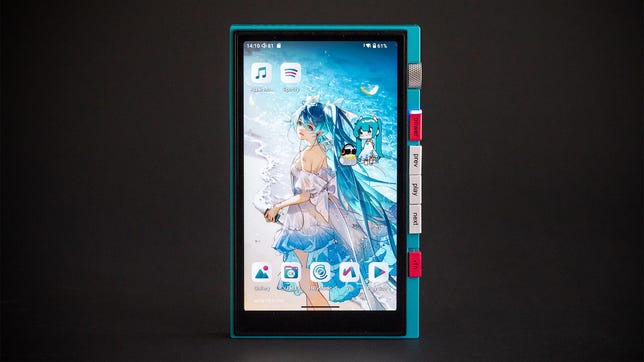
HiBy Digital M500 X Hatsune Miku Audio Player Review: Virtual Pop Star Plays Your Favorite Music


Pros

  • Great overall design
  • A little anime friend
  • Volume wheel

Cons

  • Not for you if you’re not into the kawaii aesthetic
  • No way to lock the buttons/volume
  • Are you cute enough for this? (Miku would say yes)

This artist has played at Coachella, and is currently appearing “live” in a town near you. It’s virtual Japanese pop idol Hatsune Miku. You might not have heard of Miku, but it (I’m just not comfortable calling it “she”) is popular across music, games and more. For the fans, the HiBy M500 x Hatsune Miku is a digital audio player with the same bright colors and overall aesthetic. The collaboration goes to more than colors, with an animated and occasionally vocal Miku offering some adorable and unique flair.

Thankfully, for people who aren’t necessarily familar with Hatsune Miku’s work, the M500 is also a solid mid-level audio player, with Cirrus Logic DACs, decent amp power and a fast-enough processor that makes it work smoothly. Running a modified version of Android 14, you can even install all your streaming music and other apps. The kawaii aesthetic is probably not for everyone, but HiBy did a good job with the collab/license with this well-performing and beautifully colorful media player. 

HiBy M500 x Hatsune Miku

DAC Cirrus Logic CS43198 x2
Headphone amp power 124mW (3.5mm output, claimed), 449mw (4.4mm output, claimed)
High-res compatible Up to 32bit/768kHz
Bluetooth version 5.0
Bluetooth codecs AAC, aptX HD, LDAC (plus the required SBC)
File formats AAC, AIFF, FLAC, MP3, OGG, WAV, WMA, M4A, others
Wireless 2.4 and 5 Ghz Wi-Fi, 4G version available
Storage 64 GB plus MicroSD (up to 2TB)
Battery life 26h playback, 558+ standby (claimed)
USB DAC mode No (USB-C audio out)
Screen 5-inch, 1,280×720 resolution
OS HiByOS (modified Android14)

Perhaps we should start with who, or what, Hatsune Miku is. Despite being a self-professed weeb (and fully aware that’s a pejorative), this was not an area of weebdom I was familiar with. Miku is a “virtual idol” and “vocaloid.” Using software originally developed by Yamaha, Japan’s Crypton Future Media developed Miku as the “face” of what’s basically a voice synthesizer that can also sing. While ostensibly an animated mascot, Miku has a “life” of its own, with concerts (via “hologram“), music collaborations, and more. “She” also performed on David Letterman with the band Bighead.

Miku is not AI, though there are some similarities, and there certainly could be an AI version. Instead, it’s a surprisingly widespread and popular brand, all featuring the teal pigtailed Miku. Given HiBy’s excellent job with the Evangelion license (Ok, now we’re back in my weeb neighborhood… weeborhood?) with the R4 x Evangelion, I was certainly curious about this pairing.

The HiBy M500 x Hatsune Miku showing a bootup screen on a black background.

The eyes, they’re… watching me.  

Geoffrey Morrison/CNET

Using Android 14 as a base, HiBy created custom icons and commisioned a custom Miku wallpaper with 10 other options available in the photo gallery. The most adorable aspect of the M500 is a little animated chibi-style Miku that has a little bird friend wearing a HiBy necklace. This pair sits on a layer above the background, so you can move them around if they get in the way. The idol’s idle animation sort of just blinks and bops a little. Leave them be for a bit, and they’ll go to sleep, wave their arms/wings for attention and so on. By tapping on them in different places, you can get them to do a little forward roll, headbang, wave, stamp their feet and more. Even by Miku standards, this is very kawaii (cute). 

Some still images of the various Miku animations in the HiBy M500 x Hatsune Miku.

Some still frames of the various Miku animations.

HiBy

Miku will even talk to you. On startup it says “Welcome to HiBy music, the show starts now!” If you connect headphones it will say “Headphones connected!” Unplug them and it’s “Speakers are working!” You’ll find Miko hiding in random places throughout the OS, much like the tweaks HiBy did with the R4 x Evangelion. Thankfully, Miku is not a tamagotchi and doesn’t seem bothered if you don’t interact with it. You can also disable Miku’s voice lines separately if you don’t want the commentary.

The overall look of the M500, as you can see in the photos, definitely matches the Miku aesthetic: a mostly teal/cyan frame and pinkish-red buttons. The color scheme continues on the back where there’s a drawing of Miku on a black background. Even the included wrist strap and USB-C cable have the same colors. If Miku is your vibe, I feel like this nails it. Unlike most DAPs, this device has a camera. It’s not great, definitely like what you’d find on a low-end Android phone, but if you’re trying to go more phone free this at least gives a bit of camera practicality. 

The M500 is a step-down hardware-wise compared to the R4, but it’s still a solid media player. Running a Snapdragon 680 SoC it feels fast and smooth to use. Not quite high-end phone speeds, but it never feels sluggish. There are dual Cirrus Logic CS43198 DACs that run though what HiBy describes as “low-noise, high-performance” op-amps. The 5-inch LCD has a resolution of 1,280×720 which is sharp enough for this size screen. My review sample was the Wi-Fi version, but there’s also a version with 4G-LTE connectivity (bring your own nano-SIM card).

Usability

The back of the HiBy M500 x Hatsune Miku showing the Miku artwork.

Geoffrey Morrison/CNET

When you turn on the M500, Miku will say hello. During boot-up there’s a line drawing of Miku in the background with fully-rendered eyes, so it’s sort of like a ghost watching you. I don’t think this was intentionally spooky.

Physical buttons are one of the best reasons to buy a dedicated media player, and with the M500 there’s the typical play, previous and next, and there’s also a textured volume wheel. With the latter, there’s a visual component of curved teal lines that radiate out from the bottom of the device. The mini-Miku stands on top with her bird chilling with some headphones. If you turn the volume down too fast, the floor drops from under the pair and Miku has to catch “her” balance. If you turn the volume up, eventually Miku voices some concern: “Careful, volume is too high!” Adorable.

The volume screen on the HiBy M500 x Hatsune Miku

The volume screen.

Geoffrey Morrison/CNET

I was able to get plenty of volume out of the M500, even with some power-hungry planar magnetic headphones like HiFiMan Sundaras and Isvarna. It was plenty loud, but not ear-splitting loud. Louder than you should listen to for any length of time, and that was with headphones that were pretty difficult to drive. If you have earbuds or easier-to-drive headphones, you should be able to get plenty of volume. I listened to a variety of music, including indie J-pop/rock Haku, the genre madness of Electric Callboy, the deep bass of Blue Man Group’s Audio, Weezer pretending to be Toto plus some various organ and cello music from Bach. All were lossless ranging from 16/44.1 to 24/96 and all sounded clean and accurate. The M500 (or Apple) didn’t like 24/192 via Apple Music but played 24/192 FLAC tracks with no issue. Bluetooth headphones connected fine, as you’d hope from a modern portable device.

Kawaii 

Front views of the HiBy R4 x Evangelion and M500 x Hatsune Miku on a black background.

HiBy R4 x Evangelion and M500 x Hatsune Miku

Geoffrey Morrison/CNET

In a world of endless black, grey, black and grey, grey and black and the occasional solid white devices, something as colorful and playful as the M500 x Hatsune Miku deserves a closer look. Like the previous R4, the M500 is well thought out and does its IP license justice. I’ve certainly seen countless brand “collabs” that are little more than a color change, a logo and a dubious price premium. At least here there are some delightful Easter eggs, plus some actual design with the animated mini-Miku, other artwork and voice prompts. 

At its core, also like the R4, the M500 is a solid portable media player. I mean, it’s fully Android 14 and there’s a 4G version so the line between this and an actual phone is pretty blurred. The colors and animations add character but aren’t the sole reason the M500 exists. That’s an important distinction, I think. Obviously, the M500 x Hatsune Miku is not for everyone, but I can imagine someone who’s into the kawaii aesthetic in general, or Miku specifically, finding the M500 exactly what they’d want in a media player. 


Source link

Leave a Reply

Subscribe to Our Newsletter

Get our latest articles delivered straight to your inbox. No spam, we promise.

Recent Reviews


We may receive a commission on purchases made from links.

For TV owners, High-Definition Multimedia Interface (HDMI) technology is the gateway to accessing endless content and maximizing your viewing experience. Whether it’s watching films from physical media, streaming content via your preferred subscription platform, or playing games, there are plenty of gadgets you can connect for the perfect entertainment setup in your home.

Apart from investing in the right HDMI cable, choosing the right port makes all the difference. Depending on how old your TV is, you can expect anything from the legacy HDMI 1.0 to even the most recent HDMI 2.2. However, while there’s a big jump in terms of quality between HDMI 2.1 and 2.0, there are plenty of gadgets that can still work perfectly with your HDMI 2.0 port. This is great news if you aren’t so particular about getting the best picture possible. In fact, unless you’re a hardcore gamer or have a TV made for high resolution, it’s likely you’ll be able to get the most out of what you already have without HDMI 2.1 or 2.2 ports.

To help you get the most out of your existing HDMI 2.0 port, we’ve listed broad categories of gadgets that work with it. Next, we share specific models that either maximize the port’s capabilities or still offer a great viewing experience despite the bandwidth limits. To learn how we selected the models that work well with HDMI 2.0 ports, you can skip to our methodology at the end.

1. Streaming sticks

If you own an older TV model but don’t want to trash it yet, streaming sticks are among the most affordable ways to access modern entertainment options on a budget. In fact, the HDMI 2.0 port will already let you maximize the performance of even newer streaming sticks, like the Fire TV Stick HD, which supports 1080p Full HD. So, if your TV can’t do 4K anyway, you don’t really need to get a more expensive model. An Amazon’s Choice product, the Amazon Fire TV Stick HD has an average rating of 4.7 stars from more than 62,000 reviewers.

While many newer smart TVs have built-in streaming capabilities, there are still many benefits to using a streaming device, such as regular security updates. These days, many streaming sticks are marketed as 4K-capable, like the Amazon Fire TV Stick 4K. While we’ve recommended plugging it into an HDMI 2.1 port for the best experience, an HDMI 2.0 port is also perfectly fine for most modern 4K movies and shows. If you have the extra budget, it can be an investment for future upgrades. As of March 2026, over 75,000 Amazon users have rated the Fire TV Stick 4K Max an average of 4.6 stars. However, you can also consider options like the Roku Express 4K, Apple TV 4K, and Google TV Streamer 4K.

2. Sync boxes

There’s something incredibly dramatic about having the lights match the scenes on your TV, and you can do that with a sync box. Whether you’re watching a movie, playing games, or listening to music, sync boxes help elevate your entertainment experience. While many of the latest sync boxes are designed for HDMI 2.1 ports, these are generally backwards compatible with HDMI 2.0 ports, so you can still enjoy them with their reduced capacity, such as the Philips Hue Play HDMI Sync Box 8K, which generated an average rating of 4.2 stars from more than 230 Amazon customers.

Priced at $384.99, you can connect up to 4 input devices. Unless you buy a kit, there’s also the price of the lights, which will vary depending on your screen size. The Philips Hue Play Gradient Smart TV Light Strip is available in three sizes: 55-inch ($274.99), 65-inch ($296.99), and 75-inch ($329.99). In general, many people seem quite satisfied with it, as over 2,000 Amazon users rated it 4.3 stars. 

Lastly, you will need to factor in the cost of the Philips Hue Bridge, which lets you enjoy its integration with smart home ecosystems, like Amazon’s Alexa, Google Home, and Apple HomeKit. With over 11,200 Amazon reviews, it has generated a pretty positive 4.5-star rating. Given that it tops our list of smart lighting brands, it can be a great investment if you’re already using other Philips smart lights in your home.

3. DVD and Blu-ray players

Although many people have turned to streaming to optimize their content viewing, there are still people who like owning physical media. Whether you’re a film buff, a parent of young children, an elderly person, or just someone who doesn’t want to deal with subscriptions, owning a DVD or Blu-ray player can keep all your favorite TV shows and films within reach, without the need for internet connectivity. For many old DVDs and some Blu-ray discs, they don’t max out HD resolution anyway, so you’re likely to get the most out of their content with even the older HDMI 2.0 port. In fact, even premium 4K Ultra HD Blu-ray players run flawlessly on HDMI 2.0.

On Amazon, the #1 Best Seller in its DVD category is the ELECTCOM PRO DVD Player, with over 40,300 customers rating it 4.2 stars on average. With prices starting at $41.99, it comes in different set variations that include HDMI and RCA cables, and even remote controls with large buttons designed for the comfort of seniors. But take note, this model doesn’t support Blu-ray discs. Alternatively, there’s the Panasonic Blu-ray player that retails for $89.95.An Amazon’s Choice product, more than 2,100 users gave it an average rating of 4.4 stars. Apart from playing Blu-ray discs, it can also work with CDs, DVDs, and even compatible files on your thumb drive, such as photos and videos. You may even find similar media players in secondhand or vintage stores if you’re on a tighter budget.

4. Gaming consoles

For gamers who get a little overstimulated with the latest releases, the HDMI 2.0 port already lets you experience games that run on 4K at 60 fps. So, if you’re one of those people who still enjoy older-generation consoles, like the PlayStation 4 Pro or Xbox One S, you’ll be happy to know it’s built to work perfectly with the HDMI 2.0 port. These days, you can still get secondhand models of the PlayStation 4 Slim 1TB ($199.99) or the PlayStation Pro 1TB ($240.95) from the official PlayStation store on Amazon. Despite being released years ago, both models still enjoy an average rating of at least 4.6 stars from more than 12,000 Amazon customers.

Among the devices that should always be plugged into an HDMI 2.1 port, many newer gaming consoles can benefit most from high resolution and 120Hz frame rates. But, since HDMI 2.0 supports 4K resolution at 60 frames per second, a powerful console like the Sony PlayStation 5 will still run massive, modern AAA games flawlessly in stunning ultra-high definition. Despite its price tag, it boasts a ton of satisfied customers with 2,400+ Amazon users rating the PlayStation 5 Pro around 4.6 stars.

5. HDMI switch

If you find yourself attaching several devices to your TV via the HDMI port, you may need to use an HDMI switch to free up space, like the UGREEN HDMI Switch. An Amazon’s Choice Product, it boasts a positive 4.3-star rating from 5,200 customers. Available in two colors, the switch comes in black or grey with discounts for Amazon Prime customers. With 5 input ports, you can connect all kinds of devices, such as the ones above: PCs and laptops, streaming sticks, and TV boxes. To switch devices, you can either press the buttons on the unit or use the remote, which is powered by two AAA batteries. The unit itself has an LED indicator that shows which device is active. On the other hand, its single output port is compatible with displays such as TV screens, monitors, and projectors.

But, if you’re on a budget and only really need one extra slot, the Anker HDMI Switch might be better for you. An Amazon Overall Pick product, the Anker HDMI Switch has an average rating of 4.5 stars from more than 4,000 customers. Priced at $15.99, this HDMI switch measures just 2.17 inches by 2.17 inches by 0.57 inches, so you can easily take it with you when you’re traveling, too. It comes with a pair of input ports and a single output port for displays. Unlike the UGREEN model, this doesn’t need an external power supply.

Methodology

To help you understand what your HDMI 2.0 port can do, we’ve highlighted gadgets that either maximize its capabilities or provide a great experience despite the port’s bandwidth limits. We selected devices that have averaged at least four stars from more than 200 reviewers, indicating a general trend of user satisfaction. While it didn’t affect their inclusion on the list, we also noted whether they are top-selling products in their respective categories and mentioned additional features you may enjoy beyond their primary functions.


Source link