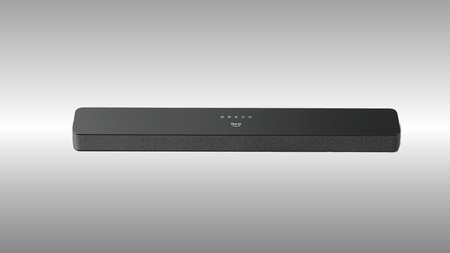
This Fire TV Soundbar Plus deal could be the easiest TV upgrade you make


Most TV speakers treat dialogue as an afterthought, burying it beneath a wall of compressed sound that makes you reach for the subtitles before the first scene is done.

The Fire TV Soundbar Plus is the answer to that frustration, and with the 3.1-channel system now down from $249.99 to $174.99, a built-in subwoofer and spatial audio are available at a price that makes upgrading feel like an obvious rather than an extravagant decision.

Amazon Fire TV Soundbar Plus on a black and white background

Save almost a third on Amazon’s Fire TV Soundbar Plus and enjoy films with the clarity and depth they’re supposed to have

For anyone who has been tolerating flat TV speakers for a long while, the Fire TV Soundbar Plus at $174.99 is a clean, uncomplicated upgrade

View Deal

The dedicated centre dialogue channel and Dialogue Enhancer work together to lift spoken word above background sound, so conversations stay intelligible even when a scene’s mix is working against you, without requiring any manual adjustment on your part.

That clarity sits alongside Dolby Atmos and DTS:X, which between them create three-dimensional audio with genuine movement and depth, meaning an action sequence or a concert film feels like it has physical space around it rather than arriving flat from a single point in the room.

The Whatsapp Logo

Get Updates Straight to Your WhatsApp

Join Now

Advertisement

Inside the bar, three full-range speakers, three tweeters, and two woofers distribute sound across the frequency range, and the four EQ modes – Movie, Music, Sports, and Night – let you shift the balance to match what you are actually watching without overcomplicating the process.

Setup involves a single HDMI cable into your TV’s eARC or ARC port, after which the Fire TV Soundbar Plus syncs automatically and can be controlled through your existing Fire TV remote if your device supports it, removing the need for a second remote entirely.

Bluetooth support also means the bar doubles as a speaker for music from your phone or tablet, extending its usefulness well beyond film nights and into everyday listening without any additional pairing complexity.

For anyone who has been tolerating flat, dialogue-swallowing TV speakers for longer than they should, the Fire TV Soundbar Plus at $174.99 is a clean, uncomplicated upgrade with a wall mount kit included, so the whole thing is ready to go from a single purchase.

SQUIRREL_PLAYLIST_10148964

Advertisement


Source link

Leave a Reply

Subscribe to Our Newsletter

Get our latest articles delivered straight to your inbox. No spam, we promise.

Recent Reviews


Amazon or not?

The big question for a lot of folks is simply whether to go with an Amazon e-reader (and Amazon’s ebook ecosystem). Amazon does dominate the e-reading market but there are alternatives, including Kobo, Barnes & Noble and other “open” e-readers that allow you to import both DRM, meaning copy-protected, and DRM-free file formats. Amazon now lets you send DRM-free ePub files to its Kindle e-readers

Budget

Naturally, you’ll want to figure out how much you’re willing to spend on a new e-reader. Amazon’s 2024 entry-level Kindle is the most affordable with a list price of $110, and should see price drops of $25 off during flash sales. Larger “tablet” e-readers like the Kindle Scribe cost over $300. 

Screen size

Some people are fine with smaller e-readers with 6-inch screens; others prefer them a little bit larger. The Kindle Paperwhite has a 6.8-inch screen, but you can also step up to a jumbo model with a 10.3-inch screen if you want a more tablet-like experience. The bigger e-readers do weigh more, however.

Waterproofing

If you plan on using your e-reader in the tub, around the pool or at the beach (or any body of water), you may want to consider getting a model that is rated as fully waterproof.

Lighting scheme

Some of the more advanced lighting schemes feature more LED lights and the ability to adjust both brightness and color temperature. 

Screen resolution and pixel density

Even entry-level e-readers now come with so-called “HD” E Ink displays so you don’t have to worry so much about having a crisp enough screen with sharp text. The key spec to look for is pixel density. 300 pixels per inch is what you ideally want, although some larger displays don’t offer that. New color E Ink readers currently offer 300 ppi for black and white and 150 ppi for color.

Physical page-turn buttons

Most e-readers now have touchscreens, so you can turn pages by simply touching or swiping the screen. Some e-readers do have physical buttons that you can press to turn pages. Some people like having those physical page-turn buttons.


Source link