
Verdict
The Philips Evnia 27M2N3500NF is a surprisingly capable and very affordable gaming screen with a more than serviceable 27-inch 1440p 144Hz screen with good detail and motion, plus sharp brightness. The OSD here is also rather feature-rich for the price, although the speakers here are tinny, and I’d like some more stand adjustment.
-
Solid detail and motion clarity
-
Good colour accuracy
-
Surprisingly feature-rich OSD
-
Stand offers meagre adjustment and stability
-
Tinny on-board speakers
Key Features
-
27-inch 1440p IPS screen:
The Evnia 27M2N3500NF comes with a panel that hits the sweet spot for screen size and resolution, while being a cut above the usual budget suspects.
-
144Hz refresh rate:
This Philips screen also has a higher refresh rate than some other more affordable screens to make on-screen action smoother and more responsive.
-
Reasonable port selection:
For a more affordable screen, you get an okay set of ports, with one HDMI and DP option, and a 3.5mm jack for external audio.
Introduction
Budget gaming monitors have come a long way in recent times, as this new Philips Evnia 27M2N3500NF proves.
Seemingly gone are the days when a sub-£200 gaming screen would have forced you into a meagre 24 or 27-inch 1080p screen with a more basic panel type and lower refresh rate than you’d have liked, which is lovely news at quite a tumultuous time for PC gaming.
Instead, this Evnia 27M2N3500NF retails for just £130 and provides you with a competent 27-inch 1440p IPS screen with a 144Hz refresh rate, solid variable refresh rate support and a surprisingly decent OSD.
It’s been a long time since I’ve tested a monitor this affordable, but other choices in and around this lower price point, such as the AOC Gaming 25G3ZM/BK, trade some screen size and resolution for a higher refresh rate and change the panel type from IPS to VA.
To see if the Even 27M2N3500NF is worth its surprisingly low price and potentially be one of the best monitors in this category, I’ve been putting it through its paces as my main gaming screen for the last week or so.
Design
- Black plastic finish
- Minimal stand adjustment
- Okay port selection
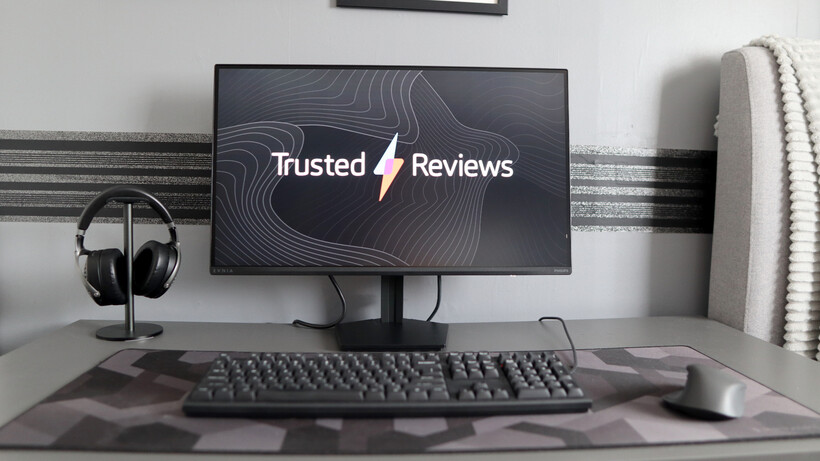
As you’d perhaps expect for a more affordable screen, the Evnia 27M2N3500NF doesn’t scream premium when it comes to its design. The chassis is quite discreet, with a black plastic finish that’s quite coarse to the touch, and at just under 4kg including the stand, it’s quite light.
That being said, I don’t think this feels like a cheap monitor. Sure, it might not be as much of a heavyweight, but it doesn’t feel badly made. My only criticism of the stand is that adjustment is lacking, with only tilt available by pushing the monitor up, although this will exhibit some side-to-side wobble when making finer adjustments.

The Evnia 27M2N3500NF’s stand features a toolless construction, with it simply clipping into the rear of the panel, and that’s it. It looks to be a proprietary rear connection, although Philips includes a separate VESA adapter for use with third-party stands and arms. The stand is also flat, so it can take objects such as soundbars for a cleaner desk aesthetic.
The port selection here is perhaps the second sign this is a more affordable choice, with only options for display – one HDMI 2.0 and one DP 1.4 port, plus a 3.5mm headphone jack for hooking up external audio, and a power plug. No USB hub or anything of the sort.

What’s here with the Evnia 27M2N3500NF isn’t flashy by any means, but it’s functional, and you can go from having a screen in pieces to gaming in a matter of minutes. My only real criticism is the lack of stand adjustment, meaning a £30 or so third-party VESA stand will perhaps be a good spend of your money, and it’ll still keep your total spend well under £200.
Image Quality
- Solid detail and motion clarity
- Reasonable black level and contrast for a more affordable screen
- Good colour accuracy and brightness
In the past, when I’ve come across cheaper gaming screens, there has been a sacrifice either on panel type, resolution or screen size. They’re usually either smaller, a lower resolution or come with a different panel type, or all three.
However, the Evnia 27M2N3500NF demonstrates that we’ve moved beyond this compromise, as it packs a combo that his the sweet spot for price to performance and a resolution appropriate for the screen size.

This is a 27-inch IPS panel with a 1440p (or 2560×1440) resolution screen that packs in more detail than a typical 1080p screen you’ll find on a larger screen that has the benefit of not needing anywhere near as much grunt to run as a 4K panel.
IPS has the benefit of stronger viewing angles, more accurate colours and sometimes better motion handling with less visible ghosting than VA, although at the expense of not as deep blacks and weaker contrast. Nonetheless., I still maintain that a cheaper IPS screen will look better than a more affordable VA option.

I had no real issues running the Evnia 27M2N3500NF through both Counter-Strike 2 and Dirt Rally 2.0, which demonstrated good detail across the 27-inch screen, with the 144Hz refresh rate adding a good sense of responsiveness and decent motion clarity. You can get higher refresh rate screens for a similar price that are better-suited to competitive gaming, although they will likely sacrifice elsewhere.
Getting my colorimeter out revealed the results I expected, with a black level of 0.18 providing decent depth at 50% brightness, although this worsened to 0.31 at peak brightness. A 1220:1 contrast ratio is okay, although, as expected for an IPS screen such as this one. The 6900K colour temperature is also a little off.

With this in mind, the 373.1 nits of peak SDR brightness give images that are decently punchy, especially for the price, although it’s not bright enough to really take advantage of the screen’s HDR10 support.
Colour accuracy, as expected for an IPS screen, is pretty good, with perfect 100% coverage of the sRGB colour space, meaning this screen displays all the mainstream colours needed for gaming and productivity workloads perfectly. For more colour-sensitive workloads, this panel is okay, with 84% DCI-P3 and 79% Adobe RGB coverage. It’s better than I expected, but not necessarily too useful.
Variable refresh rate support comes with Adaptive Sync with official support for AMD FreeSync and unofficial Nvidia G-Sync support, meaning the Evnia 27M2N3500NF comes with a tear and stutter-free experience with GPUs from both Team Red and Team Green.
Software and Features
- Surprisingly feature-rich OSD
- Tinny on-board speakers
One area I’m pleasantly surprised about with the Evnia 27M2N3500NF is its OSD. Cheaper gaming screens often skip over the intuitiveness and features on offer here, although not in the case of Philips. It’s easy to navigate, being joystick-controlled, and looks as if it’s been transplanted from higher-end Evnia screens.
There are options for everything from brightness and contrast, plus a range of different, genre-specific picture modes, on-screen crosshairs, input selection and more besides.

Philips has given the Evnia 27M2N3500NF speakers, although as expected, they’re quite tinny and shouldn’t necessarily be your main audio solution. A set of cheap desktop speakers, such as the Creative Pebble X or Majority D40X, will be a lot more serviceable.
Should you buy it?
You want solid detail and motion at an affordable price
The Evnia 27M2N3500NF impresses with its sweet spot 27-inch 1440p IPS panel and 144Hz refresh rate that provides good detail and motion for most people at a great price.
The stand this Philips screen comes with only offers tilt adjustment, and it isn’t the most stable, with some side-to-side wobble. You’re much better off investing in a third-party stand or looking for a screen with more adjustment and stability if it’s that important to you.
Final Thoughts
The Philips Evnia 27M2N3500NF is a surprisingly capable and very affordable gaming screen with a more than serviceable 27-inch 1440p 144Hz screen with good detail and motion, plus sharp brightness. The OSD here is also rather feature-rich for the price, although the speakers here are tinny, and I’d like some more stand adjustment.
Final Thoughts: The Philips Evnia 27M2N3500NF is a surprisingly capable and very affordable gaming screen with a more than serviceable 27-inch 1440p 144Hz screen with good detail and motion, plus sharp brightness. The OSD here is also rather feature-rich for the price, although the speakers here are tinny and I’d like some more stand adjustment.
The AOC Gaming 25G3ZM/BK has a higher refresh rate at 240Hz and is slightly more colour-accurate, although it’s only 24.5-inches in size and 1080p resolution, making this Philips choice stronger in detail and screen size. This Philips option is also cheaper, too.
If you’re willing to bump up the price closer to £250-£300, then you can also consider the Xiaomi G Pro 27i, which features a sharp Mini LED screen with deeper blacks, and much stronger brightness and dynamic range, along with more interesting looks, a much wider port selection and a stronger stand.
How We Test
We use every monitor we test for at least a week. During that time, we’ll check it for ease of use and put it through its paces by using it for both everyday tasks and more specialist, colour-sensitive work.
We also check its colours and image quality with a colorimeter to test its coverage and the display’s quality.
- We used a colorimeter to get benchmark results.
- We used our own expert judgement for image quality.
FAQs
The Philips Evnia 27M2N3500NF has a 1440p, or 2560×1440, resolution across a 27-inch screen.
Test Data
| Philips Evnia 27M2N3500NF |
|---|
Full Specs
| Philips Evnia 27M2N3500NF Review | |
|---|---|
| UK RRP | £130 |
| Manufacturer | Philips |
| Screen Size | 27 inches |
| Size (Dimensions) | 616 x 216 x 463 MM |
| Weight | 3.93 KG |
| Release Date | 2026 |
| First Reviewed Date | 28/04/2026 |
| Resolution | 2560 x 1440 |
| HDR | Yes |
| Types of HDR | HDR10 |
| Refresh Rate | 144 Hz |
| Ports | 1x HDMI 2.0, 1x DP 1.4, 1x 3.5mm audio jack |
| Colours | Black |
| Display Technology | IPS |
| Screen Technology | IPS |
| Syncing Technology | AMD FreeSync / Nvidia G-Sync |

Stephan is the sports journalist for the Maple Grove Report.