
Follow ZDNET: Add us as a preferred source on Google.
There’s a long-running joke that some of us who live and work with gadgets have accumulated too much tech detritus. We have boxes of old cables and adapters that should have been tossed many moons ago, but we hold on to these things like life preservers because “they’ll be useful… one day.” Sure, it’s been a long time since anyone needed a VGA-to-HDMI adapter, but — and hear me out on this one — what if my Auntie Jackie’s next-door-neighbor cat sitter needs to borrow one?
Seriously, though, I’m going through a phase of minimization in my life, and while I’m still a long way away from achieving Feng Shui enlightenment, I have been getting rid of a lot of stuff. And one collection under consideration is cables, adapters, and dongles.
Also: This Bluetti power station with wheels has spoiled the way I charge my tools and devices
But while I furiously load stuff into boxes to send off so the seagulls at my local recycling center can deal with them, I’m aware that there’s a selection of cords and adapters that I need to keep. Not for that one-in-a-million request from a cat sitter, but because they continue to be useful despite being functionally obsolete.
Of course, just because something is old doesn’t mean it’s useless. At least, not yet. As I go through boxes and drawers of stuff, I’m holding onto some things. It’s a small proportion of the overall bulk, but it’s stuff that’s still important, or at least still might be needed.
Let’s take a look.
USB-A-to-USB-C cables
The experts told us that USB-C connectivity would make everything better; one cable and charger for everything. But you’d be surprised how many gadgets with a USB-C port won’t charge when a USB-C-to-USB-C cable is attached to a USB-C charger. That issue often occurs because the gadgets lack the circuitry to activate the charger.
Also: These MagSafe wireless chargers are so much better than cords – and they’re on sale
The biggest clue to the problem is that the item ships with a USB-A-to-USB-C cable. Another indicator that something’s wrong is that nothing happens when you connect the device to the charging cable for your smartphone.
This issue explains why it’s still a good idea to keep a trusty USB-A-to-USB-C cable around. Oh, and a charger that can accept it.
The microUSB cable
Again, this is a port that won’t die. Many cheaper devices still use this port (for example, it’s used regularly by cheap power banks from Temu and eBay).
The microUSB is still around.
Adrian Kingsley-Hughes/ZDNET
While the connection is annoying, old, and prone to breakage, having a USB-A-to-microUSB charge cable is still a good idea.
Power cords
As our reliance on USB-enabled power increases, the power cord is slowly but surely vanishing. But don’t throw away all your old cords. I suggest keeping one C7 (two-pin, often called a “figure of eight”) and one three-pin earthed C13.
C13 power cord connector (left) and C8 (right).
Adrian Kingsley-Hughes/ZDNET
Ethernet cable
Wireless might be crucial today, but cabled connections still have their place. Just the other day, I needed an Ethernet cable to connect to a security camera during setup, and I then used the same cable to connect the camera’s base station to the router.
Also: I used a $4 timer to reboot my router, and it actually made my internet faster
Moral of the story? Keep a few Ethernet cables of varying lengths (one, three, and six feet) handy. If you’re feeling particularly ambitious, grab a reel of cable, some connectors, and an RJ45 crimping tool to make your own. It’s a strangely satisfying process.
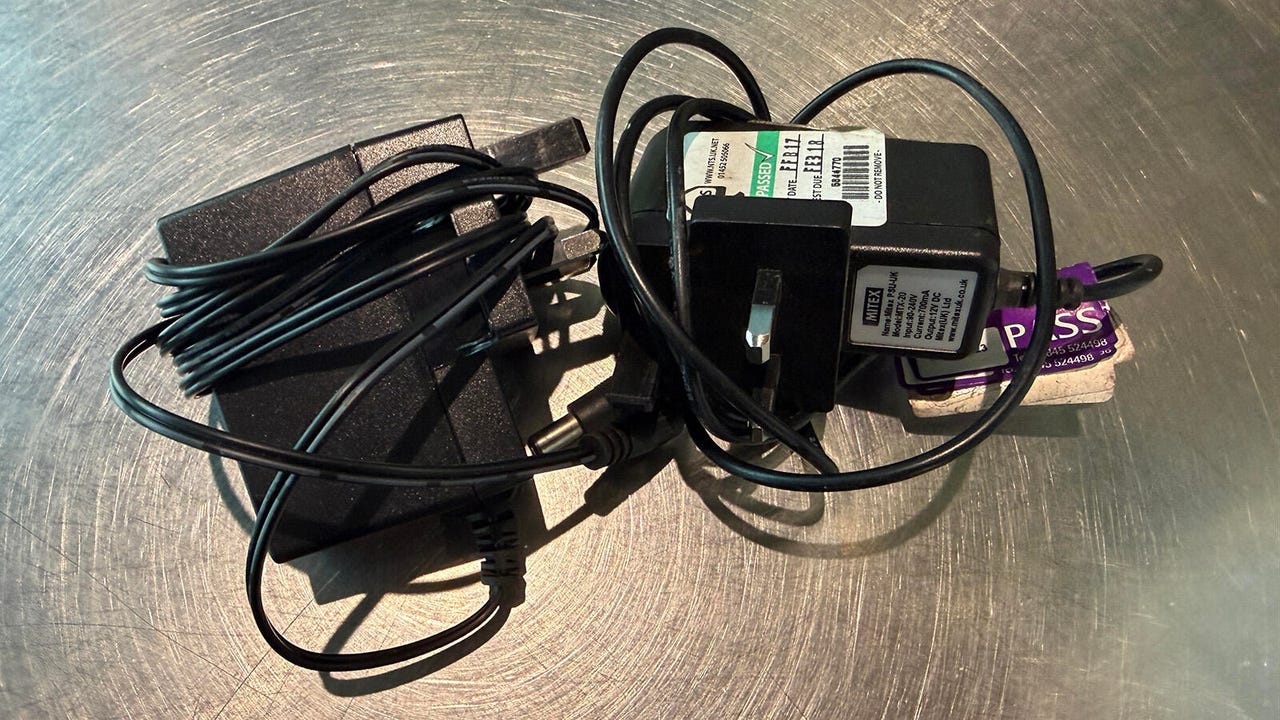
Those DC wall warts
While USB chargers have largely replaced DC chargers, there’s still a place for these older devices for cordless handsets, routers, and more.
I have too many wall warts.
Adrian Kingsley-Hughes/ZDNET
If you don’t want a drawer full of mismatched chargers, pick up a universal device.
USB dock
My Mac has an SD card reader, but no microSD slot, Ethernet port, or USB-A port. That’s why I always keep a USB dock around; it’s the Swiss Army Knife of ports. Over the years, I’ve collected a small collection of docks, and while I’m not keeping all of them, I’ll keep a couple “just in case.”
Other useful bits and bobs
There are also some things you can add to your tech gear utility belt. These items are useful beyond their size and cost, including:
- USB-C boost modules: These boost modules are great. USB-C power goes in one end, and up to 20V DC comes out the other. All you need to do is flip a few switches to get the voltage you need. (You also need a USB-C charger that can handle the output power.)
These USB-C boost modules are great for converting non-USB devices into USB. All you need is a bit of know-how.
Adrian Kingsley-Hughes/ZDNET
- Multi-charging cables: These brand themselves as the “one cable to rule them all,” and while they’re very useful, they do have some limitations (for example, the ends can be a bit on the large side, and I’ve ended up trimming them). But if you pick up a decent cable, such as the Rolling Square inCharge XL 6-in-1 or inCharge XS, it can replace a whole handful of cables.
- USB adapters: Tiny dongles for converting USB-C to USB-A, and vice versa, are super handy and can get you out of a jam. These adapters are the kind of things you don’t think about until you’re in a jam, and then you’ll wonder how you ever lived without them.
- USB power meter: This meter is for when you want to know for sure whether power is flowing. A simple USB power meter costing just a few bucks has saved me countless hours of grief over the years.
My power meter has seen a lot of action, but it still works.
Adrian Kingsley-Hughes/ZDNET
Of course, I’m still haunted by the vague, nagging fear that the moment I get rid of a cable or adapter, some bizarre, one-in-a-million situation will arise in which I need it. But you know what? If Aunt Jackie’s neighbor’s cat sitter comes a-knocking, they’re on their own.