
Verdict
The Acer TravelMate P6 14 AI is a capable Windows business laptop with solid internal grunt from its Lunar Lake processor that comes alongside a competent port selection, lightweight chassis and excellent battery life. For the price, it’s a solid option, although I do bemoan the lack of an OLED screen in any guise.
-
Lightweight and sturdy chassis
-
Solid power inside
-
Excellent battery life
-
An OLED screen would have been nice
Key Features
-
Sub 1kg weight:
The TravelMate P6 14 AI tips the scales at less than a kilo, making it one of the lighter laptops of its kind.
-
Intel Core Ultra 7 258V processor inside:
It also features a potent eight-core processor that provides a solid amount of power for productivity tasks.
-
65Whr battery inside:
This Acer laptop also has a capacious battery inside that allows it to power through a working day or two away from the mains.
Introduction
The Acer TravelMate P6 14 AI offers a clever blend of lightness and durability for a humble business laptop.
It’s unique in that it tips the scales at just under a kilo, just like the new Asus Zenbook A14 (2026), but comes with more business-class sensibilities with its ports, solid IPS screen, good software selection and a competent Lunar Lake processor inside.
For the £1599.99 price tag, this feels quite reasonable in the current market, not least with price rises across the board from other manufacturers that leave key rivals to the likes of the Dell XPS 14 (2026).
Other business-class options, such as the Lenovo ThinkPad T14s 2-in-1 Gen 1 and Dell Pro 14 Premium, are some way up the road in price, giving this Acer choice a potentially clear run as one of the best laptops we’ve tested. I’ve been putting it through its paces to find out.
Design and Keyboard
- Lightweight and sturdy chassis
- Solid port selection
- Tactile keyboard and trackpad
It seems that Acer has attempted to replicate the excellent Swift Edge 14 AI with the TravelMate P6 14 AI in some respects, with this laptop coming with cleverly engineered materials to make it sleek and light, not least for a business machine.
It’s got a blend of a carbon fibre lid (as proudly displayed with a little logo) and magnesium-aluminium alloy elsewhere to allow this laptop to tip the scales at 990g without it feeling like it’s much cheaper than the retail price suggests. This is a lightweight laptop without any real flex or bend at the corners or in the keyboard tray, which is excellent.

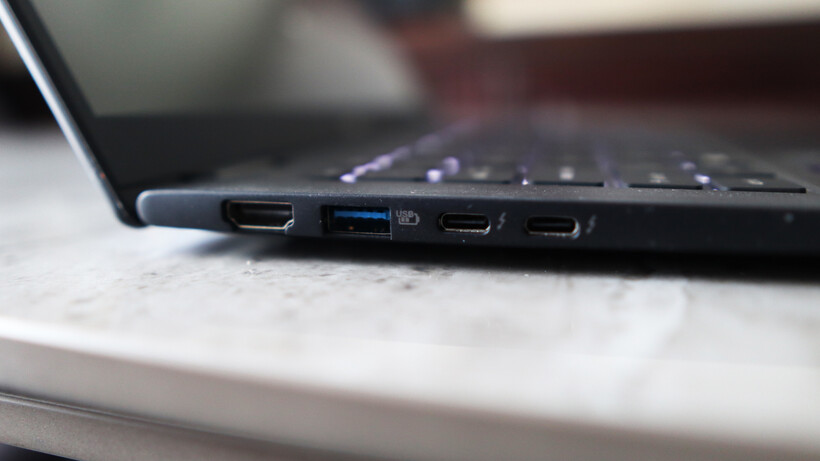
The ports on the TravelMate P6 14 AI are strong, too, with a pair of Thunderbolt 4-capable USB-C ports on the left alongside a USB-A and an HDMI port. The right side has another USB-A, a headphone jack, and security slot. For most use cases, this is more than adequate, although pros may wish for an SD card reader to supplement.
The keyboard here is also a reminder of other Acer laptops I’ve tested, with a snappy and short tactile travel in a smaller form factor layout that’s comfortable for extended periods. It’s also backlit with a bright, white light that’s sure to help for after-dark working.

As for the trackpad, it’s more about the width than depth, but nonetheless gives your fingers excellent real estate to work with. It doesn’t feel like a haptic trackpad, instead choosing to actuate with a defined mechanical click under finger.
Display and Sound
- High-res IPS screen is decent
- Okay contrast and black levels
- Reasonable speakers
Acer bundles an IPS panel with the TravelMate P6 14 AI, opting against an OLED for some reason. Nonetheless, it’s a solid 14-inch 3K (or 2880×1800) resolution panel with upwards of a 120Hz refresh rate for detailed and smooth action.
In a general sense, this panel performs as you’d expect a decent IPS option to, with reasonably deep blacks (0.10 at 50%, rising to 0.38 at peak brightness) and okay contrast (1260:1 contrast ratio), plus a near-perfect 6600K colour temperature. I also measured 471.2 nits of peak SDR brightness here, making this a punchy panel in that sense.

Colour accuracy here is perfectly cromulent for mainstream workloads, with 97% coverage of the mainstream sRGB gamut, alongside 79% DCI-P3 and Adobe RGB results. This means this panel is okay for general productivity tasks, although it isn’t the best for more creative, colour-sensitive tasks.
The TravelMate P6 14 AI’s speakers are okay, but nothing really to write home about. There’s decent mids and some bass, but you’ll want to be using the headphone jack or Bluetooth 5.4 connectivity for much better audio.
Performance
- Tried-and-tested Intel Lunar Lake processor
- Beefy iGPU against Snapdragon alternatives
- Capacious SSD, but a little on the slow side
Inside, this TravelMate P6 14 AI is technically using a last-gen Intel chip, although for the non-X-prefixed Panther Lake chips found in base model ultrabooks for the 2026 model year, such as the Dell XPS 14 (2026), the needle hasn’t moved much beyond Lunar Lake.
If you need a quick refresher, the Core Ultra 7 258V processor inside this laptop is an eight-core and eight-thread chip with a boost clock of up to 4.8GHz. It’s designed to provide a solid amount of grunt without sacrificing too much on endurance and longevity, making it a good choice for laptops such as this one.

The scores this Acer laptop achieved in both the Geekbench 6 and Cinebench R23 tests are in the ballpark for the processor inside, matching well against key rivals. That means strong single-core performance and decent, if a little disappointing, multi-threaded scores, owing to the lack of hyperthreading against AMD’s crop of modern laptop chips.
Both the PCMark 10 and 3DMark Time Spy scores were excellent, too, proving the suitability of the TravelMate P6 14 AI for productivity tasks and how powerful the Arc 140V integrated graphics are. The score it garnered here is several times that of the Adreno iGPU inside the first-gen Snapdragon X-powered laptops, and still remains ahead of the new Snapdragon X2 Elite SoC’s integrated graphics found in the likes of the Asus Zenbook A14 (2026).

Acer has also been quite generous with the TravelMate P6 14 AI’s RAM and storage configuration, given what’s going on at the moment. 32GB of RAM provides ample headroom for multi-tasking and more intensive loads, while a 1TB ASSD gives you good room for storin’ stuff. With this in mind, a slight chink in this laptop’s armour is that it isn’t the fastest SSD I’ve come across, with tested read and write speeds of 4794.88MB/s and 3911.05MB/s, respectively.
Software
- Full-fat Windows 11 installed
- Some Acer-specific apps present
- Copilot+ PC functionality is here
The TravelMate P6 14 AI comes running proper Windows 11, although it comes with some unnecessary apps or shortcuts, such as a taskbar one for Booking.com, oddly.
There are more enterprise-centric apps, as you’d expect on a business laptop, such as Acer’s catch-all TravelMateSense app. This provides access to elements such as a file shredder, USB device filter, built-in file encryption and even AI-generated wallpaper in a separate tab.

Elsewhere, this is also a Copilot+ PC and has enough AI power to warrant the inclusion of Microsoft’s tools. Chief among these is the addition of the Copilot assistant, which you can ask questions and to undertake tasks, if you so wish.
In addition, there is also generative AI functionality baked into the Photos and Paint apps, if you want it. The most useful set of AI tools is the Windows Studio effects for the webcam, which provides a convenient means of auto framing, background blur and even for making sure you maintain eye contact.
Battery Life
- Lasted for 17 hours 59 minutes in the battery test
- Capable of lasting for two working days
Acer bundles a solid 65Whr battery inside the TravelMate P6 14 AI, which is quite a large one considering the size and lightness of this laptop. There are no specific claims made about its endurance, although with a decent capacity cell and a Lunar Lake chip in tow, I had quite high hopes.
In dialling the brightness down to the requisite 150 nits, and running the PCMark 10 Modern Office battery benchmark test, this Acer laptop was able to run for 17 hours and 59 minutes, making it a dead cert for two working days away from the mains. With some hypermiling, you may be able to eke out a third. That’s a strong result, and puts this well among its Lunar Lake-powered contemporaries, even if the Dell Pro 14 Premium still remains king with closer to 24 hours runtime.
The TravelMate P6 14 AI comes with a 100W power brick that isn’t as fast as rivals to put go-juice back into the laptop. The 38 minutes to get it back to 50% is good, although the 94 minutes for a full charge is a little more middle of the road.
Should you buy it?
You want a lightweight business laptop
The TravelMate P6 14 AI offers the benefits of a lightweight business laptop without the same hefty cost as some of the dearer alternatives with similar spec sheets.
On consumer and pro-grade laptops, it is more common to get OLED screens with better definition and fidelity than an equivalent IPS.
Final Thoughts
The Acer TravelMate P6 14 AI is a capable Windows business laptop with solid internal grunt from its Lunar Lake processor, a competent port selection, a lightweight chassis, and excellent battery life. For the price, it’s a solid option, although I do bemoan the lack of an OLED screen in any guise.
The Asus Zenbook A14 (2026) is closest in price and offers similar performance and endurance thanks to its Qualcomm Snapdragon X2 Elite processor, while also netting a sub-1kg weight with clever materials and coming with an OLED screen. It is more of a consumer-grade laptop, and enterprise users have different requirements that Acer’s choice is more likely to fulfil.
Dell’s new XPS 14 (2026) in the base model configuration I’ve tested also equals the TravelMate P6 14 AI in price, although it sacrifices portability and ports against either of the above to make it a serious contender. For more choices, check out our list of the best laptops we’ve tested.
How We Test
This Acer laptop has been put through a series of uniform checks designed to gauge key factors, including build quality, performance, screen quality and battery life. These include formal synthetic benchmarks and scripted tests, plus a series of real-world checks, such as how well it runs popular apps.
FAQs
The Acer TravelMate P6 14 AI weighs under 1kg at 990g, making it especially lightweight in any guise.
Test Data
| Acer TravelMate P6 14 AI |
|---|
Full Specs
| Acer TravelMate P6 14 AI Review | |
|---|---|
| UK RRP | £1599.99 |
| CPU | Intel Core Ultra 7 258V |
| Manufacturer | Acer |
| Screen Size | 14 inches |
| Storage Capacity | 1TB |
| Front Camera | 1080p webcam |
| Battery | 65 Whr |
| Battery Hours | 17 59 |
| Size (Dimensions) | 313.6 x 227.1 x 15.9 MM |
| Weight | 985 G |
| Operating System | Windows 11 |
| Release Date | 2025 |
| First Reviewed Date | 08/05/2026 |
| Resolution | 2880 x 1800 |
| Refresh Rate | 120 Hz |
| Ports | 2x Thunderbolt 4 USB-C, 2x USB-A, 1x HDMI, 1x 3.5mm jack |
| GPU | Intel Arc 140V iGPU |
| RAM | 32GB |
| Colours | Black |
| Display Technology | IPS |
| Screen Technology | IPS |
| Touch Screen | No |
| Convertible? | No |

Stephan is the sports journalist for the Maple Grove Report.