Lenovo IdeaPad Slim 5x Review: Low-Cost Copilot Plus PC Has Appeal, Limits


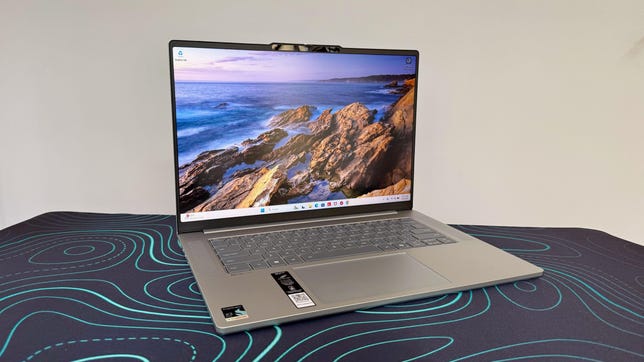
Lenovo IdeaPad Slim 5x Gen 11 laptop on a black desk mat with green swirls

Lenovo IdeaPad Slim 5x Gen 11

The Lenovo IdeaPad Slim 5x is a budget-friendly, 15-inch Copilot Plus PC built on the Qualcomm Snapdragon X2 platform. It’s a machine aimed squarely at people who want long battery life, whisper-quiet operation and dependable everyday performance in a slender chassis. To hit its sub-$1,000 price, the IdeaPad Slim 5x features Qualcomm’s entry-level Snapdragon X2 Plus chip and the minimum 16GB of RAM needed to meet Microsoft’s definition of a Copilot Plus PC.

For a budget laptop, the IdeaPad Slim 5x does a lot right. It’s a practical offering for a standard day at the office, including browsing, email, streaming and light productivity, and its Arm-based design helps keep it efficient and cool. What keeps it from being an easy recommendation for everyone is the same thing that holds back most Windows-on-Arm laptops: software compatibility remains a real consideration, at least in some specific use cases. And gaming performance is average at best from the integrated Qualcomm Adreno GPU. 

The 15.3-inch display makes the IdeaPad Slim 5x a bit of a tweener, sandwiched between more commonplace 14- and 16-inch laptops. The Acer Aspire 16 AI offers a roomier 16-inch panel at a lower price and only a slightly heavier weight, and the HP OmniBook 5 14 is more compact and portable with its 14-inch display but offers even longer battery life. This trio of budget laptops features Snapdragon X series processors, but the IdeaPad Slim 5x has the advantage of being the newest of the three, and its Snapdragon X2 chip outpaces both the two older X1 machines.

Lenovo IdeaPad Slim 5x Gen 11

Price as reviewed $850
Display size/resolution 15.3-inch 1,920×1,200 120Hz touchscreen IPS LCD
CPU Snapdragon X2 Plus X2P-42-100
Memory 16GB LPDDR5X-9523
Graphics Qualcomm Adreno X2-45
Storage 512GB SSD
Ports 2 x USB-C (10Gbps), 2 x USB-A (10Gbps), HDMI 2.1, microSD card slot, combo audio
Networking Wi-Fi 7 and Bluetooh 5.4
Operating system Windows 11 Home Arm64
Weight 3.1 pounds (1.4 kg)

The IdeaPad Slim 5x falls roughly in the middle of Lenovo’s broader IdeaPad lineup, which includes options with AMD and Intel processors, as well as the 3x and 7x Snapdragon X-based series, sized between 14 and 16 inches. Some of the 7x SKUs include the more advanced Snapdragon X2 Elite rather than the X2 Plus, which this model is built around.

The IdeaPad Slim 5x starts at $850 at Lenovo. We tested this entry-level model, but Lenovo offers a handful of upgrades. You can double the RAM to 32GB for an eye-watering $290 (thanks, RAMageddon) and bump the storage up from 512GB to 1TB for an also hefty $150.

Lenovo IdeaPad Slim 5x gray top cover against a gray wall

Matt Elliott/CNET

Two other upgrades are much more attainable, and we recommend both. It costs only $30 to swap out the basic 1,920×1,20-pixel, 120Hz IPS display for a 2.5K (2,560×1,600), 165Hz OLED panel. That’s a no-brainer for the added pixels alone, to say nothing about the better contrast and faster refresh rate, unless you require a touchscreen. The IPS offers touch support; the OLED doesn’t. You can also outfit the laptop with a bigger battery, going from a 54.7-watt-hour unit to 70 watt hours for just $10. The IdeaPad Slim 5x we tested offers great battery life, but more is always better.

The Lenovo IdeaPad Slim 5x starts at £1,310 in the UK and AU$1,699 in Australia

Lenovo IdeaPad Slim 5x performance

The processor at the heart of the IdeaPad Slim 5x, the Snapdragon X2 Plus X2P-42-100, is clearly tuned for efficiency first. That said, it manages to feel snappy in the ways that matter most for a mainstream productivity laptop. Apps open promptly, multitasking is smooth with 16GB of memory, and the machine feels comfortable handling a standard mix of browser tabs, Office work and streaming. It performed quite well against comparable machines in our benchmarks, and it should satisfy anyone looking for a reliable office notebook.

Its limitations show up when you push beyond that. The Adreno X2-45 integrated graphics are fine for light creative work, but this is not the laptop for serious gaming or any sustained graphics-heavy workloads.

Lenovo IdeaPad Slim 5x laptop with Qualcomm Snapdragon X Plus sticker in the corner

Matt Elliott/CNET

Qualcomm leads the way with laptop battery life, and the IdeaPad Slim 5x continues its run of success. The IdeaPad Slim 5x lasted 20.5 hours on our online streaming battery drain test, which was a half an hour shorter than the Acer Aspire 16 AI and nearly eight hours shorter than the HP OmniBook 5 14, but much longer than similarly priced laptops such as the Intel-based Lenovo IdeaPad 5i 16 and AMD-based Dell 14 Plus 2-in-1.

Another important note here: While Windows-on-Arm has made vast strides in terms of software compatibility, there are still issues. I was unable to get my VPN client to function on the IdeaPad Slim 5x, for instance, which has been an issue on other Arm machines, likely because of driver problems. I also couldn’t run Valorant, because its kernel-level anti-cheat system, Riot Vanguard, is incompatible with Arm architecture. You can check the apps you use to see if they have native Arm versions with this Window-on-Arm compatibility tool.

Practical, not premium design

The IdeaPad Slim 5x keeps the design language simple and practical, which suits the price. It’s solid enough for daily use, though nothing about it stands out as especially premium. While it’s fairly lightweight for its size at just over 3 pounds, it’s not featherlight or ultra-slim like some other ultraportables. It sits in the middle of the 14-inch HP OmniBook 3 14 (2.85 pounds) and the 16-inch Acer Aspire 16 AI (3.45 pounds) in size and weight.

Lenovo IdeaPad Slim 5x keyboard and touchpad

Matt Elliott/CNET

The 15-inch chassis gives the keyboard enough room to avoid feeling cramped, and it feels responsive for a chiclet-style, low-profile deck. The touchpad is generously proportioned and precise, though not luxurious in the way that glass alternatives feel.

For an IPS panel, the display is one of the strongest parts of this configuration. It delivers a bright, color-accurate picture and is what I’d call a “workmanlike” panel that reflects the price. I liked getting touch support at this price and the anti-glare finish that keeps glare and reflections away. Lab testing with a Spyder X Elite colorimeter showed a peak of 432 nits of brightness, which is very respectable for a budget laptop. Color performance was also solid, with full sRGB coverage and measured results of 77% AdobeRGB and 78% P3. It’s suitable for everyday photo work and media consumption, though it won’t rival a creator-grade panel.

Lenovo IdeaPad Slim 5x IPS display

Matt Elliott/CNET

Sound quality is something of an issue. The two 2-watt speakers sounded distractingly tinny at times, especially when the treble was peaking, and the volume was underwhelming. The FHD webcam also didn’t blow me away. It looked a bit grainy when video was full-screened, and didn’t hold up to fast motion particularly well. 

The port allotment is relatively generous with two USB-C, two USB-A and an HDMI port along with a microSD card slot, but the USB-C ports are disappointingly slow. They are of the USB 3.2 Gen 2 variety, which offers just 10Gbps speed compared with the 40Gbps you’d get from Thunderbolt 4.

Lenovo IdeaPad Slim 5x ports

Matt Elliott/CNET

Should I buy theLenovo IdeaPad Slim 5x?

The Lenovo IdeaPad Slim 5x offers solid value for students or office workers looking for a portable, dependable daily driver. It’s wholly unobtrusive, in both the positive and negative sense, but it’s a good fit for those looking for a productivity machine and want to spend significantly less than $1,000.

The problem with the IdeaPad Slim 5x, insofar as there is one, is that it’s a middling package overall. While the lows aren’t cripplingly low, the highs aren’t particularly high. It’s got a strong battery, but not the best-in-class. The highlight is the bright, responsive touchscreen, and brighter still is the option to upgrade to a higher-res OLED panel (albeit without touch support) for only an extra $30. 

The review process for laptops, desktops, tablets and other computerlike devices consists of two parts: performance testing under controlled conditions in the CNET Labs and extensive hands-on use by our expert reviewers. This includes evaluating a device’s aesthetics, ergonomics and features. A final review verdict is a combination of both objective and subjective judgments. 

The list of benchmarking software we use changes over time as the devices we test evolve. The most important core tests we’re currently running on every compatible computer include Primate Labs Geekbench 6, Cinebench 2024, PCMark 10 and 3DMark Fire Strike Ultra

A more detailed description of each benchmark and how we use it can be found on our How We Test Computers page. 

Geekbench 6 CPU (multi-core)

Lenovo IdeaPad Slim 5x Gen 11 12268HP OmniBook 5 14 11379Dell 14 Plus 2-in-1 10554Acer Aspire 16 AI 10521Lenovo IdeaPad 5i 16 2-in-1 Gen 10 10388MacBook Neo 8958

Note: Longer bars indicate better performance

Geekbench 6 CPU (single-core)

MacBook Neo 3541Lenovo IdeaPad Slim 5x Gen 11 3302Dell 14 Plus 2-in-1 2792Lenovo IdeaPad 5i 16 2-in-1 Gen 10 2645HP OmniBook 5 14 2395Acer Aspire 16 AI 2139

Note: Longer bars indicate better performance

Cinebench 2024 CPU (multi-core)

Lenovo IdeaPad Slim 5x Gen 11 702Acer Aspire 16 AI 677HP OmniBook 5 14 675Dell 14 Plus 2-in-1 537Lenovo IdeaPad 5i 16 2-in-1 Gen 10 530MacBook Neo 333

Note: Longer bars indicate better performance

Cinebench 2024 CPU (single-core)

MacBook Neo 143Lenovo IdeaPad Slim 5x Gen 11 133Dell 14 Plus 2-in-1 111HP OmniBook 5 14 110Lenovo IdeaPad 5i 16 2-in-1 Gen 10 109Acer Aspire 16 AI 96

Note: Longer bars indicate better performance

3DMark Steel Nomad

Lenovo IdeaPad Slim 5x Gen 11 413Lenovo IdeaPad 5i 16 2-in-1 Gen 10 380MacBook Neo 367HP OmniBook 5 14 228Acer Aspire 16 AI 227Dell 14 Plus 2-in-1 220

Note: Longer bars indicate better performance

Online streaming battery drain test

HP OmniBook 5 14 28 hr, 19 minAcer Aspire 16 AI 21 hr, 9 minLenovo IdeaPad Slim 5x Gen 11 20 hr, 37 minDell 14 Plus 2-in-1 14 hr, 55 minMacBook Neo 13 hr, 26 minLenovo IdeaPad 5i 16 2-in-1 Gen 10 12 hr, 30 min

Note: Longer bars indicate better performance

System configurations

Lenovo IdeaPad Slim 5x Gen 11 Microsoft Windows 11 Home; Qualcomm Snapdragon X2 Plus X2P-42-100; 16GB DDR5 RAM; Qualcomm Adreno Graphics; 512GB SSD
HP OmniBook 5 14 Microsoft Windows 11 Home; Qualcomm Snapdragon X Plus X1P-42-100; 32GB DDR5 RAM; Qualcomm Adreno Graphics; 1TB SSD
Acer Aspire 16 AI Microsoft Windows 11 Home; Qualcomm Snapdragon X X1-26-100; 16GB DDR5 RAM; Qualcomm Adreno X1-45; 512GB SSD
Lenovo IdeaPad 5i 16 2-in-1 Gen 10 Microsoft Windows 11 Home; Intel Core Ultra 7 255U; 16GB DDR5 RAM; Intel Graphics; 1TB SSD
Dell 14 Plus 2-in-1 Microsoft Windows 11 Home; AMD Ryzen AI 5 340; 16GB DDR5 RAM; AMD Radeon 840M Graphics; 512GB SSD
MacBook Neo Apple MacOS Tahoe 26.3.1; Apple A18 Pro (6‑core CPU, 5‑core GPU); 8GB LPDDR5; 256GB SSD


Source link

Leave a Reply

Subscribe to Our Newsletter

Get our latest articles delivered straight to your inbox. No spam, we promise.

Recent Reviews


Alaska doesn’t reward rushing. It rewards curiosity, patience, and a willingness to follow the wild where it leads. That’s why an Alaska UnCruise feels less like a vacation and more like an immersion. These small-ship journeys trade crowds and fixed itineraries for quiet coves, misty fjords, and days shaped by tides, weather, and wildlife instead of a clock.

We recently sailed with UnCruise from Juneau on one of their most iconic itineraries, and we can’t wait to share our firsthand experience. One morning we were kayaking beneath hanging glaciers; the next we were bushwhacking through old-growth forest or skiffing toward a shoreline that rarely sees footprints. With Uncruise we discovered Alaska at human scale: intimate, flexible, and deeply connected to the place itself.

Read on to see whether an Alaska UnCruise belongs on your bucket list.

Wild, Woolly, and Wow: The Glacier Bay Loop

LeConte Bay Alaska
Photo Credit: Jenn Coleman.

UnCruise operates trips in four of Alaska’s five regions, Southeast, Southcentral, Interior, and Southwest, but Juneau is the heart of the operation. It’s their most popular port, offering round-trip voyages through the Inside Passage as well as one-way itineraries connecting to Sitka, Ketchikan, Seattle, and Seward.

We sailed the Wild, Woolly, and Wow with Glacier Bay itinerary: a week-long, round-trip voyage from Juneau that includes one full day in Glacier Bay. Some sailings offer two days in the park, but for us, one was plenty. We woke at the base of a tidewater glacier deep in the bay and sailed out at sunset—hard to imagine a better bookend.

What really surprised us was how much we enjoyed the glaciers outside Glacier Bay. Many UnCruise itineraries explore additional tidewater glaciers that mega-ships can’t access. These areas came with fewer people, more time ashore, fewer restrictions, and, often, better weather. Glacier Bay’s massive icefields can generate their own conditions, which means sunshine elsewhere while the park sits under clouds.

Because UnCruise captains have the freedom to choose anchorages based on real-time conditions, no two trips are identical. Still, the geography naturally creates a rhythm: a loose loop around Admiralty Island, Glacier Bay to the northwest, quieter glacier systems to the southeast, and countless bays and backwaters in between for kayaking, bushwhacking, and skiff exploration.

UnCruising vs. Traditional Cruising

Kayaks on UnCruise Waterfall Cove Alaska
Photo Credit: Jenn Coleman.

Traditional cruising runs on a dual-revenue model. Competitive ticket prices, often low-margin or even loss leaders, are offset by onboard spending like drinks, specialty dining, spa treatments, internet, and retail. Scale is the strategy: 3,000 to 6,000+ passengers spread operational costs thin.

UnCruise flips that model on its head. With all-inclusive pricing and fewer than 90 passengers, the experience feels more like an adult summer camp than a floating resort. Instead of pulling into ports for pre-packaged shore excursions, the ships anchor in remote bays and rely on an in-house guide team. You’re not herded; you’re invited.

The payoff is connection, both to the place and the people. With such a small guest count, you quickly learn names, swap stories, and share the day’s highlights over genuinely excellent food and drinks that reflect the region you’re sailing through.

Alaska UnCruise vs. Other UnCruises

Kayaking Glacier Bay Alaska
Photo Credit: Jenn Coleman.

This was our third UnCruise, following trips to the Sea of Cortez and Hawaii. Alaska felt different, a good way. UnCruise started here, and it shows. The Alaska program leans heavily into wilderness exploration led by the onboard team, rather than outsourced excursions.

In Hawaii and Mexico, proximity to towns meant more third-party activities, bike rides, cultural tours, and the like. Alaska, by contrast, felt raw and remote, with days shaped almost entirely by weather, wildlife, and opportunity.

It was also colder. Hawaii and Mexico invited snorkeling and free swimming; Alaska required more gear, better tides, and a stronger sense of humor to enter the water. We did the polar plunge more for the bragging rights than the pleasure, and we’d do it again.

Life Aboard the Wilderness Legacy

Sam is delivering an after-dinner program
Photo Credit: Jenn Coleman.

The Wilderness Legacy is UnCruise’s largest ship, carrying up to 90 guests. Interestingly, similar Glacier Bay itineraries are also offered on much smaller vessels, down to just 22 passengers, depending on how intimate you want the experience to be.

We appreciated the comforts onboard: reliable Wi-Fi and hot tubs, which make glacier watching from bubbling water feel downright legendary. Cabins were compact but comfortable, no Instagram-perfect balconies here, but if your goal is to spend the day outdoors, that’s a fair trade.

Two spacious common areas brought everyone together for meals, happy hour, and nightly programming. From naturalist talks to talent shows and the always-anticipated end-of-voyage slideshow, every evening felt communal and relaxed.

The Real Reason You UnCruise: Activities

Skiff Tour LeConte Bay Alaska
Photo Credit: Jenn Coleman.

You don’t UnCruise to stay onboard. You UnCruise to get out into it.

Most days offered three core options, bushwhacking, kayaking, and skiff tours, both morning and afternoon. Plans shifted with weather and conditions, which is part of the magic. Southeast Alaska is a temperate rainforest, after all.

Our loose strategy: kayak on clear days, bushwhack in the rain, and choose skiff tours when there was something extraordinary to see, like bears feeding at Pavlov Creek. It wasn’t scientific, but it worked.

Some moments were non-negotiable: skiffing up to tidewater glaciers, the mandatory kayak orientation, or simply staying aboard when wildlife appeared unexpectedly, like the pod of roughly 30 orcas that surfaced as we exited Glacier Bay.

One of the biggest advantages of small-ship cruising is how well the guides get to know you. By midweek, excursions were subtly tailored to guests’ interests and abilities, making everyone feel both supported and challenged.

Food Worth Planning Your Day Around

UnCruise Crab Leg dinner
Photo Credit: Jenn Coleman.

Forget buffet lines. Every meal onboard was cooked to order, with meat, seafood, and vegetarian options. Everything was so good that ordering a “partial of all three” became a habit. Ordering ahead also helped reduce food waste, which we appreciated.

Dietary restrictions were handled seamlessly, and the menus reflected a strong sense of place like crab boils, butter-poached halibut, and other Alaska-forward dishes. Morning meal announcements became a highlight, and we learned to choose our breakfast seat strategically so we’d have time to contemplate dinner choices before they took our order.

An onboard pastry chef kept desserts dialed in, while talented bartenders handled everything from classics to the cocktail of the day. Happy hour quickly became a ritual: swapping stories, snacking on charcuterie and baked brie, and trying not to ruin our appetite for dinner.

Cabins: Functional, Thoughtful, and Surprisingly Cozy

Cabin-Navigator Cabin UnCruise Wilderness Legacy
Photo Credit: UnCruise Adventures.

Cabins aren’t luxurious, but they are smartly designed. Full bathrooms, potable tap water, comfortable beds, and enough storage, assuming you don’t overpack.

Our favorite feature? Hooks. Lots of them. Perfect for drying wet gear after a day outside. By the end of the voyage, the hallways looked like an REI sidewalk sale caught in a rainstorm, but our cabin always felt clean, dry, and warm.

It’s also worth noting how skilled our captain was at selecting sheltered anchorages. Even when a strong storm rolled through, we slept soundly each night, tucked behind towering cliffs that blocked the wind. Every morning delivered a new view, complete with freshly fed waterfalls spilling down the rock walls.

What to Pack (and What Not To)

Neka Bay Alaska
Photo Credit: Jenn Coleman.

UnCruise provides excellent packing lists, but the guiding principles are simple: dress in layers and expect to get wet. Waterproof pants and a solid rain jacket are non-negotiable.

Footwear is more forgiving. You’re issued gum boots, the unofficial uniform of Alaska, and we wore them every time we left the ship, including for kayaking.

One pro tip: bring soft luggage. We packed everything into soft-sided bags that folded away easily during the voyage. It kept us from overpacking and made cabin life much simpler.

Bonus Time in Juneau

Tahku whale sculpture Juneau Alaska
Photo Credit: Jenn Coleman.

As immersive as the UnCruise experience is, we would’ve felt shortchanged if we hadn’t added time in Juneau for classic Alaska adventures.

The good news: Juneau makes it easy. Seaplane tours depart right from the dock, and Mendenhall Glacier is just 20 miles away. Depending on your budget and appetite for adventure, you can reach it by bus, helicopter, or something in between and choose from ice climbing, paddling, dog sledding, or a simple walkabout.

And since you missed-out on onboard shopping during the cruise, Juneau Harbor has you covered.

The Takeaway: Who Alaska UnCruise Is (and Isn’t) For

2 bears with a salmon Pavlovs Bay Alaska
Photo Credit: Jenn Coleman.

An Alaska UnCruise isn’t about checking boxes or lounging poolside. It’s about slowing down, leaning into uncertainty, and letting the landscape set the agenda. You trade predictability for possibility, and that’s exactly the point.

If you’re curious, flexible, and happiest when your days are shaped by weather reports and wildlife sightings instead of reservations and alarms, this style of travel will feel like coming home. Alaska is vast and wild, but UnCruise has a way of making it feel personal.

For us, it wasn’t just a trip, it was a reminder of how powerful travel can be when you let a place lead.

Disclosure: A big thank you to Uncruise Adventures for hosting us! For more Uncruise travel inspiration, check out their InstagramFacebook, and YouTube accounts.

As always, the views and opinions expressed are entirely our own, and we only recommend brands and destinations that we 100% stand behind.

Ready to Book Your Trip? These Links Will Make It Easy:

Airfare:

Insurance:

  • Protect your trip and yourself with Squaremouth and Medjet
  • Safeguard your digital information by using a VPN. We love NordVPN as it is superfast for streaming Netflix
  • Stay safe on the go and stay connected with an eSim card through AloSIM

Our Packing Favs:

  • We LOVE Matador Equipment for their innovative products and sustainability focus. Their SEG45 is a game changer when you need large capacity while packing light.
  • Travel in style with a suitcase, carry-on, backpack, or handbag from Knack Bags
  • Packing cubes make organized packing a breeze! We love these from Eagle Creek

Like it? Pin it for later on Pinterest!

Hi! We are Jenn and Ed Coleman aka Coleman Concierge. In a nutshell, we are a Huntsville-based Gen X couple sharing our stories of amazing adventures through activity-driven transformational and experiential travel.


Source link