According to StatCounter, Windows is by far the most popular choice when it comes to desktop operating systems, leading the race with a market share of over 60%. You’d think something as widely adopted as Windows would be free of annoyances, but that’s far from the truth. Even the most diehard PC enthusiasts will attest to how Windows can be sluggish at times, especially compared to how polished macOS can feel. Well, if you fall in the camp of frustrated users, you’d be happy to know that Microsoft has addressed a major complaint that users have had with Windows for years — slow app launch times and stuttering.
The June 2026 update that’s rolling out for the 24H2 and 25H2 builds of Windows 11 includes Low Latency Profile — an under-the-hood optimization that’s designed to minimize stuttering and poor performance, especially when launching apps or accessing menus. The update package KB5094126 should be available to download and install on your machine. Since Microsoft rolls out updates in phases, you might need to wait a few days if you don’t spot it.
Once updated, your computer should display a build number of 26200.8655 or 26100.8655 for the 25H2 and 24H2 versions, respectively. You can check your build number by navigating to Settings > System > About. You’re more likely to notice the benefits of Low Latency Profile if your PC is a few years old and running aged hardware, but it’s noticeable even on modern builds.
How does Low Latency Profile work on Windows 11?
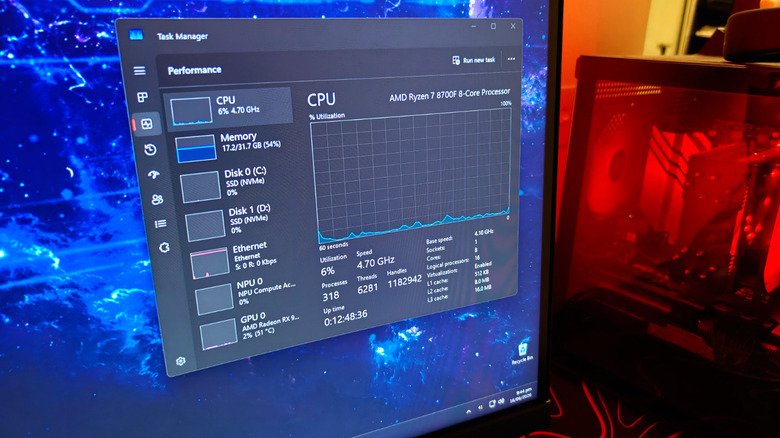
We tested app and menu launches before and after updating a Windows computer, which is specced pretty generously with an eight-core Ryzen 7 processor, a Radeon RX 9070 XT, and 32GB of RAM. Before the update, interactions like launching the File Explorer or right-clicking to access menus took a hot second to complete. You could see the container for the apps open first and then the content suddenly flashing in moments later. Post-installation, we can confirm noticeable improvements while surfing around the UI.
Microsoft hasn’t detailed exactly how the new update seems to speed up Windows 11 computers, but it largely seems to affect how fast and frequently your CPU boosts to its maximum clock speeds. When you launch an app or perform an action, Low Latency Profile boosts your CPU’s clock speed to its highest value for a few seconds and then brings it back. You can see this value jump if you have Task Manager opened while performing other actions. For better real-time metrics, you can use third-party tools like HWiNFO.
There’s no way to toggle the feature on or off easily for now, and it’s uncertain how it might affect battery life on laptops and tablets. Regardless, this is definitely a step in the right direction. If you use your computer primarily for gaming, you might also benefit from turning on the performance mode in Windows.