
Follow ZDNET: Add us as a preferred source on Google.
Digital paper tablets are getting very good. But with so many options, it’s hard to tell where different models excel. Two of the best I’ve tested this year are the Boox Go 10.3 Lumi (Gen 2) and the ReMarkable Paper Pure, both starting at $399 — and both of which come bundled with the case for around $50 more.
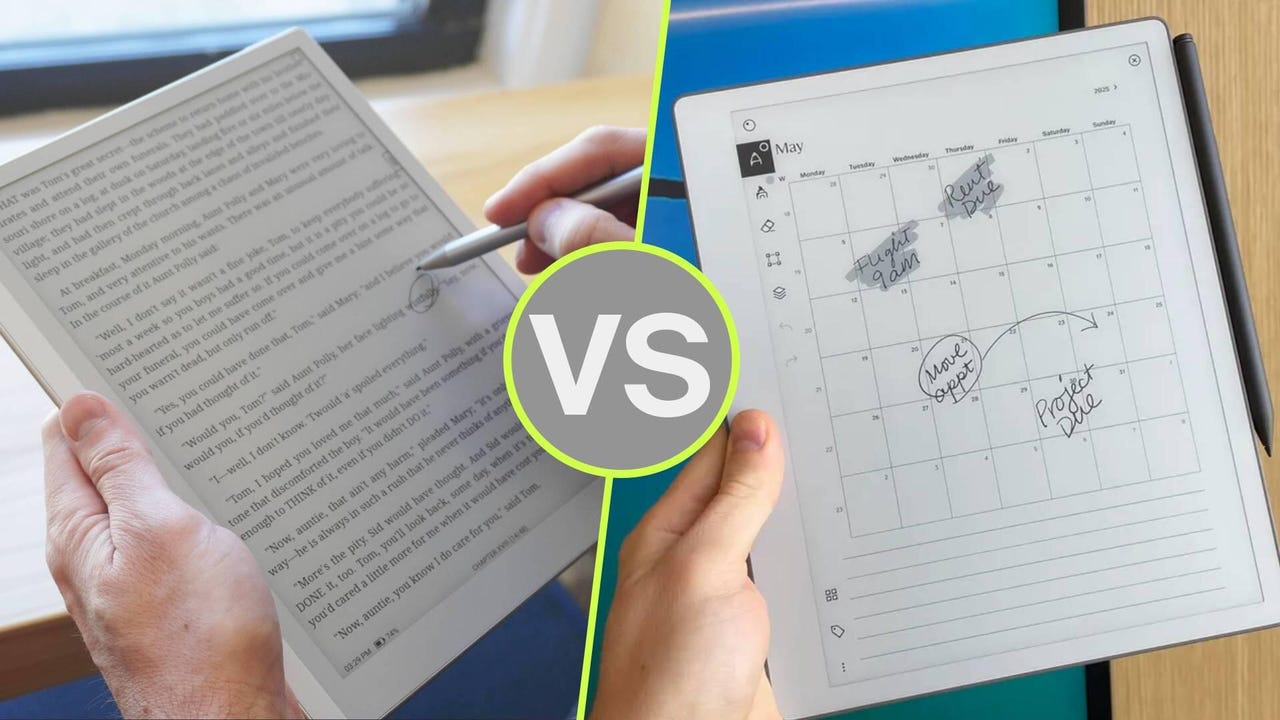
Despite the similar price, though, these tablets are for very different users. The Boox Go 10.3 is an open-ended, versatile device with access to the Android ecosystem at your fingertips — great for anyone with an extensive library of e-books. The ReMarkable Paper Pure, on the other hand, is a distraction-free work tablet with a minimalist ethos.
Also: Kindle Scribe vs. ReMarkable Paper Pure: Why I’m not writing off Amazon’s E Ink tablet just yet
I should also mention that the Boox Go 10.3 requires no subscription, offering full access to the Google Play store with the purchase of the device. The ReMarkable Paper Pure has an optional subscription called ReMarkable Connect that unlocks a handful of features and provides unlimited cloud storage for $39/year. Here’s the full breakdown of these two fantastic devices.
Specifications
|
Boox Go 10.3 Lumi (Gen 2) |
ReMarkable Paper Pure |
|
|
Display |
10.3-inch Carta 1200 glass display, 300 ppi, with backlight |
10.3-inch Canvas display, 226 ppi, no backlight |
|
Weight |
0.80 pounds |
0.79 pounds |
|
Processor |
Qualcomm Octa-core (6350) |
1.7 GHz dual-core ARM Cortex-A55 |
| RAM/Storage | 4GB / 64GB | 2GB / 32GB |
| Battery | One to two weeks (3,700 mAh) | Up to 3 weeks (3,820 mAh) |
| Subscription | None | ReMarkable Connect: $3.99/month (optional) |
| Connectivity | Wi-Fi (2.4GHz + 5GHz), Bluetooth 5.1 | Wi-Fi 5, Bluetooth 5.1 |
| Price | Starting at $399 | Starting at $399 |
You should buy the Boox Go 10.3 Lumi if…
1. You want to read e-books
If you’ve got a long list of books to read and want a tablet for taking notes, the Boox Go 10.3 is better than the ReMarkable Paper Pure for its rich access to the top e-book platforms. You’ve got the Google Play store, Amazon’s Kindle app, Libby, Kobo Books, and more at your fingertips.
Also: I replaced my Remarkable with this cheaper E Ink Android tablet – and it wasn’t so bad
You can certainly read e-books on the ReMarkable Paper Pure, but without access to third-party apps, you’ll just have to manually send the EPUB files to the tablet. This isn’t difficult, but it means that you’ll have to acquire e-books on another device. Conversely, the Boox Go 10.3 runs AndroidOS natively, and comes with an extensive toolkit for note-taking (including voice notes).
2. You want more options, not less
With access to the Google Play Store, you can install all sorts of apps onto the Boox Go 10.3 to personalize your device how you see fit. Combine this with the fact that the tablet itself is highly customizable with respect to the UI and the writing experience, which features a rich toolkit of brushes, paper templates, support for layers, shapes, custom gesture mapping, and the ability to add your own image files — even audio.
To top it off, the tablet supports virtually all the file types you’d ever imagine working with, including PDF, EPUB, txt, rtf, html, png, jpg, gif, and bmp, to name a few. By comparison, the ReMarkable Paper Pure uses its own minimalist custom UI, doesn’t support third-party apps, and offers a much more streamlined user experience.
3. You need a backlight
The Boox Go 10.3 Lumi features an adjustable light on the display that reaches around 115 nits and can be adjusted to a warm or cool tone. If you do any kind of work in dim environments (or like reading at night), the Boox Go 10.3 is the better option, as the ReMarkable Paper Pro has no lighting on its display.
You should buy the ReMarkable Paper Pure if…
1. ReMarkable’s distraction-free ethos speaks to you
If the Boox Go 10.3 is all about options, the ReMarkable ecosystem is about quieting the noise and prioritizing focus. Without access to third-party apps or email, you’ll never get notifications or pop-ups. The UI is simple, intuitive, and clean, and it gets out of your way so you can work.
Also: I’ve tested several ReMarkable tablets, but its new cheap E Ink tablet had me fooled
One way I test digital paper tablets is by timing how long it takes to go from power-on to a blank page where I can write. The Paper Pure is by far the fastest, going from powered off to writing in three seconds flat. The Boox Go, by comparison, requires the user to jump through a few menus.
2. You want a tablet for work
Where the Boox Go 10.3 is versatile enough to do a little bit of everything, the ReMarkable Paper Pure is far more specialized for work. Its library of “methods” (templates) is productivity- and project-focused, and if you sync it with your calendar, your handwritten notes can be organized by meetings, complete with a list of attendees. You can also organize notes based on keywords or tags, keeping your documents assigned to the right projects.
It’s also far easier to share documents and handwritten notes on the ReMarkable. With one tap, you can send to any linked cloud service, direct to email, or create a custom URL that navigates to your note and can be viewed by anyone with the link.
3. You want to screen share
One of the best features on the ReMarkable is the ability to mirror your tablet onto a big screen in real time, turning it into a virtual whiteboard that fits in the palm of your hand. It’s not only the feature itself, but how easy it is to use: Just navigate to a URL in the browser, and you can share your sketches or notes in meetings.
Writer’s choice
Both of these tablets have fantastic pen-to-“paper” writing experiences, and both are remarkably (no pun intended) similar in terms of physical build. They weigh the same, have the same-sized display, and nearly the same resolution. In terms of pricing, they’re also similar, starting at $399 and rising to around $450 when bundled with the case (which I highly recommend).
At the end of the day, I find the ReMarkable Paper Pure is better for my workflow. It’s more focused, optimizing the features I want to use (writing on the digital display, sharing documents) rather than trying to do everything at once. I am not an e-book reader, so I was never seeking a tablet with e-book access. I appreciate ReMarkable’s clean, distraction-free interface and how snappy it is to grab the tablet and use it like, you know, pen and paper.