6 Android Auto apps that are essential when I’m off-roading – and most are free


gaia-gpa-android-auto

Artie Beaty/ZDNET

Follow ZDNET: Add us as a preferred source on Google.


ZDNET’s key takeaways

  • Android Auto now goes beyond roads, helping you explore outdoors.
  • Most of these apps offer offline use.
  • Some off-road vehicles already have Android Auto built in.

Android Auto is a fantastic companion for your daily drive, but it can be surprisingly useful other times, too – like long road trips. And thanks to a recent rise in developer support, it’s even expanding beyond roadways.

There’s a growing catalog of Android Auto apps designed to help you navigate and explore outdoors. Whether you’re driving across the country in an RV, heading to national parks for some camping, driving off-road vehicles in a remote area, or just spending some time outside, Android Auto can help.

Also: 6 Android Auto apps I wish I found sooner, because they make every drive easier

Some of these apps are designed for RVs, others for 4-wheel vehicles, and others for off-road vehicles like ATVs. For the first two, most vehicles today have built-in screens. For the latter, a few ATVs come with factory-installed Android Auto screens, but aftermarket multimedia units are more common. 

Here’s a look at my five favorite Android Auto apps for getting outside. 

onX Offroad/Hunt

Essentially Google Maps for the off-road world, onX Offroad is your best option for exploring in your Jeep or ATV. It lists thousands of verified off-road trails along with difficulty ratings for each one, plus photos and reviews from real riders. The app lets you filter by vehicle (like 4×4, ATV, or dirt bike), and shows clear, color-coded boundaries between public and private land.

onX Hunt is similar, but designed for hunters. It lets you know exactly where you are and what you’re allowed to access on that land. It shows private land boundaries, landowner names in many areas, species layers, and offline maps, which are vitally important in the field.

National Park Service

nps-android-auto

Artie Beaty/ZDNET

The National Parks Service app is a must-have for exploring US national parks, offering interactive trail maps, self-guided tours, offline downloads of park information, and more. Much of the app’s information isn’t available through Android Auto, but even the subset that is available makes this one of the more unique offerings you’ll find. 

Also: I found a free Android app that makes deleting photos as easy as swiping left

You can access audio tours for dozens of national parks that offer step-by-step navigation, including ranger-created tours pointing out interesting information.

RV Life

rv-android-auto

Artie Beaty/ZDNET

If you have an RV, the RV Life app is essential. It helps you figure out where to stay, how to get there safely, and what you need to know along the way. When you enter your vehicle’s dimensions for the first time, the app creates routes based on your rig’s height, weight, and length, avoiding low bridges and restricted roads along the way. 

The app does require a subscription for Android Auto integration, but reviews say it’s worth the price. 

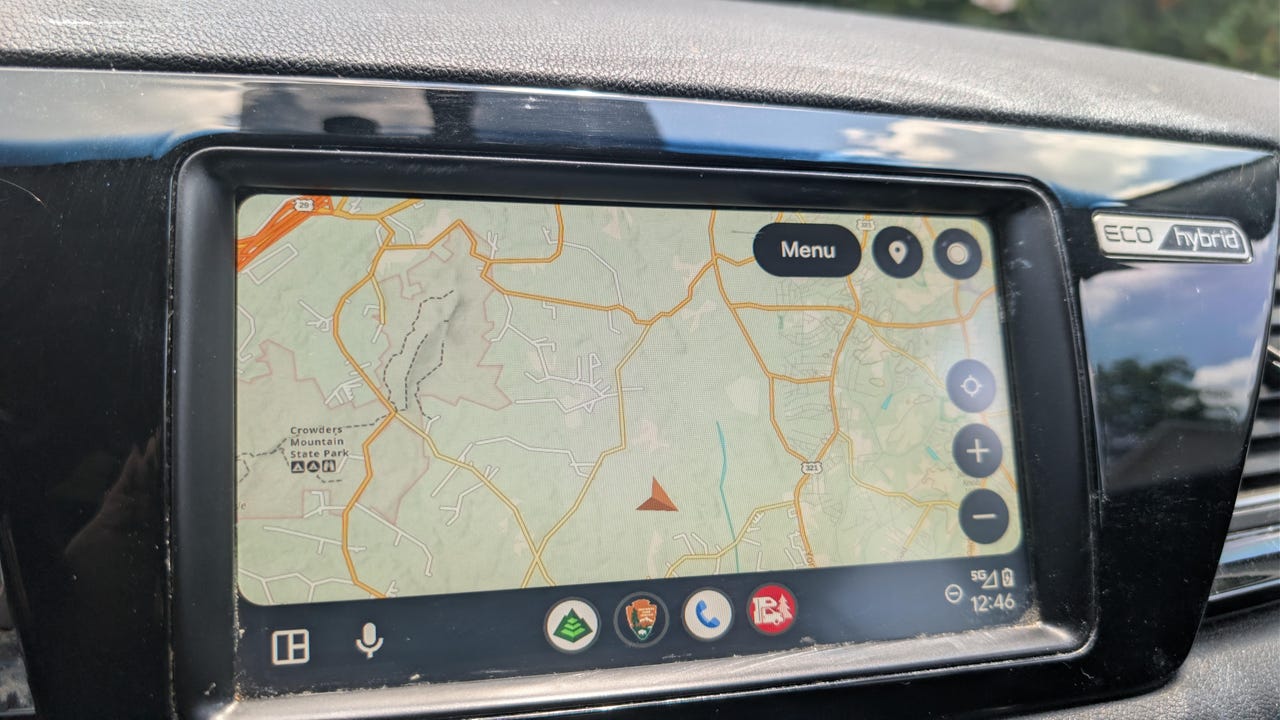
Gaia GPS

Driving where cell service doesn’t reach? The Gaia GPS app is the best option for navigation in lesser-traveled areas such as Forest Service roads, Jeep trails, hiking routes, and remote trailheads. It has a large library of map layers, including USGS topographic maps, satellite imagery, and overlays such as recent wildfire activity and public land grids. 

Also: 4 Android Auto apps I can always rely on for road trips – beyond Maps and Spotify

Android Auto compatibility lets you follow saved routes, view maps, track your position in real time, and access downloaded maps directly on your vehicle’s screen.

Spotify

spotify-android-auto

Artie Beaty/ZDNET

This is one of the biggest names in streaming, but it’s on this list because it’s the best option for offline music, and the Android Auto interface is simple. Offline mode does require a premium subscription, but it lets you easily download music and podcasts for listening when you’re not connected. 

Due to digital rights, Spotify does require you to connect to the internet at least once every 30 days, but as long as you’re not taking an extended trip offline, you’ll be good.





Source link

Leave a Reply

Subscribe to Our Newsletter

Get our latest articles delivered straight to your inbox. No spam, we promise.

Recent Reviews


Digital marketing changes fast. One minute a platform is hot, the next it’s outdated. Consumer habits shift quickly, and the strategies that worked last year might not work today. If you’re trying to stay relevant in this ever-evolving field, the big question is: how can you level up your skills without going back to school?

Whether you’re brand-new to marketing or a traditional marketer moving into digital, here are seven practical (and proven) ways to sharpen your skills, no formal degree required.

1. Take Online Courses That Actually Teach You Something

Not all online courses are equal. The best ones are built by marketers who actually do this stuff every day not just teach theory. These courses blend hands-on learning with real-world projects that help you build skills employers care about.

What to look for:

  • Instructors with real industry experience
  • Projects based on actual campaigns
  • Updated content that reflects current tools and platforms
  • Certifications that carry weight on your resume

Recommended platforms: Google Skillshop, HubSpot Academy, and LinkedIn Learning are all great places to start.

2. Learn from the Pros in the Industry

Want to know what’s working in digital marketing right now? Follow the experts who are already doing it. They share not just tactics but also insights into the strategy behind successful campaigns. If your goal is to become an SEO expert in Nepal, seek out local professionals who are ranking well or leading agencies you’ll gain insights that are specific to your market.

How to get the most from them:

  • Follow a mix of global and local thought leaders
  • Subscribe to their newsletters and podcasts
  • Ask questions and engage with their content
  • Join their webinars or virtual events

Tip: Pick experts in areas you want to master—SEO, social media, email marketing, or AI tools.

3. Use Free Resources to Explore and Learn

You don’t always have to pay to learn. There’s a ton of free, high-quality content online that covers everything from the basics to advanced strategies.

Top free resources to check out:

  • Coursera & edX: Free courses from top universities
  • Google Digital Garage: Solid fundamentals in digital marketing
  • YouTube: Tutorials, breakdowns, and real case studies
  • Blogs: Keep up with Moz, Search Engine Journal, and Content Marketing Institute

4. Get Hands-On with Personal Projects

Reading is helpful, but doing is where the real learning happens. Try testing strategies on a personal blog, passion project, or fictional brand.

Simple project ideas:

  • Start a blog and learn SEO by optimizing your posts
  • Run a small Instagram or Facebook campaign
  • Build an email list for a hobby or passion project
  • Try a basic Google Ads campaign with a tiny budget

5. Join Online Communities and Connect with Others

One of the best parts of digital marketing is the community. There are countless online (and offline) spaces where marketers help each other grow.

Where to find them:

  • LinkedIn groups: Look for niche-focused communities
  • Reddit: r/digitalmarketing, r/SEO, and r/PPC are packed with advice
  • Slack groups: Many cities and marketing niches have active ones
  • Local events: Don’t underestimate the power of in-person networking

6. Get Certified (It’s Worth It)

Certifications show that you’ve taken the time to learn and understand the tools. They’re especially helpful if you’re transitioning from another field or just getting started.

Top certifications to consider:

  • Google Ads & Google Analytics
  • HubSpot Inbound Marketing
  • Meta (Facebook) Social Media Marketing
  • Salesforce Marketing Cloud (for advanced roles)

7. Analyze Real Marketing Data

Looking at real-world data helps you understand what works—and what doesn’t. Try working with small businesses or nonprofits to get your hands on real campaign results.

Where to find real data opportunities:

  • Help a local business improve their online presence
  • Volunteer for a nonprofit’s marketing team
  • Freelance on small gigs to build a portfolio
  • Ask your employer to let you assist on a digital campaign

The Skills That Will Make You Stand Out

To be great at digital marketing, you need a mix of creative and analytical abilities. The top marketers are flexible, data-savvy, and constantly learning.

Here’s what to focus on:

  • Analytics: Know how to read and act on data
  • Writing and content: Craft messages that get attention and convert
  • Tech skills: A basic understanding of HTML, email tools, and CRMs
  • Strategy: Know how to align marketing goals with business objectives
  • Adaptability: Be ready to pivot with new trends and tools

Start Small, Learn Fast

You don’t need a fancy degree to break into or level up in digital marketing. What you need is consistency, curiosity, and a bit of creativity. Pick one or two of the strategies above that fit your style, and commit to them for the next month.

Most importantly, don’t just learn—apply. Watch a course, then launch a mini-campaign. Read a blog, then try out the strategy on your own site. Digital marketing rewards action, not just knowledge.


Source link

