
Verdict
The Philips 5500 LatteGo Automatic Bean-to-Cup Coffee Machine is a capable automatic bean-to-cup machine that makes brewing your favourite hot or cold drinks easy with convenient controls and fuss-free operation, with good quality coffee, excellent milk frothing and fuss-free maintenance. By default, I did think its coffee was on the weaker and cooler side, though.
-
Compact and simple to use
-
Lots of drink options
-
Good quality coffee and frothy milk with little effort
-
Quite expensive
-
Coffee could do with being a little hotter
Key Features
-
20 different drink options
The 5500 LatteGo has 20 different drink options for types of coffee, both hot and cold, and with or without milk.
-
Fully automatic
It’s also fully automatic, so all you need to do is load it up with beans and enough water, and push a button for it to dispense the drink you like.
Introduction
Fully automatic coffee machines aim to make your life much easier, taking the hassle out of making your morning brew. The Philips Series 5500 LatteGo Bean to Cup Coffee Machine provides this for the bean-to-cup experience, offering as simple an experience as it gets, complete with a large colour display and simple touch controls.
It comes as a more compact machine that seems ideally suited for those who want quality coffee with none of the fuss, especially with a large selection of drinks on offer, a removable milk frother and a large water tank to make a fair amount of drinks in one go.
At £649.99/$999.99, though, its endeavour to make your morning brew easier doesn’t come cheaply, and there are rivals to consider, including the Ninja Luxe Cafe Pro Series ES701UK and DeLonghi La Specialista Touch.
To see if this bean-to-cup coffee maker can come out on top as one of the best coffee machines we’ve tested, I’ve been putting it through its paces for the last few weeks.
Design and features
- Compact and narrow frame
- Lots of automatic drink options
- Convenient front display
The whole point of the Series 5500 is that it’s designed to be user-friendly first and Philips has gone the extra mile to make the brewing experience as simple as possible.
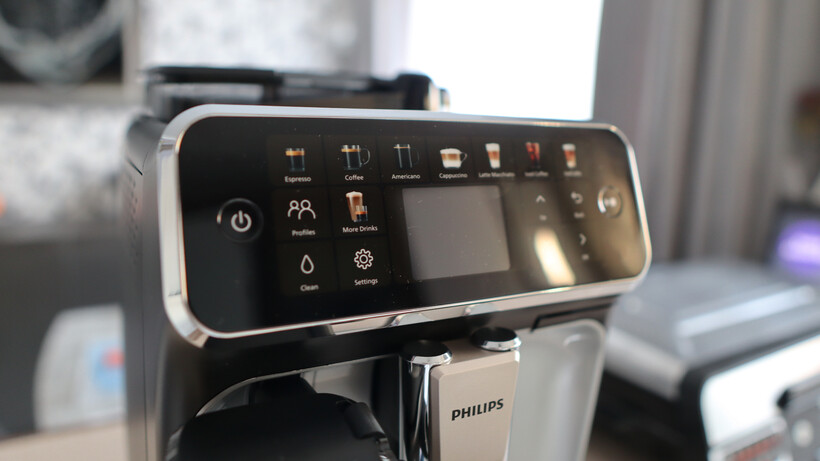
The front panel of the machine is taken up by 17 touch buttons for making the most popular drinks, so you can tap and brew everything from a shot of espresso or an Americano to a cappuccino, latte, or even iced beverages without even needing to go deeper into the machine’s menu system.

These buttons surround a smaller screen (that isn’t a touchscreen) where you can delve into the machine’s menu system to make even more drinks and configure the preset ones a little more. You can change things such as the strength of the espresso, how much water you want the machine to use, and, if applicable, how much milk you’d like. Once that’s sorted, making a drink is as easy as pressing the play button on the right-hand side.
You get a level of personalisation with the 5500 LatteGo, although it’s only to select a different ‘profile’ for multiple users who may have different tastes. There are four colours, rather than you being able to input a name or AKA.

When that profile is selected, it’ll save whatever combination you pick for a drink when you make it. The downside is that if you configure the drink differently each time you make it, such as switching the espresso between beans and ground coffee, or adding/removing milk, then you’ll always overwrite the last time you made the drink for your profile before.
The 5500 LatteGo isn’t going to take up much space on your kitchen counter either, being quite a narrow machine, and at just 24.6cm tall, it’ll easily fit under even the lowest-hanging cabinets.

Even with its more modest dimensions, Philips has managed to fit a 275g bean hopper on top (it’s here where there’s also a flap for bypassing with pre-ground coffee) with a small manual grind dial if you want to dial it in yourself, plus there’s a 1.8L water tank on the right side. The tank weirdly has no lid, meaning if you fill it right to the top, you may get a little bit of water that sloshes out as you fit it back into the machine.
On the front of the machine, there’s a large and deep drip tray that seems to fill up rather quickly in my testing, alongside a 260ml milk frother attachment that I wish were a little bigger. It’s fine for making a couple of milky drinks, but then it needs refilling each time.

Philips says the milk frother is compatible for use with plant milk, although it doesn’t specify which ones, nor provide different froth options for the milk you’re using, as the likes of the Dreo BaristaMaker do.
Coffee Quality
- Lots of drink options
- Coffee strength feels a little weak by default
- With strength upped, results were much stronger across the board
During my time with the 5500 LatteGo, I made quite a lot of coffee using both some Grind House Blend beans I had and some more ‘standard’ Lavazza ones, electing to make a good cross section of the machine’s beverages to best gauge its performance.
At least initially, I felt the default settings for the likes of an americano or a cappuccino made the coffee a little too weak, and I did have to push the strength up a notch or two to make a drink that wasn’t too watery or milky, but that’s more personal preference than any issues with the machine.

I turned it up a tick to increase the strength of an espresso with the Grind beans, which ended up with decent crema once settled and a dark colour to it. It took around 50 seconds for it to pull, and it settled with a temperature of 60°C. This is on the colder side by a touch to the usual 65°C we like, but it was still drinkable straight away.
For a flat white, I also upped the strength and the milk amount to 100ml, which, once stirred up, ended up at the desired strength with some pleasant microfoam and a lot of froth with the milk. The coffee itself had notes of caramel and a pleasant acidity.

With a café au lait, I upped both the strength and quantity of the coffee, and added a little more milk in the hope of the machine producing a larger beverage. It ended up with solid strength and a decent amount of froth. A ristretto ended up very strong with reasonable crema, too.
I tried using the ground coffee bypass for a latte macchiato, which initially didn’t work, as the machine pulled milk but no coffee, although it did work after cleaning the machine out thoroughly and retrying. The key, it seems, is to only put one exact scoop of ground coffee in, and only then will the machine take it through.

If you’re out and about, the large 360ml travel mug size is a decent size, and provides a standard black coffee with good strength that just about fits in one of my larger Starbucks mugs.
I also tried a couple of iced beverages with the 5500 LatteGo, opting for an iced latte that added the milk first and then coffee into a glass filled with ice. I added maple syrup afterwards, which changed the overall flavour a smidgen, although even here I thought the coffee was a little weaker.
Milk Frothing
- Fuss-free frothing
- Lots of volume, although not as hot as I would have liked
As opposed to offering a steam wand for milk frothing, the 5500 LatteGo offers a tubeless carafe system, where you load the milk in, and it froths as much as you put in for milky drinks.
I like the element of control a steam wand provides, as I’d experienced with the manual DeLonghi La Specialista Arte Evo, although as this is a fully automatic machine, the LatteGo provides a hands-off frothing means. It utilises steam to create negative pressure, which in turn pulls milk from the carafe, frothing it extensively, before pushing it into the cup.

In general, I felt this machine provided some especially frothy milk for cappuccinos and lattes, for instance, with good microfoam and volume. There were perhaps instances where it was a little too frothy, leaving it in the bottom of the cup after I’d finished the espresso portion.
Likewise, the milk pushed the average temperature of drinks to what I’d describe as the cooler side of drinkable. There wasn’t anything wrong with it, although I’d have liked things a little hotter if I’m being pernickety.
Maintenance
- Reasonably fuss-free maintenance
- Warns you when it’s time to descale
Maintenance is reasonably straightforward with the 5500 LatteGo, especially given the modularity of its components. You can remove everything from the drip tray to the water tank and then access the innards of the machine to empty grounds, lubricate the brew group and the like.
Washing out the LatteGo frother is only a quick rinse or a dishwasher clean away, and there are notices for descaling in the machine’s menu system. Philips also recommends you insert a coffee oil remover tablet into the pre-ground coffee chute every two months.
Should you buy it?
You want a simple and automatic bean-to-cup machine
The 5500 LatteGo excels at keeping things easy with decent coffee, strong milk frothing and lots of pre-configured drink options.
With only limited options for customisation and dialling in a drink to your preference, a semi-automated or manual machine will provide more control.
Final Thoughts
The Philips 5500 LatteGo Automatic Bean-to-Cup Coffee Machine is a capable automatic bean-to-cup machine that makes brewing your favourite hot or cold drinks easy with convenient controls and fuss-free operation, with good quality coffee, excellent milk frothing and fuss-free maintenance. By default, I did think its coffee was on the weaker and cooler side, though.
It’s a slightly different proposition to rivals such as the Ninja Luxe Cafe Pro Series ES701UK and DeLonghi La Specialista Touch, which provide a little more flexibility with brewing drinks if you’d like more control, although they aren’t as simple for newcomers as the 5500 LatteGo is. I suppose it depends on what you’re after in a coffee machine, but for budding baristas who want to keep things easy, this is a decent choice. For more choices, check out our list of the best coffee machines we’ve tested.
How We Test
We test every coffee machine we review thoroughly over an extended period of time. We use industry-standard tests to compare features properly. We’ll always tell you what we find. We never, ever, accept money to review a product.
Find out more about how we test in our ethics policy.
- Used as our main coffee machine for the review period
- Tested for at least a week
- We roast our own beans for regular coffee machines, so we can fairly compare each machine; pod machines are tested with a variety of compatible capsules
- Depending on capabilities, we test each machine’s ability to make espresso and cappuccino
FAQs
Yes, it’s automatic with milky drinks, and you can choose how much milk you want to be frothed when dialling in settings.
Full Specs
| Philips Series 5500 LatteGo Bean to Cup Coffee Machine Review | |
|---|---|
| UK RRP | £649.99 |
| USA RRP | $999.99 |
| Manufacturer | Philips |
| Size (Dimensions) | 246 x 433 x 371 MM |
| Weight | 8.7 G |
| Release Date | 2025 |
| First Reviewed Date | 01/05/2026 |
| Coffee Machine Type | Bean-to-cup |
| Integrated grinder | Yes |
| Maximum mug height | 14.5 cm |
| Pump pressure | 15 bar |
| Number of boilers | 1 |
| Milk frothing | LatteGo |
| Water capacity | 1.8 litres |

Stephan is the sports journalist for the Maple Grove Report.