
Verdict
The Govee Floor Lamp 3 is easily the Chinese smart light specialist’s most accomplished floor lamp to date, blending serious brightness with genuinely impressive colour accuracy. The new LuminBlend+ system delivers smooth, believable tones without the patchy blending you sometimes see on cheaper RGB setups, and the sheer output means it can light a room properly, not just decorate it. It’s pricier than budget rivals, but the jump in performance makes that easier to swallow. If you want a statement lamp that can also double as your main light source, the Floor Lamp 3 absolutely delivers.
-
Superb colour blending
-
Very bright output
-
Matter compatibility
-
Brilliant base lighting
-
More expensive than rivals
-
Assembly slightly fiddly
Key Features
Introduction
Govee has been at this floor lamp game for a while now, ever since the original Lyra landed back in 2021 and kicked off a wave of affordable, RGB-heavy standing lights. Since then, we’ve seen a steady evolution, but the Govee Floor Lamp 3 feels like the first proper leap rather than a gentle update.
Announced back at CES 2026, this latest model takes the familiar formula of a vertical lightstrip in a freestanding pole and pushes it much further.
The headline upgrades focus on brightness, coverage, and colour accuracy, with Govee making a big deal about its new LuminBlend+ tech.
In practice, it turns out to be one of the most convincing smart lighting systems the brand has produced so far.
Read my full Govee Floor Lamp 3 review to find out more.
Design and building
- Needs assembly
- Screwdriver provide
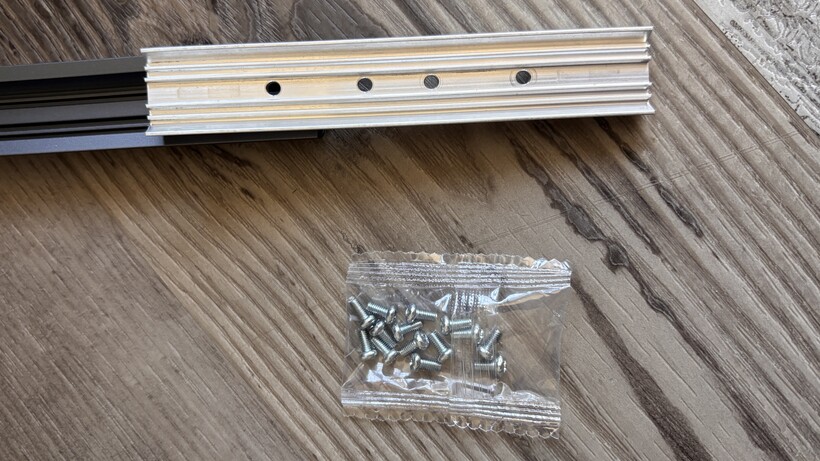
The first thing you’ll have to do is a bit of assembly but it’s incredibly straightforward, even to a DIY-buffoon like me.

The setup process sticks closely to the established Govee Floor Lamp formula, with a weighted base, three metal poles, and a lightstrip that runs the full height of the stand.

Assembly takes around ten minutes and Govee even throws in a screwdriver, fully leaning into that flat-pack furniture vibe.

The poles click and screw together securely, and the base has enough heft to keep everything stable once upright.
Threading the lightstrip through the pole is the only mildly awkward part. It takes a bit of patience, but it is not difficult.

Unlike the Govee Uplighter, the wiring is already integrated into the strip itself, so you are not feeding loose cables through the tubes, which simplifies things slightly – you just have to connect it to the wire coming out of the base.
The strip itself is housed in a soft, diffused casing that helps smooth out the LEDs and protect them during installation. It is a similar approach to outdoor lightstrips, and it works well in eliminating harsh hotspots.
The base is where things get more interesting. This is not just a lump of metal keeping the lamp upright but a lighting feature in its own right.

The illuminated dual-ring base creates a subtle glow from underneath while also casting a halo around the top edge.
It looks surprisingly classy and adds an extra layer of ambient lighting even when the main strip is not doing much.
You also get a physical remote, which gives you quick access to brightness, colour temperature, scenes, and music sync without needing to dive into the app every time. It’s essentially an evolution of the one that launched with the Lyra back in 2021.

When it comes to placing the lamp you have a choice to either point the lamp directly at you, or to turn it around and make it face a wall, to project colour in a less intrusive way. The latter is definitely recommended here, it creates a brilliant effect which I’ll talk more about in a bit.
Features
- Matter compatible
- Main features and colour choices through the Govee app
Getting started is very straightforward. Simply power it on and the lamp cycles through colours to signal it is ready to pair.

Adding to your smart home is possible in a couple of different ways, either directly using the Matter QR code or via Bluetooth through the Govee app.
I took the app route and it picked up the Floor Lamp 3 almost instantly, prompting me to add it without any digging around menus. During the syncing process you’re also asked to pair the remote, which simply requires you to pull the battery tab, press a button, and you are done.
Obviously, a key component of a Matter smart home system is that you don’t have to bother with a brand’s app if you don’t want to. Instead, you can control devices through whatever smart home ecosystem you use.
But, as always with Govee, you will want to pair it through the Govee app if you actually want to do anything interesting. And you can always grab a Matter code from within the Govee app and sync the lamp across other smart home systems after your initial setup.
The Govee app has improved a lot over the past couple of years. It’s still super busy, with an absolute plethora of options on offer and can still be a bit daunting, especially for newbies, but it is much less clunky than it was and is much easier to navigate now.
Under the Scene tab you’ll find a multitude of different lighting effects, categorised under headings like Atmosphere, Festival, Natural and Life; with names like Thunderstorm, Peach Orchard and Rustling Leaves… there are over 100 on offer.

The LuminBlend-focused effects are where this lamp really shines, with options like Ukiyo-e showing off just how smooth the colour transitions can be.
There’s also the AI Lighting Bot 2.0 built into the Govee app, who you can chat or text with, in order to create personalised lighting effects. Think things like ‘Beach fire,’ ‘Sweet 16 pink party vibes,’ or even ‘Party for a dog who only sees in black and white,’ and the bot will use its AI smarts to match your prompt to a lighting effect.
I found that if you keep it relatively simple, it pretty much nails the vibe that you’re after.
If there’s not an effect already set up that you like you can pretty much customise to your heart’s content in the DIY section. And you can also share your designs with the Govee community, or download one created by someone else.
Performance
- Three separate lights
- Bright
- Very good colour reproduction
The Floor Lamp 3 is effectively treated as three separate lights in the app. There’s the main strip, the upper base ring, and the lower base glow.

And then these are split into sections; eight for the lightstrip, four for the upper ring, five for the lower, so you can effectively blend 17 different shades which gives you a huge range of control which makes for some amazing effects and is where the Floor Lamp 3 really pulls away from earlier models and cheaper rivals.
The headline figure on the specs sheet is that 2100 lumens, and it shows. Compared to something like the SwitchBot RGBICWW Floor Lamp with a 1200 lumens brightness and the difference is pretty clear, albeit at nearly three times the price.
The SwitchBot is a solid budget option, but the Govee simply operates on another level when it comes to brightness, smoothness, and overall polish.

The Floor Lamp 3 is not just accent lighting. It is easily capable of lighting up a large room on its own, with an industry-widest 1000K–10,000K tunable white range. Whites are bright and clean, with a wide temperature range that spans from very warm tones to crisp, daylight-style illumination.

The 170-degree light spread also makes a noticeable difference. Whether you point it into a room or bounce it off a wall, it fills the space far more effectively than most upright lightstrip designs.

But the real story here is colour quality and the different areas you can apply that to. Govee has always been strong in this area, but LuminBlend+ takes things up a notch and the combo the three lights is striking.

Colours look smoother, more natural, and far less segmented than before. Pastel tones in particular look far more convincing, without the banding or patchiness that can ruin the effect on cheaper RGB setups.
The dual-sided illumination adds to the overall impact, casting light both forward and backward for a more immersive feel. Combined with the segmented control in the app, you can create some genuinely impressive lighting scenes.
Music sync is also here, reacting either via the built-in mic or audio from your phone. It is not new, but it remains a fun addition if you want the lamp to double as part of a party setup.
Should you buy it?
You want something bright and fun
This light is proper lighting when you need it, but the three individually controllable lights can also be a lot of fun.
You want something cheaper
This is a high-end product with a price to match, and you can get something more basic for less if you don’t need all of the features here.
Final Thoughts
The Floor Lamp 3 feels like GoveE refining its floor lamp formula rather than just iterating on it.
It keeps the playful, customisable nature the brand is known for, but backs it up with proper lighting performance this time around. The brightness is there, the coverage is there, and most importantly, the colour quality now matches the ambition.
Yes, it costs more than the alternatives (but is actually cheaper and better than its Philips Hue rival), and the app can still feel a bit overwhelming at first. But once you get past that, this is one of the most capable smart floor lamps you can buy right now.
How We Test
We test every smart light we review thoroughly over an extended period of time. We use industry standard tests to compare features properly. We’ll always tell you what we find. We never, ever, accept money to review a product.
Find out more about how we test in our ethics policy.
- Used as our main smart light for the review period
- Tested for at least a week
- We measure the light output from bulbs at different colour temperatures and colours so we can compare light output
- We test compatibility with the main smart systems (HomeKit, Alexa, Google Assistant, SmartThings, IFTTT and more) to see how easy each light is to automate
FAQs
Yes, you can add the lamp to Wi-Fi, although you’ll want to use the Govee app for the widest range of settings.
Full Specs
| Govee Floor Lamp 3 Review | |
|---|---|
| UK RRP | £169.99 |
| USA RRP | $169.99 |
| Manufacturer | – |
| Size (Dimensions) | 152 CM |
| Release Date | 2026 |
| First Reviewed Date | 08/06/2026 |
| Model Number | Govee Floor Lamp 3 |

Stephan is the sports journalist for the Maple Grove Report.