What Do Those ‘Maintain Top Safe Speed’ Signs Mean?


Some speed limit signs are smaller than others, but all are designed to be easy to identify, bearing the simple legend Speed Limit, and the maximum speed permitted. That speed can differ a lot depending on where you’re driving, but these signs typically have a uniform design on U.S. roads: A white rectangle with a black border and black text. These signs will be intimately familiar to most drivers, but there’s another speed-related sign that’s a completely different (though very similar looking) beast: Maintain Top Safe Speed. It’s designed only to be used in the most dire emergency situations, which, thankfully, have not arisen on U.S. roads to date.

In a country as enormous and varied as the United States, federal laws are established for those cases where uniformity is important. The establishment of the Manual on Uniform Traffic Control Devices was another step towards that, keeping road signs uniform and recognizable. Because of this, it has to be thorough and complete. That it certainly is – one edition of the manual reaches almost 1,200 pages. It covers everything from the design and shape of the everyday parking sign and the regulations surrounding it, to the Emergency Management Signs. Maintain Top Safe Speed is one of these signs, and was designed to be used to alert drivers to the fact that the area they’re passing through is extremely, fatally dangerous, potentially affected by nuclear radiation. 

As the MUTCD puts it, “since any speed zoning would be impractical under such emergency conditions, no minimum speed limit can be prescribed by the Maintain Top Safe Speed sign in numerical terms.” There were very limited ways to protect the general public driving through a potentially irradiated zone beyond this.

Road signs for the most dangerous circumstances.
Should the world be plunged into such a situation that these signs are necessary to be deployed on U.S. roads, a tactic was devised to ensure that they did not clash with the more conventional speed limit signs that may have been on their route. They could simply be affixed over the top of the existing sign, thereby making it abundantly clear that the perilous circumstances rendered the latter sign irrelevant for the time. Drive safe, but drive fast.

As well as Maintain Top Safe Speed, the Emergency Management Signs also include Emergency Aid Center, Evacuation Route, Area Closed, Shelter Directional, Permit Required, and Traffic Control Point. These are all to help the authorities and the public attempt to navigate a harrowing emergency situation. Maintain Top Safe Speed was introduced in the document in 1961, and though it has never had to be erected as a functional road sign, all of these things, such as that year’s expansion of a program to establish fallout shelters in buildings across the country, were the result of a very real possibility that they might. 

The context is crucial: In 1961, the Cold War was at an extremely volatile point, with the Soviet Union’s testing of the largest nuclear weapon ever detonated, the so-called Tsar Bomba, that year. Nobody at the time really knew if one power or the other would take that most devastating of steps and use a nuclear weapon, nor what the ultimate consequence of such a decision would be for our planet. It was clear, though, that a series of measures had to be established for a potential worst case scenario, and the Maintain Top Safe Speed sign and similar ones were one part of this wider effort.


Source link

Leave a Reply

Subscribe to Our Newsletter

Get our latest articles delivered straight to your inbox. No spam, we promise.

Recent Reviews


angry-birds-android-auto

Artie Beaty/ZDNET

Follow ZDNET: Add us as a preferred source on Google.


ZDNET’s key takeaways

  • Several mobile games are compatible with Android Auto.
  • The games all have simple touch-screen controls.
  • These are slow-paced, short-burst games. 

If you spend downtime in your car waiting for school pickup or during a lunch break, there’s a good chance you pass the time with mobile games. Here’s what you probably didn’t know: You could be playing some of those games on your car’s screen instead. A handful of popular mobile games are compatible with Android Auto, meaning you can play them in your car.  

Also: 4 Android Auto developer settings that make driving so much easier – how to enable them

You might have browsed your Android Auto apps and already seen the Gamesnacks app, which hosts several dozen light games that are not unlike early internet flash games. However, these games are more robust; they’re the same games you’d play on your phone, just on a bigger screen.

The catalog of Android Auto-compatible games isn’t huge, but it’s worth a look. None of these titles has complex controls or a steep learning curve, and all are perfect for short sessions. 

How to get started

To play on your car’s screen, you will need to install these games on your phone and have your vehicle in park. The good thing is, though, when you’re connected to your car and open the app on Android Auto, you can still use your phone for other things. This is ideal when you have a child in the car with you and need to pass the time, but don’t want to hand over your phone. 

Also: 4 Android Auto apps I highly recommend for your next road trip – beyond Maps and Spotify

I tried a quick run-through of the available games; while they didn’t run as smoothly as on my phone, they’re enough to play comfortably. Here’s a rundown of my favorites.

angry-birds-android-auto

Artie Beaty/ZDNET

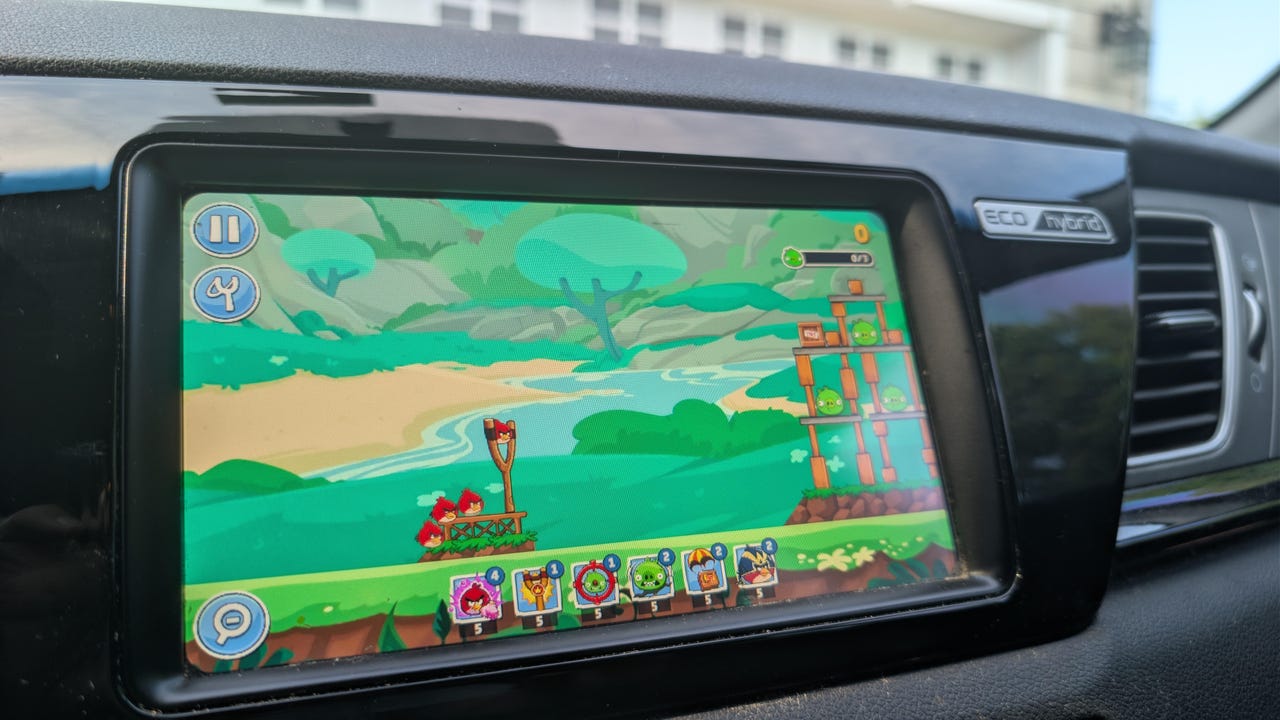
Angry Birds Friends: I hadn’t played Angry Birds in years, but the slingshot-style gameplay was easy to pick back up. It works well on a car touchscreen, and the levels go by quickly. Since the game is actually on your phone, your progress saves, so you can keep going across multiple sessions. I enjoyed not just beating levels, but immediately replaying a level I had just beaten to get a higher score. 

beach-buggy-racing

Artie Beaty/ZDNET

Beach Buggy Racing (1 and 2): Both versions of this cart-racing game feature colorful racers with very simple controls, making them the perfect games to kill 5 or 10 minutes. The tracks are filled with powerups, shortcuts, and other racers to beat (computer players, not online). I feel like this game takes more advantage of the bigger screen than any other on this list, and it’s the one that feels most like a “real” video game.

candy-crush-android-auto

Artie Beaty/ZDNET

Candy Crush Soda Saga: I’ve never been a fan of Candy Crush or its many versions or clones, but this is probably the most popular game available for Android Auto. The match-three gameplay is easy to pick up and play in short bursts, and it is relaxing to just zone out for a few minutes. Since the action is slower, it’s easy to play on a car screen than are games that require more movement.

farm-heroes-android-auto

Artie Beaty/ZDNET

Also: I saw the future of Android Auto, and now Google has me dreading my own car

Farm Heroes Saga: This game is from the same developers as Candy Crush and functions the same way, you’re just matching fruit, vegetables, and water instead of candy. This game goes a bit beyond the standard match-three format, as it sometimes requires you to collect a specific number of a particular piece. I still enjoyed this game, I just gave the more popular name the nod first.


Source link