
A Forgotten US Auto Brand Is Back To Try And Undercut Slate’s $25K Pickup Truck


Over the last year, Slate has built a lot of the buzz across the industry for its ambitious plans to sell a small, simple truck at an affordable price — and now that truck might be facing a new competitor that doesn’t just undercut its price, but also uses an entirely different type of powertrain and fuel source.

Progress on the Slate pickup continues full speed ahead, with the company recently showing a full prototype and announcing a starting price under $25,000. While the Slate’s basic features and low price (relative to other new pickups) will be a draw for buyers, one factor likely to limit its appeal is its battery electric powertrain. EVs absolutely have their benefits in certain situations, but a lack of easy roadtrip capability from this vehicle’s estimated 200-mile range and a possible lack of home charging options for buyers will both be significant hurdles. 

Enter the REO Industries Runabout, another small truck from a startup manufacturer with big promises. Not only does the Runabout’s planned starting price of $21,500 significantly undercut the Slate, but it also uses a traditional internal combustion engine. However, while REO has already started taking reservations for the Runabout, plenty of hesitation is warranted given the long list of failed automotive startups in recent years. With its back-to-the-basics, internal combustion approach, could REO be different?

Old school in every way

If the REO name sounds familiar, that’s because at one time it was both an automobile builder and one of the most established names in American truck building, with the original version of the company closing in 1975. In its reincarnation, REO is a Texas-based startup that’s hoping to take the small pickup truck back to its ’80s and ’90s roots.

Interestingly, a big part of the inspiration for the REO Runabout was the founder’s love of old Toyota pickup trucks and Japanese Kei trucks — namely their mechanical simplicity and longevity. The Runabout hopes to be a modern version of that, with body-on-frame construction, mechanical four-wheel drive, and a naturally aspirated four-cylinder engine with either a manual or automatic transmission. This is a much different setup than the popular Ford Maverick, which uses a unibody design with either hybrid or turbocharged powerplants.

How can REO achieve all of this at such a low price point? The plan is to keep things simple inside and out. Though the engine specs haven’t been finalized, the motor will most likely be supplied by an existing automaker to save money and give buyers some peace of mind. REO’s overall goal is to sell something similar to a Japanese Kei truck, but for it to be better-sized for American drivers and U.S. roads.

An American version of the Kei truck

REO plans to sell the Runabout in three different body styles, including the entry-level two-door truck with a drop-side bed, a four-door truck, and an enclosed SUV model. The company plans to show the lineup in full and release more details in the latter part of 2026. 

Given the long list of failed and bankrupt auto startups in recent years, it’s natural to be skeptical about REO’s plans to build and sell inexpensive trucks in the United States directly to consumers. However, unlike other failed startups, REO is not trying to sell state-of-the-art electric vehicles. Instead, it is going for cheap, gasoline trucks purposely engineered to be low-tech and simple. These are the vehicles that many American buyers have said they want in an era of ballooning vehicle sizes, prices, and technological complexity. Of course, sometimes what people say they want and what buyers actually want to pay for are different things.

REO is hoping that recent shifts in federal emissions regulations and the Trump Administration’s openness toward to smaller vehicles will give it the opening it needs into a market that’s historically been very difficult for newcomers. Time will tell whether REO’s ambitious plans can become reality. At the very least, its plan to bring affordable, simple pickup trucks to the American market is something to watch.


Source link

Leave a Reply

Subscribe to Our Newsletter

Get our latest articles delivered straight to your inbox. No spam, we promise.

Recent Reviews


How to get Siri AI - join the waitlist today

Apple / Elyse Betters Picaro / ZDNET

Follow ZDNET: Add us as a preferred source on Google.


ZDNET’s key takeaways

  • Siri AI requires the iOS 27 developer beta and a waitlist.
  • A free Apple Developer account is enough to install the beta.
  • Apple says Siri AI will launch in beta later this year.

Apple finally gave Siri the major update everyone has wanted for years, moving it from the voice assistant era to the intelligent AI era.

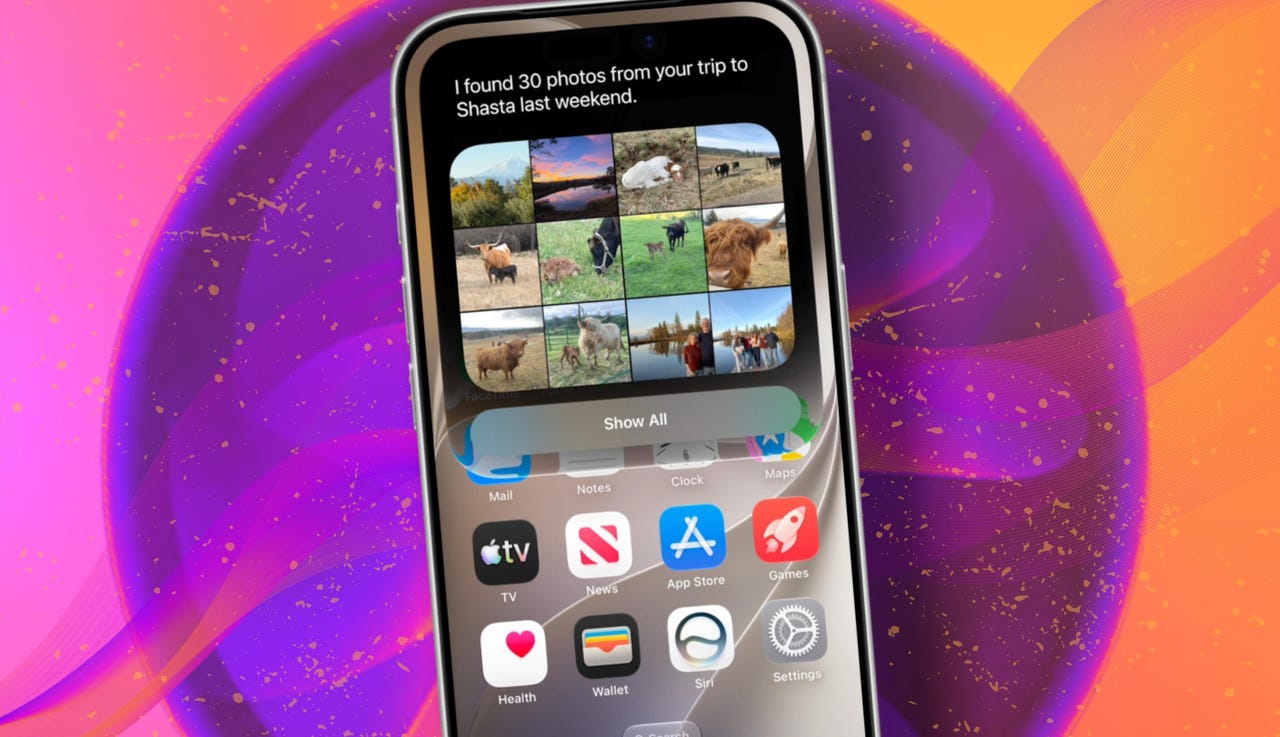
At WWDC 2026 in June, the company introduced Siri AI, a new version of Siri “powered by Apple Intelligence.” Apple said Siri AI is more conversational, understands personal context, can answer broader questions, and can take action across apps. It can also use my information from messages, emails, photos, notes, and the screen itself to get more done on my behalf.

Also: The two biggest iOS 27 features at WWDC for me had nothing to do with Siri AI

The catch? (There’s always one, right?) The iOS 27 developer beta needs to be installed first, and even then, there is a waitlist.

How to get Siri AI

What you’ll need: An iPhone 15 Pro or Pro Max, any iPhone 16 model, or any iPhone 17 model running the iOS 27 developer beta.

Install the iOS 27 developer beta on a secondary device, but be sure to back it up first. Remember, developer betas are unfinished software. Apps can crash or glitch, battery life can drain, and features can disappear.

The good news is Apple no longer requires a $99-a-year Apple Developer Program membership just to get access to beta software. A free Apple Developer account is enough. To join, if you haven’t before, simply go to Apple’s Developer website or use the Apple Developer app, sign in, and agree to the developer terms.

Also: 3 new MacOS 27 features make it worth upgrading right away for me – Siri included

Once that’s done, any new developer beta will automatically appear for the iPhone associated with that Apple Account. To check for iOS 27 and install it now, open Settings > General > Software Update > Beta Updates. From there, select iOS 27 Developer Beta, go back to the Software Update screen, and install the update.

Need help? Check out ZDNET’s guide on installing the iOS 27 developer beta.


Show more

Install the iOS 27 developer beta

Elyse Betters Picaro / ZDNET

After the iOS 27 developer beta is installed, the iPhone will reboot, but Siri AI will not automatically be available to try. Apple is using a waitlist. To join it, open the Settings app, go to Apple Intelligence and Siri, and select “Try New Siri.” Follow the prompts to opt in. Once a spot opens, a notification will appear saying New Siri is available.

Also: Getting real about WWDC and Siri AI – Video

Apple has not confirmed how long the wait will take, but it has said Siri AI will be available in beta “later this year.”


Show more

Join the Siri AI waitlist

Elyse Betters Picaro / ZDNET

Should you wait to try Siri AI?

Maybe. The iOS 27 developer beta is the only route to Siri AI right now. But it’s meant for developers testing apps and APIs, not for most people who need a stable daily phone. Only install it on an iPhone that’s not used every day, or wait for the iOS 27 public beta. That’s expected in July and is easy for anyone to try. An official release for the general public isn’t expected until this fall.

Also: How Data Can Improve Your Health and Wellness

As for me? I joined. I have a spare iPhone running the iOS 27 developer beta right now, and the first thing I did was get on the waitlist to try Siri AI. But that’s because I’m usually excited to try AI tools, and I want to play with the new Siri and be able to write about it. 

Should you join Siri Ai waitlist?

Elyse Betters Picaro / ZDNET

What can Siri AI do?

Apple said the new Siri AI is “a dramatically more capable and conversational assistant” that can help you “find information and get things done throughout the day.” That’s nice, but what, specifically, can it do? According to Apple, the new Siri AI can:

Also: Will your iPhone support Siri AI? The answer is complicated

  • Access “broad world knowledge for up-to-date answers” on any topic.
  • Provide “detailed responses” and “natural back-and-forth conversation.”
  • Use “personal context” in messages, emails, and photos to help find what you need.
  • Find details like restaurant tips, hotel confirmations, and trip photos.
  • Understand what’s on screen and answer questions about it.
  • Use “Visual Intelligence” in Camera and screenshots.
  • Take actions across apps, including drafting emails and editing or sharing photos.
  • Let you ask about images, files, and text from context menus.
  • Generate, rewrite, and proofread text systemwide.
  • Match punctuation and tone in Mail and Messages based on how you usually write.
  • Save “conversation history” in a dedicated Siri app.
  • Offer more expressive voices and better dictation.
  • Help split bills with Apple Cash.
  • Run across iPhone, iPad, Mac, Apple Watch, CarPlay, AirPods, and Vision Pro.
  • Work from Spotlight on iPad and Mac.

When will Siri AI be available?

Apple said it will be available in beta “later this year,” starting in English.

Which iPhone models support Siri AI?

The answer is complicated, but here’s my best guess:

  • iPhone 15 Pro and iPhone 15 Pro Max
  • All iPhone 16 models
  • Any later iPhone models

Apple hasn’t provided a supported device list, but its iOS 27 page shows Siri AI requires “an Apple Intelligence-enabled device.” Apple’s support page for Apple Intelligence also lists “iPhone 15 Pro models, and iPhone 16 models or later.” Apple’s iOS page uses similar wording for Apple Intelligence in iOS 27, as well: “all iPhone 16 models and later, iPhone 15 Pro, iPhone 15 Pro Max.”

There are also regional limits. Apple said Siri AI will “not initially” be available in the EU on iPhone and iPad.


Show more


Source link