Maple Grove Daily

Maple Grove Daily

Subscribe to Our Newsletter

Get our latest articles delivered straight to your inbox. No spam, we promise.


We may receive a commission on purchases made from links.

When it comes to tools, yard care, and other home improvement material and equipment, Lowe’s and Harbor Freight are two of the largest names in the U.S. market. Harbor Freight is certainly more focused on tools and hardware, with several budget-friendly quality tools in its catalogue. Meanwhile, Lowe’s will happily sell you a yard care power tool set and a dishwasher in the same transaction, while also offering unexpected services like solar panel installation. When it comes to the tools they offer, however, the two companies are pretty similar.

In the past, we’ve compared Home Depot to Walmart or Costco, and it wasn’t hard to find some areas where one outshines the other. After all, we were comparing department stores to specialized hardware stores. It’s clear that Lowe’s and Harbor Freight — two companies that operate in the same sector and act in no small part through the brands they own — look much more similar, which makes it a bit more challenging to distinguish which place is better to shop for certain items.

Still, we managed to find three products from Lowe’s that Harbor Freight can’t compete with. These are niche tools with specific use cases, and you’ll be hard-pressed to find something better at Harbor Freight. They may not be the only Lowe’s items that outperform competing products at Harbor Freight, but they’re hard to disagree with.

Milwaukee Convertible Hand Truck

The Milwaukee Convertible Hand Truck sold by Lowe’s has 150 pounds of capacity when used like a normal hand truck in vertical position and 300 pounds in horizontal position. While Harbor Freight’s closest item, the Franklin 2-in-1 Convertible Hand Truck, can carry far more with an 800-pound carrying capacity, Lowe’s option works much better as a portable unit. As some users point out, it’s great if you don’t need (or if you already have) a bulkier tool that can move heavier items.

The Franklin model weighs 30 pounds on its own, but the Milwaukee hand truck is half as heavy. It has 5-inch tires instead of the 10-inch monsters of the Harbor Freight model, and it is not as wide, which makes it easier to maneuver in small spaces. No, it’s not made by the Milwaukee you’re thinking about. Instead, this is an established alternative brand that makes affordable tools (though mostly hand trucks). Lots of Lowe’s users found the hand truck to be useful when moving, while others said it was helpful to use when setting up event spaces.

What really makes this unit the best portable hand truck option, however, is its ability to fold down and become even smaller. We haven’t tested this item ourselves, but according to Lowe’s instructional videos and some user reviews, unfolding it and switching between vertical and horizontal positions is pretty simple. Plus, it’s only $79.99, which is $10 less than Harbor Freight’s comparable model.

Kobalt 850-Lumen 6 -Mode LED Rechargeable Headlamp

At first blush, Kobalt’s 850-lumen headlamp looks like a modestly more powerful version of the Braun 700 Lumen rechargeable LED headlamp sold by Harbor Freight. A more careful examination, however, reveals a few pivotal differences. First, while the Kobalt measures 850 Lumens max by default, it can be pushed momentarily to 1,000 lumens using “Turbo” mode. This makes Lowe’s option significantly more powerful and versatile. As seen in a YouTube video by The Backwoods Mechanic, this small torch can light up a much larger area than what you’d think, as Lowe’s customer reviews often point out.

Both lights are rechargeable and cost about the same price. Speaking broadly, versatility is the most important advantage the Kobalt model has over the Braun. The latter can change the area covered by the light from a broad but shallow view to a focused beam. It also has three modes: high power, low power, and strobe. Meanwhile, Lowe’s offers a headlamp with more max brightness and four power modes — plus strobing and red light modes.

These features are all appreciated by user reviewers, who say the light allows you to keep your hands free to use other tools. Some users complained in the reviews on both product pages that these lights don’t last as long on a full charge as the manufacturer claims. However, the added brightness and versatility of the Kobalt model makes it a more worthwhile purchase.

Kobalt Quiet Tech 24-volt String Trimmer and Leaf Blower Kit

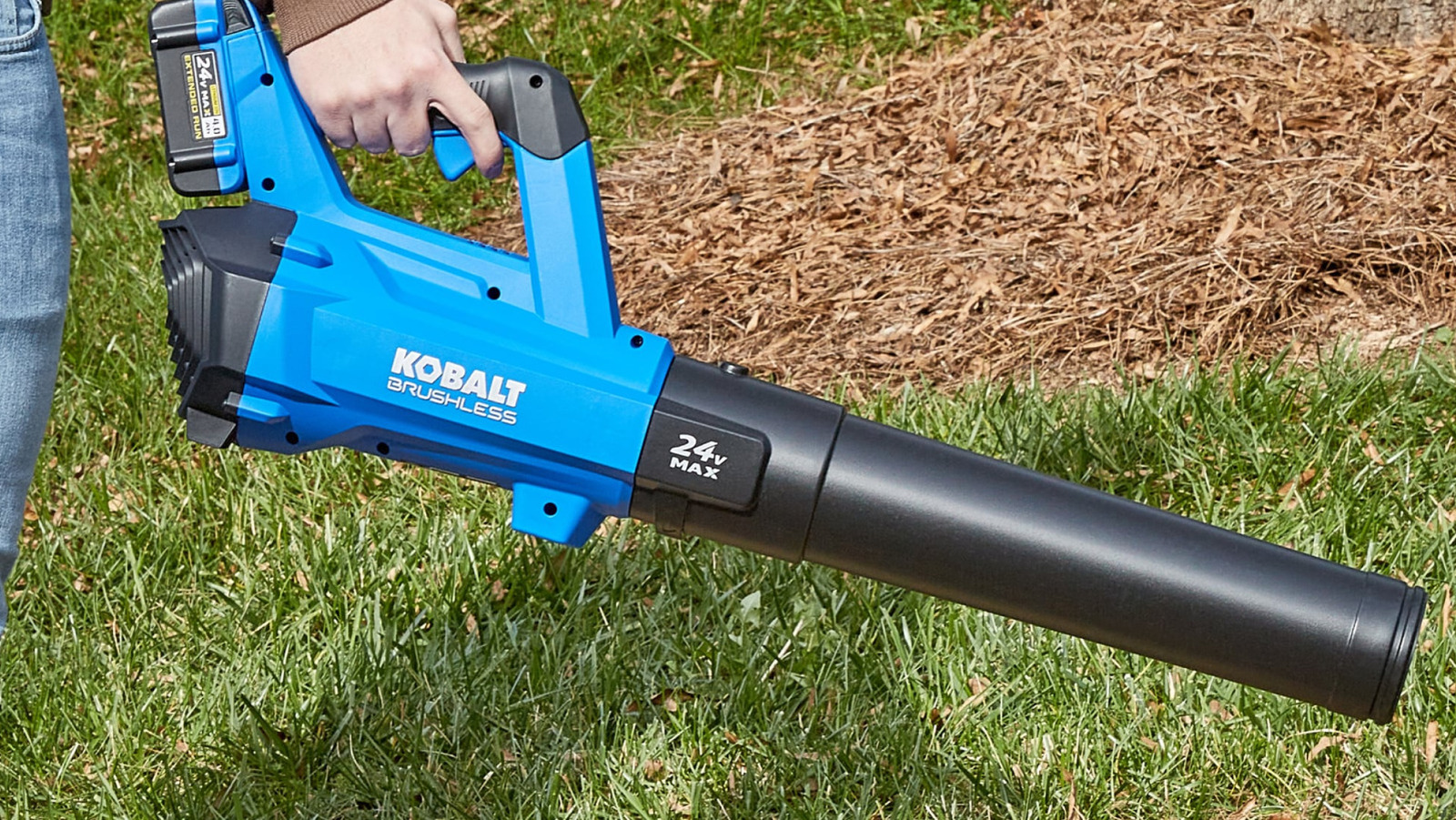
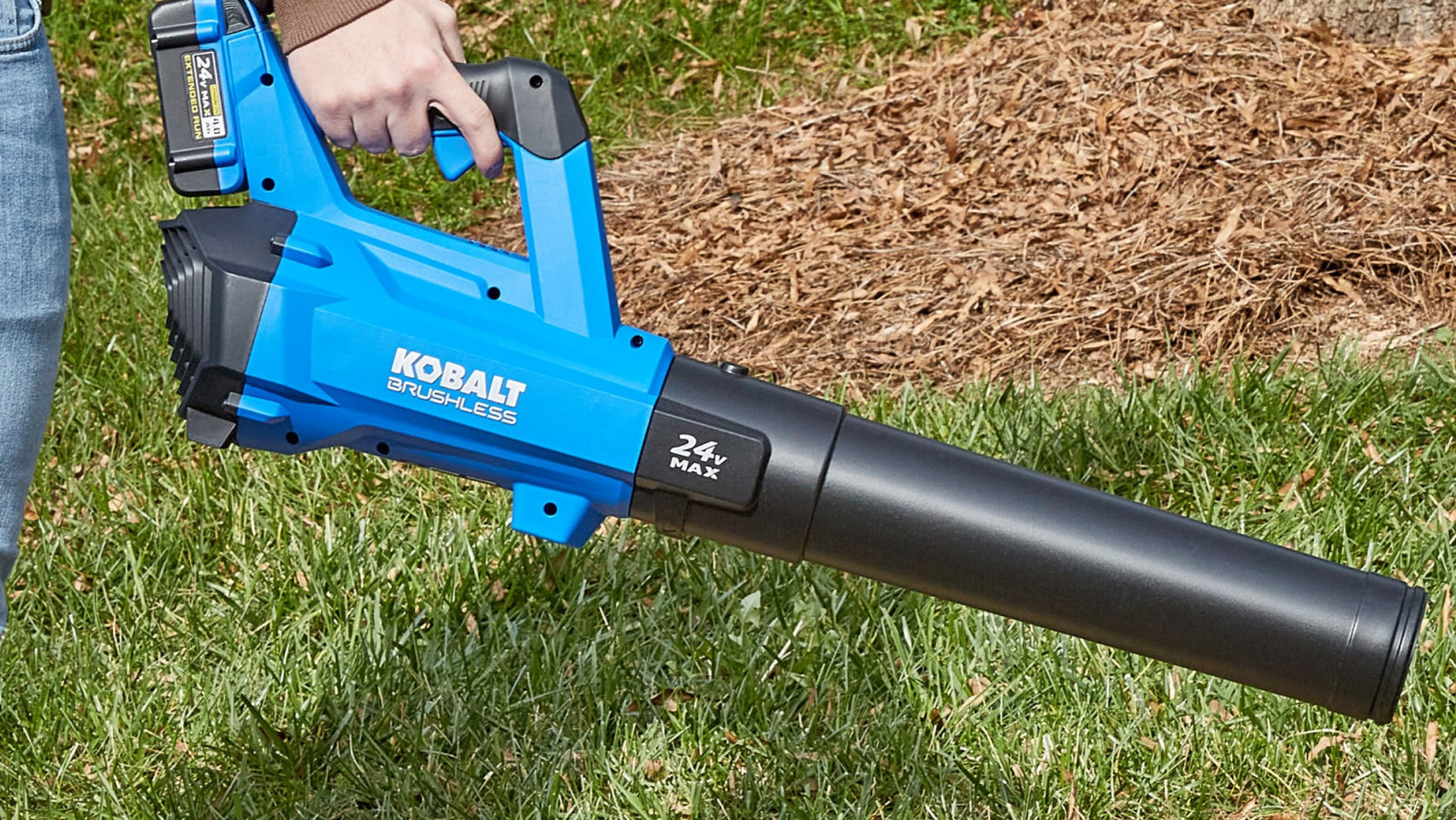
Kobalt is all over this article. That’s unsurprising, seeing as it’s one of the brands owned by Lowe’s. The brand’s Quiet Tech String Trimmer, Blower, and Battery Kit also beats out its competition at Harbor Freight, as customers say it is not only more powerful than its competitors but also quieter.

Priced at $219, this set includes a blower and a string trimmer, as well as a 24V/4Ah battery and its charger. For some users, this is enough for a small yard. Others claim that you would be better served by a larger battery if you need to care for a larger surface. You can find a comparable bundle of tools at Harbor Freight by getting the $55 Bauer string trimmer, the $55 blower, and the $100 battery and charger combo. Combined, these will cost you $210.

While the Kobalt bundle is slightly pricier, it’s worth it for the better quality. Kobalt’s blower has a variable speed trigger and moves air at a maximum of 500 cfm at 120 mph, while the Bauer has two static speeds and stops at 338 cfm and 96 mph. Kobalt’s string trimmer also has a wider and adjustable swath that can stretch between 13 and 15 inches, whereas the Bauer model can only span 12 inches. According to a user review, the Kobalt items are also easy to put together and use even for beginners. 

Methodology

To determine which tools offered by Lowe’s were the best, we relied on customer reviews and only included items that had at least a 3.9-star rating out of 5. We then found alternatives at Harbor Freight that had similar offerings at a comparable price. Finally, we compared the items to find products at Lowe’s that had extra features or would get you more value for your purchase. When available, we considered the opinions of users and professional reviewers when building this list.





Source link


Samsung S95H OLED TV at CES

Kerry Wan/ZDNET

Follow ZDNET: Add us as a preferred source on Google.


ZDNET’s key takeaways

  • Smart TVs track viewing habits with ACR tech.
  • Collected data fuels billions in targeted ads.
  • Turning off ACR protects privacy but takes effort.

Most modern smart TVs come with a silent partner: Automatic Content Recognition (ACR). This ad-tracking tech monitors everything on your screen in real-time, feeding your viewing history into a database to build a precise profile of your habits. It’s the engine behind those eerily specific ads — and it’s likely running the moment you press power.

Also: Own a Samsung TV? I changed these 6 settings to make the system run like new again

What’s the incentive behind this invasive technology? According to market research firm eMarketer, in 2022, advertisers spent an estimated $18.6 billion on smart TV ads, and these numbers are expected to continue rising.

How does ACR work?

To understand how ACR works, imagine a constant, real-time Shazam-like service running in the background while your TV is on. It identifies content displayed on your screen, including programs from cable TV boxes, streaming services, or gaming consoles. ACR does this by capturing continuous screenshots and cross-referencing them with a vast database of media content and advertisements.

According to The Markup, ACR can capture and identify up to 7,200 images per hour, or approximately two images every second. This extensive tracking provides valuable insights for marketers and content distributors, as it reveals connections between viewers’ personal information and their preferred content. By “personal information,” I mean email addresses, IP addresses — and even your physical street address.

Also: Your Roku has hidden settings and menu screens – here’s how to unlock them

By understanding what viewers watch and engage with, marketers can make decisions on content recommendations to create bespoke advertising placements. They can also track advertisements that lead to purchases.

Because ACR operates clandestinely in the background, many of us aren’t even aware of its active presence each time we’re enjoying our favorite shows. Opting out of using ACR is complex and sometimes challenging. Navigating your TV settings might take several dozen clicks to better protect your privacy.

If you, like me, find this feature intrusive or unsettling, there’s a way to disable it on your smart TV. It may take some patience, but below is a How-To list for five major brands that demonstrates how to turn off ACR.

How to turn off ACR on a smart TV

  1. Press the Home button on your remote control.
  2. Navigate to the left to access the sidebar menu.
  3. In the sidebar menu, choose the Privacy Choices option.
  4. Select the Terms & Conditions, Privacy Policy option.
  5. Ensure that the checkbox for Viewing Information Services is unchecked. This will turn off ACR and any associated ad targeting.
  6. Select the OK option at the bottom of the screen to confirm your changes.


Show more

  1. Press the Home button on your remote control to access the home screen.
  2. Press the Settings button on your remote.
  3. In the settings side menu, select the Settings option.
  4. Navigate to and select the General option.
  5. In the General menu, choose System.
  6. Select Additional Settings.
  7. In Additional Settings, locate and toggle off the Live Plus option.

LG further allows you to limit ad tracking, which can be found in Additional Settings.

  1. In the Additional Settings menu, select Advertisement.
  2. Toggle on the Limit AD Tracking option.

You can also turn off home promotions and content recommendations:

  1. In the Additional Settings menu, select Home Settings.
  2. Uncheck the Home Promotion option.
  3. Uncheck the Content Recommendation option.


Show more

  1. Press the Home button on your remote control to access the main menu.
  2. Navigate to and select Settings.
  3. Choose Initial Setup.
  4. Scroll down and select Samba Interactive TV.
  5. Select Disable to turn off Samba TV, which is Sony’s ACR technology.

Sony also allows for enhanced privacy by disabling ad personalization:

  1. Go to Settings.
  2. Select About.
  3. Choose Ads.
  4. Turn off Ads Personalization.

As an extra step, you can entirely disable the Samba Services Manager, which is embedded in the firmware of certain Sony Bravia TVs as a third-party interactive app.

  1. Go to Settings.
  2. Select Apps.
  3. Select Samba Services Manager.
  4. Choose Clear Cache.
  5. Select Force Stop.
  6. Finally, select Disable.

If your Sony TV uses Android TV, you should also turn off data collection for Chromecast:

  1. Open the Google Home app on your smartphone.
  2. Tap the Menu icon.
  3. Select your TV from the list of devices.
  4. Tap the three dots in the upper right corner.
  5. Choose Settings.
  6. Turn off Send Chromecast device usage data and crash reports.


Show more

  1. Press the Home button on your remote control to access the main menu.
  2. Navigate to and select Settings.
  3. Choose System.
  4. Select Privacy.
  5. Look for an option called Smart TV Experience, Viewing Information Services, or something similar.
  6. Toggle this option off to disable ACR.

To disable personalized ads and opt out of content recommendations:

  1. In the Privacy menu, look for an option like Ad Tracking or Interest-Based Ads.
  2. Turn this option off.
  3. Look for options related to content recommendations or personalized content.
  4. Disable these features if you don’t want the TV to suggest content based on your viewing habits.


Show more

  1. Press the Home button on your TCL TV remote control.
  2. Navigate to and select Settings in the main menu.
  3. Scroll down and select the Privacy option.
  4. Look for Smart TV Experience and select it.
  5. Uncheck or toggle off the option labeled Use Info from TV Inputs.

Also: Is your Roku TV spying on you? It’s possible, but here’s how you can easily stop it

For extra privacy, TCL TVs offer a few more options, all of which can be found in the Privacy menu:

  1. Select Advertising.
  2. Choose Limit ad tracking.
  3. Again, select Advertising.
  4. Uncheck Personalized ads.
  5. Now, still in the Privacy menu, select Microphone.
  6. Adjust Channel Microphone Access and Channel Permissions as desired.


Show more

Remember that while these steps will significantly reduce data collection, they may also limit some smart features of your TV. Also, it’s a good idea to periodically check these settings to ensure they remain as you’ve set them. Especially after software updates, your revised settings may sometimes revert to their default state.

Also: How to clear your TV cache (and why you shouldn’t wait to do it)

The driving force behind targeted advertisements on smart TVs is ACR technology, and its inclusion speaks volumes about manufacturers’ focus on monetizing user data rather than prioritizing consumer interests.

For most of us, ACR offers few tangible benefits, while the real-time sharing of our viewing habits and preferences exposes us to potential privacy risks. By disabling ACR, you can help keep your data to yourself and enjoy viewing with some peace of mind.

Editor’s note: This article was first published in 2024. It was last thoroughly updated, fact-checked, and reviewed in January 2026.


Source link

Recent Reviews