The World’s Smallest Wellness Wearable, Smart Earrings, Just Launched on Kickstarter


Wearables like smartwatches and smart rings can be bulky, making them difficult to wear 24/7. That’s a gap that smart earring creator Lumia Health hopes to fill with the Lumia 2 device, which was originally created in collaboration with researchers at Johns Hopkins, Duke and Harvard to assist patients with chronic blood flow disorders.

The company calls the Lumia 2 smart earrings the world’s smallest wellness wearable. It’s an earring back-like device about the size of a coffee bean that houses a second-generation PreciseLight sensor, processors, a battery and additional health sensors.

On Tuesday, the Lumia 2 earrings launched on Kickstarter, earning more than $800,000, which is over 80 times the original goal of $10,000.

What Lumia 2 tracks

Weighing less than 1 gram and being five times smaller than AirPods, miniaturized biosensing technology allows the Lumia 2 smart earrings to track over 20 health metrics, including sleep, activity (steps, calories and active minutes), readiness, the menstrual cycle, temperature, heart rate and heart rate variability, blood oxygen (SpO2) and blood flow. The latter is what inspired the creation of Lumia Health.

“Six years ago, my father fell and broke six ribs because not enough blood flow was getting to his head,” Daniel Lee, co-founder and CEO of Lumia Health, said in a Kickstarter video. “We should be able to measure blood flow in real time, so we can avoid some of these catastrophic injuries.”

Event Tagging is also available, so you can log your activities and behaviors, such as caffeine intake, meditation and travel. 

All of this will be available in the accompanying app, which is iOS– and Android-compatible with an iPhone SE (second generation) or later, iOS 17 or later and Android 11 or later, with Bluetooth Low Energy 5.0 or later.

Silver Lumia 2 hoop earrings in a person's hear with their hair pulled back.

Track sleep, blood flow, heart rate, energy and more with Lumia 2.

Lumia

Different ways to wear it, one significant location

With its three designs — the stud, huggie hoops and ear cuffs for those without pierced ears — Lumia 2 places its sensors directly behind your ear. Compared with wrist- and finger-based wearable devices, this location near the heart and ear’s shallow blood vessels provides, according to Lumia Health, a stronger signal that is less affected by movement, enabling continuous, uninterrupted data.

While it was designed to match most looks in gold, silver and titanium finishes, you can also use Lumia 2’s SwitchBack technology to attach the device to your already-existing collection of push-back earrings. 

Battery life that never ends

Unlike other wearables that require removal for charging, the Lumia 2 uses swappable batteries that each last seven days. Once your battery needs charging, you simply remove it, swap in the fully charged backup and then place your in-need-of-charging battery into the charger so it’s ready seven days later. 

Using a swappable battery supports the company’s claim that the Lumia 2 can collect continuous data, especially when you’re sleeping, since most people charge their devices during this time. 

Every 3 minutes, the Lumia 2 collects blood flow and heart rate metrics, including HRV. You can also enable Live Mode to capture data once per second for a fixed period, such as when you’re exercising or want immediate feedback. 

There are plans to create a configurable data capture rate that lets you select a higher sampling frequency, such as once per minute, but this will sacrifice battery life.

Silver Lumia 2 smart earrings with a swappable battery.

With swappable batteries, you never have to wait for the Lumia 2 to charge.

Lumia

Privacy

Data collected by Lumia 2 is encrypted, anonymized and access-controlled, according to the company, which states in its Kickstarter FAQs that it shares your data only with third-party cloud server providers, such as AWS, to help Lumia Health securely store and serve you your data. 

Or, if you opt in to the Data From the People, For the People program, you would authorize your data to be added to a de-identified, aggregated pool of open-source data provided to top researchers. Lumia Health vets these research partners to ensure they’re working in the best interest of both public health and the health conditions the company aims to serve.

When asked about how research partners are vetted, a Lumia Health representative didn’t immediately respond to a request for comment.

Note that Lumia 2 is not an FDA-cleared medical device, meaning it’s not designed to diagnose or treat any health condition.

Cost and membership

Lumia 2’s base price is $249, while hoops, cuffs and studs will cost extra. All finishes — gold, silver and titanium — are priced equally. 

However, a membership is required. The monthly fee is $20, while the one-year plan is $14 per month, and the two-year plan is $10 per month. With all three, you get app insights, unlimited cloud storage and software updates.

Currently, the most affordable Kickstarter reward is priced at $279 and includes a smart earring back, a titanium cuff, two titanium studs, two batteries and a six-month membership plan. Pricier plans offer different designs, finishes and plans.

Shipping to the US is free, while shipping to Canada (except Québec) is about $20. 

A silver Lumia 2 hoop earring on a marble countertop.

A membership is required to access Lumia 2’s insights through its app.

Lumia

The Lumia timeline

Lumia Health was founded in early 2020, and yes, there was once a Lumia 1, released in February 2025. One month later, in March, the concepting for Lumia 2 began, and it was officially announced in November. 

Now that the Lumia Kickstarter has begun, the device’s beta launch is scheduled for September, with shipments expected in December. Beta access was limited to 500 backers and has already sold out.


Source link

Leave a Reply

Subscribe to Our Newsletter

Get our latest articles delivered straight to your inbox. No spam, we promise.

Recent Reviews


The Windows Insider Program is about to get much easier

Ed Bott / Elyse Betters Picaro / ZDNET

Follow ZDNET: Add us as a preferred source on Google.


ZDNET’s key takeaways

  • Microsoft is making the Insider Program less complicated.
  • Beta channel will be a more reliable preview of the next retail release.
  • Other changes will allow testers to quickly enable/disable new features.

Last month, Microsoft took official notice of its customers’ many complaints about Windows 11. Pavan Davaluri, the executive vice president who runs the Windows and Devices group, promised sweeping changes to Windows 11. Today, the company announced the first of those changes in a post authored by Alec Oot, who’s been the principal group product manager for the Windows Insider Program since January 2024.

Those changes will streamline the Insider program, which has lost sight of its original goals in the past few years. (For a brief history of the program and what had gone wrong, see my post from last November: “The Windows Insider Program is a confusing mess.”)

Also: If Microsoft really wants to fix Windows 11, it should do these four things ASAP

If you’re currently participating in the Windows Insider Program, these are meaningful changes. Here’s what you can expect.

Simplifying the Insider channel lineup

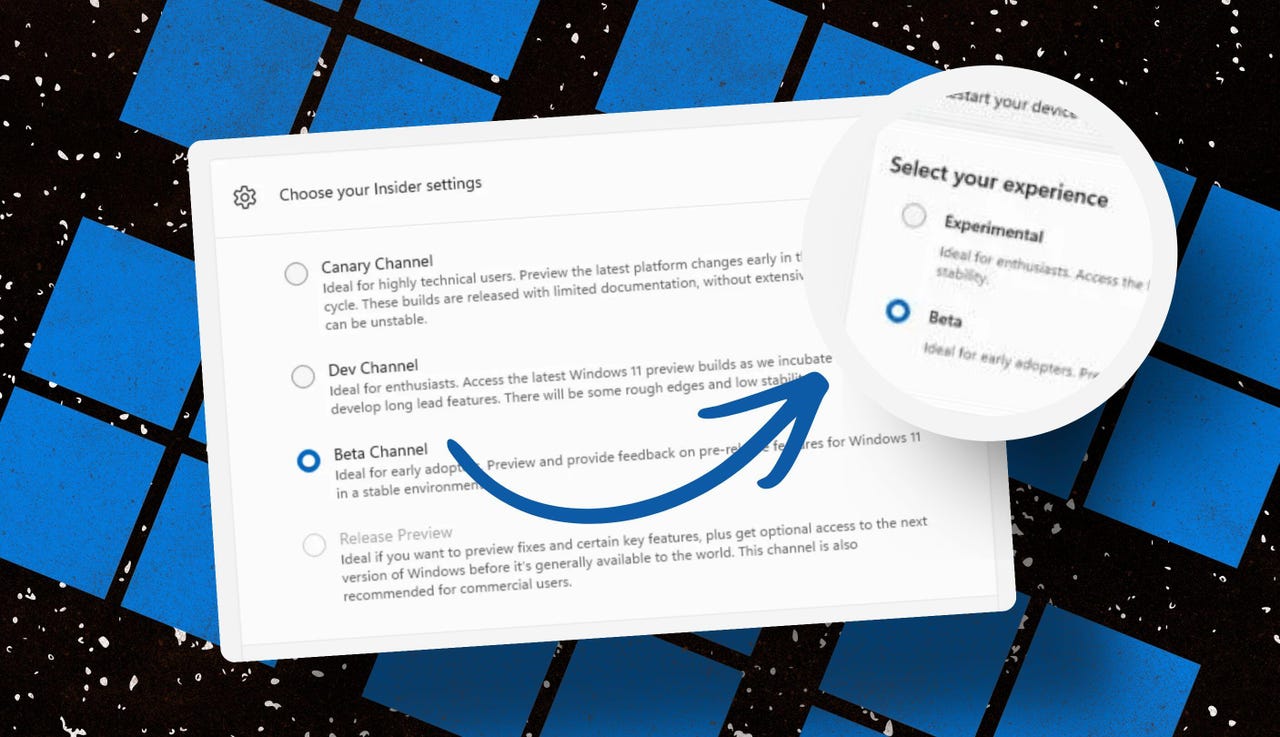
Throughout the Windows 11 era, signing up for the Insider program has required choosing one of four channels using a dialog in Windows Settings. Here’s what those options look like today on one of my test PCs.

insider-program-channels-lineup-old

The current Insider channel lineup is confusing, to say the least.

Screenshot by Ed Bott/ZDNET

Which channel should you choose? As the company admitted in today’s post, “the channel structure became confusing. It was not clear what channel to pick based on what you wanted to get out of the program.”

The new lineup consists of two primary channels: Experimental and Beta. The Release Preview channel will still be available, primarily for the benefit of corporate customers who want early access to production builds a few days before their official release. That option will be available under the Advanced Options section.

windows-insider-channel-lineup-new

This simplified lineup is easier to follow. Beta is the upcoming retail release, Experimental is for the adventurous.

Screenshot courtesy of Microsoft

Here’s Microsoft’s official description of what’s in each channel now, with the company’s emphasis retained:

  • Experimental replaces what were previously the Dev and Canary channels. The name is deliberate: you’re getting early access to features under active development, with the understanding that what you see may change, get delayed, or not ship at all. We’ve heard your feedback that you want to access and contribute to features early in development and this is the channel to do that.
  • Beta is a refresh of the previous Beta Channel and previews what we plan to ship in the coming weeks. The big change: we’re ending gradual feature rollouts in Beta. When we announce a feature in a Beta update and you take that update, you will have that feature. You may occasionally see small differences within a feature as we test variations, but the feature itself will always be on your device.

These changes will apply to the Windows Insider Program for Business as well.

Offering a choice of platforms

For those testers who want to tinker with the bleeding edge of Windows development, a few additional options will be available in the Experimental channel. These advanced options will allow you to choose from a platform that’s aligned to a currently supported retail build. Currently, that’s Windows 11 version 25H2 or 26H1, with the latter being exclusively for new hardware arriving soon with Snapdragon X2 Arm chips.

Also: Microsoft account vs. local account: How to choose

There will also be a Future Platforms option, which represents a preview build that is not aligned to a retail version of Windows. According to today’s announcement, this option is “aimed at users who are looking to be at the forefront of platform development. Insiders looking for the earliest access to features should remain on a version aligned to a retail build.”

windows-insider-advanced-options-new

The Future Platforms option is the equivalent of the current Canary channel

Screenshot courtesy of Microsoft

Minimizing the chaos of Controlled Feature Rollout

Last month, I urged Microsoft to stop using its Controlled Feature Rollout technology, especially for builds in the Beta channel. Apparently, someone in Redmond was listening.

One of the most common questions we receive from Insiders is “why don’t I have access to a feature that’s been announced in a WIP blog?” This is usually due to a technology called Controlled Feature Rollout (CFR), a gradual process of rolling out new features to ensure quality before releasing to wider audiences. These gradual rollouts are an industry standard that help us measure impact before releasing more broadly. But they also make your experience unpredictable and often mean you don’t get the new features that motivated many of you to join the Insider program to begin with.

Moving forward, Insider builds in the Beta channel will no longer suffer from this gradual rollout of features. Meanwhile, the company says, “Insiders in the Experimental channel will have a new ability to enable or disable specific features via the new Feature Flags page on the Windows Insider Program settings page.”

windows-insider-feature-flags

Builds in the Experimental channel will include the option to turn new features on or off.

Screenshot courtesy of Microsoft

Not every feature will be available from this list, but the intent is to add those flags for “visible new features” that are announced as part of a new Insider build.

Making it easier to change channels

The final change announced today is one I didn’t see coming. Historically, leaving the Windows Insider Program or downgrading a channel (from Dev to Beta, for example) has required a full wipe and reinstall. That’s a major hurdle and a big impediment to anyone who doesn’t have the time or technical skills to do that sort of migration.

Also: Why Microsoft is forcing Windows 11 25H2 update on all eligible PCs

Beginning with the new channel lineup, it should be easier to change channels or leave the program without jumping through a bunch of hoops.

To make this a more streamlined and consistent experience, we’re making some behind the scenes changes to enable Insider builds to use an in-place upgrade (IPU) to hop between versions. This will allow in most cases Insiders to move between Experimental, Beta, and Release Preview on the same Windows core version, or leave the program without a clean install. An IPU takes a bit more time than your normal update but migrates your apps, settings, and data in-place.

If you’ve chosen one of the future platforms from the Experimental channel, those options don’t apply. To move back to a supported retail platform, you’ll need to do a clean install.

Also: Apple, Google, and Microsoft join Anthropic’s Project Glasswing to defend world’s most critical software

The upshot of all these changes should make things a lot clearer for anyone trying to figure out what’s coming in the next big feature update. Beta channel updates, for example, should offer a more accurate preview of what’s coming in the next big feature update, so over the next month or two we should get a better picture of what’s coming in the 26H2 release, due in October.

When can we start to see those changes rolling out to the general public? Stay tuned.


Source link