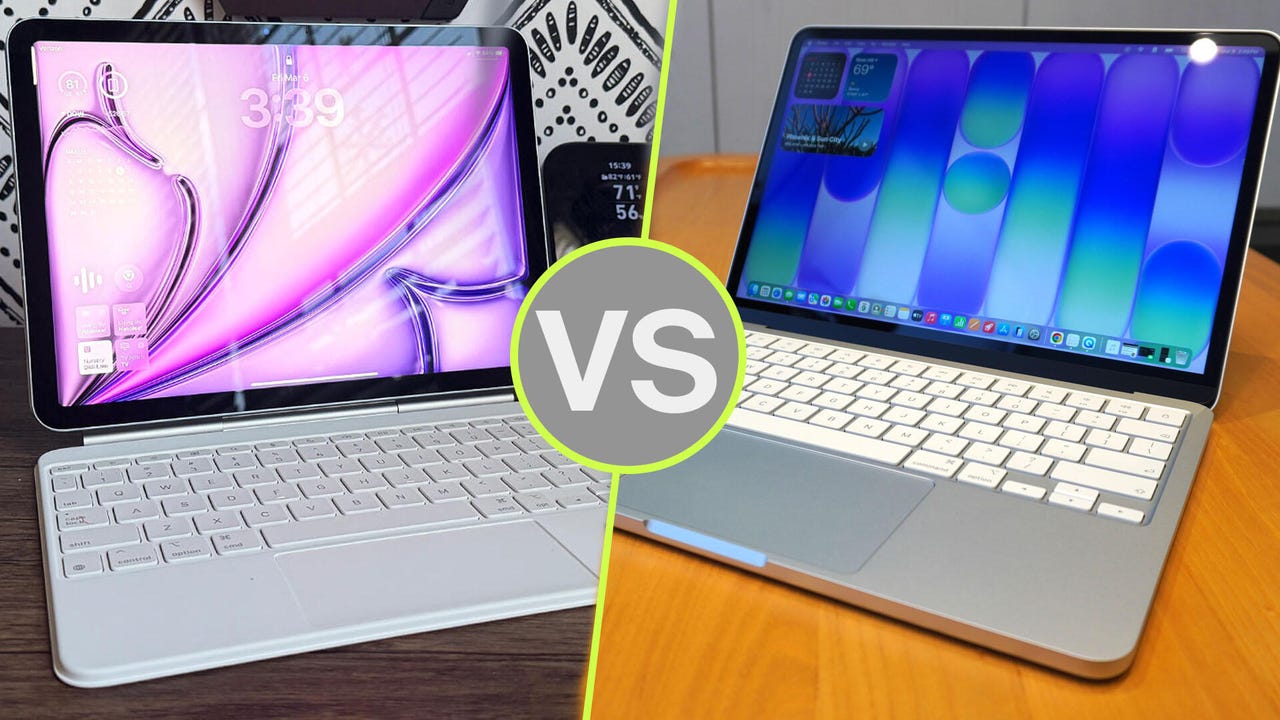
MacBook Neo vs. iPad Air: How I’m choosing between Apple’s $599 laptop and tablet


iPad Air M4 vs MacBook Neo

Maria Diaz and Kyle Kucharski/ZDNET

Follow ZDNET: Add us as a preferred source on Google.


With the introduction of the MacBook Neo this spring, Apple added a fresh entry-level option to its hardware lineup. Before, if you didn’t want to commit to a new MacBook Air or Pro, you were relegated to the iPad, which offers a significantly different user experience. (Or you could buy a discounted MacBook that’s a year or two old.)

Also: MacBook Neo review: My biggest concern with Apple’s near-perfect budget laptop

But all that has changed. The new MacBook Neo starts at $599 — the same price as the latest affordable iPad Air M4 with 128GB of storage, bringing the MacBook experience to an accessible price point. This puts these two devices on equal footing, but they’re very different in terms of usability. Which one is a better fit for you? Let’s break it down. 


Specifications

iPad Air M4 (11-inch)

MacBook Neo 

Display

11-inch Liquid Retina display, 500 nits brightness, 264 ppi

13-inch Liquid Retina display, 500 nits brightness

Weight

1.03 pounds (465 grams)

2.7 pounds (1.23 kg)

Processor

Apple M4  

Apple A18 Pro

RAM/Storage 12GB of memory with 128GB-1TB storage 8GB of memory, 256GB-512GB storage
Battery Up to 10 hours of web surfing and watching video on Wi-Fi, 9 hours on 5G Up to 11 hours of web surfing, 16 hours video streaming
Camera Landscape 12MP Center Stage camera, 12MP wide camera, 4K video 1080p FaceTime HD camera, HD video recording
Connectivity Wi-Fi 7, Bluetooth 6, 5G Wi-Fi 6E, Bluetooth 6
Price Starting at $599 Starting at $599

You should buy the iPad Air M4 if…

iPad Air (2026)

Maria Diaz/ZDNET

1. You want the touchscreen experience

It might seem obvious, but the iPad is fundamentally different than a MacBook as a touch device. iPadOS is optimized for touch or use with an Apple Pencil, and as such, offers a more tactile, intuitive form of interaction. 

iPads are so popular because they don’t really feel like “computers” — the ability to tap, drag, and zoom with your fingers directly is like working with a physical object. This makes them great for younger kids, older folks, or anyone with visual impairments. 

Read the review: iPad Air M4

For artists who want the tactile experience and don’t need the MacBook Pro’s processing power, the iPad Air offers a much more accessible middle ground, with a vivid display and stylus support for sketching, illustrating, and iterating on designs. 

2. You’re an artist or creator 

iPad Air M4

Kerry Wan/ZDNET

The iPad Air M4 features a 12MP Center Stage camera, 4K video recording at up to 30 fps, and a better display, making it better for creators who want to shoot photos or videos. The smaller, thinner frame is way more conducive to shooting content, and stylus support makes for fast, intuitive image editing. 

Additionally, the M4 processor in the iPad Air has 12GB of unified memory to work with, alongside an eight-core CPU and nine-core GPU (compared to a six-core and five-core in the Neo), bringing significantly more processing power to the table.

3. You want a better display 

The MacBook Neo opened up a new entry point into the MacBook line, but its display is not as flashy as those on the MacBook Air or Pro. The iPad is a much better option for anyone who wants a brilliant display, but doesn’t need the top-of-the-line processing power in the MacBook Pro. 

Also: MacBook Neo vs. MacBook Air: I compared Apple’s new laptops, and here’s my winner

The gorgeous tandem OLED display on the iPad has 264 pixels per inch and an optional nano-texture display, offering a brighter, more vivid image. This benefits artists, but it’s also a better choice for streaming movies, as video content looks crisper and more realistic. 

You should buy the MacBook Neo if…

Apple MacBook Neo in silver

Kyle Kucharski/ZDNET

1. You want the MacBook experience 

The Neo delivers a satisfying MacBook experience, though there are some trade-offs. I’ve written about this at length, but Apple did a great job balancing build and features, retaining the best features from more powerful MacBooks, but keeping the cost low with more modest hardware. 

For example, you don’t get backlighting on the Neo’s keyboard, but the keys still feel functional. The Neo’s trackpad is not haptic, but it is still better than many other Windows PC in the price range. 

Also: After using MacBook Neo, it’s clear Windows needs to rethink its PC strategy (and fast)

The result is a laptop that feels almost identical to a MacBook Air or Pro on the surface — its only limitation being its processing power. If you’re using it for what it’s designed for — everyday tasks, working out of the browser, and using Apple’s iPhone integrations — it feels great. 

2. You want a device for work 

MacBook Neo Citrus

Kerry Wan/ZDNET

On that note, if you’re looking for something to use for work-related tasks, the Neo is a better option. It runs the same operating system as a MacBook Pro, with a keyboard and mouse that offer better functionality for work-related tasks. Although you can certainly get a keyboard for the iPad Air and connect it to a wide range of accessories, MacOS is simply better for productivity tasks, while iPadOS shines with creative tasks, tablet gaming, and media. 

3. You want the more price-efficient option

Both the MacBook Neo and iPad Pro start at $599, but the Neo is a little more cost-effective. If the iPad Air M4 is a high-performing niche device, the Neo is more entry-level but also more versatile. The Neo has trade-offs as mentioned, but for the majority of users who want a MacBook for non-demanding workloads, it’s going to feel nearly identical to a higher-specced Mac.

Writer’s choice

I’ve used both products, and personally, I prefer the Neo. It’s a little more of a generalist device, but the pros (low cost, bang for buck) heavily outweigh the cons (lower-end hardware). Compared to other Windows PCs at a similar price point, the Neo offers a very competitive experience, especially if you’re an iPhone user, as it comes with the full suite of iPhone integrations, like Continuity and Phone Mirroring. 

Also: Microsoft was right about the future of PCs – it just took the MacBook Neo to prove it

If you’re an artist or creator committed to a device for those workflows, the iPad Air M4 is a better choice. But for essentially everyone else, the Neo is a better option. Even though the iPad is better for younger kids, the Neo is a commendable entry point into the MacBook ecosystem that scales up to some of the most powerful consumer laptops on the market today.





Source link

Leave a Reply

Subscribe to Our Newsletter

Get our latest articles delivered straight to your inbox. No spam, we promise.

Recent Reviews


We may receive a commission on purchases made from links.

For TV owners, High-Definition Multimedia Interface (HDMI) technology is the gateway to accessing endless content and maximizing your viewing experience. Whether it’s watching films from physical media, streaming content via your preferred subscription platform, or playing games, there are plenty of gadgets you can connect for the perfect entertainment setup in your home.

Apart from investing in the right HDMI cable, choosing the right port makes all the difference. Depending on how old your TV is, you can expect anything from the legacy HDMI 1.0 to even the most recent HDMI 2.2. However, while there’s a big jump in terms of quality between HDMI 2.1 and 2.0, there are plenty of gadgets that can still work perfectly with your HDMI 2.0 port. This is great news if you aren’t so particular about getting the best picture possible. In fact, unless you’re a hardcore gamer or have a TV made for high resolution, it’s likely you’ll be able to get the most out of what you already have without HDMI 2.1 or 2.2 ports.

To help you get the most out of your existing HDMI 2.0 port, we’ve listed broad categories of gadgets that work with it. Next, we share specific models that either maximize the port’s capabilities or still offer a great viewing experience despite the bandwidth limits. To learn how we selected the models that work well with HDMI 2.0 ports, you can skip to our methodology at the end.

1. Streaming sticks

If you own an older TV model but don’t want to trash it yet, streaming sticks are among the most affordable ways to access modern entertainment options on a budget. In fact, the HDMI 2.0 port will already let you maximize the performance of even newer streaming sticks, like the Fire TV Stick HD, which supports 1080p Full HD. So, if your TV can’t do 4K anyway, you don’t really need to get a more expensive model. An Amazon’s Choice product, the Amazon Fire TV Stick HD has an average rating of 4.7 stars from more than 62,000 reviewers.

While many newer smart TVs have built-in streaming capabilities, there are still many benefits to using a streaming device, such as regular security updates. These days, many streaming sticks are marketed as 4K-capable, like the Amazon Fire TV Stick 4K. While we’ve recommended plugging it into an HDMI 2.1 port for the best experience, an HDMI 2.0 port is also perfectly fine for most modern 4K movies and shows. If you have the extra budget, it can be an investment for future upgrades. As of March 2026, over 75,000 Amazon users have rated the Fire TV Stick 4K Max an average of 4.6 stars. However, you can also consider options like the Roku Express 4K, Apple TV 4K, and Google TV Streamer 4K.

2. Sync boxes

There’s something incredibly dramatic about having the lights match the scenes on your TV, and you can do that with a sync box. Whether you’re watching a movie, playing games, or listening to music, sync boxes help elevate your entertainment experience. While many of the latest sync boxes are designed for HDMI 2.1 ports, these are generally backwards compatible with HDMI 2.0 ports, so you can still enjoy them with their reduced capacity, such as the Philips Hue Play HDMI Sync Box 8K, which generated an average rating of 4.2 stars from more than 230 Amazon customers.

Priced at $384.99, you can connect up to 4 input devices. Unless you buy a kit, there’s also the price of the lights, which will vary depending on your screen size. The Philips Hue Play Gradient Smart TV Light Strip is available in three sizes: 55-inch ($274.99), 65-inch ($296.99), and 75-inch ($329.99). In general, many people seem quite satisfied with it, as over 2,000 Amazon users rated it 4.3 stars. 

Lastly, you will need to factor in the cost of the Philips Hue Bridge, which lets you enjoy its integration with smart home ecosystems, like Amazon’s Alexa, Google Home, and Apple HomeKit. With over 11,200 Amazon reviews, it has generated a pretty positive 4.5-star rating. Given that it tops our list of smart lighting brands, it can be a great investment if you’re already using other Philips smart lights in your home.

3. DVD and Blu-ray players

Although many people have turned to streaming to optimize their content viewing, there are still people who like owning physical media. Whether you’re a film buff, a parent of young children, an elderly person, or just someone who doesn’t want to deal with subscriptions, owning a DVD or Blu-ray player can keep all your favorite TV shows and films within reach, without the need for internet connectivity. For many old DVDs and some Blu-ray discs, they don’t max out HD resolution anyway, so you’re likely to get the most out of their content with even the older HDMI 2.0 port. In fact, even premium 4K Ultra HD Blu-ray players run flawlessly on HDMI 2.0.

On Amazon, the #1 Best Seller in its DVD category is the ELECTCOM PRO DVD Player, with over 40,300 customers rating it 4.2 stars on average. With prices starting at $41.99, it comes in different set variations that include HDMI and RCA cables, and even remote controls with large buttons designed for the comfort of seniors. But take note, this model doesn’t support Blu-ray discs. Alternatively, there’s the Panasonic Blu-ray player that retails for $89.95.An Amazon’s Choice product, more than 2,100 users gave it an average rating of 4.4 stars. Apart from playing Blu-ray discs, it can also work with CDs, DVDs, and even compatible files on your thumb drive, such as photos and videos. You may even find similar media players in secondhand or vintage stores if you’re on a tighter budget.

4. Gaming consoles

For gamers who get a little overstimulated with the latest releases, the HDMI 2.0 port already lets you experience games that run on 4K at 60 fps. So, if you’re one of those people who still enjoy older-generation consoles, like the PlayStation 4 Pro or Xbox One S, you’ll be happy to know it’s built to work perfectly with the HDMI 2.0 port. These days, you can still get secondhand models of the PlayStation 4 Slim 1TB ($199.99) or the PlayStation Pro 1TB ($240.95) from the official PlayStation store on Amazon. Despite being released years ago, both models still enjoy an average rating of at least 4.6 stars from more than 12,000 Amazon customers.

Among the devices that should always be plugged into an HDMI 2.1 port, many newer gaming consoles can benefit most from high resolution and 120Hz frame rates. But, since HDMI 2.0 supports 4K resolution at 60 frames per second, a powerful console like the Sony PlayStation 5 will still run massive, modern AAA games flawlessly in stunning ultra-high definition. Despite its price tag, it boasts a ton of satisfied customers with 2,400+ Amazon users rating the PlayStation 5 Pro around 4.6 stars.

5. HDMI switch

If you find yourself attaching several devices to your TV via the HDMI port, you may need to use an HDMI switch to free up space, like the UGREEN HDMI Switch. An Amazon’s Choice Product, it boasts a positive 4.3-star rating from 5,200 customers. Available in two colors, the switch comes in black or grey with discounts for Amazon Prime customers. With 5 input ports, you can connect all kinds of devices, such as the ones above: PCs and laptops, streaming sticks, and TV boxes. To switch devices, you can either press the buttons on the unit or use the remote, which is powered by two AAA batteries. The unit itself has an LED indicator that shows which device is active. On the other hand, its single output port is compatible with displays such as TV screens, monitors, and projectors.

But, if you’re on a budget and only really need one extra slot, the Anker HDMI Switch might be better for you. An Amazon Overall Pick product, the Anker HDMI Switch has an average rating of 4.5 stars from more than 4,000 customers. Priced at $15.99, this HDMI switch measures just 2.17 inches by 2.17 inches by 0.57 inches, so you can easily take it with you when you’re traveling, too. It comes with a pair of input ports and a single output port for displays. Unlike the UGREEN model, this doesn’t need an external power supply.

Methodology

To help you understand what your HDMI 2.0 port can do, we’ve highlighted gadgets that either maximize its capabilities or provide a great experience despite the port’s bandwidth limits. We selected devices that have averaged at least four stars from more than 200 reviewers, indicating a general trend of user satisfaction. While it didn’t affect their inclusion on the list, we also noted whether they are top-selling products in their respective categories and mentioned additional features you may enjoy beyond their primary functions.


Source link