Google Glasses Are Coming Again: Here’s What to Expect


Last December, I wore Google Glasses in several forms while they were still under development. Soon you’ll be able to get your hands on the final versions. When, exactly, and for how much? We may find out more in just a handful of days.

While Meta has been the biggest tech company aiming for a place on your face in glasses form, it’s far from the only one. Google’s about to enter the race with a whole range of smart glasses, the company’s first return to everyday face tech since Google Glass in 2013.

This time, the focus is almost entirely on AI. Gemini will be the reason and the biggest function for what makes Google’s Android XR glasses work, but they’ll come in a wide range of designs: Warby Parker, Gentle Monster, Kering Eyewear and Samsung are all expected to have their own models. Xreal, a maker of display glasses, will have an additional plug-in mixed reality device called Project Aura, too.

This year’s Google I/O developer conference is just around the corner on May 19, and we should hear a lot more about Google’s smart glasses strategy. But we already know a lot, since Google talked about and demoed these glasses last year. Now that we’re in 2026, all these glasses should finally arrive, and if you’ve even been half-thinking about getting a pair of smart glasses, you’ll want to see what they’re all about.

Watch this: What to Expect From Google I/O: Glasses, Glasses, Glasses

All about Gemini

Google, Samsung and Qualcomm have been collaborating on Android XR, a new OS for a whole range of mixed reality headsets, AI glasses, display-enabled glasses and eventually augmented reality glasses. The first product of this collaboration, Samsung Galaxy XR, arrived last fall. 

Galaxy XR is very much a VR headset, but also a mixed reality computer, similar to the Apple Vision Pro and the Meta Quest 3. It runs Android apps via its Android XR OS, and also has Gemini AI that can respond to voice, and run live to see anything on your device’s screen and in the real world via its external cameras.

That on-tap Gemini assistant is exactly what will be the key app for the next wave of smart glasses. Much like Meta’s Ray-Ban and Oakley glasses, which use Meta AI, Google’s glasses will use Gemini and also related Gemini apps like Nano Banana and NotebookLM

Pop-up information on the display-enabled glasses will offer contextual details, like live map data.

Google

The display-free glasses will use microphones and built-in speakers to respond to AI prompts, handle live language translation, or play music and phone calls. A camera can take photos and videos, or activate a Gemini Live mode for continuous recording and AI awareness about the world. 

An additional line of display-enabled glasses, with a color display in one lens, will show snapshots taken on the glasses, show phone notifications, play videos or even provide live assistive captioning or translation. Certain apps will also work on the glasses as extensions of what you’re doing on your phone: Google Maps can show directions and maps displayed on the ground in front of you with a head tilt, or Uber can show driver status.

A man wearing Android XR glasses

CNET’s Patrick Holland trying on a prototype model of the glasses last year, also at Google I/O.

Lexy Savvides

Three (or more) design partners

Warby Parker, Korean fashion eyewear brand Gentle Monster and European eyewear brand Kering are already official Android XR glasses partners, meaning all three will launch lines of Android XR glasses. Expect lots of designs and fashion riffs, much like how Meta’s glasses partner EssilorLuxottica makes many frame designs under its Oakley and Ray-Ban brands.

Gucci smart glasses are expected via Kering, and there are sure to be more surprises. Also, Samsung is likely in the mix. Even though Samsung is already a partner helping make all these other glasses (likely by provisioning camera and display components), Samsung is reportedly going to announce its own Android XR glasses at some point, too. 

Add to the mix Xreal, a manufacturer of USB-tethered display-enabled glasses, which is making its own Android XR mini-computer called Project Aura (more on that below).

Much like Google’s many partnerships with watch brands years ago via Android Wear, more glasses brands could come aboard. 

Xreal Project Aura glasses on a pedestal, tethered to a processor puck

Project Aura, made by Xreal and Google, are display glasses that can run Android XR apps like a full mixed reality headset. They’re just part of what’s coming next year.

Google

A separate sort of AR glasses experience, Project Aura

The Xreal-made glasses work differently from the other smart glasses, acting more like a mini VR headset than an all-day set of eyewear. Project Aura is a specialized set of Xreal glasses with a larger display and extra cameras that plug into a processing puck the size of a phone. Wearing them (which I did last year), you can run apps and 3D experiences and even use hand tracking like a VR headset.

Project Aura runs the same apps as the Galaxy XR and uses the same chipset. It’s truly a sort of shrunken-down mixed reality experience, aiming to serve as a development tool for future Google AR glasses that might connect directly to phones as well as an actual product. But it’s not meant to be worn all day. Instead, like Xreal’s other glasses, it’s a sort of “headphones for your eyes” wearable display with audio that can extend displays out around you on the go.

The big difference: How well they’ll work with Google and Android

Google’s big advantage with Android XR should be how well these devices work with AI apps you might already use or with apps on your phone. On Android phones, these should feel more deeply integrated with phone controls and apps, like a smartwatch. With iOS, they should also work with Gemini services.

There still haven’t been everyday smart glasses that connect deeply with the phones in our pockets, and Google’s should be the first. Apple might follow next year with glasses of its own.

Google’s already said phone notifications should appear as interactive widgets on the glasses, but will more apps also build deeper hooks? And will more AI be allowed beyond Gemini? For now, Google has said Gemini is the primary AI service for its glasses. But these glasses will also work with WearOS watches, too.

CNET's Scott Stein wearing Google Samsung smart glasses

Will you know who’s wearing these glasses, and how comfortable will the AI privacy policies feel?

Scott Stein/CNET

Will Google solve the privacy and social acceptance issues?

Meta has repeatedly run into trouble over its handling of users’ personal data, and inappropriate public use of its smart glasses cameras has led to social media backlash. Meta’s AI privacy policies are murky, and Meta’s not a company that’s respected for social media safety or privacy, with very good reason.

Will Google do better? It’s considered more reputable, but it’s also a company that already blends ads into our personal data and is increasingly swallowing up more data, like health and fitness, for its connected AI services. Google will have to explain how responsible it’ll be with glasses going forward, and overcome public acceptance factors. Will the “Glasshole” moniker come back to bite it?

Price and release date unknown

We have no idea when these glasses are coming, other than “sometime in 2026.” But expect more news starting at Google I/O on May 19. I’ll be there, and we’ll be reporting on all the AI and smart glasses news as it happens. We should know more then.


Source link

Leave a Reply

Subscribe to Our Newsletter

Get our latest articles delivered straight to your inbox. No spam, we promise.

Recent Reviews


The Windows Insider Program is about to get much easier

Ed Bott / Elyse Betters Picaro / ZDNET

Follow ZDNET: Add us as a preferred source on Google.


ZDNET’s key takeaways

  • Microsoft is making the Insider Program less complicated.
  • Beta channel will be a more reliable preview of the next retail release.
  • Other changes will allow testers to quickly enable/disable new features.

Last month, Microsoft took official notice of its customers’ many complaints about Windows 11. Pavan Davaluri, the executive vice president who runs the Windows and Devices group, promised sweeping changes to Windows 11. Today, the company announced the first of those changes in a post authored by Alec Oot, who’s been the principal group product manager for the Windows Insider Program since January 2024.

Those changes will streamline the Insider program, which has lost sight of its original goals in the past few years. (For a brief history of the program and what had gone wrong, see my post from last November: “The Windows Insider Program is a confusing mess.”)

Also: If Microsoft really wants to fix Windows 11, it should do these four things ASAP

If you’re currently participating in the Windows Insider Program, these are meaningful changes. Here’s what you can expect.

Simplifying the Insider channel lineup

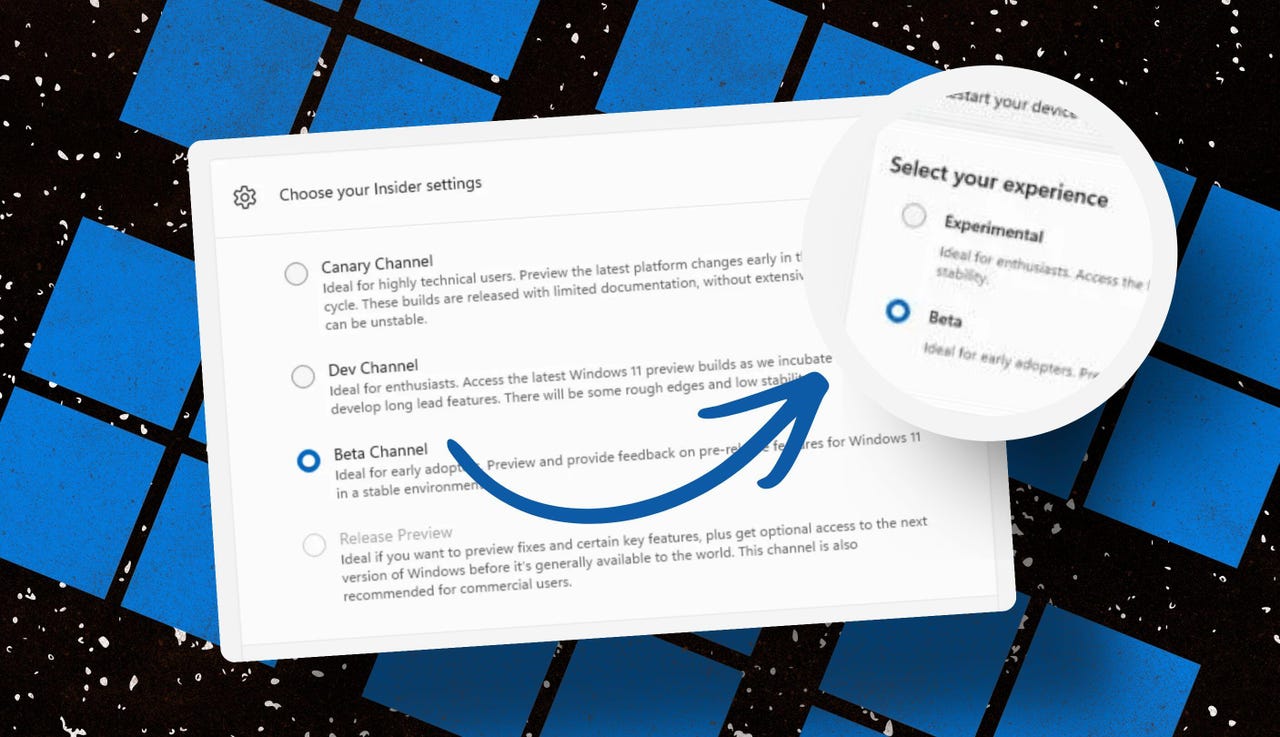
Throughout the Windows 11 era, signing up for the Insider program has required choosing one of four channels using a dialog in Windows Settings. Here’s what those options look like today on one of my test PCs.

insider-program-channels-lineup-old

The current Insider channel lineup is confusing, to say the least.

Screenshot by Ed Bott/ZDNET

Which channel should you choose? As the company admitted in today’s post, “the channel structure became confusing. It was not clear what channel to pick based on what you wanted to get out of the program.”

The new lineup consists of two primary channels: Experimental and Beta. The Release Preview channel will still be available, primarily for the benefit of corporate customers who want early access to production builds a few days before their official release. That option will be available under the Advanced Options section.

windows-insider-channel-lineup-new

This simplified lineup is easier to follow. Beta is the upcoming retail release, Experimental is for the adventurous.

Screenshot courtesy of Microsoft

Here’s Microsoft’s official description of what’s in each channel now, with the company’s emphasis retained:

  • Experimental replaces what were previously the Dev and Canary channels. The name is deliberate: you’re getting early access to features under active development, with the understanding that what you see may change, get delayed, or not ship at all. We’ve heard your feedback that you want to access and contribute to features early in development and this is the channel to do that.
  • Beta is a refresh of the previous Beta Channel and previews what we plan to ship in the coming weeks. The big change: we’re ending gradual feature rollouts in Beta. When we announce a feature in a Beta update and you take that update, you will have that feature. You may occasionally see small differences within a feature as we test variations, but the feature itself will always be on your device.

These changes will apply to the Windows Insider Program for Business as well.

Offering a choice of platforms

For those testers who want to tinker with the bleeding edge of Windows development, a few additional options will be available in the Experimental channel. These advanced options will allow you to choose from a platform that’s aligned to a currently supported retail build. Currently, that’s Windows 11 version 25H2 or 26H1, with the latter being exclusively for new hardware arriving soon with Snapdragon X2 Arm chips.

Also: Microsoft account vs. local account: How to choose

There will also be a Future Platforms option, which represents a preview build that is not aligned to a retail version of Windows. According to today’s announcement, this option is “aimed at users who are looking to be at the forefront of platform development. Insiders looking for the earliest access to features should remain on a version aligned to a retail build.”

windows-insider-advanced-options-new

The Future Platforms option is the equivalent of the current Canary channel

Screenshot courtesy of Microsoft

Minimizing the chaos of Controlled Feature Rollout

Last month, I urged Microsoft to stop using its Controlled Feature Rollout technology, especially for builds in the Beta channel. Apparently, someone in Redmond was listening.

One of the most common questions we receive from Insiders is “why don’t I have access to a feature that’s been announced in a WIP blog?” This is usually due to a technology called Controlled Feature Rollout (CFR), a gradual process of rolling out new features to ensure quality before releasing to wider audiences. These gradual rollouts are an industry standard that help us measure impact before releasing more broadly. But they also make your experience unpredictable and often mean you don’t get the new features that motivated many of you to join the Insider program to begin with.

Moving forward, Insider builds in the Beta channel will no longer suffer from this gradual rollout of features. Meanwhile, the company says, “Insiders in the Experimental channel will have a new ability to enable or disable specific features via the new Feature Flags page on the Windows Insider Program settings page.”

windows-insider-feature-flags

Builds in the Experimental channel will include the option to turn new features on or off.

Screenshot courtesy of Microsoft

Not every feature will be available from this list, but the intent is to add those flags for “visible new features” that are announced as part of a new Insider build.

Making it easier to change channels

The final change announced today is one I didn’t see coming. Historically, leaving the Windows Insider Program or downgrading a channel (from Dev to Beta, for example) has required a full wipe and reinstall. That’s a major hurdle and a big impediment to anyone who doesn’t have the time or technical skills to do that sort of migration.

Also: Why Microsoft is forcing Windows 11 25H2 update on all eligible PCs

Beginning with the new channel lineup, it should be easier to change channels or leave the program without jumping through a bunch of hoops.

To make this a more streamlined and consistent experience, we’re making some behind the scenes changes to enable Insider builds to use an in-place upgrade (IPU) to hop between versions. This will allow in most cases Insiders to move between Experimental, Beta, and Release Preview on the same Windows core version, or leave the program without a clean install. An IPU takes a bit more time than your normal update but migrates your apps, settings, and data in-place.

If you’ve chosen one of the future platforms from the Experimental channel, those options don’t apply. To move back to a supported retail platform, you’ll need to do a clean install.

Also: Apple, Google, and Microsoft join Anthropic’s Project Glasswing to defend world’s most critical software

The upshot of all these changes should make things a lot clearer for anyone trying to figure out what’s coming in the next big feature update. Beta channel updates, for example, should offer a more accurate preview of what’s coming in the next big feature update, so over the next month or two we should get a better picture of what’s coming in the 26H2 release, due in October.

When can we start to see those changes rolling out to the general public? Stay tuned.


Source link