4 Shady Things Some Car Dealers Do That Are Actually Illegal


Buying a car is one of the priciest decisions most Americans will ever make. As if price wasn’t enough, the complicated and time-consuming fine print adds insult to injury. It’s as high-stakes as it is confusing. Unfortunately, that combination has created plenty of opportunities for some dealerships to take advantage of people. Of course, you can still find credible car dealers out there. But the Federal Trade Commission (FTC) has warned that some car dealers have been known to cross the line from aggressive sales into outright illegal behavior.

The FTC has specific rules and regulations in place to keep the shadiest illegal sales tactics at bay. But that doesn’t always mean car dealerships follow them as they should. From hidden fees to crooked financing, the FTC previously estimated that people had lost billions of dollars (not to mention millions of hours) to deceptive deals. These four tactics are some of the most common. Every last one can violate federal consumer protection laws, so it’s definitely something to be aware of.

Bait-and-switch advertising

It’s so frustrating when you see a car listed at a great price online, only to get to the dealership and find out the offer’s not even available. You got bait-and-switched, which violates the FTC Act. In California, the CARS Act takes protecting consumers a step further by going after this practice.

Bait and switch scams can happen in more ways than one. Maybe a dealership advertises a specific vehicle that it doesn’t actually have in inventory. Or maybe it tells you about discounts or rebates that you don’t qualify for. The same for financing terms that change once the paperwork begins. It’s all a bait and switch. And it’s all illegal.

The dealership’s just trying to get you in the door with one offer, only to pressure you into accepting a more expensive alternative. But the law says dealers aren’t allowed to misrepresent any key information about a vehicle’s price, financing terms, or availability. What you see advertised is what you should realistically expect to pay, no exceptions. The same goes for used cars, too.

Hidden junk fees

Everybody knows somebody with a similar story: You and the car salesperson agree on a price, then you get to the signing process and see the final price contains fees that were never clearly disclosed. These so-called “junk fees” are almost always buried deep in lengthy contracts, revealed right when you’ve already committed and are less likely to walk away. Billions of dollars have been wasted on these junk fees, but the FTC’s putting its foot down.

Junk fees come in several different forms. You might see duplicate warranty coverage, vague administrative or processing fees, unnecessary service contracts, or charges for extra features your vehicle doesn’t even support. Whatever it may be, federal regulations say dealerships can’t offer you add-ons that don’t deliver a real benefit. Dealers also have to clearly disclose the full offering price upfront, not just a partial figure designed to get you on the hook. Always double-check the car loan’s terms, just to be safe.

Forcing add-ons

Upsells are a thing just about anywhere you shop. But shady car dealerships have a way of pressuring consumers into purchasing extras or agreeing to specific financing terms by framing them as a requirement to seal the deal. That’s not the same thing as an upsell. It’s actually unlawful. Car dealerships have been known to force these add-ons on customers, intentionally failing to disclose them in initial advertising and dropping the bomb only after the buyer has invested time and effort in the sale.

Examples include requiring customers to purchase extended warranties or service packages that weren’t part of the original offer. In some cases, dealerships also insist that buyers use in-house financing to qualify for a particular price. That’s illegal, too. They aren’t allowed to limit your ability to shop for better loan terms elsewhere. To stay compliant, the FTC says dealers have to tell you that add-ons are optional and can’t condition a deal on specific financing arrangements.

Misusing sensitive customer data

Beyond pricing and sales tactics, federal law is also looking out for how dealerships handle sensitive customer data. Because many dealers arrange financing or leasing, they’re legally considered financial institutions under federal regulations. Therefore, the FTC says they have to follow the same strict data protection requirements as banks and other lenders.

These rules require dealerships to put comprehensive security programs into place to protect customer information. That includes Social Security numbers, financial records, and other personal data collected during the financing process. Failure to do so (or, worse, allowing unauthorized access) is a violation of federal law.

In addition to these basic precautions, dealers also have to regularly assess risks, implement encryption and access controls, monitor their systems, and update their security measures. They’re also required to report certain data breaches within a specified timeframe. Otherwise, they’re breaking federal law. If you’ve encountered any one of these shady dealings, the FTC encourages you to report the fraud.


Source link

Leave a Reply

Subscribe to Our Newsletter

Get our latest articles delivered straight to your inbox. No spam, we promise.

Recent Reviews


The Windows Insider Program is about to get much easier

Ed Bott / Elyse Betters Picaro / ZDNET

Follow ZDNET: Add us as a preferred source on Google.


ZDNET’s key takeaways

  • Microsoft is making the Insider Program less complicated.
  • Beta channel will be a more reliable preview of the next retail release.
  • Other changes will allow testers to quickly enable/disable new features.

Last month, Microsoft took official notice of its customers’ many complaints about Windows 11. Pavan Davaluri, the executive vice president who runs the Windows and Devices group, promised sweeping changes to Windows 11. Today, the company announced the first of those changes in a post authored by Alec Oot, who’s been the principal group product manager for the Windows Insider Program since January 2024.

Those changes will streamline the Insider program, which has lost sight of its original goals in the past few years. (For a brief history of the program and what had gone wrong, see my post from last November: “The Windows Insider Program is a confusing mess.”)

Also: If Microsoft really wants to fix Windows 11, it should do these four things ASAP

If you’re currently participating in the Windows Insider Program, these are meaningful changes. Here’s what you can expect.

Simplifying the Insider channel lineup

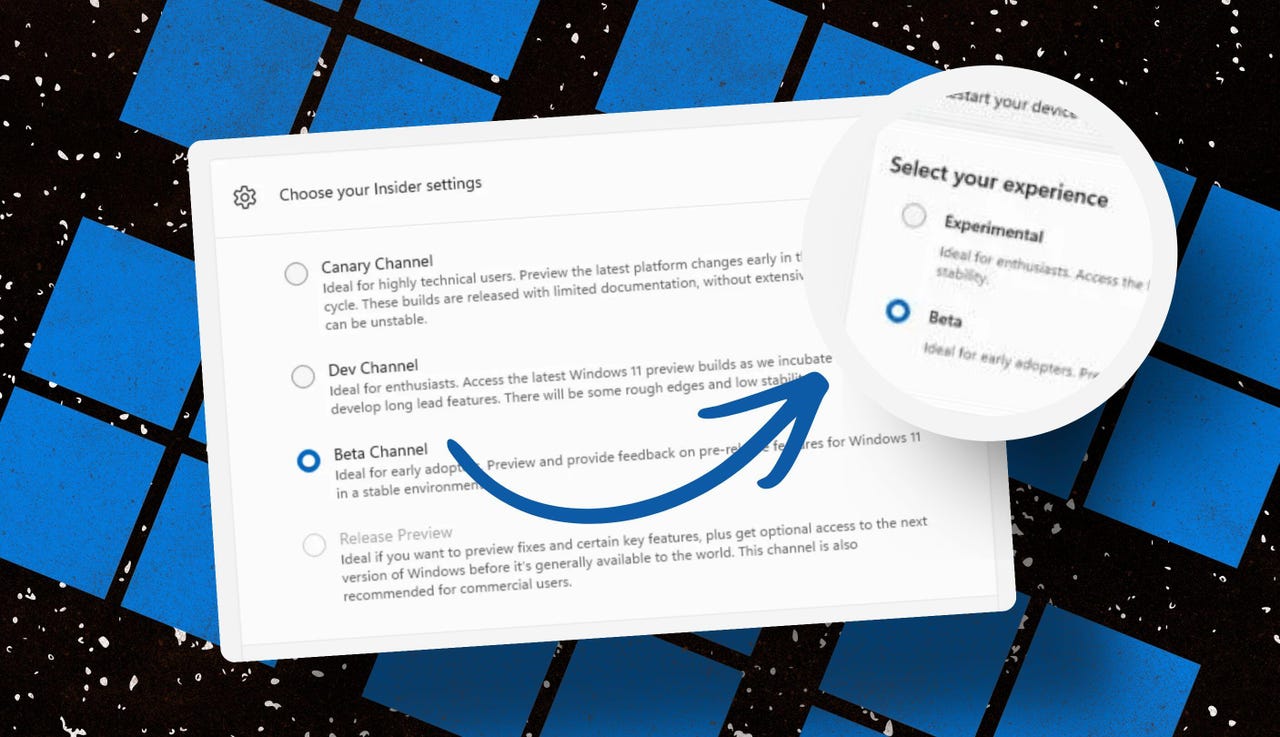
Throughout the Windows 11 era, signing up for the Insider program has required choosing one of four channels using a dialog in Windows Settings. Here’s what those options look like today on one of my test PCs.

insider-program-channels-lineup-old

The current Insider channel lineup is confusing, to say the least.

Screenshot by Ed Bott/ZDNET

Which channel should you choose? As the company admitted in today’s post, “the channel structure became confusing. It was not clear what channel to pick based on what you wanted to get out of the program.”

The new lineup consists of two primary channels: Experimental and Beta. The Release Preview channel will still be available, primarily for the benefit of corporate customers who want early access to production builds a few days before their official release. That option will be available under the Advanced Options section.

windows-insider-channel-lineup-new

This simplified lineup is easier to follow. Beta is the upcoming retail release, Experimental is for the adventurous.

Screenshot courtesy of Microsoft

Here’s Microsoft’s official description of what’s in each channel now, with the company’s emphasis retained:

  • Experimental replaces what were previously the Dev and Canary channels. The name is deliberate: you’re getting early access to features under active development, with the understanding that what you see may change, get delayed, or not ship at all. We’ve heard your feedback that you want to access and contribute to features early in development and this is the channel to do that.
  • Beta is a refresh of the previous Beta Channel and previews what we plan to ship in the coming weeks. The big change: we’re ending gradual feature rollouts in Beta. When we announce a feature in a Beta update and you take that update, you will have that feature. You may occasionally see small differences within a feature as we test variations, but the feature itself will always be on your device.

These changes will apply to the Windows Insider Program for Business as well.

Offering a choice of platforms

For those testers who want to tinker with the bleeding edge of Windows development, a few additional options will be available in the Experimental channel. These advanced options will allow you to choose from a platform that’s aligned to a currently supported retail build. Currently, that’s Windows 11 version 25H2 or 26H1, with the latter being exclusively for new hardware arriving soon with Snapdragon X2 Arm chips.

Also: Microsoft account vs. local account: How to choose

There will also be a Future Platforms option, which represents a preview build that is not aligned to a retail version of Windows. According to today’s announcement, this option is “aimed at users who are looking to be at the forefront of platform development. Insiders looking for the earliest access to features should remain on a version aligned to a retail build.”

windows-insider-advanced-options-new

The Future Platforms option is the equivalent of the current Canary channel

Screenshot courtesy of Microsoft

Minimizing the chaos of Controlled Feature Rollout

Last month, I urged Microsoft to stop using its Controlled Feature Rollout technology, especially for builds in the Beta channel. Apparently, someone in Redmond was listening.

One of the most common questions we receive from Insiders is “why don’t I have access to a feature that’s been announced in a WIP blog?” This is usually due to a technology called Controlled Feature Rollout (CFR), a gradual process of rolling out new features to ensure quality before releasing to wider audiences. These gradual rollouts are an industry standard that help us measure impact before releasing more broadly. But they also make your experience unpredictable and often mean you don’t get the new features that motivated many of you to join the Insider program to begin with.

Moving forward, Insider builds in the Beta channel will no longer suffer from this gradual rollout of features. Meanwhile, the company says, “Insiders in the Experimental channel will have a new ability to enable or disable specific features via the new Feature Flags page on the Windows Insider Program settings page.”

windows-insider-feature-flags

Builds in the Experimental channel will include the option to turn new features on or off.

Screenshot courtesy of Microsoft

Not every feature will be available from this list, but the intent is to add those flags for “visible new features” that are announced as part of a new Insider build.

Making it easier to change channels

The final change announced today is one I didn’t see coming. Historically, leaving the Windows Insider Program or downgrading a channel (from Dev to Beta, for example) has required a full wipe and reinstall. That’s a major hurdle and a big impediment to anyone who doesn’t have the time or technical skills to do that sort of migration.

Also: Why Microsoft is forcing Windows 11 25H2 update on all eligible PCs

Beginning with the new channel lineup, it should be easier to change channels or leave the program without jumping through a bunch of hoops.

To make this a more streamlined and consistent experience, we’re making some behind the scenes changes to enable Insider builds to use an in-place upgrade (IPU) to hop between versions. This will allow in most cases Insiders to move between Experimental, Beta, and Release Preview on the same Windows core version, or leave the program without a clean install. An IPU takes a bit more time than your normal update but migrates your apps, settings, and data in-place.

If you’ve chosen one of the future platforms from the Experimental channel, those options don’t apply. To move back to a supported retail platform, you’ll need to do a clean install.

Also: Apple, Google, and Microsoft join Anthropic’s Project Glasswing to defend world’s most critical software

The upshot of all these changes should make things a lot clearer for anyone trying to figure out what’s coming in the next big feature update. Beta channel updates, for example, should offer a more accurate preview of what’s coming in the next big feature update, so over the next month or two we should get a better picture of what’s coming in the 26H2 release, due in October.

When can we start to see those changes rolling out to the general public? Stay tuned.


Source link