
Follow ZDNET: Add us as a preferred source on Google.
ZDNET’s key takeaways
- Flipper One is an open Linux pocket computer from Flipper Devices.
- It targets IP-connected hardware, networking, AI, and SDR projects.
- Flipper Devices wants developers to help shape the new platform.
After many months of speculation, Flipper Devices Inc., the company behind the wildly successful Flipper Zero, has finally lifted the lid on its next project — the Flipper One.
Also: 7 useful things I can do with my Flipper Zero – as someone who’s used it for years
And if you thought the Flipper Zero was incredibly cool, this will blow you away.
So, what is the Flipper One?
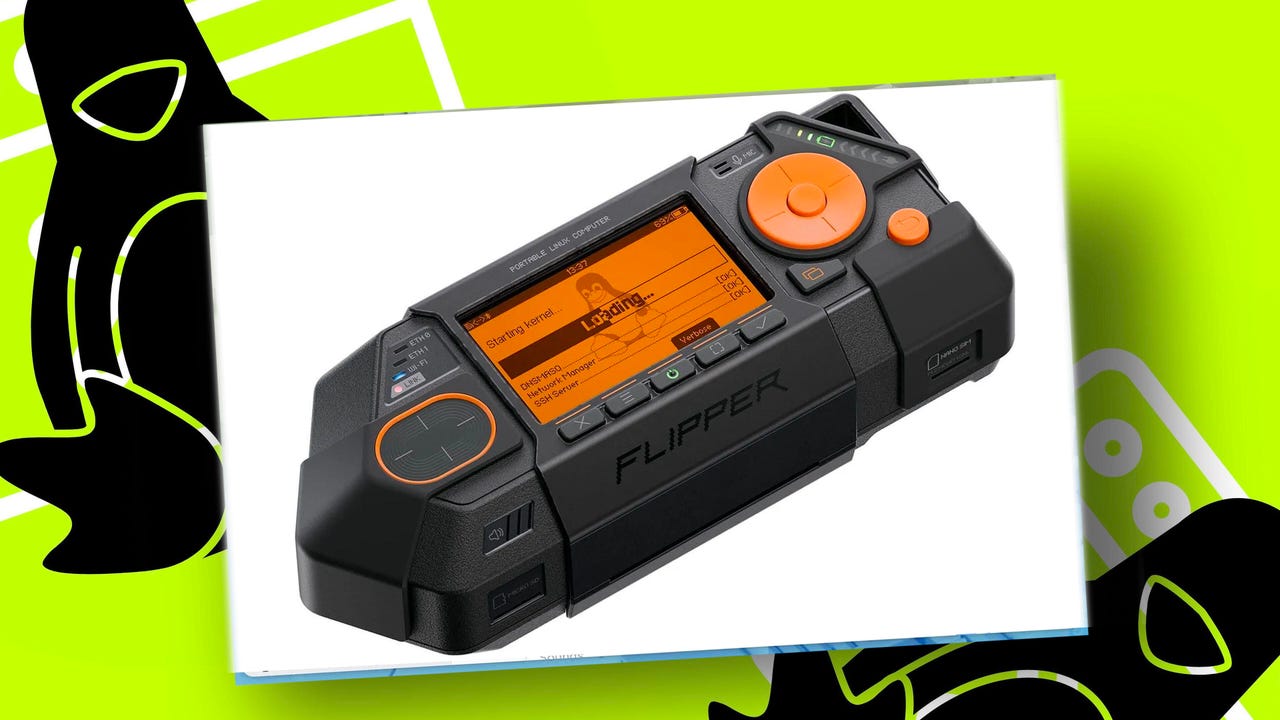
The Flipper One is an open — and when Flipper Devices says open, it means it: full mainline Linux kernel support, absolutely no binary blobs, closed drivers, proprietary firmware, or vendor-locked board support package — high-performance Linux platform that can form the basis for pretty much anything that you want it to do, from a network analyzer to an SDR (software-defined radio) to an offline AI or LLM project.
Think full-on pocket computer.
Doing all this demands power, and the Flipper One has it. Inside, there’s a high-performance 2.2 GHz octa-core RK3576 chipset that features a Mali-G52 GPU and an NPU capable of 6 TOPS (trillion operations per second), allowing you to run local LLMs (large language models — one of which will be a Flipper One-specific LLM for using the tool).
This chipset is fully supported by Linux, and it comes with 8GB of built-in RAM to run the operating system and apps.
The Flipper One is powered by two processors.
Flipper Devices
All this power in a device that sits in the palm of your hand.
But there’s more.
Running alongside this main chip is a secondary dual-core Raspberry Pi RP2350 microcontroller for handling the basic tasks of the Flipper One, including the display, button interface, touchpad control, LEDs, and power subsystem. In fact, if you don’t want to run Linux, the Flipper One can run entirely on the RP2350 chip. This makes the Flipper One a very power-efficient device when it’s not running Linux.
There’s a lot of hardware packed into the Flipper One.
Also: If you like your Flipper Zero, then you’ll love this
Everything from a 1.4-inch screen, a touchpad, a five-button D-pad, and an M.2 slot that can accept a range of hardware, from cellular or satellite modems, SDR modules, and SSDs (NVMe or SATA) to AI accelerators and Wi-Fi cards. While the Flipper Zero was aimed at interacting with devices not connected to the internet — think level zero devices — the Flipper One is aimed at IP-connected hardware, or level one stuff.
To pull this off, it features twin gigabit Ethernet ports (so you have a router or bridge out of the box), Wi-Fi 6E support (something that the Flipper Zero didn’t have, and while you could add wireless support, it was pretty primitive), and 5 Gbps Ethernet over USB-C.
Wi-Fi is handled by the MediaTek MT7921AUN chipset (the Wi-Fi chip used in the Alfa AWUS036AXML wireless adapter, a very popular pick among security professionals because it’s so versatile), which is very popular among hardware hackers and penetration testers because it’s fully supported by Linux, and it has advanced features such as monitor mode and packet injection capabilities.
Solving a Raspberry Pi problem Linux
In building the Flipper One, the developers wanted to fix one of the most annoying aspects of the Raspberry Pi platform, and one that’s been bugging me for years. Yes, the Raspberry Pi is a very versatile platform. I’ve had boards that one day are running penetration tests on Wi-Fi networks, and the next day that same board is a router.
I like the Raspberry Pi, but continually having to start by reflashing the microSD card is frustrating.
Adrian Kingsley-Hughes/ZDNET
But here’s the problem — any time I want to change what a Raspberry Pi does, it always starts with reflashing the microSD card. The developers working on the Flipper One want to change this, take a completely different approach, and put an end to having to juggle a bunch of microSD cards.
Also: Flipper Zero: ‘Can you really hack Wi-Fi networks?’ and other questions answered
To do this, the Flipper One will run a Debian-based Linux platform called Flipper OS, and FlipCTL, program that displays a menu on screen and provides wrappers for Linux programs, enabling them to be turned into graphical interfaces.
Let’s start with Flipper OS, an add-on to the Linux OS and allows the system to run profiles that have been configured with specific packages and settings. Flipper OS will allow these profiles to be booted up, cloned, or deleted at will. Want to change what your Flipper One is doing? Boot up a different profile. Broke something in a specific profile? Reload a different one.
Think of a desktop system running a bunch of virtual machines. It’s a fascinating concept.
The developers also want to take this concept of profiles further, going beyond the Flipper One and creating a platform that can be used for “cyberdeck builds based on Raspberry Pi, or any portable tactical Linux box.” But, as Pavel Zhovner, the founder of Flipper Devices, makes clear in today’s blog post, “we’re not 100% sure how to architect it yet.”
FlipCTL is an operating system designed for tiny screens.
Flipper Devices
FlipCTL is there to solve a problem that exists with Linux systems — they just don’t work great on tiny screens. FlipCTL offers a comprehensive framework for building menu-based interfaces that work on small LCD screens and can be controlled using a D-pad and a few buttons. This would give you access to Linux tools like ping, nmap, and traceroute right from the tiny built-in screen — without losing your mind. I’m someone who’s run Kali Linux on a Raspberry Pi board with a 7-inch display, and while I could make it work (very well, actually), this wasn’t a fun experience.
Also: Flipper Zero: How to install third-party firmware (and why you should)
Also, the idea is that if you want to build something simple like a router or a NAS box — something that doesn’t need a big screen to work — you can get it working using FlipCTL without needing to go into full-blown Linux.
The Flipper One can also act like a thin client or survival desktop, a computer that you always have with you. All you need is a display, keyboard, and mouse, and you have a full Linux system at your fingertips.
Flipper One needs YOU (if you’re a developer)!
As much as this is an official announcement of the Flipper One, it’s also a call for help. While the project is clearly quite mature, and a product isn’t all that far in the future (although no one is going to commit to a timeline just yet), the developers at Flipper Devices want the help of the community, not only to help shape the direction of the project, but also to help with some of the nitty-gritty work, like getting full mainline Linux kernel support for NPUs, getting Flipper OS profile support working, and helping choose a specific NTN (non-terrestrial network, in other words, satellite) M.2 module to support.
Now, if this were anyone other than Flipper Devices, I’d say that getting that sort of support would be a huge challenge. Many a great project has stumbled by not being able to muster developer enthusiasm. But the Flipper Zero has a huge community of developers and enthusiasts doing all sorts of things, from building custom firmware to creating bespoke apps. It’s one of the liveliest and most supportive communities I’ve seen lately, and while it’s not as mature as communities that have built around things like Linux distros or Raspberry Pi hardware, it’s a very fresh and active community that gets a lot done.
The Flipper Zero is a super-powerful tool, and the Flipper One builds on this.
Adrian Kingsley-Hughes/ZDNET
On top of that, just look at what the Flipper Zero could do. I’ve yet to see a tool that makes working with things like RFID and sub-GHz frequencies so simple and straightforward.
Biggest question answered
This announcement also answers the question that I’d been pondering ever since I first heard whispers about the Flipper Zero’s successor — just what is Flipper One supposed to be? Having read all the documentation released today — and there’s a lot of it — I’m convinced that it’s focused on becoming a serious competitor to the Raspberry Pi and other SBC (single-board computer) projects.
Yes, I know that’s a big statement, but given how big the Flipper Zero got in a short space of time, and how much software and hardware developer interest there has been in it, I think it has a chance.
Here we have the groundwork for a full, open hardware and software cyberdeck platform, a truly versatile, modular, portable computing platform. A platform that not only packs a lot of hardware, but also fully leverages the M.2 slot to make the Flipper One as versatile as possible.
Whether you want to slot in an SSD or work with a satellite modem, the Flipper One wants to make that as easy as possible. And if the Flipper Zero is anything to go by, the Flipper One will be an amazing tool.
The elephant in the room
There is one unknown — price. At $199, the Flipper Zero is hardly cheap, so the Flipper One is going to be more than that. The modular nature of the Flipper One will help keep costs down. The flip side is that you’ll be spending on accessories — an M.2 satellite modem will set you back at least $100.
It’s not going to be cheap, but neither are Raspberry Pi 5 boards nowadays.