What’s The Line Below The Battery Icon On Your iPhone Lock Screen For?


It was only a few years ago that the iPhone was ridiculed for offering next to zero customization features, barring the ability to change the wallpaper. Soon came widgets, the ability to move app icons around on the home screen freely, and recently, more lock screen customization. You can use a different font for the clock, add widgets to the lock screen, or even use wallpapers that cleverly overlap a portion of the clock for a neat depth effect. Apple’s Liquid Glass design system also added a layer of transparency effects across the whole user interface.

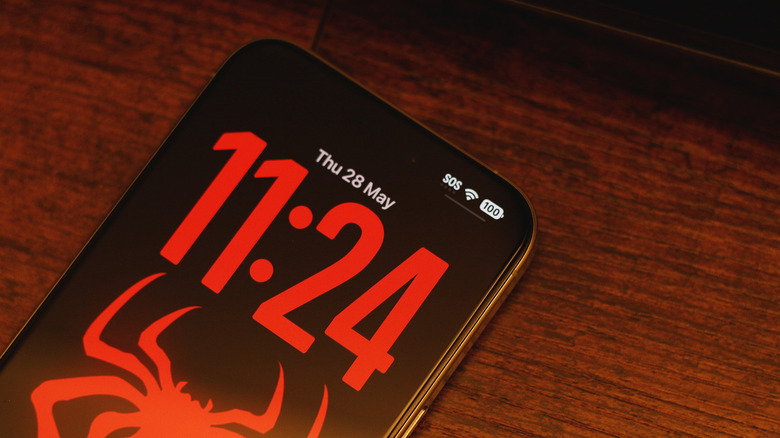
Even with widgets and a busy wallpaper, it’s pretty difficult to conjure a lock screen on the iPhone that looks bad. Those going for a minimalist look will likely stick to solid colors or subtle gradients with a widget-free layout and a bold, spacious font for the clock. Even then, you might have noticed a small UI element that manages to stand out on an otherwise clean lock screen — the tiny horizontal line below the battery icon. If you’ve interacted with it before, you’ll realize that it is actually an indicator for the Control Center.

Just like you can swipe down from the top-right corner of your iPhone’s screen inside any app, doing so on the lock screen will also bring up the Control Center. This is where you can access device controls like Wi-Fi or Bluetooth. The line simply lets you know that the gesture is available from the lock screen too.

How to get rid of the Control Center indicator
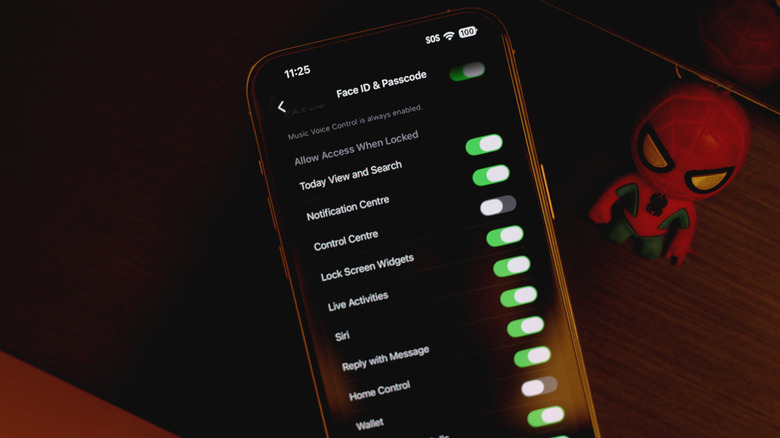
If the line below the battery indicator is ruining your lock screen aesthetic, you’ll be glad to know that there is a way to remove it — though it requires disabling the Control Center when your device is locked. On your iPhone, navigate to Settings > Face ID & Passcode, scroll down, and under the “Allow Access When Locked” section, tap to disable the “Control Center” toggle. Now, the Control Center indicator will only show up when your iPhone is unlocked. 

Unfortunately, this means that the indicator pops back up when your iPhone recognizes your face and unlocks the device. In practice, this would basically mean the line would only stay hidden for a split second before you pick up your iPhone and it authenticates you using Face ID. If you’re still rocking an iPhone with a Touch ID sensor, though, you get to flaunt your clean lock screen for a bit longer.

That said, disabling Control Center on the lock screen is a great way to boost your iPhone’s security since it only allows access to device controls when it is unlocked. In case your iPhone is stolen, the thief won’t be able to toggle on Airplane Mode in hopes of preventing you from tracking it. Stolen Device Protection on iOS also strengthens things further by requiring Face ID or Touch ID authentication before major account changes or payments can be made at unfamiliar locations.


Source link

Leave a Reply

Subscribe to Our Newsletter

Get our latest articles delivered straight to your inbox. No spam, we promise.

Recent Reviews


Researchers in South Korea developed a wearable system that uses seven smart rings to read finger and hand motions to translate American Sign Language and International Sign Language into text. The purpose is to make communicating easier between those who sign and nonsigners without needing a separate human interpreter. 

AI Atlas

According to the study, published Friday in the journal Science Advances, the system reliably recognized 100 ASL and ISL words during testing. It also performed well with users the system had not seen before, and it didn’t require recalibration for each person. Because the system detects words in sequence, it can produce sentence-level translations without extra training on grammar. 

ASL and ISL are the everyday languages of more than 72 million deaf and hard-of-hearing people. However, most hearing people do not know any words in these languages or have a very basic understanding. That gap makes certain tasks, like ordering at a restaurant or asking for help, much more difficult. 

A graphic shows two illustrated people talking in sign language, ASL and ISL. The graphic also shows the different components of the ring as well as pictures of hands modeling the rings.

A concept of how the rings work in the real world. 

American Association for the Advancement of Science (AAAS)

Existing sign language translator prototypes often rely on bulky gloves that can distract from or block natural hand movement or feel uncomfortable for the wearer, which limits real word adaption. Camera-based technologies can work well in controlled environments but are often limited to those places where a camera can be set up with a clear line of sight, the researchers wrote. 

To solve these problems, the researchers designed sensing rings for each finger that can capture precise motion and finger position while letting the hands move naturally. The rings can detect both signs that involve movement, like the words for “dance,” “fly” and “sun,” and signs that are held still, like “I” and “you.”

“These advances suggest that [the device could enable] barrier-free public translation systems for unseen users and unrestricted daily assistive interfaces,” the authors wrote in the study. 

The authors are affiliated with Yonsei University, Hankuk University of Foreign Studies and the Korea Institute of Science and Technology, among others. While the technology is still experimental, the authors wrote that the technology has the potential to ease communication difficulties. The underlying idea could also help improve controls for other systems, like virtual or augmented reality.

“Beyond sign language translation, the ring-type, wireless, and modular architecture of (wirelessly connected, ring-type sign language translators) may also be extended to other gesture-driven applications such as virtual or augmented reality control, touchless device interfaces, or rehabilitation monitoring systems where fine-grained hand movement tracking is essential,” they wrote.


Source link