How Will Musical Instrument Tariffs Affect Our Orchestras?


Tariffs have affected musical instruments.

But not as policy makers expected.

Musical Instrument Tariffs

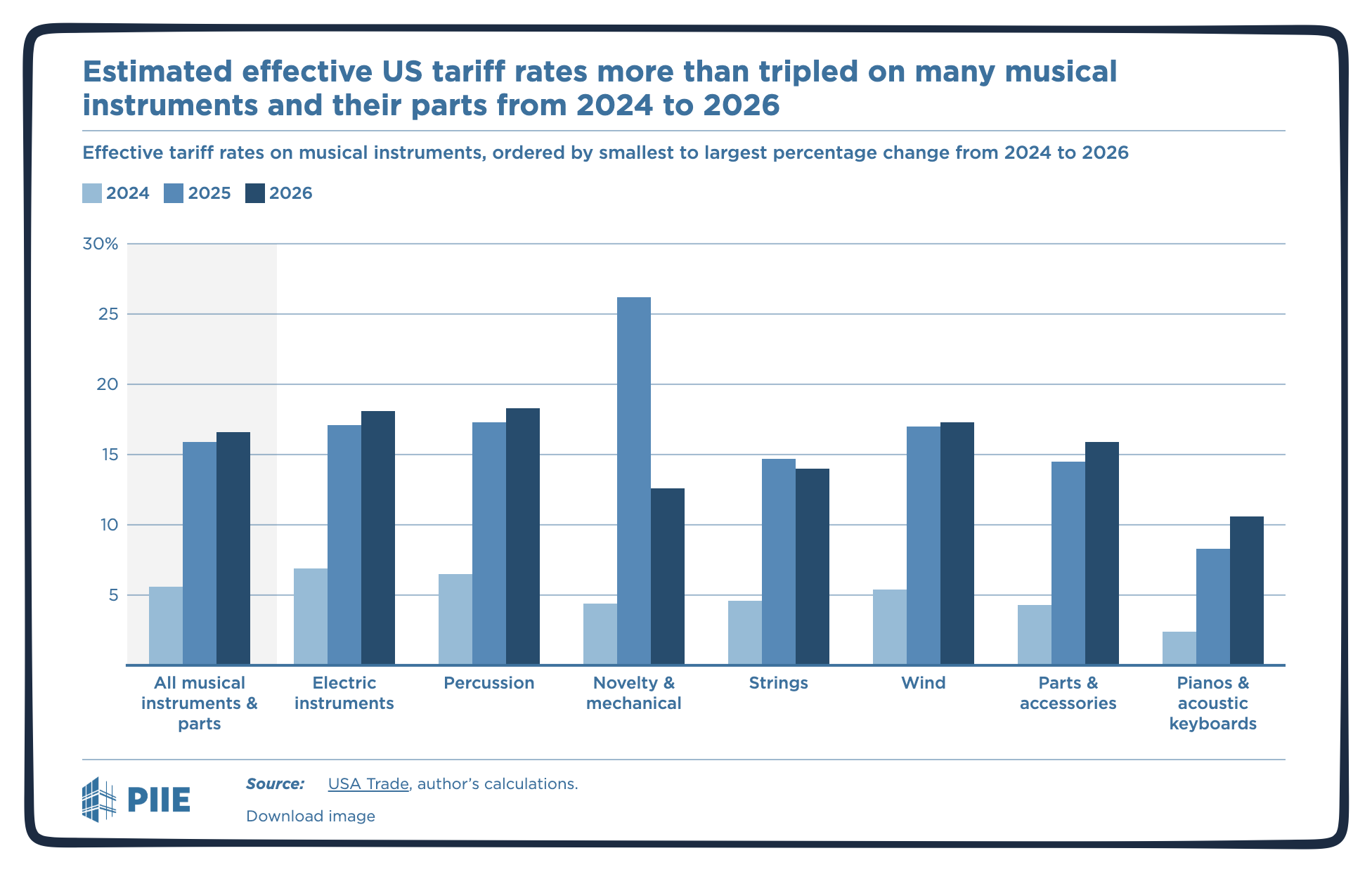
Musical instrument tariffs came close to tripling from the end of 2024 to a 2026 level of 16.6%. But demonstrating the uneven landscape, pianos, violins, and horns were among the hardest hit:
musical intsrument tariffs

Nudging musical instrument Import levels down by slightly more than 20% between the end of 2024 and the first quarter of 2026, the tariffs did precisely what they were supposed to do.

But not quite.

Tariffs impacted our higher quality professional instruments from Europe, Japan, and South Korea less than the lower quality imports from China. Chinese tariffs were the primary reason for the 70% plunge in orchestral wind instruments.

Less from China was supposed to mean more domestic production.

Instead, we wound up with a cascade of unintended consequences.

Our Bottom Line: Unintended Consequences

Demand

PIIE (Peterson Institute for International Economics) explains why tariffs constrain consumer demand:

  1. Higher prices of the instruments.
  2. Higher costs for other goods that diminish available funds for musical instruments.
  3. Less spending from descending consumer confidence created by the economic uncertainty.

As a result, with fewer musicians entering the pipeline, at the other end, we will have a shrinking number of skilled professionals buying high quality instruments.

Supply

Meanwhile, on the supply side, steel and aluminum tariffs added to production costs. Consequently, one U.S. producer decided it was cheaper to pay Chinese tariffs than to continue making brass instruments in his Ohio factory.

So, where are we? At just 0.7% of tariff revenue, the dollar argument doesn’t work. Furthermore, instead of bringing the industry home, tariffs are pushing it beyond our borders. And of course, we want to encourage our young musicians.

Perhaps, as in the past, it all takes us back to Benoit Mandelbrot telling us that the closer we look the more we see:

tariff impact British coastline

My sources and more: Thanks to PIIE for inspiring today’s post and providing its facts.

The post How Will Musical Instrument Tariffs Affect Our Orchestras? appeared first on Econlife.


Source link

Leave a Reply

Subscribe to Our Newsletter

Get our latest articles delivered straight to your inbox. No spam, we promise.

Recent Reviews


Google Gemini

Lance Whitney/ZDNET

Follow ZDNET: Add us as a preferred source on Google.


ZDNET’s key takeaways

  • Google is downloading a 4GB file to the PCs of many Chrome users.
  • The file is harmless and is used for the Gemini Nano on-device LLM.
  • You’ll see it if you’ve opted into the on-device AI setting in Chrome.

Google is silently saving a Chrome-related file to many computers. That’s nothing earth-shaking. But this file is a hefty 4GB in size, which has caught the attention of some Google watchers. What is the file, why is it being installed, and how can you check for it?

Also: I let Chrome’s AI agent shop, research, and email for me – here’s how it went

In a new blog post, computer scientist Alexander Hanff, aka the Privacy Guy, pulled back the curtain on this mysterious file. Named weights.bin, the file is being downloaded deep within the user data folder of many Chrome users. The file itself is related to Gemini Nano, which Google is using as the on-device AI model for Chrome users.

If you delete the file, it comes back

Though there’s nothing risky or dangerous about the file, Hanff and others have expressed concerns that it’s being downloaded without users’ knowledge or permission. And if you delete the file, it eventually comes back, Hanff said. That by itself is hardly alarming; that’s part of any software update. Rather, some of the criticism centers on the file’s size. If you have ample hard disk space, then 4GB is likely not a big deal. But if you’re running low, that big a file might chew up space you can’t spare.

Traditionally, AI models like Gemini use the cloud to interact with you. Submit a request, ask a question, or kick off a conversation, and the AI taps into its online data and resources to respond. But that method can be slow and naturally requires that you be connected. By traveling between your device and the cloud, your data can also be exposed.

A trend has emerged in which companies are experimenting with locally stored LLMs (large language models). That not only speeds up the process, but it also means you can use the AI offline and more securely. Gemini Nano has already been in play on Google’s own Pixel phones.

That explains why the file is so large; it has to pack in a lot of data. In this case, a weights file contains numbers that measure the level of importance an AI model assigns to your input. The AI uses these values to determine what should come next. For example, let’s say you start typing the phrase “Why did my new phone cost me an arm and a…” at the prompt. The AI assigns weights to your input to help it predict that the next word would be “leg.”

Also: This powerful Gemini setting made my AI results way more personal and accurate

How can you tell if the file has been downloaded to your PC? First, open Chrome, go to Settings, and select System. On the System screen, check whether the On-device AI option is turned on. If so, then you probably have the file or will soon get it.

To double-check, you’ll have to navigate to the user folder on your PC. That location varies based on your operating system. On my Windows 11 PC, I ran a search in File Explorer for weights.bin. The search took a long journey through the following path: C:\Users\lance\AppData\Local\Google\Chrome\User Data\OptGuideOnDeviceModel\2025.8.8.1141. At that final location, the weights.bin file appeared, measuring 4GB.

Since the file is downloaded again if you simply delete it, you’ll have to take an extra step to get rid of it permanently. After you delete the file, go back to Settings in Chrome and select System. Then  turn off the switch for On-device AI.

But as long as you have enough disk space (and if you can’t spare 4GB, then it’s time to clean up your drive), the file is little cause for concern. Just forget about it, especially if you’re keen to try on-device AI, and we’ll see what the future holds for Gemini Nano.


Source link



