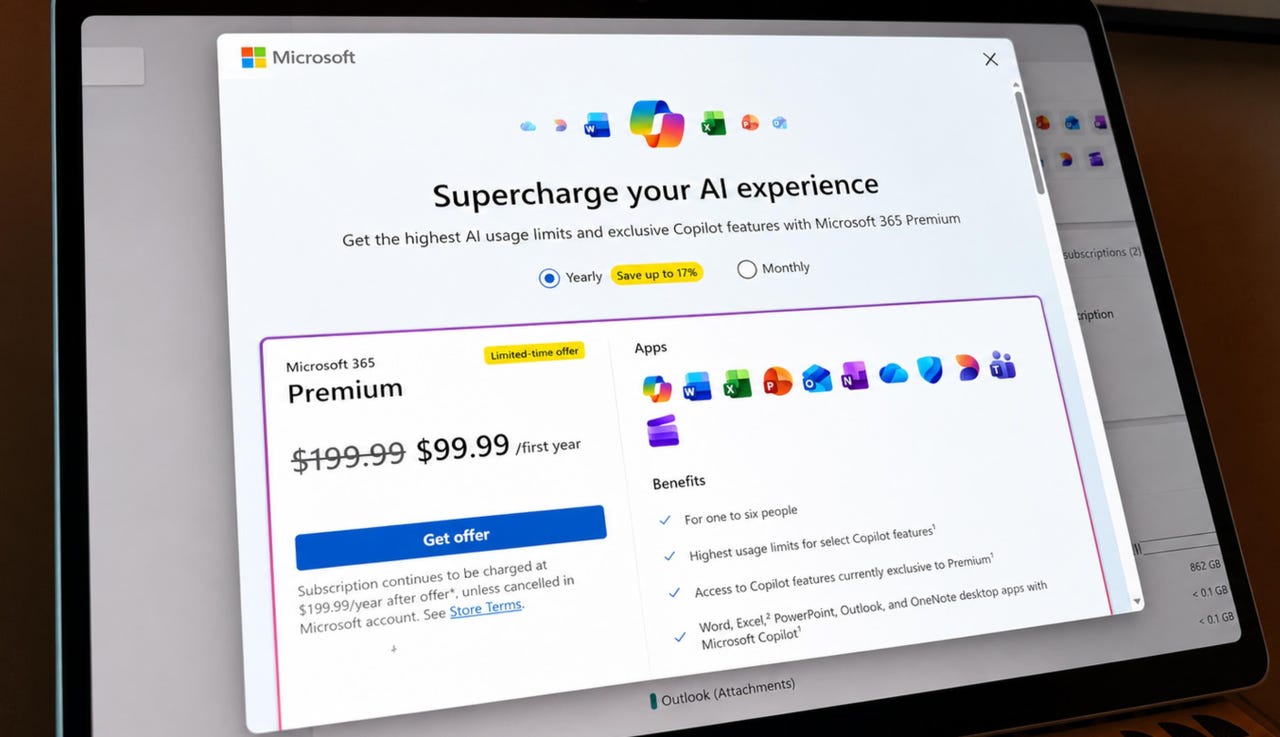

Microsoft 365 Premium is half off if you have a Basic, Personal, or Family subscription.
Ed Bott / ZDNET
Follow ZDNET: Add us as a preferred source on Google.
ZDNET’s key takeaways
- Microsoft 365 Premium is the successor to Copilot Pro.
- It includes some advanced AI features and higher usage limits.
- Microsoft is currently offering 50% off for the first year.
Inflation is brutal right now. The price of a dozen eggs? Sky-high. Fill the tank in your car? Be prepared for sticker shock. Airfare? Don’t ask.
Also: Microsoft’s first reasoning model is one of 7 AIs just released at Build – what we know so far
And the software that you use at work and at home? Yeah, that’s getting more expensive, too.
Last year, Microsoft jacked up the price of its Microsoft 365 Personal and Family subscriptions by more than 30%. Someone has to pay for all those new AI features, and that someone is you — even if you don’t use those features.
Last year’s Microsoft 365 price increase was just the beginning.
Screenshot by Ed Bott/ZDNET
Now, Redmond is trying to upsell those same subscribers to a new plan, Microsoft 365 Premium, which costs $200 a year. That’s 54% more than the price of Microsoft 365 Family. There’s a tempting discount for existing subscribers — $100 for the first year, which is 50% off. Essentially, Microsoft is offering $30 to existing Family subscribers to try the new edition for a year. But after that promo runs out, Satya Nadella’s marketing team is hoping that you’ll keep paying.
Also: AI Model Release Tracker: Microsoft AI’s first reasoning model arrives
I went through a ton of documentation and paid for a Premium subscription to figure out exactly what you get with this edition. I’ve assembled the results in this post.
What is Microsoft 365 Premium?
At the beginning of 2025, when Microsoft was stumbling through the Microsoft 365 rebranding and price increase, Copilot Pro was an add-on that cost $20 a month, or $200 a year. Subscribers gained priority access to the latest ChatGPT models, as well as access to AI features in the free web versions of Word, Excel, OneNote, and Outlook. If you had a paid subscription to Microsoft 365 Personal or Family, you got those AI features in the desktop Office apps as well.
Also: I paid Microsoft’s premium Copilot agents to do my work – they were confidently bad at it
Microsoft has never disclosed how many people paid for Copilot Pro, but it’s a safe bet that the number was very low. In November, the company ditched Copilot Pro and released Microsoft 365 Premium, which is effectively a bundle of the old Copilot Pro with Microsoft 365 Family included.
What features are included in Microsoft 365 Premium?
I’ve put together a table to help you see at a glance what’s in Microsoft 365 Premium and how it compares to the other subscription plans in the Microsoft 365 group.
Microsoft calls it M365 Copilot on the service’s home page, so I’ve adopted that nomenclature here as well.
| Plan | Cost | What you get |
|---|---|---|
| M365 Basic | $2/month; $20/year | 100 GB OneDrive storage, Office web apps, and ad-free Outlook.com email for one user |
| M365 Personal | $10/month; $100/year | 1 TB OneDrive storage, Office desktop apps on up to five PCs, ad-free Outlook.com email, 60 Copilot credits per month, “extensive use” of Copilot Chat, and 15 Deep Research credits |
| M365 Family | $13/month; $130/year | Everything in Personal, for up to six users; each user gets 1 TB of private OneDrive storage space and Office desktop apps on five PCs, but only the account owner gets access to AI features |
| M365 Premium | $20/month; $200/year | Everything in Family for up to six users; the account owner gets access to “exclusive AI features” and increased AI usage beyond standard credit limits |
Microsoft 365 editions at a glance
As of today, those “exclusive AI features” include three agents — Researcher, Analyst, and a Photos Agent, which is still in preview. Those options are only available in the M365 Copilot web app to the owner of an M365 Premium subscription.
These agents are only available in the Microsoft 365 Copilot app with a Premium subscription — and only for the owner.
Screenshot by Ed Bott/ZDNET
Aren’t some of those features free?
Copilot features are free in Windows, in Edge, and in the Copilot mobile app, as part of the Copilot Free plan. That plan has some usage limits — 15 boosts per day to generate images, and access to the latest AI models is only during nonpeak hours. The expanded AI features are only available with a Microsoft 365 subscription.
Also: Build 2026: Microsoft’s MDASH exits preview with 100+ specialized threat-hunting AI agents
Here’s an official support document explaining how those credits work: AI credits and limits for Microsoft 365 subscriptions. You can also find some useful information here: Which Copilot Plan Is Right for You?
How does it compare to ChatGPT Plus?
Copilot Pro was originally designed to be a direct competitor to ChatGPT Plus, OpenAI’s main paid offering for consumers. The change to Microsoft 365 Premium keeps the same $20-per-month price tag as ChatGPT Plus, but adds the benefits of a Microsoft 365 Family subscription. Copilot in Microsoft 365 uses the same OpenAI models as ChatGPT Plus and has similar usage limits, but allows you to engage directly with Word, Excel, and other Office files.
The user interface is different, of course, which means that some features in Copilot don’t work exactly as expected. (See my firsthand experience trying to generate a file for download in Copilot, for example.)
If you’re already a Microsoft 365 subscriber and you use ChatGPT Plus extensively, you might want to try the Microsoft variation, especially with the current promotional offer. If your primary working environment is Google Docs or another non-Microsoft alternative, the case for Microsoft 365 Premium is less compelling.
Who is Microsoft 365 Premium designed for?
The target market for this product is people who already subscribe to Microsoft 365 Personal or Family, enjoy engaging with an AI chatbot or tinkering with AI-enhanced images, and regularly hit usage limits with ChatGPT or other commercial options.
Also: Work IQ is Microsoft’s big bet on agent-first enterprise IT, and I have questions
If your use of AI features ranges from “occasionally” to “never,” you don’t need it.
How can I get a deal on Microsoft 365 Premium?
You can get a free one-month trial of Microsoft 365 Premium here: Try Microsoft 365 Premium for a month – Microsoft Store.
If you’re an existing subscriber to any consumer edition of Microsoft 365, including the $2-a-month Basic plan, you qualify for a one-year subscription to Premium at the reduced rate of $100. It includes all the features in Microsoft 365 Family, so if you already have a Family plan subscription, you can get a one-year extension for $30 off and try the AI features for a full year. Trial editions don’t qualify for the discount, but you can pay $2 for a one-month subscription to Microsoft 365 Basic and then immediately upgrade to a one-year M365 Premium plan at the discounted rate.
Also: I’m no Copilot fan, but these 6 new AI skills turned Edge into my favorite mobile browser
To redeem the offer, go to https://account.microsoft.com, sign in with the Microsoft account for the subscription owner, and click the Manage Microsoft 365 Family, Personal, or Basic link at the top of the page. Be sure to read the terms carefully.
Any existing time remaining on your current plan is prorated and added to the new subscription. When the extended subscription ends, you’ll be charged at the full rate. You can ensure that doesn’t happen by turning off recurring billing. When you reach the end of the term, you’ll need to sign up again to resume your old subscription type.