Where Waste Generation Is Worst


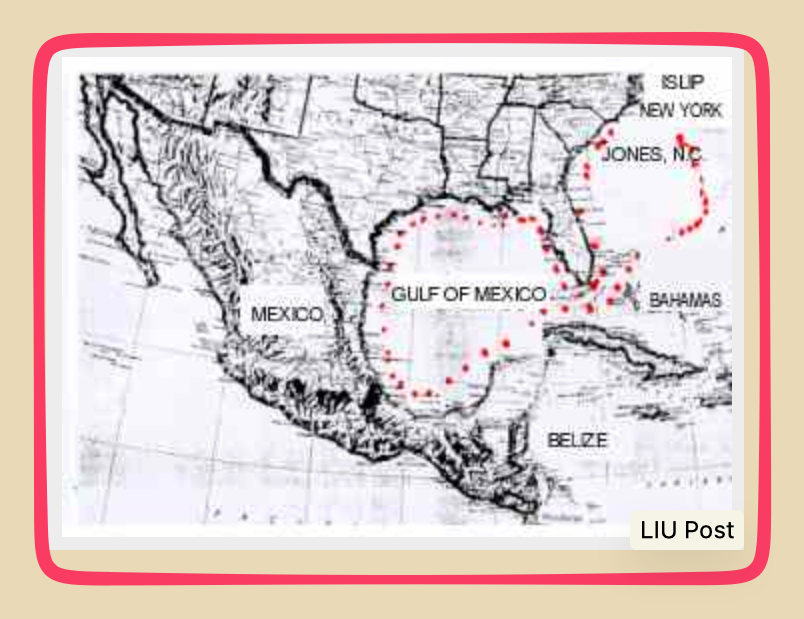
Today’s story starts in 1987 with a garbage barge called the Mobro. A group of investors hoped to make some money by turning New York’s garbage into electricity. But when the Mobro departed with the garbage from Islip, Long Island, no town inside or outside the U.S., would accept its 6 million pounds of trash. North Carolina refused it; Louisiana said no; Mexico stopped it from entering its waters. So, after 6 months and more than 6,000 miles, the Mobro returned home to Brooklyn and burned its cargo.

Stopping repeatedly, the Mobro with its Break of Day tugboat went down the East Coast and looped the Gulf:
mobro map


Fiji’s Refusal

Now, 39 years later, the South Pacific’s Fiji archipelago is also refusing to become a garbage destination. In Fiji, Australian Dial-a-Dump’s Ian Malouf and Kookai label’s Rob Cromb propose to convert non-recyclable garbage into electricity. Near a new private port, they project incinerating 900,000 tonnes of waste annually. The upside is the diesel Fiji would no longer need.

However, Fiji’s ambassador to the UN summed up the Fiji response when he said his island nation, “must not become the Pacific’s ashtray.” Tainting images of Fiji’s pristine beaches, massive garbage incineration would harm its tourism business. In addition, they worried that the emissions presented a health hazard.

As a result, they said, “No.”

Our Bottom Line: Waste Generation and Disposal

Waste Generation

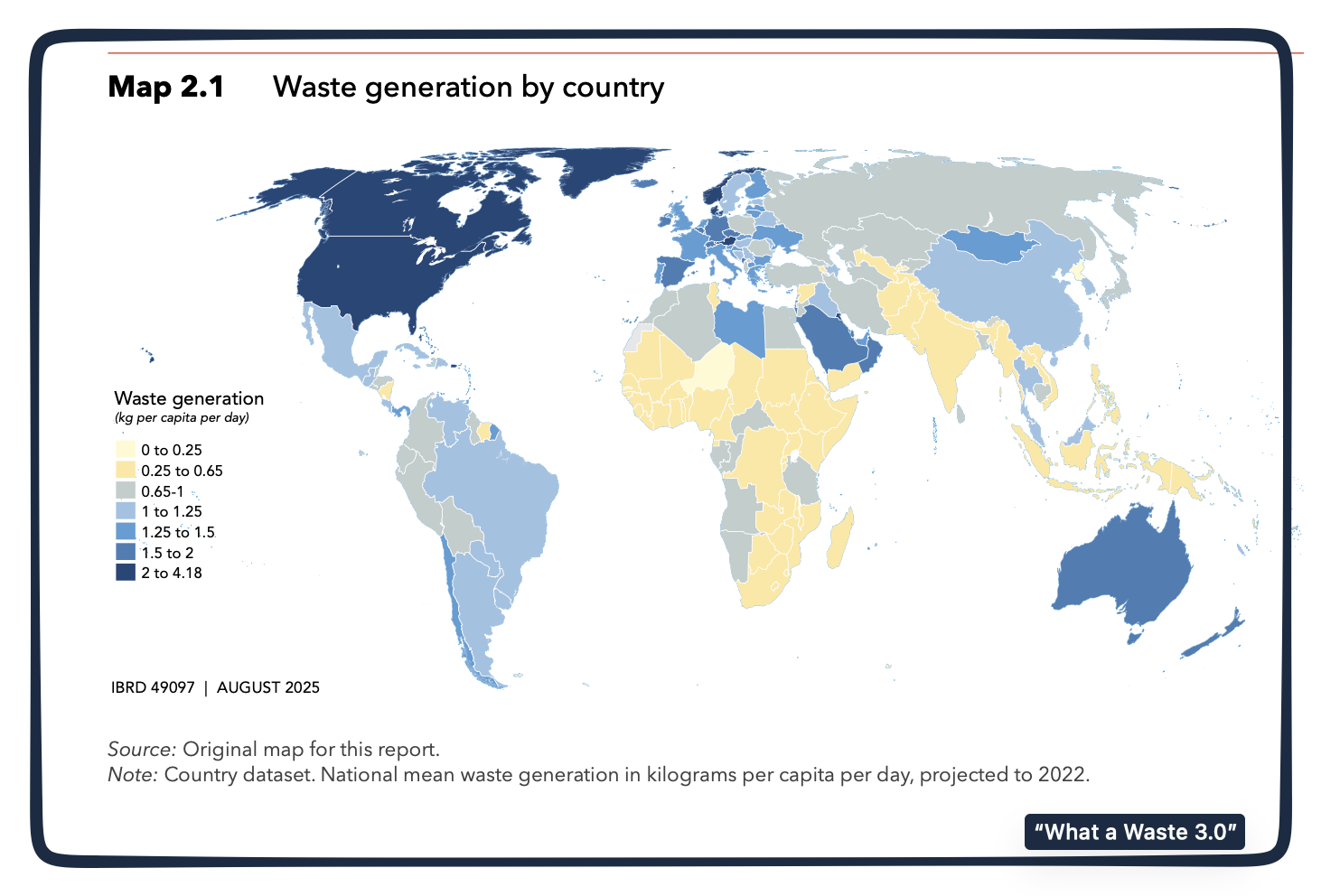
You can see the U.S. and Canada are the darkest blue nations:
waste generation

Waste Disposal

Whereas China had been a primary destination for the world’s waste, their increasing affluence meant they no longer needed the raw materials nor wanted the pollution. As a result, by 2021, they had banned all imported solid waste. The decision was a whopper. It created a massive shift in waste movement.

This is what China’s imported solid waste looked like in 2013:

the world's waste and China

Now, according to the World Bank’s 2026 What a Waste 3.0 report, global plastic waste shipments are down from 12.4 million tonnes in 2017 to 6.3 million tonnes in 2022. But still developed nations continue exporting waste to developing nations, with Malaysia, Indonesia, and Vietnam the major destinations.

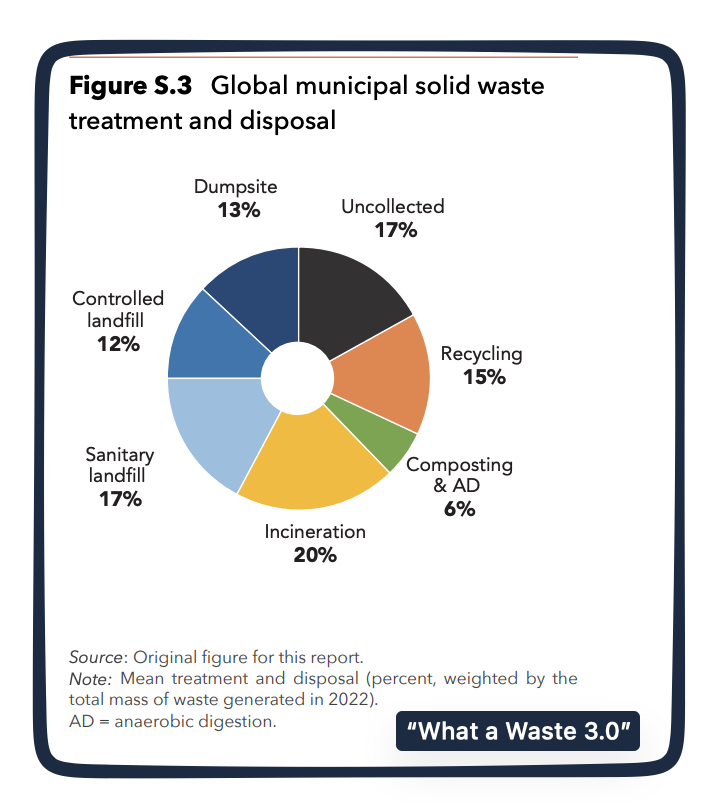
These are the treatment and disposal alternatives:
waste generation

So, returning to our title, where is waste generation worst? There are so many possible answers. But fundamentally, It depends on whether we mean quantity or quality.

My sources and more: Thanks to the BBC’s World Business Report for alerting me to “Waste Colonialism.” From there, we returned to an econlife on recycling and the Mobro, and then found the Fiji facts at Yahoo. However, if you look at just one past econlife post, do go to Bethel, Alaska. But, by far, my best source was the World Bank’s 2026 What a Waste 3.0 report.

Our featured image is a picture of the Mobro.


Source link

Leave a Reply

Subscribe to Our Newsletter

Get our latest articles delivered straight to your inbox. No spam, we promise.

Recent Reviews


Google Gemini

Lance Whitney/ZDNET

Follow ZDNET: Add us as a preferred source on Google.


ZDNET’s key takeaways

  • Google is downloading a 4GB file to the PCs of many Chrome users.
  • The file is harmless and is used for the Gemini Nano on-device LLM.
  • You’ll see it if you’ve opted into the on-device AI setting in Chrome.

Google is silently saving a Chrome-related file to many computers. That’s nothing earth-shaking. But this file is a hefty 4GB in size, which has caught the attention of some Google watchers. What is the file, why is it being installed, and how can you check for it?

Also: I let Chrome’s AI agent shop, research, and email for me – here’s how it went

In a new blog post, computer scientist Alexander Hanff, aka the Privacy Guy, pulled back the curtain on this mysterious file. Named weights.bin, the file is being downloaded deep within the user data folder of many Chrome users. The file itself is related to Gemini Nano, which Google is using as the on-device AI model for Chrome users.

If you delete the file, it comes back

Though there’s nothing risky or dangerous about the file, Hanff and others have expressed concerns that it’s being downloaded without users’ knowledge or permission. And if you delete the file, it eventually comes back, Hanff said. That by itself is hardly alarming; that’s part of any software update. Rather, some of the criticism centers on the file’s size. If you have ample hard disk space, then 4GB is likely not a big deal. But if you’re running low, that big a file might chew up space you can’t spare.

Traditionally, AI models like Gemini use the cloud to interact with you. Submit a request, ask a question, or kick off a conversation, and the AI taps into its online data and resources to respond. But that method can be slow and naturally requires that you be connected. By traveling between your device and the cloud, your data can also be exposed.

A trend has emerged in which companies are experimenting with locally stored LLMs (large language models). That not only speeds up the process, but it also means you can use the AI offline and more securely. Gemini Nano has already been in play on Google’s own Pixel phones.

That explains why the file is so large; it has to pack in a lot of data. In this case, a weights file contains numbers that measure the level of importance an AI model assigns to your input. The AI uses these values to determine what should come next. For example, let’s say you start typing the phrase “Why did my new phone cost me an arm and a…” at the prompt. The AI assigns weights to your input to help it predict that the next word would be “leg.”

Also: This powerful Gemini setting made my AI results way more personal and accurate

How can you tell if the file has been downloaded to your PC? First, open Chrome, go to Settings, and select System. On the System screen, check whether the On-device AI option is turned on. If so, then you probably have the file or will soon get it.

To double-check, you’ll have to navigate to the user folder on your PC. That location varies based on your operating system. On my Windows 11 PC, I ran a search in File Explorer for weights.bin. The search took a long journey through the following path: C:\Users\lance\AppData\Local\Google\Chrome\User Data\OptGuideOnDeviceModel\2025.8.8.1141. At that final location, the weights.bin file appeared, measuring 4GB.

Since the file is downloaded again if you simply delete it, you’ll have to take an extra step to get rid of it permanently. After you delete the file, go back to Settings in Chrome and select System. Then  turn off the switch for On-device AI.

But as long as you have enough disk space (and if you can’t spare 4GB, then it’s time to clean up your drive), the file is little cause for concern. Just forget about it, especially if you’re keen to try on-device AI, and we’ll see what the future holds for Gemini Nano.


Source link