
Verdict
Hisense’s new flagship projector is as spectacular and innovative on the inside as it looks from the outside
-
Striking and beautifully finished design
-
Outstanding and flexible picture performance
-
Strong sound by projector standards
-
Expensive for a lifestyle projector
-
Picture presets could be better
-
Lacks cutting edge gaming support
Key Features
-
4K DLP optical system
The XR10 can deliver a picture considered by America’s Consumer Technology Association to be true 4K
-
Comprehensive HDR support
The XR10 can play Dolby Vision, HDR10+, HLG and HDR10
-
Liquid cooling system
With a huge claimed brightness of 6,000 lumens, Hisense has decided to make the XR10 the first projector of its type to feature a liquid cooling system
Introduction
While there are undoubtedly some excellent lifestyle projectors out there, there arguably isn’t a truly ‘out there’ one… out there.
If you see what I mean. Hisense is on a mission to change that, though, with its new XR10: A flagship (£5,999) projector Hisense has clearly created with the intention of proving that convenient projectors can also be seriously strong performers.
In fact, with features such as a 6,000 lumens maximum light output backed by the lifestyle projection world’s first liquid cooling system, support for every HDR format that matters and advanced laser lighting and iris controls, the XR10 actually blurs the lines between the usually quite separate lifestyle and home theatre projection worlds.
Design
- Premium bronze metallic finish
- Transparent sections reveal inner workings
- Large cubic shape provides speaker room
Aside from its roughly cubic shape, the XR10 looks unlike any projector you’ve seen before. Its front edge sports a huge lens on one side surrounded by a bold bronze enclosure, while two vertical areas on the other side of the front panel contain a variety of sensors designed to deliver premium AI-driven auto setup and picture optimisation systems.
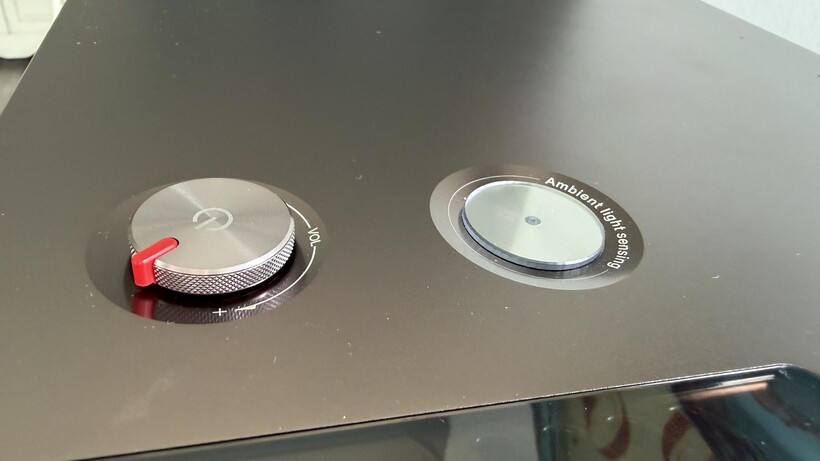
There’s an ambient room condition sensor on the top edge that can be used by the projector to automatically optimise pictures to room conditions, while Hisense has also provided a gloriously analogue element to the design in the form of a silver rotating-dial volume control (there to back up the projector’s secondary use as a standalone wireless stereo speaker).

The top, left and right sides are dressed in the same metallic bronze finish used for the lens enclosure, except for a section on the left hand side that’s actually see-through, revealing a section of the projector’s inner construction and laser lighting arrangement to anyone curious to take a look.
Build quality throughout is outstanding, and while the XR10’s mixture of different finishes and elements sounds like a potential hot mess, actually everything somehow hangs together perfectly.

The worst that can be said about the XR10’s appearance is that it’s bigger (and heavier) than most lifestyle projectors, making it less convenient to cart about than most of its much more affordable rivals.
Hisense has actually got ahead of potential ‘big and heavy’ critiques, though, by shipping the projector with a fetching leather carry case, complete with wheels and extendable handle.

User Experience
- Useful if lightweight remote control
- VIDAA smart system
- Voice control
While the remote control you get with the XR10 is a rather plasticky item for such a premium-finished projector, its no-nonsense layout, backlighting and direct access buttons for Netflix, YouTube, Prime Video and Disney+ make it more helpful than your average projector remote.
A mic button on the remote means you can also issue the projector with verbal instructions if you’re comfortable with talking to inanimate objects, with voice control parsing and smart features provided by Hisense’s own VIDAA operating system.

This makes a refreshing change to the Google TV system projectors usually use, delivering a relatively clean, straightforward interface while still carrying all the streaming apps most households will need. Including the BBC iPlayer – the one app that typically gets away from Google TV-based projectors.
Hisense’s picture and sound fine-tuning menus aren’t integrated into the VIDAA system quite as straightforwardly and logically as I’d have liked, but it only takes a few minutes of experimentation to find your way round and uncover all the most important stuff. Which is just as well, for as we’ll see you’ll need to pay a few visits to the set up menus if you want to get the absolute best from Hisense’s new projector flagship.
Features
- 6000 lumens
- Full HDR support
The XR10’s 6000 lumens of claimed, liquid-cooled brightness, claimed 4K resolution and triple laser lighting system are arguably its headline features – but as you might hope with a £5999 projector, that’s just the tip of the feature iceberg.
Particularly important is the projector’s lens iris system, with which Hisense claims the XR10 can deliver a promising 60,000:1 dynamic contrast ratio. Such dynamic iris systems can often create issues such as mechanical noise or distracting brightness instability, though, so it’s also good to see Hisense claiming a more than respectable 6,000:1 native contrast ratio for its new flagship projector. A claim that’s especially promising when it’s accompanied by such a monster brightness claim as 6000 Lumens.

Not surprisingly for such a bright, premium projector, the XR10 can support high dynamic range video. In fact, it can support all of the main HDR formats, adding Dolby Vision and HDR10+ playback to the more predictable HD10 and HLG formats. This rare but very welcome HDR flexibility enables the XR10 to play the best version of any content it receives, be it from one of its built-in streaming apps or a connected 4K Blu-ray player or external streaming box/stick.
The DLP projector system at the XR10’s heart is claimed to be capable of covering an almost incomprehensible 110% of the enormous BT.2020 colour spectrum that’s generally thought of right now more as a container format than a widely used mastering format.
My own measurements using Portrait Displays’ Calman Ultimate software and G1 signal generator plus a Klein K10-A colorimeter didn’t quite back that up; I found it topping off a bit lower, at a still pretty remarkable 95.6% of BT.2020 in its default Standard preset. My measurements did reveal coverage of nearly 145% of the DCI-P3 spectrum actually used for most HDR mastering, though, and the XR10 has picture modes capable of ‘expanding’ HDR content to take advantage of that massive colour range.

Another major justification for the XR10’s £5999 price comes from its lens. This is a 16-element, all-glass affair precision engineered to maintain the detail and sharpness of 4K images all the way through the projector’s optics and on to your screen.
For all its serious home theatre-like specifications and features, though, the XR10 hasn’t forgotten its lifestyle roots. On the contrary, it’s decided to turn its convenient features up to 11 by becoming the first projector ever to combine an 8MP camera with dual so-called time-of-flight sensors to deliver ultra-accurate automatic focus, keystone, image size and even object avoidance features that can adapt images to almost any environment – including side angle projector placement.
So you can just take the projector out of its fancy leather carry case, put it more or less where you want, point it in the rough direction of your screen, and the projector will take care of the rest.
The range of image adjustment the XR10 supports is pretty extreme, too, with extensive vertical and horizontal optical image shift options being joined by a massive 2.0x level of optical zoom. This means the projector should fit into almost any size or shape of living room, and can deliver a 100-inch image when sat as little as 1.86m from your screen.
While most serious projectors in the £6k price bracket are really designed only for dedicated dark room settings, the XR10’s combination of huge brightness and premium light controls, lifestyle design and ambient light sensor suggest that Hisense sees its projector as potentially a genuine daytime display option too.

The cube-like design of the XR10 is a result in part of Hisense’s desire to complete the projector’s plug and play appeal by equipping it with an integrated speaker system. Though as with pretty much everything about the XR10, the speaker system here is a cut above the lifestyle projector norm.
For starters it incorporates a dedicated ‘.1’ bass driver alongside a stereo speaker system, and it supports the DTS:Virtual X virtual surround sound format. It’s sound has been developed with the audio gurus at French audio brand Devialet. The only audio feature surprisingly missing is support for Dolby Atmos.
At first glance the XR10 seals its premium status with an impressive roster of connections. Three HDMI inputs lead the way rather than the two you usually get on projectors, backed up by an optical digital audio output, a trio of USB ports, a headphone jack, plus the Ethernet/Wi-Fi/Bluetooth network options expected with pretty much any living-room friendly lifestyle projector.
Hooking an Xbox Series X up to the XR10 reveals the XR10 isn’t quite as well specified for gamers as we might have hoped. One of the three HDMI ports is only specified to HDMI 2.0 specification, but even though the other two claim HDMI v2.1 support, the only real 2.1 feature they seem to support is auto low latency mode switching when a game source is detected.

Even if you set the HDMI inputs to the Enhanced Pro settings, they don’t support the 4K in HDR at 120Hz refresh rates available from the Xbox Series X and PlayStation 5 consoles – as well as decently specced PCs. You can only get 120Hz at 1440p resolution in standard dynamic range, too, so if you want HDR, you’ll have to stick to 60Hz.
One bit of good gaming news, though, is that the projector takes only 34ms to render 60Hz games, and you can halve this without seemingly any major impact on picture quality if you call in a provided DLP Turbo feature. At 120Hz native lag drops to 19ms, which can again be halved by the turbo mode, and if you’re happy to drop the resolution down to 1080p you can actually get the projector to 240Hz, where lag is natively just 9ms, or 4.8ms with DLP Turbo engaged.
Picture Quality
- Exceptional brightness
- Dazzling colour
- Strong contrast for such a bright projector
The XR10’s picture quality gets it spectacularly back on track after its slight gaming connection disappointment.
Pretty much everything about its images breaks new ground. The most instant impact can be seen, not surprisingly, in the remarkable intensity and vividness delivered by its massive brightness and colour range. I can’t think of any other projector costing less than six figures that’s delivered so much visceral, HDR-friendly punch.
HDR was designed for TV screens rather than projectors, and is typically difficult for projectors to do serious justice to; especially as they don’t have access to any of the local dimming or pixel level light controls that premium TVs have to draw on. With the XR10, though, especially in its Standard preset, HDR images erupt off even a neutral gain screen with a sense of vibrancy, solidity and brightness that’s light years – pun intended – of anything projectors can typically achieve. Even premium models.

What’s more, there’s nothing at all forced, strained, unbalanced or unsubtle about the XR10 Standard mode’s exceptional picture dynamics. Colours look balanced enough and contain enough blend subtleties and nuances to still look believable and natural (despite them not being measurably accurate to mastering standards).
This makes them pretty much endlessly watchable without you having to worry about becoming distracted by the likes of garish tones, or flat, cartoonish backdrops. I’ve seen one or two XGIMI projectors get close to the sort of extreme colour saturations and high brightness levels the XR10 produces, but they weren’t able to do this with anything like the balance, finesse or simple authenticity that the XR10 does.
There’s always a worry that a projector as bright as the XR10 will struggle to deliver convincing, movie friendly black tones. Projectors (currently) don’t after all, have any sort of local dimming technology like TVs do. Somehow, though, the XR10 actually manages to partner its impressive brightness and vibrancy with some of the best black levels I’ve seen from any even premium lifestyle projector.
In fact, so long as you take the trouble to set the projector’s Iris feature to its 1 setting, it beats many HDR-capable dedicated home theatre projectors in this key picture quality area. It does so without even the subtlest, faintest dark scene details being crushed out of the picture.
As a result, dark scenes look as detailed and three-dimensional as bright ones – an essential component of the sort of consistency any display needs to deliver if it’s to provide a truly immersive experience.
The XR10’s phenomenal brightness, colour response and contrast performance enable it to work exceptionally well as both a dark and bright room projector. In a dark room, HDR looks incredibly compelling and dynamic, while in a bright room the intensity of the XR10’s colours and the raw punch of its brightness helps images retain a level of solidity and vividness in bright rooms that’s incredibly rare in the projection world. This is one projector with home theatre aspirations that really could also replace a TV in a regular living room.

At this point I should stress that my comments have mostly been focused on the XR10’s glorious Standard mode pictures. Beautifully judged and balanced though this mode’s ‘expansion’ of incoming HDR (and SDR) pictures might be, though, the results aren’t measurably accurate for film fans who want to see images looking as the director intended. Hisense has covered this issue off by equipping the XR10 with a Filmmaker Mode which my Calman Ultimate tests reveal delivers exceptionally accurate results, especially with HDR.
It should be said that the Filmmaker Mode has to seriously hammer the image’s brightness compared with the Standard mode to achieve this sort of measurable accuracy. Once you’ve come to terms with this, though, and set the Iris feature to its manual ‘1’ setting to reduce some slightly pervasive greyness that appears with the Filmmaker Mode’s out of the box setup, the Filmmaker Mode images really are still extremely engaging – not least because the projector is still able to deliver lots of detail, depth and colour subtlety despite how relatively little brightness it’s got to work with.
The couple of mentions I’ve made over the past couple of paragraphs of tweaks to the XR10’s presets bring us to arguably its biggest flaw, as all of the preset options the projector carries require manual intervention to get the best out of them.
Even with Dolby Vision content, which provides the projector with extra image data to work with, the default Dolby Vision Bright setting actually looks quite alarmingly ‘off’, with over-saturated colours and too many colour and black level fluctuations. This Dolby Vision issue can be solved to outstanding effect by switching to the provided Dolby Vision Dark setting, and setting the Iris to 1.
I’d also generally suggest setting sharpness to its zero level with 4K content, but leaving Hisense’s rather clever Super Resolution feature switched on to get the most detailed but also natural level of sharpness, and recommend the Film option from the XR10’s motion processing options for a result that slightly calms judder with 24p films without creating either the soap opera effect or unwanted processing artefacts.
While these sorts of issues prevent the XR10 from being quite as laid back and truly plug and play to use as some lifestyle projectors, though, the bottom line is that it does carry the tools to fix pretty much all of the image issues its presets might create.

The only exception to this is the DLP rainbow effect, where red, green and blue stripes can sometimes flit around in your peripheral vision or over particularly stand-out bright objects in the picture. I consider myself more susceptible to seeing such rainbowing than most, though, and on the XR10 it actually didn’t bother me as much or as often as I would have expected it to considering the sort of brightness the projector can produce.
It’s worth wrapping up the picture section by stressing that while the XR10’s presets could have been a bit better conceived, despite a little clipping of bright highlights the dynamic tone mapping system the projector uses to optimise HDR10 content to its capabilities is outstanding without any manual interference – arguably the best such system I’ve seen on any sub-£10k projector bar, perhaps, Sony’s Bravia 7.
And that model can’t get nearly as bright as this Hisense one can if you’re looking for a projector capable of working in both bright and dark room conditions.
The auto set up tools also do a uniquely good job of getting the image to the size and shape you want whenever you set the projector up in a different location. So in some ways, at least, the XR10 really is easier to use than many projectors – even some other lifestyle models.
Sound Quality
The XR10 continues to venture beyond typical projector territory with its audio. It’s able to go louder, for instance, than many TVs, never mind projectors – and it puts this volume to good use both for unlocking an impressively extreme dynamic range by projector standards.
It casts the sound clear of the projector’s bodywork so that it can create a room-filling sound stage that feels unusually well connected with the images being produced across the room; so long as you’ve got the projector sat in front of your seating position rather than behind you.

Classic film soundtrack rumbles are delivered with impressive bass extension without typically causing crackling, hard low frequency cut offs or buzzing distortions. This impressive bass provides a strong counterpoint to the XR10’s trebles too, helping them avoid most of the harshness and thinness that lesser sound systems can suffer with. So the XR10’s Devialet-tuned audio can sound detailed and clean without becoming over-bright or forensic.
The clarity extends to dialogue too – though perhaps because of Hisense’s desire to keep voices locked at the heart of the action, dialogue can also sound a little too contained in the projector compared with the rest of the sound, leaving it appearing dislocated from the onscreen action.
Mentioning this is so nit-picky it almost seems unfair, though, given how much more powerful and immersive the XR10 sounds than pretty much any other projector in town. It’s worth adding, too, that the projector’s audio performance is scarcely impacted at all by cooling fan noise – presumably thanks to the efforts of that unique liquid cooling system.

Should you buy it?
Outstanding picture and sound
From its ability to deliver HDR-friendly extreme brightness while still retaining cinematic black levels to its high 4K sharpness, vivid but well-controlled colour, impressive range of presets (including an accurate HDR Filmmaker Mode) and punchy, room-filling sound, the XR10 is every inch a premium performer.
While it’s great to find the XR10 sporting three HDMIs, none of those HDMIs proves capable of taking in 4K/120Hz gaming feeds. You can get 120Hz at 1440p resolution, but only if you’re prepared to lose HDR.
Final Thoughts
The Hisense XR10 isn’t cheap by modern projector standards. Especially modern ‘lifestyle’ projector standards. The truth is, though, that this is no ordinary lifestyle projector.
From its design through to its set up features and, most of all, its picture and sound performance, the XR10 is for my money the most all-round premium lifestyle projector I’ve ever tested.
In fact, with a little manual intervention it can deliver picture quality good enough to turn it into a true home theatre projector when that’s what you want it to be, giving it a jack of all trades appeal that suddenly makes its price seem much easier to understand and justify.
How We Test
The Hisense XR10 was tested over two weeks with HDR and SDR content. Image quality was checked objectively with Portrait Displays’ Calman Ultimate software and G1 signal generator, plus the Klein K10-A colorimeter.
- Tested for two weeks
- Tested with real world content
- Also tested with industry-respected objective testing equipment
FAQs
Impressively the XR10 supports all of the four main HDR formats: HDR10, HLG, Dolby Vision and HDR10+.
It’s a DLP projector using tri-laser lighting, plus there’s an Iris system available to provide more control over the projector’s blend of brightness and contrast.
One of the most appealing characteristics of the XR10 is that it’s bright enough and colourful enough to be used in even quite bright living room set ups, yet it can also turn its hand very well to serious lights-down movie nights.
Test Data
| Hisense XR10 | |
|---|---|
| Brightness (HDR) | 4416 nits |
| Adobe RGB | 160.2 % |
| DCI-P3 | 144.1 % |
| Delta Colour accuracy (Delta E) | 5.4 |
Full Specs
| Hisense XR10 Review | |
|---|---|
| Manufacturer | Hisense |
| Size (Dimensions) | 213 x 273 x 293 MM |
| Weight | 10.6 KG |
| Release Date | 2026 |
| Resolution | 3840 x 2160 |
| Projector Type | DLP projector |
| Brightness Lumens | 6000 |
| Lamp Life | 25,000 hours |
| Max Image Size | 300 inches |
| HDR | Yes |
| Types of HDR | HDR10, HDR10+, HLG, Dolby Vision |
| Ports | Three HDMI, 12V Trigger port, two USB-A ports, RS-232C port, optical digital audio output, 3.5mm line out, LAN |
| Audio (Power output) | 31 W |
| Colours | Bronze metallic |
| Projector Display Technology | Laser DLP |
| Throw Ratio | 0.84:1-2.00:1 |

Stephan is the sports journalist for the Maple Grove Report.