
pros and cons
- Excellent sustained performance
- Ergonomic design
- Powerful cooling
- Very expensive
- Buggy software
more buying choices
Follow ZDNET: Add us as a preferred source on Google.
It’s been almost a year since I last reviewed an MSI gaming handheld. Recently, I spent a couple of weeks trying out the new MSI Claw 8 EX AI+, and it’s hard to believe that this device is part of the same series. So much has changed.
Back then, it was like the company was trying to find its footing in the handheld market; the previous generation showed promise but was still rough around the edges. This new model is a refinement. MSI reworked the Claw 8, now boasting better ergonomics, stronger cooling, and a new Intel Arc G-Series processor.
Peak design
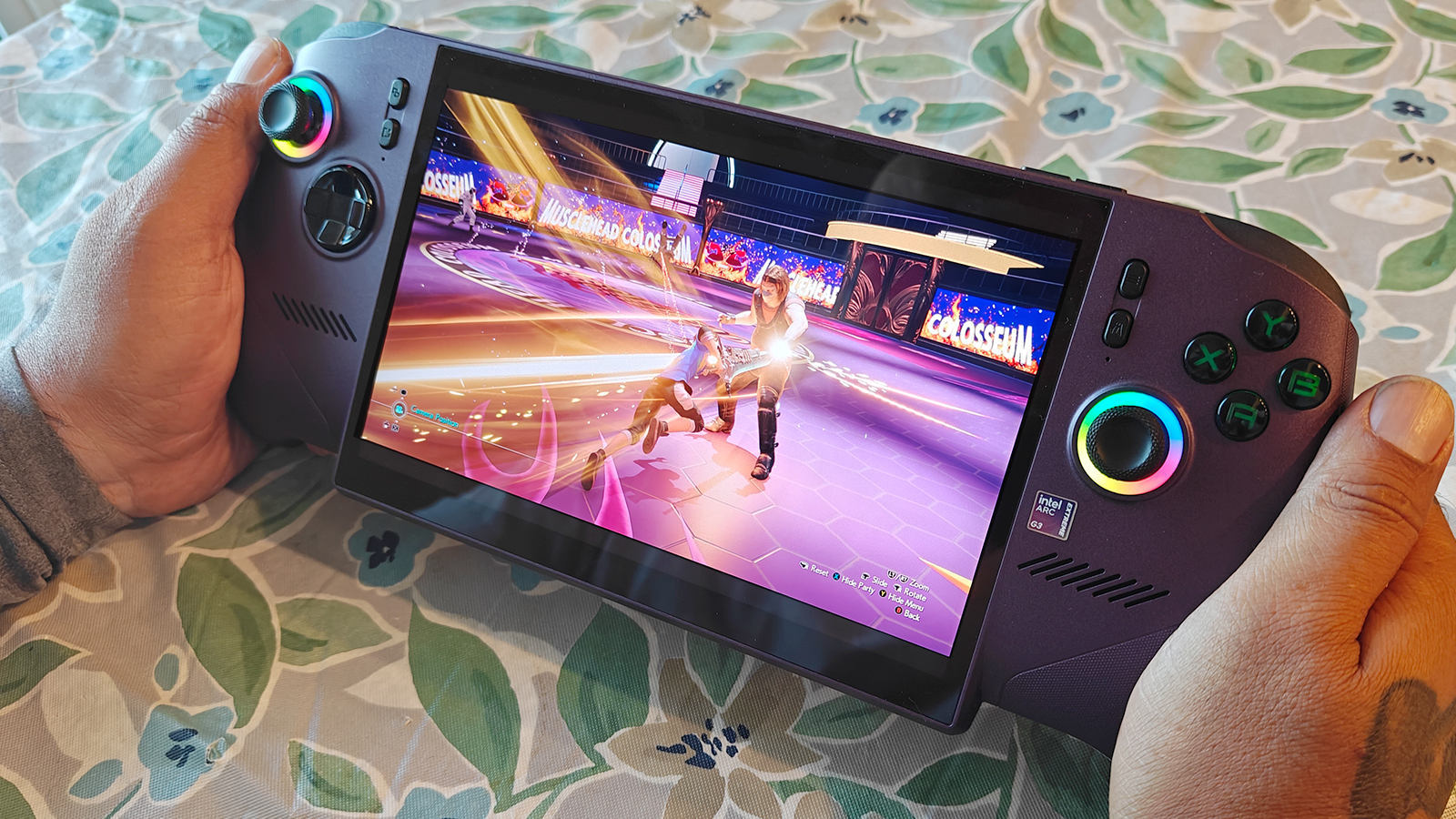
According to MSI, the design team drew inspiration from the Xbox Series X controller when developing the Claw 8 EX AI+, and it shows. The handheld features flared handles similar to the controller, as well as a laser-etched texture for a non-slip grip. Buttons are evenly spaced for maximum comfort.
I have to give MSI credit for the handheld’s weight balance. Despite its hefty size, it doesn’t feel heavy or awkward to hold. The weight is evenly distributed across its chassis, perfect for longer gaming sessions. There are several smaller refinements, too. MSI states that the directional pads now have a “metal dome” to improve input accuracy.
Certain aspects of the Claw 8 EX remained unchanged from the previous generation. The analog sticks and triggers still use Hall Effect sensors, helping ensure long-term accuracy and responsiveness. The display remains unchanged as well. MSI kept the same eight-inch Full HD IPS panel with the 120Hz refresh rate. It’s a good-looking screen with vibrant colors and high contrast.
System woes
MSI’s Claw 8 EX runs on Windows 11, and I have mixed feelings about that. Windows isn’t the best for handheld gaming, to say the least. You often run into performance hiccups and software quirks. To be honest, I did experience that. One recurring issue involved the Quick Menu button. Pressing it launches the device’s system settings. Whenever I opened the menu, the cursor would automatically jump from the system settings to the MSI Quick Settings. Admittedly, I don’t know if this was intentional or a bug, but having the cursor jolt to the left every time I hit the button got old really fast.
Also: I underestimated what a 15-in-1 docking station could do for my PC – this one’s $100 off, too
Another issue involved the MSI App Player. This lets you download Android games directly from the Google Play Store. Sounds great, but sadly it didn’t work. Every attempt resulted in an error message that read: “Initializing App Player. Please try again later.” After a while, I gave up and downloaded the Google Play Games beta. Through the beta software, I was able to install Android games just fine. Arknights was one of these games and it ran perfectly.
Navigating the Windows-based interface takes some getting used to. Its many system layers can feel cluttered and difficult to navigate. One of the reasons why I like SteamOS-based handhelds so much is that the operating system is more streamlined. That doesn’t mean MSI’s device is super difficult to use, but it does have a learning curve.
Despite my criticisms, Windows 11 does offer unique advantages. It allows the Claw 8 EX to double as a mini-PC. The device has plenty of power to handle robust multitasking. Plus, it gives access to other gaming services unavailable through SteamOS. You can connect your Ubisoft Connect, Xbox, Epic, and Battle.net accounts to this device and hop between them at any time.
Also: The best external hard drives of 2026: Expert tested and reviewed
If you don’t want to navigate through Windows, the handheld has a special Xbox Mode that replaces Win 11 with a more streamlined UI. I liked this alternative interface more because it reduces the number of layers you have to dig through, though there are still several.
Performance
The star of the show on the Claw 8 EX is the Intel Arc G3 Extreme processor. This chip is part of Intel’s recently introduced Arc G-Series, a new family of hardware that takes the Panther Lake architecture and optimizes it for handheld gaming. In this area, MSI’s device earns top marks. Performance is awesome. Below is a list of some of the games and my experience with them.
- Remnant II and Final Fantasy VII Rebirth ran way better than I had expected. I figured there would be some performance issues, but I’m happy to report there were none.
- Civilization VI also performed well. The processor handled the large maps and the many on-screen units with ease. However, playing the game with handheld and touchscreen controls is really awkward. I recommend getting a mouse.
- Because it’s a demanding game, I ran into some issues playing Monster Hunter Wilds. Luckily, with a few tweaks to game settings, I was able to enjoy the title just fine with no stuttering, although the resolution wasn’t great.
- Hades 2 ran like a dream.
- Some goes for Spryo Reignited Trilogy. It ran beautifully… once I toned its resolution down to Full HD.
As a PC, the Claw 8 EX does well. MSI sent me an OWC Thunderbolt Go Dock, so I can use the handheld as a Windows computer. I’m happy to report that navigating the internet felt smooth. Apps launch quickly, and the device maintains strong, sustained performance.
A big reason for that consistency is the Cooler Boost HyperFlow’s ability to manage internal temperatures. It pulls in cool air while simultaneously expelling warm air. Heat is only noticeable when you place your hand directly on the back panel or the heat vents. It never reaches the hand rests on either side.
Also: Windows 10 just very quietly got another year of free support – but why?
Another benefit of the Intel Arc G3 processor is its energy efficiency. During testing, the Claw 8 EX took about four hours to drop down to 50% battery while playing Civilization 6. Let’s compare that runtime to the Lenovo Legion Go S, a gaming handheld I really like. I played Hades 2, a much lighter game than Civ 6, on the Legion Go S, and I had to run for a charger after about two hours. Longevity is a strong suit for the MSI model.
ZDNET’s buying advice
Currently, the MSI Claw 8 EX AI+ is out of stock. The company told me that “a few hundred units” will soon be made available across Micro Center, Best Buy, and MSI’s US Store with an estimated restock date of July 3, 2026. Another restock is expected in August. When it does come back, it will retail for $1,799, which is pretty steep.
Compared to many of the other handhelds I’ve reviewed, this is the best performing. I had very few problems running games. If you’re looking for a top-notch gaming device and can afford the luxury price, I highly recommend it.