12 Signs You Should Replace Computer Parts Or Upgrade To A New PC


We may receive a commission on purchases made from links.

Growing up in the early days of personal computers, I learned a lot about how they work — and how to troubleshoot when they don’t. True, there are some issues that you can’t DIY your way out of. A completely dead computer that won’t even power up can feel like one of those.

The good news is that there are plenty of signs that your computer is on its way out and needs an upgrade. Some signs also indicate it’s time for a new machine altogether, though those are less common. Either way, recognizing those signs means you have some time to act.

While there are plenty of commonalities between laptop computers and desktop PCs, we’re focusing on desktop versions here. Because laptops don’t necessarily have a lot of extra interior space for upgrades, it’s harder to suggest solutions for them. Also, a desktop PC can behave differently based on what peripherals you’re using with it, whereas a laptop usually has the basics built in. 

Thus, we’re focusing on desktop computers (generally Windows machines) that are simple enough to crack open and update, in terms of both hardware and software/firmware.

Flickering

No matter what the specific cause is, flickering can be a major sign that your monitor is on its way out. It could be the connection itself, especially if you’re using a monitor and PC combination that requires an adapter. In my experience, an older monitor with an adapter won’t perform at its best, and it’s about more than just the visual quality.

I constantly have to adjust my HDMI-to-VGA cable, which is the type with pins, to stop the flickering I experience. Ultimately, I’ll probably keep the older monitor until the problem becomes constant rather than intermittent. Yet, it’s a sign that I need to keep an eye on things and upgrade before it gets worse.

Flickering can also be caused by problems with the variable refresh rate, or VRR. If you’re using a monitor with VA or OLED panels, it’s even more likely that flickering is due to VRR. Changing your settings — or turning off VRR — could resolve flickering issues. If it doesn’t, it might be time for new PC hardware or a new monitor, or both.

Slow gaming

Slow gaming can indicate a few different problems with your computer, but two main culprits come to mind: the graphics card or RAM. It’s easy enough to check the required specifications before buying or downloading a game, but you’ll need to check your PC specs, too.

For example, at the time of writing, Minecraft had minimum requirements for its processor (Intel Celeron J4105 or AMD FX-4100) and graphics (Intel HD Graphics 4000 or AMD Radeon R5). If your computer’s hardware doesn’t meet those minimums, the game may not run well. I’ve also had games completely crash because I didn’t have a compatible graphics card to run them.

If your favorite games don’t run well, it’s worth checking the specifications and seeing if your hardware measures up. It’s also possible that updating your drivers and adjusting settings could improve the gaming experience. Ultimately, you may need to buy new parts or a new computer that better suits your gaming habits.

Sluggish performance

Whether you like to live dangerously with dozens of tabs open 24/7 or only run one application at a time, a slow reaction time could be a sign that it’s time to replace your computer parts. If a slowdown happens with a single app, you might be able to resolve the problem by changing your settings. For example, after updating Adobe Premiere Pro, I had to change my Video Rendering and Playback setting to get normal processing speed.

If your PC consistently lags no matter what you’re trying to do, changing settings might not be the right fix. Though there are a few potential causes of slow reaction time, the one I’ve dealt with the most is a lack of RAM, which stands for random access memory. RAM helps determine how quickly your PC performs tasks, so more of it can improve performance if your system doesn’t already have enough.

The good news is that while you generally can’t upgrade RAM in some laptops, a PC is a different matter. Plus, since RAM performs a job (rather than storing data), it’s one of those parts that could be ideal to buy used.

Glitchy visuals

If you often stream content or play video games on your computer, visual glitches can indicate a variety of problems. While monitor flickering is a separate issue, other visual glitches could stem from graphics card problems.

You may not need gaming PC components to get a decent level of performance, but it’s not always a bad idea to upgrade beyond the bare minimum. That way, you can hopefully avoid the glitches that can disrupt gameplay and ruin a good time. As someone who casually games (Minecraft and The Sims), glitching visuals really ruin the experience, and I’ve had The Sims crash, too.

The deficiencies in my gaming experience were due to both a lower-quality graphics card and insufficient RAM. As Intel explains, if you don’t have enough RAM for the demands you’re placing on it, everything slows down — and that includes tasks like gaming and video editing. If you experience visual glitches, it might be time to upgrade your graphics card, but check your RAM, too.

Overheating

It’s easy to tell when a laptop is overheating, especially if you tend to use it in your lap. With a desktop PC, overheating may happen with less fanfare. Some signs of overheating can include a PC slowdown or a fan that comes on often and sounds like a jet engine.

If your PC is running too hot, you might need to consider replacing the fan or cooling system. A dirty fan can also contribute to overheating, so cracking the case open and cleaning it (such as with compressed air) could boost performance. Ensuring that the space where you use your computer is a comfortable temperature can also help. Higher ambient temperatures are going to heat up your computer’s components, which means the system has to work harder to cool them.

Again, while most laptops have a built-in cooling system you can’t update, a desktop PC is a different story. If you’re upgrading your machine, there are plenty of choices, including air and liquid CPU coolers, and it may be worth looking at passive systems, too.

Fan noise

Fan noise could indicate overheating, which may be a separate sign your computer needs some TLC. But even if your computer isn’t overheating, loud fan noises could signify another problem. The fan itself might be on its way out, so swapping it out might be a good idea. Or, the fan might require cleaning if it’s accumulated dust and debris.

What’s more, fan noise from a dirty fan could indicate another issue with your PC. A lack of air circulation within the PC case could be one reason for the debris buildup. Basically, your PC case should have positive air pressure, meaning more air is being pushed in than exhausted out. Negative pressure can allow more dust into the case, which can clog your fan and get other parts dirty, too.

Fortunately, you don’t have to overspend on most PC parts, especially fans. If you decide to nix the fan noise by adding an alternative cooling system, that’s another option that could help keep your computer cool and quiet.

PC won’t power up

Clearly, a PC that won’t power on has something wrong with it. Figuring out what, exactly, the problem is could take some sleuthing. Either way, you’ll need to troubleshoot the issue and may need some parts or, in some cases, a new PC entirely. I once tried to power on my computer, only for it to have a delayed response because of an update. I’ve also left my PC on overnight (in sleep mode), only to find it unresponsive in the morning.

The first few steps to determining your course of action involve things like checking your connections and power cable. Considering that a dead PC could be a complete loss, I wasn’t too worried about opening up the case and poking around inside when this happened to me.

You might find an obviously unplugged cord or something else detached that should be connected. Or, you may not find anything awry — in which case, a new PC is probably in your future, as was my experience.

Longer startup time

After a few decades of PC ownership, a longer bootup time has often been a harbinger of computer death for me. No computer can live forever, of course, but some of my previous desktop PCs only lasted three or so years. Technology has, fortunately, improved since then, but sometimes, a PC still becomes outdated as hardware and software requirements evolve.

For example, Microsoft notes that your computer could run slowly because of insufficient storage space or outdated hardware, among other things. Checking your computer’s specifications will tell you what components it has, and looking for potential updates can provide more context.

If no other troubleshooting steps work, your next choice may be to swap out parts or purchase a brand-new PC. Our advice? As soon as your PC starts struggling to start up, take that as a warning sign and start troubleshooting. A slowdown could also be caused by a virus or a bogged-down hard drive, among other things.

Blue screen of death

The blue screen of death is one computer problem that could seem impossible to overcome for Windows users. Although my techie dad tried everything in his IT arsenal to revive it, I once had to trash a previously great laptop when the blue screen was all it could muster up.

While my preferred solution to the issue is replacing the computer altogether, there are some things to try to salvage your machine. The blue screen, which is essentially an error message that you may not be able to immediately get past, signifies that the operating system has encountered a critical error it can’t recover from.

According to HP, the blue screen of death can stem from hardware issues, driver problems, software conflicts, corruption of your operating system, malware, overclocking, or disk errors. Troubleshooting can involve rebooting in Safe Mode, reverting recent hardware or software installations (or system updates), malware checks, and running Windows diagnostic tools. Reinstalling Windows may also be worthwhile if you’re able to get your computer to respond enough to manage it.

Internet dropping out

When your device drops its internet connection, a whole host of causes could be to blame. For one thing, it could be your internet provider. Or, it could be that your computer’s wireless network adapter needs a new driver. It could also be that some other underlying issue causes your network card to drop the connection, even when your diagnostics don’t find anything actually wrong.

If you’ve narrowed down the potential causes, internet dropouts could signify a component problem. In my experience, my internal wireless network card kept dropping the connection despite being closer to the Wi-Fi router than any other device in the house. Those other devices were also working fine while my computer floundered to connect.

Ultimately, I bought a cheap dongle for less than $20 off Amazon. My TP-Link dongle proved to be far more effective at keeping the Wi-Fi connection stable than the internal wireless network card and even outlived the PC itself (which I recently had to replace).

Security update expiration

After six years of owning one desktop PC, I was considering replacing it because of the cost of updating Windows and the computer’s overall age. It turns out that since Windows 10 is no longer supported, there’s a cost if you want to upgrade (up to around $200). Otherwise, you may need to take additional steps to secure your device.

For me, it was mostly an issue of convenience, staying up to date and using my favorite applications. While there are other operating systems out there, my preference has always been Windows, and I started shopping around for a new one when mine quit on me.

With any operating system, however, you could face a lack of support for your current OS as things shift. For example, Apple lists many Mac desktops as obsolete (the newest on that list at the time of writing was manufactured in 2015). One 2019 Mac is classified as “vintage,” a label given to products released more than five years ago but less than seven. While you don’t have to invest in a new PC if yours is outdated, you’ll need a newer machine to get all the perks and support from your chosen operating system.

Lack of storage space

Running out of storage space might be one of the worst experiences you can have with PC ownership. Though many online services offer cloud storage, in my experience, it’s extremely pricey. Plus, if you ever let a subscription lapse, you could lose access to your content. Security breaches are also a potential concern.

A lack of storage space, especially with an older device, could be a sign it’s time to buy a new machine. If your PC is newer and lacks space to store all your files, an upgrade might be in order. You’ll need to make sure the new parts are compatible, especially if you’re swapping out internal storage parts.

There’s also the option to invest in external storage, which is a move I made years ago when my laptop at the time felt unreliable (for many of the reasons listed here). An external hard drive — specifically the WD My Passport, which came from Amazon — gave me peace of mind while switching between devices and cloud storage providers.


Source link

Leave a Reply

Subscribe to Our Newsletter

Get our latest articles delivered straight to your inbox. No spam, we promise.

Recent Reviews


Two rocket companies walk into an antitrust review. They leave as a de facto monopoly. And somehow, the punchline may be that this was good for consumers, taxpayers, and maybe even competition.

A little context. In 2006, Boeing and Lockheed Martin combined their launch divisions into a joint venture called United Launch Alliance (ULA). That’s what I mean when I say they “combined.” It wasn’t technically a merger, and the distinction matters once you get deep into antitrust doctrine. For simplicity, though, think of it as a merger to monopoly. That sounds especially bad in an industry responsible for launching national-security payloads.

By every static measure, this is the textbook nightmare.

Readers know I think textbook metrics are often a bad starting point. So I was intrigued by a recent paper from Ruibing Su, Chenyu Yang, and Andrew Sweeting arguing that the deal was probably a good idea after all.

Their key insight—missing from the standard model—is that every launch teaches engineers something. The team flying its 50th mission knows things the team flying its first mission does not. Before the “merger,” that knowledge accumulation was duplicated across two separate programs, with separate engineering teams, supply chains, and production systems. That creates a clear possibility for efficiencies in a very specific sense—not just cost cutting, but faster learning.

The question is whether those efficiencies were large enough to outweigh the standard monopoly problem.

Su, Yang, and Sweeting argue yes. Using a structural model packed with all the usual modern industrial-organization bells and whistles, they analyze the space-launch industry from 1985 to 2024. Their conclusion: the learning synergies were real and large enough to offset the harms from increased market power.

They also find that when the government committed to multiyear block buys—instead of shopping for launches one mission at a time—costs fell dramatically. Forward-looking procurement gave the supplier stronger incentives to invest in improving future performance, even without a direct competitor applying pressure.

That’s a serious empirical result for one industry. The harder question is what regulators were supposed to do with that possibility at the time.

‘Too Speculative’ Usually Means ‘Too Hard’

Every merger in a learning-intensive industry raises the same questions. Will the merged firm keep innovating, or grow complacent? What happens to entry when the incumbent has a decade of accumulated know-how and the challenger starts from scratch? Will the dominant firm use its position to lock up critical inputs and foreclose rivals?

In practice, regulators mostly punt. Merger review tends to focus on static effects—prices, concentration levels, market shares—while treating “dynamic efficiencies” as something vague and speculative floating out in the ether. That bias consistently cuts in one direction: against mergers in the industries where dynamic effects may matter most.

To be fair, studying dynamic efficiency is hard.

Economists can build full dynamic models that try to capture learning, investment, and long-run competition. But even the people building those models openly acknowledge the tradeoffs. Ariel Pakes and Ulrich Doraszelski, in their handbook chapter on “Applied Dynamic Analysis in IO,” caution that the framework “delivers very little in the way of analytic results of applied interest.” Steven Berry and Giovanni Compiani, surveying the same literature, are not much more optimistic: “[T]he attempt to add dynamics may create enough compromises that the result is not better than the static model.”

So, yes, if the only way to incorporate dynamics into merger review is through a five-year structural-modeling project, regulators will mostly keep ignoring them.

You Can’t Buy Experience

Let’s work through some alternatives. Instead of going full structural industrial organization, let’s think in simple price-theory terms. Strip away the details for a moment. There’s a relatively straightforward way to capture many of the important dynamics here.

The key idea is that output today affects costs tomorrow. A firm that produces more accumulates something valuable over time.

That’s a reduced-form way to capture several different phenomena. The rocket example relies on learning by doing, but it’s hardly unique. Retailers benefit from denser distribution networks. Airlines build advantages through route density. Manufacturers refine tooling and supplier relationships through sustained production volumes in ways smaller rivals struggle to match. In platform markets, the equivalent is an installed base.

The engineering details differ. Don’t let that distract from the economics. In each case, output today builds a productive stock that lowers future costs.

Notice that this differs from standard capital accumulation. There, investment and production are separate decisions that compete for scarce resources. Cash spent on a new machine is cash not spent making products. Time spent building the next semiconductor fabrication plant is time not spent operating the current one.

The productive stock here works differently. You can’t simply write a check for a year of launch experience or a denser airline route map. The only way to build those assets is by producing. Output and investment therefore do not compete with each other. They are the same decision. Producing more today is investing more today.

To circle back to mergers specifically, this framework does not explain every dynamic-efficiency claim. Some dynamics involve patent races, product repositioning, entry timing, demand-side network effects, or strategic investments chosen separately from output. Those may require different tools.

Most merger-efficiency claims, though, are more mundane. They involve scale, experience, density, know-how, or installed bases. Take T-Mobile and Sprint in 2019. The companies argued that combining their spectrum holdings and cell sites would allow them to build a higher-quality 5G network than either could alone. That’s fundamentally a network-density claim. The “stock” is network capacity, and producing more output helps build it.

Competition Falls. Production Might Rise.

A merger involving this kind of productive stock pulls in two directions at once.

Start with the familiar concern: less competition. After a merger, the combined firm no longer worries as much about losing customers to its closest rival because, in a sense, it owns the rival too. Before common control, if Boeing’s launch division raised prices, some customers would switch to Lockheed Martin. After common control, many of those “lost” sales stay inside the same organization. The merged firm recaptures business it used to lose.

That weakens the incentive to fight for the marginal customer. The predictable result is higher markups and less output.

You can think of this graphically. Common control rotates the marginal-benefit curve inward. Before the merger, winning a launch contract from your rival is a real gain. Afterward, winning business from another division of your own company is partly just stealing from yourself. The merged firm internalizes cross-product diversion, so the marginal benefit of expanding output falls. Quantity falls with it.

That’s the standard merger story.

But this framework introduces a competing force. If producing today builds productive capability for tomorrow, then every additional launch also generates experience, operational knowledge, and learning by doing. Those gains lower the effective marginal cost of future production.

Push that effect far enough, and the supply curve can actually slope downward. The firm still pays the immediate cost of the launch, but it is also effectively purchasing future cost reductions.

Under that logic, consolidation can increase the incentive to produce. A combined firm captures more of the returns from building productive capability, so producing today becomes more valuable. Larger production volumes accelerate learning. Greater internal coordination makes it more likely the resulting efficiencies will actually materialize, instead of being duplicated across separate organizations and supply chains.

Where the Textbook Graph Starts Misbehaving

To see both forces in a single picture, we need to think about the marginal cost of building this productive stock. How does learning change the firm’s marginal-cost curve? What’s the “price” of experience?

Physical capital has a rental rate—the amount you would pay each period to use it. Dale Jorgenson called this the “user cost of capital”: the implicit rental value of an asset the firm owns rather than leases. Experience and operating capability have a similar structure, even if nobody literally sends the firm a bill.

What’s the value of owning that stock? Each unit of output today adds to it and lowers future costs. The present value of those future savings is effectively the rental value of the stock. Producing one additional launch is therefore cheaper than the accounting cost suggests, because part of the expenditure is really purchasing future productivity improvements.

Call the normal accounting cost per launch the static marginal cost. Call the static cost minus this implicit “rental rebate” the dynamic marginal cost, net of rental. Static marginal cost is what shows up on the invoice. Dynamic marginal cost is what actually drives the firm’s production decision once it accounts for learning effects.

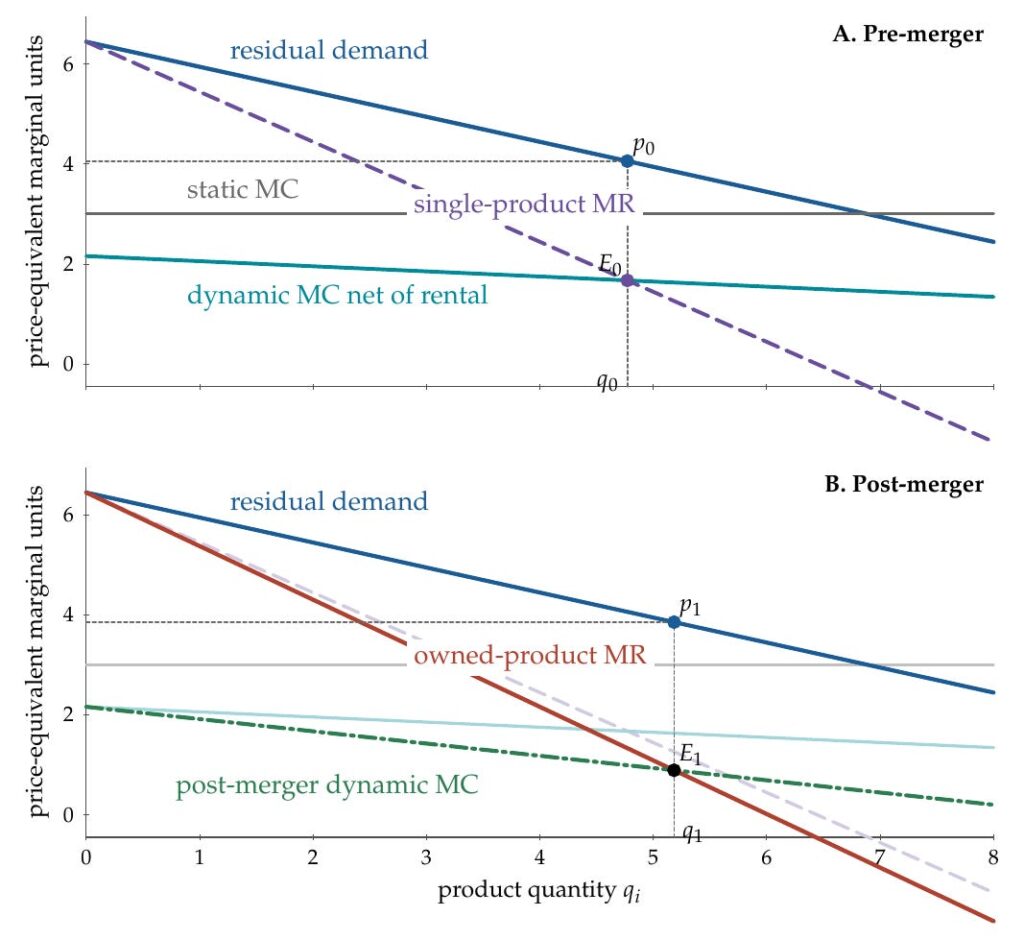
Pre-merger, in the top panel, the firm faces residual demand for its own product and a standard single-product marginal-revenue curve. Static marginal cost sits at 3. Dynamic marginal cost, net of the rental rebate, sits closer to 2. The firm produces where marginal revenue intersects dynamic marginal cost, and we can read off price and quantity from there.

Post-merger, two things change simultaneously.

First, marginal revenue rotates inward to “owned-product marginal revenue.” This is the standard diversion effect in picture form. If that were the only change, the merger would mechanically reduce output and raise prices.

Second, dynamic marginal cost rotates further downward to “post-merger dynamic marginal cost.” The combined firm captures more of the value from producing today. There is less duplication across engineering organizations. Higher combined output pushes the firm farther up the learning curve—or, equivalently, farther down the cost curve. More of the future cost reduction stays inside the firm instead of leaking to a competitor. The rental rebate grows larger, so the firm’s perceived marginal cost falls.

In the figure, the dynamic-marginal-cost shift dominates.

The picture also clarifies when the result flips. If the learning curve is relatively flat, dynamic marginal cost barely moves, and the marginal-revenue rotation wins. Quantity falls, prices rise…cats and dogs living together, mass hysteria.

In one sense, this is all almost tautological. If the force pushing quantity upward exceeds the force pushing it downward, output rises. Not exactly a profound insight. The value of the framework is that it helps us think systematically about when each force dominates.

That means thinking more carefully about how learning actually works. If experience spills over heavily to competitors, a merger does little to change how much of the rental rebate the firm captures. Dynamic marginal cost barely moves. The industry may already exhibit a downward-sloping cost structure even if no individual firm fully internalizes it. The outcome then depends on how steep the learning curve is, how private the learning remains, and how durable the resulting advantage proves to be. The theory helps organize the investigation.

It also pushes us to think about alternatives. A merger is one way to increase the returns from producing today, but it is hardly the only one.

Su, Yang, and Sweeting find that costs fell sharply when the government shifted from buying launches individually to committing to multiyear block purchases. That policy effectively guaranteed suppliers a stream of future orders. The mechanism is the same one illustrated in the figure. A larger committed order book increases the value of investing in learning today because the firm expects to produce the future launches that benefit from those improvements. The rental rebate gets larger. Dynamic marginal cost rotates downward.

Not Every Market Gets a SpaceX

The figure shows when a merger is most likely to generate genuine cost savings: when learning curves are steep, experience remains private, and the productive stock is durable.

We should be careful, though. Those same conditions also make entry harder. A new entrant starts with zero accumulated experience, while the merged firm sits on years of operational knowledge. If learning is steep, the cost gap will be large. If learning is private, entrants cannot easily catch up by poaching engineers. If the stock is durable, the advantage persists.

It is tempting to treat those entry barriers as the offsetting “cost” of the efficiency and simply net the two effects against each other. I’ve argued before that this gets the analysis backwards. Achieving scale is not an antitrust harm. Preventing rivals from achieving scale through better products or lower prices is not an antitrust harm either. That is what competition on the merits looks like.

The same logic applies to accumulated learning. If ULA’s experience made it harder for entrants to win contracts, that productive stock was doing exactly what productive stocks are supposed to do. The merger accelerated the accumulation of that stock by combining output. It did not do so by sabotaging competitors.

The actual antitrust harm must come from some separate exclusionary mechanism. The restraint is the problem, not the stock itself. Foreclosing key inputs. Locking up distribution. Raising rivals’ costs through means unrelated to the merged firm’s own productivity.

As it happens, ex post, entry turned out to be possible. SpaceX arrived and detonated the market structure so completely that much of this now feels almost quaint. Not every market gets a SpaceX, though.

Still, we have tools for thinking carefully about these problems. This kind of simplified framework does not replace a full structural model, but it gives you a way to reason through the question before building one—and a way to understand what the model is actually doing once you have.

Most importantly, it forces specificity. Which curves are shifting? What mechanism is moving them? Which effects are observable ex ante, and which only become visible after the fact?

If we can answer those questions clearly, we are already a long way toward understanding the market.

The post In Space, No One Can See Your HHI appeared first on Truth on the Market.


Source link