
Verdict
This is a capable business headset that delivers most of the essentials at a reasonable price, so it’s an option to consider if you need multi-device connectivity, a raise-to-mute boom mic and a tidy charging dock. But call performance, build quality, and comfort fell short of my expectations, and the ANC doesn’t offer distraction-free noise elimination. As a WFH headset, this could do the job, but I’d only recommend it for actual office use if you’re not in a noisy environment
-
Handy charging dock
-
Useful dongle for a low-latency connection
-
Raise-to-mute boom mic
-
Bluetooth multipoint connectivity
-
The build feels cheap and isn’t comfortable for long wear
-
ANC isn’t effective
-
Sound quality is muffled
-
USB-A dongle won’t suit newer computers
Key Features
-
ANC and transparency modes
Two modes, one for staying aware of your surroundings and noise-cancelling for focus
-
Dual-mode wireless connectivity
It works over Bluetooth and with a 2.4GHz USB dongle
Introduction
Go to Amazon and search for work headsets, and you’ll find there are a lot of brand names you’ve never heard of. Realistically, many of these cheap options are going to be similar products with generic badges slapped on, and that means they probably won’t be the most reliable buys.
Mixx Audio, on the other hand, is a UK-based company with proper UK-based support. But even if it’s more trustworthy, are its products significantly better than what’s on offer from rivals? If you want a decent wireless headset with call-optimised features that won’t cost you the kind of money that rivals from Epos or Jabra will, the B20S is worth considering.
It’s £99.99, comes with the headset, a 2.4GHz USB wireless dongle, and a handy charging dock. It could be ideal for office workers on calls all day or home workers after a tidy setup – Mixx says it’s certified for Microsoft Teams and Unified Communications (UC) platforms, so it’ll work well with Cisco Webex, Zoom, Google Workspace and other platforms.
Design
- On-ear closed-back headset with adjustable headband
- Boom mic on an arm – mutes when raised and unmutes when lowered
- Built-in busy light
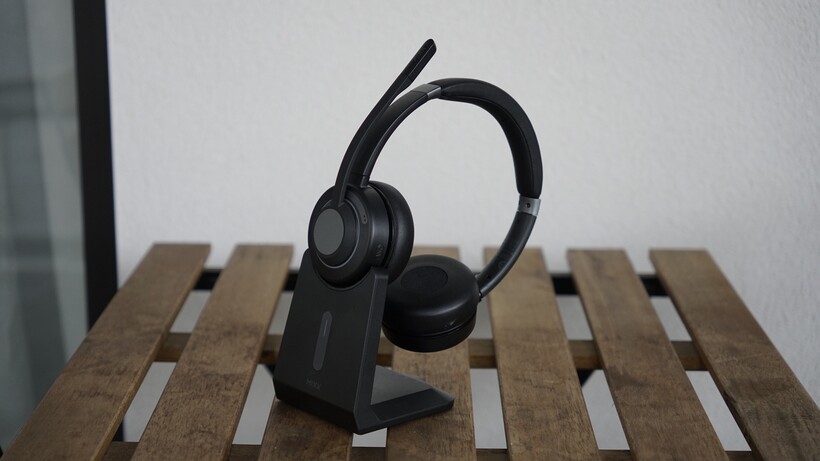
At a glance, the B20S definitely looks the part as a smart wireless business headset with a black exterior and matte grey circular elements on each ear cup. It has an on-ear fit with an adjustable headband using a classic notched slider, and there’s a little padding on the underside of the headband. The whole thing is made of plastic, and at 184g it’s lightweight enough that you could wear it all day.

While there’s a good amount of padding on the ear cushions, I do think it’s lacking a bit from the headband, and I’d always keep in mind that on-ear designs don’t offer that much of a passive seal. In my use, I’ve found a couple of issues with the build. It feels cheap despite not competing with the sub-£50 headsets in this category; the boom mic arm in particular feels flimsy, and I’ve had a bit of a comfort issue with the top of the headband. Of course, comfort is subjective, but I’ve been testing a cheaper headset alongside this model, and I’ve found the more affordable pair of cans preferable.
However, the dock is a standout feature that you’re probably not going to find in more affordable rivals. This gives you a way to keep your headset topped up and serves as a neat place for it to live on your desk. It’s well-built with a sturdy base, four non-slip feet, a light on the front to display charge status and a place for the dongle at the bottom.

You’ll need to lift it up to get to the dongle, but it’s otherwise very well put together. You can charge the Mixx headset either directly from a USB-C cable or with any USB-C cable plugged directly into the dock. The only thing I’d make sure of in advance is that your computer supports a USB-A 2.4GHz dongle, as you’ll need an adapter if you’ve got a laptop that only has USB-C slots (like any MacBook in recent years).
The headset has functional button controls. There’s a multifunction button to handle power, pairing and play/pause, while a double-press of this button switches between Bluetooth and USB dongle modes. There are also volume up/down buttons, which double as ways to skip forwards and backwards if you hold down (holding volume up goes forwards, holding volume down goes back).
It’s an intuitive setup, but my main problem would be that these are mushy rather than tactile buttons. It took me longer than I’d like to admit to notice that there were volume buttons because I couldn’t feel their presence with my fingers alone. You definitely can’t navigate by feel alone, as there’s almost no texture to the keys, so you’ll need to make sure you memorise button positions.

Features
- Bluetooth multipoint for two device connections simultaneously
- 2.4GHz wireless dongle included
- Raise-to-mute boom mic with audible status announcements
You’re not left with solely Bluetooth for connectivity, thanks to the included dongle, which offers a stable, low-latency connection for your work computer. I like that this can be stored in the dock when not in use, but it might’ve been even more convenient if it could be stashed away on the body of the headset itself.

When it comes to Bluetooth, it’s Bluetooth 6, and you’re getting a handy multipoint connection, so you can stay connected to a laptop for incoming Teams calls and to your phone at the same time without needing to disconnect and reconnect. In use, a double-press of the multifunction is a straightforward way to switch between the modes.
One of the headline selling points would be that these have active noise-cancelling and transparency modes, unlike a lot of other cheaper models. Honestly, in my experience, the ANC didn’t make much of a difference.
I played a bit of ambient noise from a radio and also brought these to a local coffee shop; in either situation, the poor passive seal and limited ANC capabilities meant that background distractions got through pretty clearly. Because of this, I recommend them more for a quiet office or home working situation.

The transparency mode works well enough; it sounds a little artificial, but it does its job and will work for a chat with a colleague.
I found it easy to position the beam-forming boom mic near my mouth, and Mixx says it uses advanced clear voice ENC tech to make sure voices sound clear on calls and to reduce environmental background noise. I tested this both at home and out at the cafe, with calls and voice memos recorded to my phone.
I found the microphone limited the background noise at the cafe, but sadly, not without distortion of my voice, and some words not coming through. And it all also sounded soft, too, so you’ll find yourself needing to speak up to be heard on calls. At home, the voice pickup on the mic was better, but that’s expected in a quiet environment. I also tested the microphone from just the dongle connection and think this offers a very slight improvement.

The raise-to-mute support is handy, and I like that the headset announces to you when you’re muted or not – it’s a nice touch. The red busy light shows on both earcups and is a clear signal to those around you that you’re on a call.
Battery-wise, you should get 16 hours of talk time, and I like that the headset announces its battery level each time you switch it on. However, 16 hours is below what you’d expect for this category. If you don’t use it with the dock, you may end up with an empty battery quicker than you expect.
Sound Quality
- 40mm dynamic drivers
- Tuned for voice calls rather than music listening
For headsets, music playback is a secondary function and not the priority. So I wasn’t too surprised to find that the sound was poor to passable. In general, it’s adequate for background listening or podcasts, but it is clearly not tuned for music.

I started out with Hozier’s Too Sweet and found it muffled and lacking bass detail at a normal volume. If you’re okay with increasing the volume a little, you’ll at least find vocals are nicely centred, so you’re not going to be struggling to follow along. I found the lyrics in both the Hozier track and Griff’s Walk were well-defined.
But there’s just not much of a sense of depth, dynamism and instrumental positioning, though, and the soundstage feels a bit narrow and cramped. Some sound does leak, so others in your office might hear your tracks, but if you’re mainly listening to a podcast between meetings or needing voice clarity on calls, I think it’s passable. I just wouldn’t get these to replace your music headphones.

Should you buy it?
It’s decent value for what you get
At £99.99 with the headset, charging dock, dongle and cable included, the B20S does offer more than rivals might in the box. It has good connectivity and should work as a handy option for anyone juggling calls across multiple devices.
Its comfort, build and sound are lacking
The build doesn’t feel premium, and they don’t feel comfortable enough for all-day wear. While it has ANC, it doesn’t work that well, and the microphones and sound quality aren’t as impressive as you’d hope for something focused on calls.
Final Thoughts
The Mixx B20S is an affordable business headset that will work well if you need it for working from home or in a relatively quiet office, as it has solid wireless flexibility, a boom mic with raise-to-mute support, and an included charging dock that works well.
It does fall short when it comes to build quality and comfort, though, which are some of its most significant weaknesses. And it doesn’t have the best noise-cancelling, sound quality or microphone performance in a busier environment. For those reasons, it’s not quite as ideal as it might seem at first for hybrid workers.
Overall, I’d say this is fine for those who have occasional calls and if your priority is having a neat desk with a headset that’s always topped up and ready to go, thanks to the dock. But it’s harder to recommend if you’re on calls all day. In that case, it’ll be worth investing in a better work-focused product with stronger ANC and microphones.
How We Test
The MIXX B20S Business Headset was tested for multiple days of real-world testing. We test every headphone we review thoroughly over an extended period of time.
We use industry-standard tests to compare features properly. We’ll always tell you what we find. We never, ever, accept money to review a product.
Find out more about how we test in our ethics policy.
- Used for several days
- Tested with real world use
FAQs
Yes, the B20S is optimised for Microsoft Teams and the other popular conferencing platforms like Zoom and Google Meet because it is specifically designed for UC (Unified Communications) use, and the USB wireless dongle offers a stable low-lag connection.
Yes, while you can’t play audio simultaneously from both, it can stay connected to two devices at once thanks to Bluetooth multipoint. It’ll switch over to the one playing audio or the one with an incoming call.
Full Specs
| Mixx B20S Review | |
|---|---|
| UK RRP | £99.99 |
| Manufacturer | Mixx |
| IP rating | No |
| Battery Hours | 16 |
| Release Date | 2021 |
| Noise Cancellation? | Yes |
| Connectivity | Bluetooth 6 |
| Colours | Black |
| Frequency Range | 20 20000 – Hz |
| Headphone Type | On-ear |

Stephan is the sports journalist for the Maple Grove Report.