


Pros
- Staggering performance from an RTX 5080
- Sharp and smooth display
- Loads of fast I/O
- Elegant looks and surprising weight for its size
- Four RAM and storage slots for upgrades
Cons
- It’s still huge
- Diminishing returns and a high sticker price
- So-so battery life
- Display is still just IPS
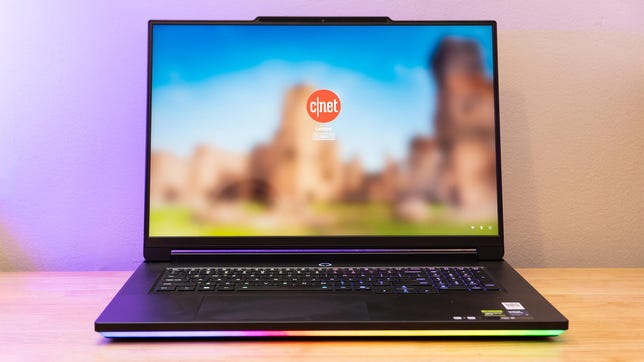
The Legion 9i Gen 10 is the top dog in Lenovo’s gaming laptop stable. It goes big, and it goes fast, packing in top-end CPU and GPU options and providing plenty of power to run them both at full tilt. It even has a wild display providing both 2400p/240Hz and 1200p+/440Hz modes, though it’s only an IPS panel.
Unsurprisingly, all of that comes with a high price that’ll cost you anywhere from $4,680 to close to $7,000 fully loaded (thanks, RAMageddon). Our test machine here comes in at $5,685. Its 7.8-pound weight almost feels reasonable considering all that the 18-inch Legion 9i squeezes in. You can still get a lot more performance for your money from a gaming desktop, and much cheaper gaming laptops have better returns, but if you need all the performance you can get and need to take it on the road, the Legion 9i just might make sense.
Lenovo Legion 9i Gen 10 (18IAX10)
| Price as reviewed | $5,685 |
|---|---|
| Display size/resolution | 18-inch 3,840×2,400 IPS, 240Hz (Dual mode: 1080p/440Hz) |
| CPU | Intel Core Ultra 9 275HX |
| Memory | 64GB DDR5-4800 |
| Graphics | Nvidia GeForce RTX 5080 16GB (175 watts) |
| Storage | 2TB SSD (PCIe Gen5) |
| Ports | 2x Thunderbolt 5, USB-C 10Gbps, 3x USB-A 10Gbps, HDMI 2.1, combo audio, SD card slot, 2.5Gb Ethernet |
| Networking | Wi-Fi 7 and Bluetooth 5.4 |
| Operating system | Windows 11 Home 25H2 |
| Weight | 7.8 pounds (3.5 kilograms) |
The Lenovo Legion 9i Gen 10 (18IAX10), as configured above, wasn’t offered as a preconfigured model from Lenovo. Instead, Lenovo offers a similar configuration with 32 gigabytes of memory (32GB SODIMM) and 1 terabyte of storage for a starting price of $4,680 at the time of writing. Doubling the memory adds $650 to the price and doing the same for storage adds $355, raising the price to $5,685.
The body is thick, but still relatively easy to put in an appropriately large backpack.
For an additional $785, Lenovo will upgrade the GPU to an RTX 5090 24GB. A $50 upgrade to Windows 11 Pro also unlocks the option to get 192GB of memory, which comes with a sharp $3,770 uptick from the 32GB base price. With a 2TB drive selected, Lenovo also offers a second 2TB PCIe 4.0 SSD option for an additional $510. Yes, it’s all painfully expensive, and frankly, hard to believe. But that’s where we’re all at right now.
Lenovo’s product details mention a glasses-free 3D display option, but it wasn’t on any preconfigured models or in the custom configurations at the time of writing.
Lenovo Legion 9i Gen 10 performance
Just one look at the specs sheet should tell you that the Legion 9i Gen 10 can cruise. Just about the only things that seem capable of bogging it down are the kind of games and high settings that will bog down even future CPU and GPU generations. Even then, the Legion 9i shows its might. It proved up to the task of smooth and stable framerates in Assassin’s Creed: Shadows and Forza Horizon 6 with demanding graphics settings.
The lid and lights really make the Legion 9i stand out.
The Intel Core Ultra 9 275HX proves mighty, offering extreme single- and multicore performance. The Legion 9i might be a bad choice for that CPU power alone, as you can get the same CPU and similar performance from a machine less than half the price, like the Acer Predator Helios Neo 16S AI. It’s the Legion 9i’s ability to combine that CPU performance with a potent Nvidia RTX 5080, running both parts at high power levels and keeping them cool, that sets it apart.
The Legion 9i chewed through the 3DMark benchmark, seeing the RTX 5090-powered Alienware 18 Area-51 only lead it by about 12% on average despite being 29% more expensive. The gap narrowed further in games, where the Alienware only has a 2% advantage for the games tested. The Legion 9i maintained triple-digit framerates in all of our game benchmarks except Assassin’s Creed: Shadows, and even that hit a satisfying 84 fps. Gaming at 4K even proved doable, with the system running Shadow of the Tomb Raider with its highest settings at its native 3,840×2,400 pixels with an average of 100 fps.
You’ll want to be sure the system has both its Windows and LegionSpace performance modes enabled to get full power. Dropping either can not only hurt peak performance but also sustained speeds. In the Performance mode, the system readily maintained 98.8% consistency running 3DMark’s Steel Nomad Stress Test with scores ranging from 5,588 to 5,658 points. With Balanced mode, the system had not only lower scores, ranging from 3,647 to 3,848, but also had a lower 95% consistency, which is technically a failure. That lower setting is helpful when you don’t want the fans running at full speed, though, offering a way to enjoy still-strong performance without all the noise.
Even the storage included in the Legion 9i rips, hitting over 12,200 megabytes per second in sequential reads and over 13,300MB/s in sequential writes in CrystalDiskMark 8.
Enjoy the light show.
All the power on deck can put some serious demand on the battery and wall charger, though. In a couple of cases, I ran demanding tests and played games while the battery was already fairly low and even with the system plugged in, the battery levels continued to drain until the Legion 9i automatically went to sleep. This issue didn’t crop up if the battery was above about 25%. I’m not sure if every Legion 9i will have this drain. We reached out to Lenovo but it didn’t respond before we published. Either way, something to keep an eye on if you get one.
The battery is a big one, packing in 99.9 watt-hours — just under the legal limit for air travel. Even with such serious hardware to run, it managed a fair 4 hours in our battery test. I was also able to get some office work done on the system and got a similar battery life. Some of the laptops I’ve tested have considerably longer life, but they’re smaller and not nearly as powerful.
Somehow light for an 18-inch monster
The Legion 9i is a sizable tank ready for war, especially with the carbon-fiber-infused top cover that looks somewhere between frost forming on glass and black-and-blue camouflage. The aluminum framing feels incredibly sturdy with minimal flex, even on the display. The display lid, despite having a very firm hinge, also opens readily with one hand.
All that said, the Legion 9i is perhaps not as hulking as it could be for a gaming beast with an 18-inch display. Tipping the scales at 7.8 pounds, the Legion 9i weighs more than most laptops, but you could certainly do worse. The Alienware 18 Area-51, for instance, weighed 9.2 pounds. Even the smaller Alienware 16 Area-51 weighed 7.2 pounds.
The Legion 9i Gen 10 is reasonably light for its size at 7.8 pounds.
You’ll still need a pretty sizable bag to carry it around in, though. The Legion 9i measures 15.9 by 11.7 by 1.1 inches, with the display alone accounting for about a quarter-inch of that thickness. The rubber feet on the bottom bring the thickest point to 1.5 inches. My backpack (an Able Carry Daily) was able to fit Lenovo’s smaller 16-inch Legion 7i Gen 10 into its laptop sleeve, but the Legion 9i couldn’t fit even in the main compartment.
The Legion 9i’s size has its benefits. In addition to the preinstalled PCIe 5.0×4 SSD, you’ll find behind a little metal cover three additional M.2 slots inside for PCIe 4.0×4 SSDs. Similarly, the system has four SODIMM slots, so you can upgrade from the 64GB configuration without needing to give up the preinstalled memory.
Lenovo manages cooling with four intake fans on the underside of the system and exhausts all at the rear. It can get a little loud at max load, but it’s thankfully not shrill, and the keyboard doesn’t get hot either.
Keeping all the exhaust at the rear also provides plenty of space for an abundance of ports. The Legion 9i has four 10Gbps USB ports with one Type-A on the left and two more on the right, alongside a USB Type-C. That right edge also includes a full-size SD card slot and a webcam kill switch. Also on the left are two Thunderbolt 5 USB-C ports for ultrafast connections, docking, DisplayPort 2.1 output and up to 100-watt power delivery. USB PD won’t power the laptop at full throttle, but it can help keep the battery topped up when working casually, so you don’t have to bring the bulky, 400-watt power supply around. The left edge also includes a 3.5mm audio combo jack and a 2.5Gb Ethernet port. The Legion 9i finds space for the system’s primary power input and an HDMI 2.1 port on the rear among the exhaust vents.
The system’s integrated 5-megapixel webcam captures crisp visuals, and it’s paired with mics that grab my voice clearly and with a nice fullness.
Lots of connection options dot the left and right sides, with power and HDMI out at the rear.
Aside from the carbon-fiber cover, per-key back-lit keyboard, glowing Legion logo on the lid and light bar that wraps around the front half of the base, the system is actually relatively subtle. Its design isn’t aggressively angular, and even its beefy exhaust vents look more industrial and less fighter jet engine. It can pass for a workstation with all the lighting off. All that lighting is RGB, though, and it looks good, evenly illuminating both the primary and secondary keycap legends.
The Legion 9i’s keyboard gives you a fairly solid typing experience. The keys have a good dish, great stabilization and quick, poppy travel. On their own, they’re a joy to type on. I got up to a decent typing speed of 106 words per minute with 98% accuracy fairly quickly.
The size of the laptop makes the keys a far reach, though, and my wrists ended up resting uncomfortably on the front lip of the laptop. It’s fine for quick typing, but less so for extensive writing. Lenovo includes full-size, offset arrow keys that are great for navigation. It also has a near-full-size number pad that’s helpful for data entry, though a bit harder to adapt to if you have big hands. The massive glass trackpad makes for smooth, comfortable mousing around and has a gentle, silent physical click.
Lenovo squeezes six speakers into this laptop, with two pairs of woofers and two tweeters. The combination can pump out a good deal of sound, though even with four woofers, you shouldn’t expect deep bass. I even found the speakers could distort on some really punchy bass tracks played at higher volumes.
Still, the speakers do their job well, providing powerful enough game audio to hear over the sound of the fans while gaming. I zipped through a few hours of Forza Horizon 6, often relying on the speakers to tell me when I needed to shift gears and found them plenty satisfactory for casual play. Blitzing through maps in Trepang2, they kept the action intense and soundtrack bumping, but they didn’t quite have a strong enough stereo effect to help me hear where enemies were hiding.
The 18-inch display is a great one. It maxes out at 3,840×2,400-pixel resolution and can run at a smooth 240Hz. It’s a bright, colorful IPS panel hitting 510 nits and 99% coverage of the DCI-P3 color space in testing. The color is accurate as well, measuring at a max dE1976 of 1.58. You won’t get the contrast or pixel response of OLED here, though, as the monitor only manages about a 1,200:1 contrast ratio and shows faint ghosting in fast motion. Gaming at full resolution is still great, and motion blur is minor. The monitor can switch over to 1,920×1,200 pixels and reach a 440Hz refresh rate for even smoother visuals. This swap requires a system restart, though, so it’s not seamless. Glare, however, is an issue with the glossy screen, so watch out for bright windows.
Is the Lenovo Legion 9i Gen 10 worth buying?
The Legion 9i packs a ton of muscle that you can bring on the road. It’s not exactly thin or light, but at 7.8 pounds, it’s hardly unreasonable for an 18-incher with big specs. Whether it’s serious work or serious play, the Legion 9i has the grunt to get things done, and it has enough I/O to enable a rigorous workstation or decked-out battlestation.
The price is high — but so is the competition at this point — and there are always diminishing returns at this level. Don’t be shocked if you see a laptop half as expensive hitting 75% of the performance (or worse, a desktop at that price almost matching it). If you need that leading-edge performance paired with portability, though, the Legion 9i will be hard to beat.
Geekbench 6 CPU (multicore)
Alienware 18 Area-51 21472Lenovo Legion 9i Gen 10 20547Alienware 16 Area-51 20043HP Omen 16 Max 18924Lenovo Legion 7i Gen 10 18719Alienware 16X Aurora 18587Acer Predator Helios Neo 16S AI 18113
Geekbench 6 CPU (single-core)
Lenovo Legion 9i Gen 10 3102Alienware 16 Area-51 3073Alienware 18 Area-51 3068Lenovo Legion 7i Gen 10 2983HP Omen 16 Max 2961Alienware 16X Aurora 2948Acer Predator Helios Neo 16S AI 2944
Cinebench 2024 CPU (multicore)
Lenovo Legion 9i Gen 10 2202Alienware 18 Area-51 2113Alienware 16 Area-51 2002Acer Predator Helios Neo 16S AI 1641Alienware 16X Aurora 1630Lenovo Legion 7i Gen 10 1543HP Omen 16 Max 1467
Cinebench 2024 CPU (single-core)
Lenovo Legion 9i Gen 10 135Alienware 18 Area-51 134Alienware 16 Area-51 134HP Omen 16 Max 131Lenovo Legion 7i Gen 10 131Alienware 16X Aurora 129Acer Predator Helios Neo 16S AI 128
3DMark Fire Strike Ultra
Acer Predator Helios Neo 16S AI 17668Alienware 18 Area-51 16431Lenovo Legion 9i Gen 10 15570Alienware 16 Area-51 13504HP Omen 16 Max 10975Lenovo Legion 7i Gen 10 6995Alienware 16X Aurora 6929
Guardians of the Galaxy (High @ 1920 x 1080)
Lenovo Legion 9i Gen 10 198Alienware 18 Area-51 184Alienware 16 Area-51 183Acer Predator Helios Neo 16S AI 177Alienware 16X Aurora 174Lenovo Legion 7i Gen 10 167HP Omen 16 Max 162
Shadow of the Tomb Raider (Highest @ 1920 x 1080)
Lenovo Legion 9i Gen 10 236Alienware 18 Area-51 230Acer Predator Helios Neo 16S AI 219Alienware 16 Area-51 207HP Omen 16 Max 189Alienware 16X Aurora 184Lenovo Legion 7i Gen 10 173
The Riftbreaker GPU (1920 x 1080)
Alienware 18 Area-51 481.21Lenovo Legion 9i Gen 10 447.47Alienware 16 Area-51 371.84HP Omen 16 Max 345Alienware 16X Aurora 260.11Lenovo Legion 7i Gen 10 251.99Acer Predator Helios Neo 16S AI 220.58
Online streaming battery drain test
Alienware 16X Aurora 7:36Lenovo Legion 7i Gen 10 4:56Alienware 18 Area-51 4:02Lenovo Legion 9i Gen 10 3:55HP Omen 16 Max 2:45Alienware 16 Area-51 2:29Acer Predator Helios Neo 16S AI 1:55
System configurations
| Acer Predator Helios Neo 16S AI | Windows 11 Home; Intel Core 9 Ultra 275HX; 32GB DDR RAM; 8GB Nvidia GeForce RTX 5070; 1TB SSD | |
|---|---|---|
| Alienware 18 Area-51 | Windows 11 Home; Intel Core Ultra 9 275HX; 64GB DDR5 RAM; Nvidia GeForce RTX 5090; 2TB SSD | |
| Alienware 16 Area-51 | Windows 11 Home; Intel Core Ultra 9 275HX; 32GB DDR5 RAM; Nvidia GeForce RTX 5080; 1TB SSD | |
| Alienware 16X Aurora | Windows 11 Home; Intel Core Ultra 7 255HX; 32GB DDR5 RAM; Nvidia GeForce RTX 5060; 1TB SSD | |
| HP Omen 16 Max | Windows 11 Home; Intel Core Ultra 9 275HX; 32GB DDR5 RAM; Nvidia GeForce RTX 5080; 1TB SSD | |
| Lenovo Legion 7i Gen 10 | Windows 11 Home; Intel Core Ultra 7 255HX; 32GB DDR5-5600 RAM; Nvidia GeForce RTX 5060; 1TB SSD | |
| Lenovo Legion 9i Gen 10 | Windows 11 Home; Intel Core Ultra 9 275HX; 64GB DDR5-4800 RAM; Nvidia GeForce RTX 5080; 2TB SSD |

Stephan is the sports journalist for the Maple Grove Report.



