5 Of The Best Handheld Game Consoles That Are Cheaper Than A Steam Deck OLED


These days, there are a lot of different handheld consoles and PCs available on the market. Still, one device in particular tends to hog the spotlight: the Steam Deck OLED. When you look at the device’s specs and the massive library of games Steam has available, it’s not hard to imagine why. The handheld brings portability and convenience to tons of titles that, not so long ago, you would only expect to be able to play while tied to your PC or console.

But that convenience and innovation come at a cost. Currently, the cheapest Steam Deck OLED you can buy costs $789 new, according to the official Steam Deck website. That’s just for the 512 GB storage model — if you want more space, then you can expect to drop $949 on the larger 1 TB model. Valve’s handheld certainly doesn’t come cheap, even if the Steam Deck OLED really is worth it. However, that doesn’t mean that you’re totally stuck if it’s out of budget or out of stock. It’s far from the only handheld worth your attention.

They may not be a direct replacement as such, but there are a few handheld consoles and PCs out there that can give the Steam Deck a run for its money. Of course, buying new consoles isn’t ever that cheap — hence why you might want to wait to pick them up used or refurbished instead – but some options are still more affordable than others. And paying less doesn’t mean that you necessarily need to skimp too much on performance, gaming catalog, or graphics.

Nintendo Switch 2

You’d be hard-pressed to talk about handheld game consoles without bringing up a member of the Nintendo Switch family. The latest addition to the metaphorical Nintendo family tree is the Nintendo Switch 2, which offers a 7.9-inch wide color gamut LCD screen with a 1920 by 1080 resolution when played in Handheld Mode. It may not be an OLED, but it does have the Steam Deck OLED’s screen size and resolution beat otherwise. And when it’s docked, it can go all the way up to 3840 by 2160 at 60 frames per second (FPS) or 2560 by 1440 with 120 FPS. 

The Nintendo Switch 2 costs $449.99 on its own, or around $500 when bundled with either “Mario Kart World,” “Pokémon Pokopia,” or “Donkey Kong Bananza” on the Nintendo website. Admittedly, that’s a lot of money, but it still costs a lot less than the Steam Deck OLED — even when accounting for the Switch 2’s inevitable price hike in September. Don’t be fooled by its lighter price tag; Nintendo’s newest handheld still boasts impressive performance that can comfortably compete with the Steam Deck. Tests shared by Digital Foundry largely attribute this to both the Switch 2’s built-in DLSS feature and the console’s achievements while docked.

One notable difference between the Steam Deck OLED and the Switch 2 that might give you pause is evident when it comes to storage space. Even the smaller of the two Steam Decks offers 512 GB of space, while the Switch 2 only offers 256 GB. However, you can expand the Switch 2 up to 2 TB using a microSD Express card at an additional cost.

ASUS ROG Xbox Ally

The ROG Xbox Ally is a handheld gaming PC that packs 16 GB of RAM, 512 GB of storage, and an AMD Ryzen Z2 A processor into a portable package. As the name suggests, you can easily use it to access Xbox Cloud Gaming, Play Anywhere titles, and games installed on your Xbox, should you have one. That’s not the whole story, though. Since the ROG Xbox Ally is also effectively a Windows 11 PC, you can use it with other gaming platforms and stores — including Steam. 

When you take a look at each device’s tech specs, the Steam Deck OLED and the ROG Xbox Ally offer some similar features and specifications. For example, both devices offer 16 GB of LPDDR5 on-board RAM with 6400 MT/s and a 512 GB NVMe SSD for storage, and you can connect them to your TV or monitor. They’re also both a similar size and weight, so they’re similarly comfortable for taking on the go. One difference is that the Xbox Ally offers a slightly smaller, higher-definition 7-inch 1920 by 1080 screen, while the Steam Deck offers a 7.4-inch 1280 by 800 screen.

If you opt for the standard ASUS ROG Xbox Ally model, as opposed to the upgraded (and more expensive) ROG Xbox Ally X, then you can expect to drop $599.99, making it a couple of hundred dollars cheaper than a Steam Deck OLED. If you shop carefully, you also might be able to bag yourself three months of Game Pass included in the cost. Of course, things add up quickly if you keep paying for Game Pass beyond that time frame, but if you’re mostly planning on using Steam, then you might not need the subscription anyway.

Ayaneo Pocket DS

If you long for the days of dual-screen gaming, then the Ayaneo Pocket DS might be for you. This handheld console is a little different from some of the others on this list, not only thanks to its throwback design, but also because it uses an Android ecosystem and runs on a Snapdragon G3x Gen 2 chip. Although that means it works a little differently and has slightly different capabilities, it’s still a capable system. Besides running mobile games, you can also emulate other consoles and enjoy cloud gaming — or, using something like Rocknix, you might even be able to access Steam directly.

The Pocket DS’s upper lid houses a bright, 800-nit 7-inch OLED screen with full HDR, alongside a smaller 1024 by 768 LCD screen on the lower half. Unlike the Nintendo DS, both screens are also touch-enabled. There may not be that many games you’d instinctively use both screens with, but it’s a novel way to play. Speaking of games, according to RetroDodo, the handheld can deftly handle 3D titles like “Diablo Immortal” and “Gears of War,” alongside an assortment of emulated consoles.

Despite some features staying the same, such as the battery, Snapdragon SoC, and Adreno A32 GPU, the exact price and specifications you can expect from an Ayaneo Pocket DS depend on exactly which model you pick. An Ayaneo Pocket DS with 16 GB of RAM and 512 GB of storage will set you back $689. Or, if you don’t mind paying $10 more than a 512 GB Steam Deck OLED, you can go for a Starry Yellow Ayaneo Pocket DS with 16 GB of RAM and 1 TB of storage for $799. That’s still $150 cheaper than the comparable 1 TB Steam Deck OLED.

Ayn Odin 3

The Ayn Odin 3 is another Android-based handheld, this time running on a Qualcomm Dragonwing Q8 processor. Despite the console’s relatively small size — the whole thing comes in at around 9 by 3.5 inches and weighs less than 400 grams — it comes with full-size Hall-effect joysticks, a 6-inch AMOLED screen, and, depending on which model you choose, a surprisingly large amount of RAM.

Which of the four tiers of Ayn Odin 3 you pick dictates both how much RAM and built-in storage you get. The four tiers are called Base, Pro, Max, and Ultra, with each level offering more (and costing more) than the last. Ultra takes the title of the most intense tier, with 24 GB of RAM and 1 TB of Universal Flash Storage (UFS) for $519. Meanwhile, the other tiers scale from 8 to 16 GB of RAM and 128 to 512 GB of storage, increasing in price from $349 to $499.

Don’t be deceived by the Odin 3’s operating system. With the right setup, it can run a surprisingly wide range of PC games, including titles like “Monster Hunter World,” “Blue Prince,” and “Hollow Knight: Silksong,” with few issues. And you can access Steam through the device, along with a diverse range of emulators. Your mileage may vary somewhat depending on what you like to play, with some titles dropping frames or struggling to load, but it’s still a powerful device with big performance potential.

Anbernic Win600

The Anbernic Win600 3050e Blue packs a surprising punch given its price. For $475 — or currently, $350 — Anbernic’s answer to the handheld PC boom includes 16 GB of DDR4 RAM at 3200 MHz, a 1 TB SATA SSD, and an AMD Athlon Silver 3050e Dali APU processor. Both the SSD and memory are replaceable, too, meaning you could swap them out for other parts further down the line if you wanted a more custom experience or to replace any broken parts. You can also opt to run either Windows 11 or SteamOS on the Win600, bringing it a little closer to the Steam Deck. And much like most of the company’s other gaming gadgets, you can use it to emulate select older consoles.

Compared to the Steam Deck OLED, the Win600 3050e is definitely less powerful, in part due to its choice of processor. So, if you want to play the newest, biggest, most resource-intensive releases on your handheld, then this might not be the device for you. However, you can still expect to run a relatively large range of different older and lighter-weight releases without too much trouble, particularly if you choose to knock the graphics down a notch to do so. According to tests shared by Droix.Net, while intensive AAA titles like “Cyberpunk 2077” can struggle significantly at higher settings, popular titles like “Hades,” “PowerWash Simulator,” and “Street Fighter V” run fine on lower graphics settings. So, at almost half the price of the Steam Deck OLED, it offers a respectable and relatively more affordable option for handheld gaming that could suit you perfectly, depending on your tastes and gaming habits.

How we selected which handheld consoles to include

There are a lot of amazing handheld consoles out there, so picking out a few highlights was tricky. To help with that, we chose a few things to keep in mind while narrowing down our options. First, and perhaps most obviously, we made sure that every handheld console we picked had at least one option available that was cheaper than the 512 GB Steam Deck OLED model. That means that we basically only picked handhelds that currently cost less than $789. Some consoles we picked had specific editions, variants, or upgrades available that would cost more, like the premium ROG Xbox Ally X or the 1 TB edition of the Ayaneo Pocket DS, but they all have at least one option that still costs less.

Then, once we had accounted for prices, we looked at each handheld’s specifications, reviews, and capabilities carefully. We made sure to single out handhelds with reasonable processing power and storage capacity similar to the Steam Deck OLED models, and we checked out how they performed based on reviews and tests. Similarly, we were sure to look at user reviews on relevant sales platforms to make sure that people were generally happy with their purchases.

Something else we kept in mind was the variety of games each handheld could run. One of the joys of a Steam Deck is having access to Steam’s massive library, so it was important to make sure that each console could also run a range of different games through cloud gaming, emulation, or natively. Not every console picked will be able to run everything a Steam Deck could, but you should still have plenty of choices with these consoles.


Source link

Leave a Reply

Subscribe to Our Newsletter

Get our latest articles delivered straight to your inbox. No spam, we promise.

Recent Reviews


Alaska doesn’t reward rushing. It rewards curiosity, patience, and a willingness to follow the wild where it leads. That’s why an Alaska UnCruise feels less like a vacation and more like an immersion. These small-ship journeys trade crowds and fixed itineraries for quiet coves, misty fjords, and days shaped by tides, weather, and wildlife instead of a clock.

We recently sailed with UnCruise from Juneau on one of their most iconic itineraries, and we can’t wait to share our firsthand experience. One morning we were kayaking beneath hanging glaciers; the next we were bushwhacking through old-growth forest or skiffing toward a shoreline that rarely sees footprints. With Uncruise we discovered Alaska at human scale: intimate, flexible, and deeply connected to the place itself.

Read on to see whether an Alaska UnCruise belongs on your bucket list.

Wild, Woolly, and Wow: The Glacier Bay Loop

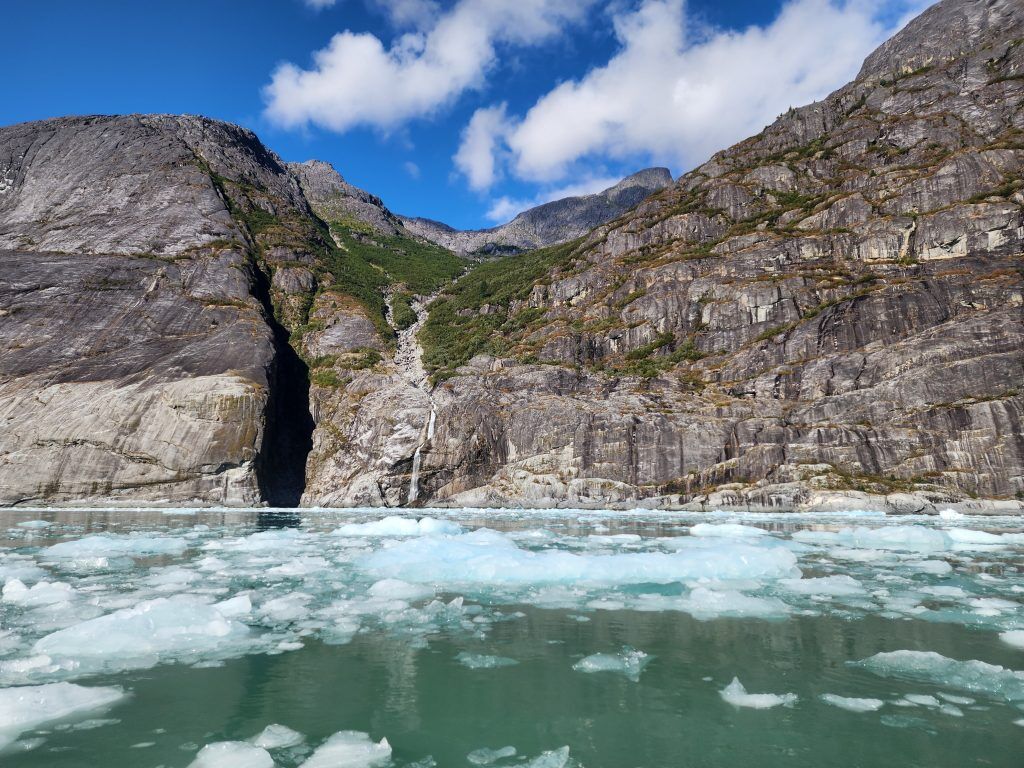
LeConte Bay Alaska
Photo Credit: Jenn Coleman.

UnCruise operates trips in four of Alaska’s five regions, Southeast, Southcentral, Interior, and Southwest, but Juneau is the heart of the operation. It’s their most popular port, offering round-trip voyages through the Inside Passage as well as one-way itineraries connecting to Sitka, Ketchikan, Seattle, and Seward.

We sailed the Wild, Woolly, and Wow with Glacier Bay itinerary: a week-long, round-trip voyage from Juneau that includes one full day in Glacier Bay. Some sailings offer two days in the park, but for us, one was plenty. We woke at the base of a tidewater glacier deep in the bay and sailed out at sunset—hard to imagine a better bookend.

What really surprised us was how much we enjoyed the glaciers outside Glacier Bay. Many UnCruise itineraries explore additional tidewater glaciers that mega-ships can’t access. These areas came with fewer people, more time ashore, fewer restrictions, and, often, better weather. Glacier Bay’s massive icefields can generate their own conditions, which means sunshine elsewhere while the park sits under clouds.

Because UnCruise captains have the freedom to choose anchorages based on real-time conditions, no two trips are identical. Still, the geography naturally creates a rhythm: a loose loop around Admiralty Island, Glacier Bay to the northwest, quieter glacier systems to the southeast, and countless bays and backwaters in between for kayaking, bushwhacking, and skiff exploration.

UnCruising vs. Traditional Cruising

Kayaks on UnCruise Waterfall Cove Alaska
Photo Credit: Jenn Coleman.

Traditional cruising runs on a dual-revenue model. Competitive ticket prices, often low-margin or even loss leaders, are offset by onboard spending like drinks, specialty dining, spa treatments, internet, and retail. Scale is the strategy: 3,000 to 6,000+ passengers spread operational costs thin.

UnCruise flips that model on its head. With all-inclusive pricing and fewer than 90 passengers, the experience feels more like an adult summer camp than a floating resort. Instead of pulling into ports for pre-packaged shore excursions, the ships anchor in remote bays and rely on an in-house guide team. You’re not herded; you’re invited.

The payoff is connection, both to the place and the people. With such a small guest count, you quickly learn names, swap stories, and share the day’s highlights over genuinely excellent food and drinks that reflect the region you’re sailing through.

Alaska UnCruise vs. Other UnCruises

Kayaking Glacier Bay Alaska
Photo Credit: Jenn Coleman.

This was our third UnCruise, following trips to the Sea of Cortez and Hawaii. Alaska felt different, a good way. UnCruise started here, and it shows. The Alaska program leans heavily into wilderness exploration led by the onboard team, rather than outsourced excursions.

In Hawaii and Mexico, proximity to towns meant more third-party activities, bike rides, cultural tours, and the like. Alaska, by contrast, felt raw and remote, with days shaped almost entirely by weather, wildlife, and opportunity.

It was also colder. Hawaii and Mexico invited snorkeling and free swimming; Alaska required more gear, better tides, and a stronger sense of humor to enter the water. We did the polar plunge more for the bragging rights than the pleasure, and we’d do it again.

Life Aboard the Wilderness Legacy

Sam is delivering an after-dinner program
Photo Credit: Jenn Coleman.

The Wilderness Legacy is UnCruise’s largest ship, carrying up to 90 guests. Interestingly, similar Glacier Bay itineraries are also offered on much smaller vessels, down to just 22 passengers, depending on how intimate you want the experience to be.

We appreciated the comforts onboard: reliable Wi-Fi and hot tubs, which make glacier watching from bubbling water feel downright legendary. Cabins were compact but comfortable, no Instagram-perfect balconies here, but if your goal is to spend the day outdoors, that’s a fair trade.

Two spacious common areas brought everyone together for meals, happy hour, and nightly programming. From naturalist talks to talent shows and the always-anticipated end-of-voyage slideshow, every evening felt communal and relaxed.

The Real Reason You UnCruise: Activities

Skiff Tour LeConte Bay Alaska
Photo Credit: Jenn Coleman.

You don’t UnCruise to stay onboard. You UnCruise to get out into it.

Most days offered three core options, bushwhacking, kayaking, and skiff tours, both morning and afternoon. Plans shifted with weather and conditions, which is part of the magic. Southeast Alaska is a temperate rainforest, after all.

Our loose strategy: kayak on clear days, bushwhack in the rain, and choose skiff tours when there was something extraordinary to see, like bears feeding at Pavlov Creek. It wasn’t scientific, but it worked.

Some moments were non-negotiable: skiffing up to tidewater glaciers, the mandatory kayak orientation, or simply staying aboard when wildlife appeared unexpectedly, like the pod of roughly 30 orcas that surfaced as we exited Glacier Bay.

One of the biggest advantages of small-ship cruising is how well the guides get to know you. By midweek, excursions were subtly tailored to guests’ interests and abilities, making everyone feel both supported and challenged.

Food Worth Planning Your Day Around

UnCruise Crab Leg dinner
Photo Credit: Jenn Coleman.

Forget buffet lines. Every meal onboard was cooked to order, with meat, seafood, and vegetarian options. Everything was so good that ordering a “partial of all three” became a habit. Ordering ahead also helped reduce food waste, which we appreciated.

Dietary restrictions were handled seamlessly, and the menus reflected a strong sense of place like crab boils, butter-poached halibut, and other Alaska-forward dishes. Morning meal announcements became a highlight, and we learned to choose our breakfast seat strategically so we’d have time to contemplate dinner choices before they took our order.

An onboard pastry chef kept desserts dialed in, while talented bartenders handled everything from classics to the cocktail of the day. Happy hour quickly became a ritual: swapping stories, snacking on charcuterie and baked brie, and trying not to ruin our appetite for dinner.

Cabins: Functional, Thoughtful, and Surprisingly Cozy

Cabin-Navigator Cabin UnCruise Wilderness Legacy
Photo Credit: UnCruise Adventures.

Cabins aren’t luxurious, but they are smartly designed. Full bathrooms, potable tap water, comfortable beds, and enough storage, assuming you don’t overpack.

Our favorite feature? Hooks. Lots of them. Perfect for drying wet gear after a day outside. By the end of the voyage, the hallways looked like an REI sidewalk sale caught in a rainstorm, but our cabin always felt clean, dry, and warm.

It’s also worth noting how skilled our captain was at selecting sheltered anchorages. Even when a strong storm rolled through, we slept soundly each night, tucked behind towering cliffs that blocked the wind. Every morning delivered a new view, complete with freshly fed waterfalls spilling down the rock walls.

What to Pack (and What Not To)

Neka Bay Alaska
Photo Credit: Jenn Coleman.

UnCruise provides excellent packing lists, but the guiding principles are simple: dress in layers and expect to get wet. Waterproof pants and a solid rain jacket are non-negotiable.

Footwear is more forgiving. You’re issued gum boots, the unofficial uniform of Alaska, and we wore them every time we left the ship, including for kayaking.

One pro tip: bring soft luggage. We packed everything into soft-sided bags that folded away easily during the voyage. It kept us from overpacking and made cabin life much simpler.

Bonus Time in Juneau

Tahku whale sculpture Juneau Alaska
Photo Credit: Jenn Coleman.

As immersive as the UnCruise experience is, we would’ve felt shortchanged if we hadn’t added time in Juneau for classic Alaska adventures.

The good news: Juneau makes it easy. Seaplane tours depart right from the dock, and Mendenhall Glacier is just 20 miles away. Depending on your budget and appetite for adventure, you can reach it by bus, helicopter, or something in between and choose from ice climbing, paddling, dog sledding, or a simple walkabout.

And since you missed-out on onboard shopping during the cruise, Juneau Harbor has you covered.

The Takeaway: Who Alaska UnCruise Is (and Isn’t) For

2 bears with a salmon Pavlovs Bay Alaska
Photo Credit: Jenn Coleman.

An Alaska UnCruise isn’t about checking boxes or lounging poolside. It’s about slowing down, leaning into uncertainty, and letting the landscape set the agenda. You trade predictability for possibility, and that’s exactly the point.

If you’re curious, flexible, and happiest when your days are shaped by weather reports and wildlife sightings instead of reservations and alarms, this style of travel will feel like coming home. Alaska is vast and wild, but UnCruise has a way of making it feel personal.

For us, it wasn’t just a trip, it was a reminder of how powerful travel can be when you let a place lead.

Disclosure: A big thank you to Uncruise Adventures for hosting us! For more Uncruise travel inspiration, check out their InstagramFacebook, and YouTube accounts.

As always, the views and opinions expressed are entirely our own, and we only recommend brands and destinations that we 100% stand behind.

Ready to Book Your Trip? These Links Will Make It Easy:

Airfare:

Insurance:

  • Protect your trip and yourself with Squaremouth and Medjet
  • Safeguard your digital information by using a VPN. We love NordVPN as it is superfast for streaming Netflix
  • Stay safe on the go and stay connected with an eSim card through AloSIM

Our Packing Favs:

  • We LOVE Matador Equipment for their innovative products and sustainability focus. Their SEG45 is a game changer when you need large capacity while packing light.
  • Travel in style with a suitcase, carry-on, backpack, or handbag from Knack Bags
  • Packing cubes make organized packing a breeze! We love these from Eagle Creek

Like it? Pin it for later on Pinterest!

Hi! We are Jenn and Ed Coleman aka Coleman Concierge. In a nutshell, we are a Huntsville-based Gen X couple sharing our stories of amazing adventures through activity-driven transformational and experiential travel.


Source link