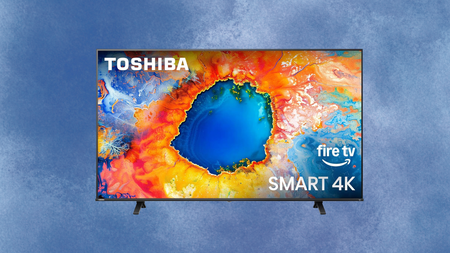
A huge 50% drop puts this 65‑inch 4K TV at its best price


How often does a 65-inch 4K drop to a price that makes you stop scrolling and actually read the listing?

A deal this sharp on a screen this size does not come around often, and when it does, it tends to disappear before most people have had a chance to think it over properly.

Toshiba Smart 4K TV on a sky blue background

A huge 50% drop puts Toshiba’s 65‑inch 4K Smart TV at its best price, but grab it while you still can

With 50% off, the Toshiba 65C350NU is a serious amount of screen for the money, and with a deal this good, expect stock to move quickly.

View Deal

That is exactly the situation with the Toshiba 65-inch Class C350 Series LED 4K UHD Smart Fire TV, now down from $529.99 to $264.99 and saving you a flat $265 at checkout.

The C350 runs Fire TV as its operating system, which means Netflix, Prime Video, Disney+, and Hulu all live on the same home screen without any input switching or app hunting every time you want to watch something different.

Alexa is built into the remote as well, so finding a show, checking what is on live TV, or jumping between streaming services is as quick as pressing a button and asking out loud rather than navigating through menus manually.

Advertisement

Picture quality is handled by a 4K LED panel with HDR10 support and a 300-nit maximum brightness, which gives the image enough dynamic range to hold up well in a normally lit living room during the day without washing out in bright scenes.

The Whatsapp Logo

Get Updates Straight to Your WhatsApp

Join Now

The panel runs at 60Hz with a 120Hz motion rate, keeping fast-moving content like sport and action sequences looking smooth rather than blurry, and the 178-degree viewing angle means the picture holds up reasonably well even from seats well off to the side.

Connectivity covers three HDMI ports, two USB ports, Bluetooth, and Wi-Fi, with AirPlay also supported for households already deep in the Apple ecosystem who want to mirror or cast from an iPhone or iPad without any additional hardware.

Up to six individual user profiles can be created on the TV, so every person in the household gets a personalised home screen and watch history rather than sharing one cluttered queue with everyone else.

At half its original price, the Toshiba 65C350NU is a serious amount of screen for the money, and with a deal this aggressive on a 2025 model, it is reasonable to expect stock to move quickly.

Advertisement

Honestly, the C350 is a strong pick at this price, though if you want to weigh it against the wider market before deciding, our best TVs of 2026 guide covers the strongest options across every budget from entry-level to premium in one place.

SQUIRREL_PLAYLIST_10148964


Source link

Leave a Reply

Subscribe to Our Newsletter

Get our latest articles delivered straight to your inbox. No spam, we promise.

Recent Reviews


Google Gemini

Lance Whitney/ZDNET

Follow ZDNET: Add us as a preferred source on Google.


ZDNET’s key takeaways

  • Google is downloading a 4GB file to the PCs of many Chrome users.
  • The file is harmless and is used for the Gemini Nano on-device LLM.
  • You’ll see it if you’ve opted into the on-device AI setting in Chrome.

Google is silently saving a Chrome-related file to many computers. That’s nothing earth-shaking. But this file is a hefty 4GB in size, which has caught the attention of some Google watchers. What is the file, why is it being installed, and how can you check for it?

Also: I let Chrome’s AI agent shop, research, and email for me – here’s how it went

In a new blog post, computer scientist Alexander Hanff, aka the Privacy Guy, pulled back the curtain on this mysterious file. Named weights.bin, the file is being downloaded deep within the user data folder of many Chrome users. The file itself is related to Gemini Nano, which Google is using as the on-device AI model for Chrome users.

If you delete the file, it comes back

Though there’s nothing risky or dangerous about the file, Hanff and others have expressed concerns that it’s being downloaded without users’ knowledge or permission. And if you delete the file, it eventually comes back, Hanff said. That by itself is hardly alarming; that’s part of any software update. Rather, some of the criticism centers on the file’s size. If you have ample hard disk space, then 4GB is likely not a big deal. But if you’re running low, that big a file might chew up space you can’t spare.

Traditionally, AI models like Gemini use the cloud to interact with you. Submit a request, ask a question, or kick off a conversation, and the AI taps into its online data and resources to respond. But that method can be slow and naturally requires that you be connected. By traveling between your device and the cloud, your data can also be exposed.

A trend has emerged in which companies are experimenting with locally stored LLMs (large language models). That not only speeds up the process, but it also means you can use the AI offline and more securely. Gemini Nano has already been in play on Google’s own Pixel phones.

That explains why the file is so large; it has to pack in a lot of data. In this case, a weights file contains numbers that measure the level of importance an AI model assigns to your input. The AI uses these values to determine what should come next. For example, let’s say you start typing the phrase “Why did my new phone cost me an arm and a…” at the prompt. The AI assigns weights to your input to help it predict that the next word would be “leg.”

Also: This powerful Gemini setting made my AI results way more personal and accurate

How can you tell if the file has been downloaded to your PC? First, open Chrome, go to Settings, and select System. On the System screen, check whether the On-device AI option is turned on. If so, then you probably have the file or will soon get it.

To double-check, you’ll have to navigate to the user folder on your PC. That location varies based on your operating system. On my Windows 11 PC, I ran a search in File Explorer for weights.bin. The search took a long journey through the following path: C:\Users\lance\AppData\Local\Google\Chrome\User Data\OptGuideOnDeviceModel\2025.8.8.1141. At that final location, the weights.bin file appeared, measuring 4GB.

Since the file is downloaded again if you simply delete it, you’ll have to take an extra step to get rid of it permanently. After you delete the file, go back to Settings in Chrome and select System. Then  turn off the switch for On-device AI.

But as long as you have enough disk space (and if you can’t spare 4GB, then it’s time to clean up your drive), the file is little cause for concern. Just forget about it, especially if you’re keen to try on-device AI, and we’ll see what the future holds for Gemini Nano.


Source link