Anker Soundcore Nebula P1i Projector Review: Huge Ears, Bright Image, Affordable Price


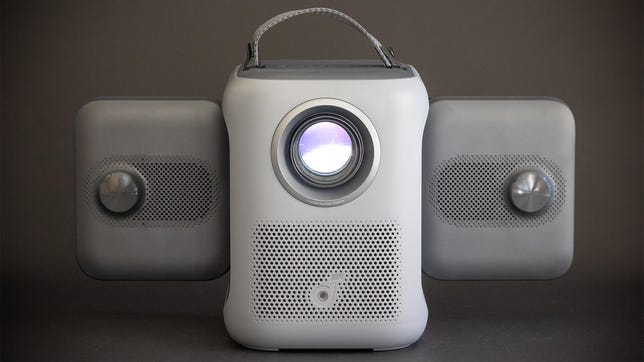
The gray Anker Nebula P1i Portable Projector has unique speakers that stick out from the side of the device.

Pros

  • Clever rotating “ears”
  • Decently bright
  • Google TV streaming

Cons

  • Budget lens limits placement options
  • A bit noisy at full brightness

The Soundcore Nebula P1i has speakers that fold out and rotate. They look a lot like little elephant ears. They’re also gray. So if you add a trunk and a second eyeball — and you squint a lot — then it’s sort of a mini robot elephant. It’s actually a projector, of course, and a budget one at that.

What’s most impressive beyond the adorable and functional “ears” is the fact that the P1i performs far better than you’d expect for a projector that includes Google TV and costs less than $400. It has a simplistic lens that requires it to be positioned at roughly midpoint of the image it is projecting (no upward throw), but as long as you don’t mind that, a trapezoidal image or a bit of keystone correction, this is a great budget projector.

 Specs and such

  • Resolution: 1080p 
  • Lumens spec: 380 (ANSI)
  • Zoom: No
  • Lens shift: No
  • Light source type: LED

To avoid confusion, a quick explanation about naming. Parent company Anker seems to hate the name Anker and has numerous subbrands, but also, they drop and combine subbrands regularly. So the Nebula subbrand has been absorbed into Soundcore, the subbrand famous for quite decent Bluetooth headphones and speakers. It’s an odd pairing in my mind, but what do I know? So you can alternately call this the Anker Soundcore Nebula P1i or the Soundcore Nebula P1i by Anker. That’s a mouthful. Also, apparently the “S” is lowercase in their branding, but no, sorry, that’s a bridge too far.

The P1i has 1080p resolution, quite a step up from the 720p that was common in budget projectors not too long ago. Unless you’re sitting exceptionally close to a normal-sized image or trying to project an abnormally huge image, this resolution is more than enough — you’re not going to see pixels.

The Soundcore Nebula P1i on a black background with its speakers folded.

Geoffrey Morrison/CNET

Soundcore claims a light output of 380 ANSI lumens. I measured 382 in its most accurate mode. That is, I think, the closest a company’s claims have ever been to my real-world measurements. Usually they’re more… let’s say “optimistic.” Even more impressive is the P1i is actually capable of even more. In the least accurate Conference mode, it’s capable of 603 lumens. That’s quite good for an inexpensive projector, brighter than many portables and not far off something like the Epson Flex Plus, which I measured as 655 in its most accurate mode, though a far brighter 817 in its brightest.

The biggest issue with the P1i is the lens, in that it’s a simple design similar to other budget projectors like the TCL A1 and Vimgo P10. While there are benefits, not least reduced cost, the drawback is no upward throw. The vast majority of projectors create an image that’s slightly above its lens. This allows for coffee-table placement or mounting on a ceiling, and the projected image appears somewhere near the middle of the wall. 

The P1i, instead, projects its image straight out the front. The middle of the lens is basically the middle of the image. It’s rare that anyone would mount a projector around four feet in the air to project on the middle of a wall, so if you place it on a low-slung table this gives you two choices: The easiest is just dealing with a trapezoidal image, but almost as easy is using the P1i’s built-in keystone correction. This isn’t ideal because it’s only using a portion of the imaging chip, so you’re losing resolution and brightness as well as potentially adding some artifacts. For a $370 projector, this isn’t a huge deal, but it’s worth keeping in mind.

Connections

  • HDMI inputs: 1
  • USB port: 1 USB-A
  • Audio output: 3.5mm headphone, Bluetooth
  • Internet: Wi-Fi
  • Streaming interface: Google TV
  • Remote: Backlit

The main attraction of the P1i is the adjustable speakers. For a projector that’s clearly intended for use in impromptu spaces, this seems like a great idea. People might be gathered around in front, beside, behind or all of these. Many small projectors only have speakers facing one direction, maybe two, and if they’re not facing you, the sound is often quieter or more muffled. The P1i’s speakers can rotate out 90 degrees so they’re facing backward, and then they can rotate so they face forward or up. They’re independent, so one can face one direction and the other in a different direction. It’s a clever idea that I imagine a lot of people will use. 

The back of the Soundcore Nebula P1i on a black background with the speakers facing different directions.

Geoffrey Morrison/CNET

Each speaker has 10 watts of power at its disposal, so they can play fairly loud. However, the sound is rather thin, without much bass even graded on the curve of small drivers in a small box. While the audience is more likely to hear what’s going on with the P1i compared to some portable speakers, they’re not going to be overwhelmed with the sound quality. Fair, perhaps, given the price, but as you’ll read in the next section, the price isn’t a totally valid excuse.

The streaming interface is Google TV, like nearly all modern projectors. It’s slick enough in daily use and gives you access to all the major streaming services and countless minor ones, too. If you want to connect a gaming console or your own streaming stick, like Roku or Amazon, there’s an HDMI input on the back. Curiously, the 3.5mm audio output is labeled AUX, implying a line-level input, but it’s a headphone output.

Picture quality comparisons

TCL A1

The most logical competitor to the P1i I’ve reviewed recently is TCL’s A1. This is also a budget projector with built-in streaming. It also has a simple lens, so no upward throw. Pricing at launch was a lot more expensive, $500 to the P1i’s $370, but currently the A1 is cheaper just about everywhere. I compared them both side by side on a 1.0-gain screen.

The Soundcore Nebula P1i sitting on its speakers which are facing up and back.

Geoffrey Morrison/CNET

Physically, the P1i is larger, roughly twice the overall volume of the A1. Its gray-on-gray exterior uses cheaper-looking plastic with none of the A1’s classy design. While the A1’s has a handle, which can double as a stand, it’s the P1i’s rotating ears which steals the show. Being able to direct sound directly at the audience is an absolute boon for a low-power sound system. That’s not to say the P1i sounds better, exactly. The A1 has a fuller sound with better bass. The P1i has a little clearer treble. So I’d say the A1 has a slight edge in sound quality, but the P1i is far more versatile and will be better heard by more people sitting around the projector.

In their regular modes, both the Anker and the TCL have similar brightness. I measured 382 and 433 lumens respectively. That’s not enough of a difference to notice. However, you can get more light from the Anker using the less accurate Standard mode, which is only slightly cooler/bluer than the Movie mode. This results in a roughly 45% increase in brightness, which is noticeable, and likely the mode most people will use. However, there’s also a lot more fan noise compared to the dimmer mode or the TCL A1. A low noise mode reduces the fans but also the brightness, and this is back down to roughly the same brightness as the A1. 

In terms of contrast ratio, the A1 is definitely better, with an as-measured 2,522:1 to the P1i’s still-decent 826:1. So the darkest parts of the A1’s image look less gray, but given the greater light output of the P1i, this is less of a factor than if they had the same brightness. Contrast ratio is great, and generally the most important aspect of a display’s performance, but the additional light output is more practical since you can create a bigger image that’s still watchable. 

A side view of the Soundcore Nebula P1i with its remote on a black background.

Geoffrey Morrison/CNET

Color is probably the biggest difference between the two. The P1i’s color is more saturated and more accurate than the more washed-out colors of the A1. Grass is greener; reds are richer and deeper. After the overall brightness, the color difference is what’s most noticeable. The A1 is fine for the price, but in terms of color, the P1i looks like a more expensive projector.

The TCL A1 wins on aesthetics and, slightly, sound quality. The P1i, however, creates a better image than its price implies and the rotating speakers are likely far more useful in a wider variety of situations. There are two other options that aren’t direct competitors but are worth considering. Both Anker’s own Mars 3 Air and TCL’s PlayCube are roughly twice the price of the P1, but both are smaller and have built-in batteries. If portability is your main goal, those are worth checking out.

It’s all in the ears

The Soundcore Nebula P1i on a black background with its speakers extended.

Geoffrey Morrison/CNET

Soundcore (nee Nebula, nee Anker) has designed some real oddball projectors recently, and to be honest, I’m here for it. I’ve been reviewing projectors for a very long time, and it’s refreshing to see companies try different things. 

The P1i is one of the best budget options I’ve seen for the occasional movie night or wall-sized gaming session. I think the price is great, especially considering you get Google TV streaming, a rarity at that price not long ago. Performance, overall, is better than you’d expect for one of the least expensive projectors I’ve ever reviewed. 

My only issue is the lack of upward throw, which basically requires you to use keystone correction if you don’t place it pretty high off the floor. This isn’t a huge issue, especially since I doubt anyone buying a sub-$400 projector is expecting a perfect image. Overall, the image is better than the price implies, so if it’s a bit trapezoidal, so be it. 


Source link

Leave a Reply

Subscribe to Our Newsletter

Get our latest articles delivered straight to your inbox. No spam, we promise.

Recent Reviews


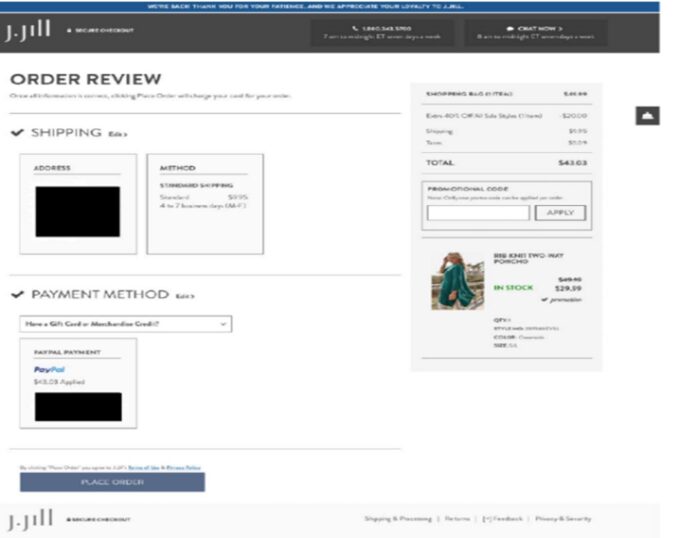
In Cody v. Jill Acquisition LLC, No. 25-937 (S.D. Cal. June 30, 2025), the Southern District of California declined to enforce a retail site’s terms of use and compel arbitration, holding that the plaintiff, who used guest checkout to place an online order at the retail clothing site, did not have adequate notice of the terms and the arbitration clause. This case should serve as a wake-up call for online entities to reexamine electronic contracting processes. It exemplifies how, even if a website’s visual design and its placement of the hyperlinked Terms of Use during user checkout are comparable to other presentations that have been deemed enforceable, a court could still decline to enforce online terms if the context of the transaction is not the typical e-commerce transaction between a registered customer and a retail site. In this case, the court found that by checking out as a guest without creating an account, the user was less likely to expect a continuing relationship and, therefore, the site’s notice and presentation of the terms below the “Place Order” button were not conspicuous enough in this instance to bind the plaintiff.

The plaintiff in Cody filed a putative class action complaint over the site’s pricing policies for alleged violations of the California Business and Professions Code and the Consumer Legal Remedies Act. The defendant moved to compel arbitration, arguing the plaintiff had agreed to the site’s terms of use that contained a “Binding Arbitration Agreement and Class Action Waiver” when plaintiff clicked the “Place Order” button and completed her purchase from the defendant’s website.

Generally speaking, a contract will be enforceable based on an inquiry notice if: (1) the website provides reasonably conspicuous notice of the terms; and (2) the consumer takes some action, such as clicking a button, that unambiguously manifests assent to those terms. When evaluating whether there was an agreement to arbitrate, the court in Cody first considered the visual design of the webpages and found that the visual aspect of the notice was satisfied by the defendant’s website layout. As the court stated, the relevant criteria for evaluating whether the visual elements provide conspicuous notice are whether the advisal is displayed prominently enough that the court can assume a reasonably prudent Internet user would have seen it. Elements such as a “clear and legible” notice on the order page and a hyperlink placed directly above or below an action button formatted in bright, contrasting color and readable font within a relatively uncluttered web page have been favorably cited by courts in past cases.

The court here found the visual design to be adequate because of factors such as the underlined blue hyperlink to the terms of use and its location directly below the “Place Order” button. [See below image from the court opinion of the final contracting screen ].

Although the court recognized that the “design of the website alone might support concluding that the notice would be reasonably conspicuous,” it went on to consider the full context of the guest checkout transaction at issue in Cody.  Here, the court distinguished it from those types of transactions where a user might anticipate “some sort of continuing relationship.” The court emphasized that when considering the notice requirement, the visual design of the website must be examined within that context. As it stated: “This means that courts should expect that a reasonable internet user is more vigilant in looking for contractual terms when the context of the transaction reasonably implies a contractual relationship.” To the court, when a user “simply purchases goods or avails herself of a one-time discount offer,” there is less reason for her to expect a continued relationship beyond the purchase. 

In the case at hand, the court considered plaintiff’s decision to check out as a guest as one where the user did not anticipate a continuing relationship, and compared it with other traditional e-commerce transactions involving registered users where the Ninth Circuit previously found that such context would put a user on inquiry notice that a purchase on the company’s website constituted an agreement to its terms.

“Generally speaking, courts are more likely to conclude that a user anticipating ‘some sort of continuing relationship’ would expect to be bound by terms, whereas a user ‘who simply purchases goods or avails herself of a one-time discount offer’ would be less likely to form such an expectation.”

“This context distinguishes this case from those in which the Ninth Circuit has found that the context of the transaction would put a user on inquiry notice that use of a company’s website or services constituted an agreement to its terms and conditions, including an arbitration provision.”

Thus, despite the adequacy of its visual aspects on the J. Jill site, the court found that proper notice was not sufficiently conspicuous in this case because of the guest checkout context of the transaction (“The context of the transaction therefore weighs against concluding that Plaintiff was sufficiently aware that, by placing an order through jjill.com, she would be entering into an agreement including an arbitration provision”).  

In another recent case, Chabolla v. ClassPass, Inc., 129 F.3d 1147 (9th Cir. 2025), the Ninth Circuit affirmed a lower court’s ruling that declined to send a proposed class action to arbitration. In the ClassPass case, the plaintiff signed up for a trial period for ClassPass, a service that sells subscription packages for access to various gyms and fitness studios, but later took issue when subscription charges resumed after gyms reopened following the COVID-19 pandemic. The contracting process in this case involved several signup screens. [An image from the court opinion of the final screen appears below].

In this case, the court’s decision was a flip, of sorts, of the Cody case, with the Ninth Circuit finding the visual presentation of the terms lacking, even though the context of the transaction would seemingly put the user on notice of an ongoing relationship that would contemplate the user agreeing to site terms. The appeals court found that while a trial subscription opportunity may not indicate an anticipation of an ongoing relationship in all instances, the context neither weighs in favor of nor against the notice requirement. This is because, as the court noted, the other aspects of the context – such as how the purchase is described as a “plan” or a “membership” and how the benefit of ClassPass is to gain access to gyms and fitness studios – conjure the idea of a continuing relationship. Nonetheless, the court ultimately decided that a reasonably prudent internet user would not be deemed to have unambiguously manifested assent to the terms by working her way through ClassPass’s multi-page website checkout process.

Taken together, these two recent decisions show that courts – at least those within the Ninth Circuit – are considering the actual context in which these internet transactions occur when deciding whether an online entity’s contracting and checkout process binds the user to the terms. While visual presentation and web flow design remains important for e-commerce sites, the above two court decisions show that context also matters.

We have previously highlighted the importance of web design in determining if a service’s terms are deemed enforceable. Now, companies might take a second look at their own user registration and e-commerce purchase processes to ensure they offer reasonably conspicuous notice of the existence of contract terms and obtain the user’s manifestation of assent to those terms in all contexts and types of transactions, including those transactions where guest or expedited checkout is used.

Contexts that indicate transient relationships, such as guest checkout or a trial opportunity, may mean that even an ordinary presentation of terms in the form of a hyperlink to the terms located beneath a “Place Order” button – a presentation that is used regularly by many sites – might need to be bolstered, in some cases, to provide the user additional notice that he or she is entering into a transaction that mandates acceptance of contractual terms. As the Cody court commented: “[T]he onus must be on website owners to put users on notice of the terms to which they wish to bind consumers.” Ultimately, the above court decisions accentuate the need for counsel to be involved in the decisions underlying the design and wording of online contracting processes and presentation of terms so entities can attain adequate user notice and assent that would satisfy even the most exacting scrutiny for any type of transaction.


Source link