
Verdict
A cheaper, lighter camera for indoors, the Arlo Essential 3 2K Indoor Security Camera might have a lower price than the rest of the range, but it has the same core features. That includes excellent object detection options, a brilliant app and high-quality 2K footage. With its clever privacy shield this is a top indoor camera, provided you don’t mind paying the relatively high subscription costs.
-
Good value
-
Clever privacy shield
-
Excellent footage
-
Powerful object detection via a subscription
-
Subscriptions are expensive
Key Features
Introduction
As good as the Arlo system is, fitting one of the weatherproof, battery-powered cameras seems a bit overkill. The Arlo Essential 3 2K Indoor Security Camera redresses the balance: the same core features, but in a cheaper body that needs to be permanently wired, with the addition of a privacy shutter.
It gets all of the basic right, and image quality is very good, but is the camera worth the price of the subscription you’ll need?
Design and Installation
- Wall or desk mounted
- USB-C power
- Privacy shutter
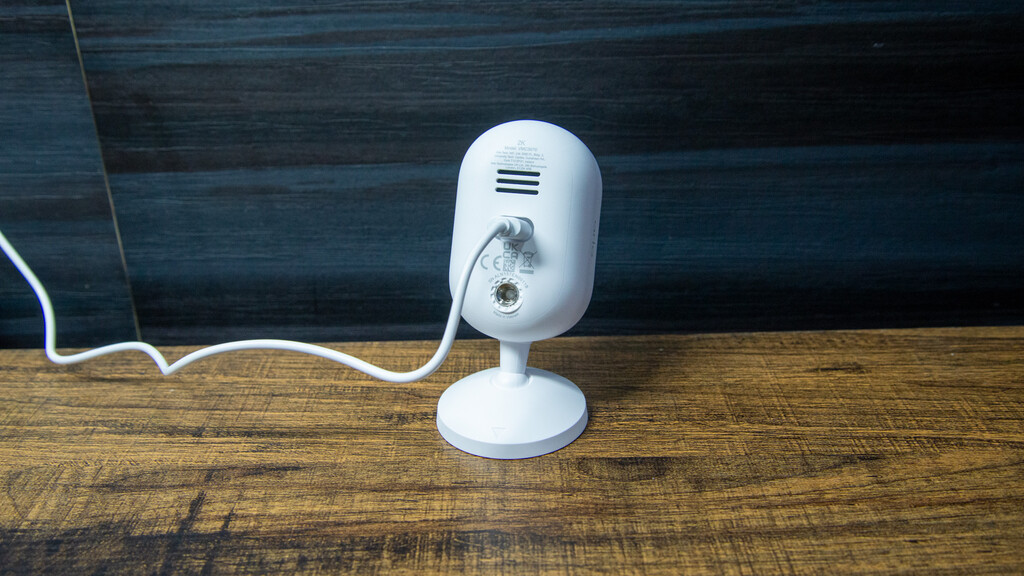
As there’s no battery, the Arlo Essential 3 2K Indoor Security Camera is quite a bit smaller than the other cameras in the range, such as the Arlo Pro 6 2K. All you need to set it up is a power socket within reach of the required USB-C cable.

This camera can be sat on a desk or bookshelf, which is the easiest way to install it. If you prefer, the stand can be moved to the back and used as a wall mount, giving a more permanent installation.
One key difference that you’ll notice with this camera, compared to the other Arlo models, is the integrated privacy shield: a plastic cover that swings up in front of the camera to prevent it from recording.

I think that’s quite important for indoor cameras, and it’s nice to have this privacy feature, which also gives you a simple way to check if the camera is on or off.

Features
- Subscription required for main features
- Custom AI detection option
- Very powerful object detection
This camera is quick and easy to connect to your Wi-Fi (2.4GHz and 5GHz networks supported) and into the Arlo app. This app remains one of my favourite, offering a brilliant range of controls and a simple way to find footage.
Before I get into the features, I have to point out that you need a subscription to make the most of the camera. If you don’t want to pay monthly, then don’t buy this camera.
A basic Arlo Secure subscription costs £7.99 a month for a single camera and includes just seven days of video history, which is stingy compared to the competition. You also get Basic Person, Animal, Package and Vehicle Detection.
There’s also a multi-camera version of this plan for £11.99 a month, covering up to four cameras. It’s not clearly advertised on the website, but you can find it in the app under the subscriptions section.
If you want the more advanced AI features, you’ll need Arlo Secure Plus, which costs £19.99 a month for unlimited cameras, gives you 14 days of video history and supports resolutions up to 4K.
At the higher tiers in particular, Arlo Secure is expensive compared with rivals such as Ring, which starts at just £4.99 for a single camera, with higher tiers adding extra features for cameras and the Ring Alarm.
I’d stick with the standard plan, especially if you’re using a 2K camera, although I’ll also explain the new AI features.
With Arlo Secure, you do get a lot of controls. With the basic plan, the object detection options dramatically cut down the number of motion alerts that I got. It’s unlikely that you’ll need them inside, but activity zones can futher reduce false alerts in some situations.

On the most expensive package, there’s support for facial recognition, although this only works on a single camera in your system. Realistically, it makes more sense to have this option on an external camera.

Vehicle recognition (like facial recognition) is also available, although this is a feature that you’re unlikely to need indoors unless something goes horribly wrong.
Custom detection on the higher tier is the only detection type of its kind that I’ve seen. With this, you can train the camera with before and after shots to spot your own custom events, such as the front door being left open. I find that I need a big enough difference between images for the feature to work, but it does open up a lot of possibilities.
There’s also support in the more expensive package for fire detection. If the camera spots a fire starting it can send an alert.
But, as nice as the extras are, they don’t feel essential, and I’d stick with the more basic cloud subscription options to save money.
In the app, there are three modes: Arm, Arm Home and Standby. For each mode, you can set which cameras you want to have on. They’re essential for an indoor camera, where you won’t want to record everything going on in your home.
Modes can be set manually, scheduled or even triggered by your location, so you can largely automate the process.
With the Arlo Essential 3 2K Indoor Security Camera, when it’s set to not record the privacy shield quickly snaps into position.
Recorded footage can be accessed via the app, with loads of filtering options: date, specific camera and even what triggered the motion (person, vehicle, etc). There’s then a thumbnail list of events, which can be watched and saved to your phone for longevity.
Performance
- Excellent 2K video
- Sharp video at night and during the day
With its 2K (2304 x 1296) resolution, the Arlo Essential 3 2K Indoor Security Camera has the same resolution as the bulk of the rest of the range of cameras. This step up from Full HD is a good one, adding a bit more sharpness and detail, but without the file size and bandwidth requirements of 4K.
There’s a 130° field of view from this model, which is enough to capture most of a room, provided the camera is sensibly placed.
In daylight, the footage is excellent, as good as you can expect. Even in the busy Trusted Reviews Home Technology Lab, there’s detail all the way through the frame, and faces are sharp and clear.

At night, the Arlo Essential 3 2K Indoor Security Camera switches to black and white footage, using IR to light up the space. These IR lights work well, with the main frame sharp. Moving objects become a bit softer, but even so, it’s easy to find a frame where people are easy to identify. Again, you don’t really get better than this.

Should you buy it?
You want a smart, quality indoor camera
Excellent 2K footage day and night, plus a wide range of detection options make this camera a winner.
You want a camera with lower monthly costs
Arlo Secure is quite expensive, and there are cameras with cheaper or even no monthly subscription costs.
Final Thoughts
In terms of pure quality and features, the Arlo Essential 3 2K Indoor Security Camera is an excellent bit of kit.
It’s well-priced, shoots excellent video, and the Arlo app is brilliant, with some of the most advanced detection options. The flip side is that subscriptions are expensive, but if you want the best features, this camera is great. For alternatives, including subscription-free options, read my guide to the best indoor security cameras.
How We Test
We test every security camera we review thoroughly over an extended period of time. We use industry standard tests to compare features properly. We’ll always tell you what we find. We never, ever, accept money to review a product.
Find out more about how we test in our ethics policy.
- Used as our main security camera for the review period
- We test compatibility with the main smart systems (HomeKit, Alexa, Google Assistant, SmartThings, IFTTT and more) to see how easy each camera is to automate
- We take samples during the day and night to see how clear each camera’s video is
FAQs
No, but without a subscription you miss out on the advanced features, such as people detection.
No, this camera is powered by USB only.
Full Specs
| Arlo Essential 3 2K Indoor Security Camera | |
|---|---|
| Manufacturer | Arlo |
| Size (Dimensions) | 53 x 53 x 110 MM |
| Weight | 106 G |
| Release Date | 2026 |
| First Reviewed Date | 10/06/2026 |
| Model Number | Arlo Essential 3 2K Indoor Security Camera |
| Resolution | 2304 x 1296 |
| Battery Length | hrs |
| Smart assistants | Yes |
| App Control | Yes |
| Camera Type | Wired indoor |
| Mounting option | Wall or bookshelf |
| View Field | 130 degrees |
| Recording option | Cloud |
| Two-way audio | Yes |
| Night vision | Yes (black and white) |
| Motion detection | Yes |
| Activity zones | Yes |
| Object detection | People. vehicles, animals (via subscription) |
| Audio detection | Fire alarms |
| Power source | Mains |

Stephan is the sports journalist for the Maple Grove Report.