How I block ads with a $7 Raspberry Pi alternative – it’s easy


A $7 ESP32-S3 is a powerful and versatile system

Adrian Kingsley-Hughes/ZDNET

Follow ZDNET: Add us as a preferred source on Google.


ZDNET’s key takeaways

  • A cheap $7 board can turn its hand to ad blocking.
  • It works as a DNS sinkhole, stripping out ads before download.
  • Other options include using a Raspberry Pi and buying hardware.

They say that necessity is the mother of invention, and the skyrocketing prices of Raspberry Pi boards have definitely been the kick in the pants that I’ve needed to look at cheaper, perhaps also better-suited, alternatives. I mean, the Pi is a great board, but for a lot of applications I’ve used it for over the almost 15 years that they’ve been around, it’s also been overkill.

The other day, I needed to put together an ad-block solution, not because I dislike ads, but simply because I was working with quite a limited bandwidth. I reflexively reached for a Raspberry Pi board, but stopped when I remembered how much they cost nowadays and put it back.

Also: I tested a Bluetooth tracker that leverages LoRa mesh networks to find things – and it’s so accurate

I was going to use PiHole on the Pi, but then I remembered coming across an ad-block project that worked on an ESP32 board. And the good news is that you can pick up one of those boards for under $10.

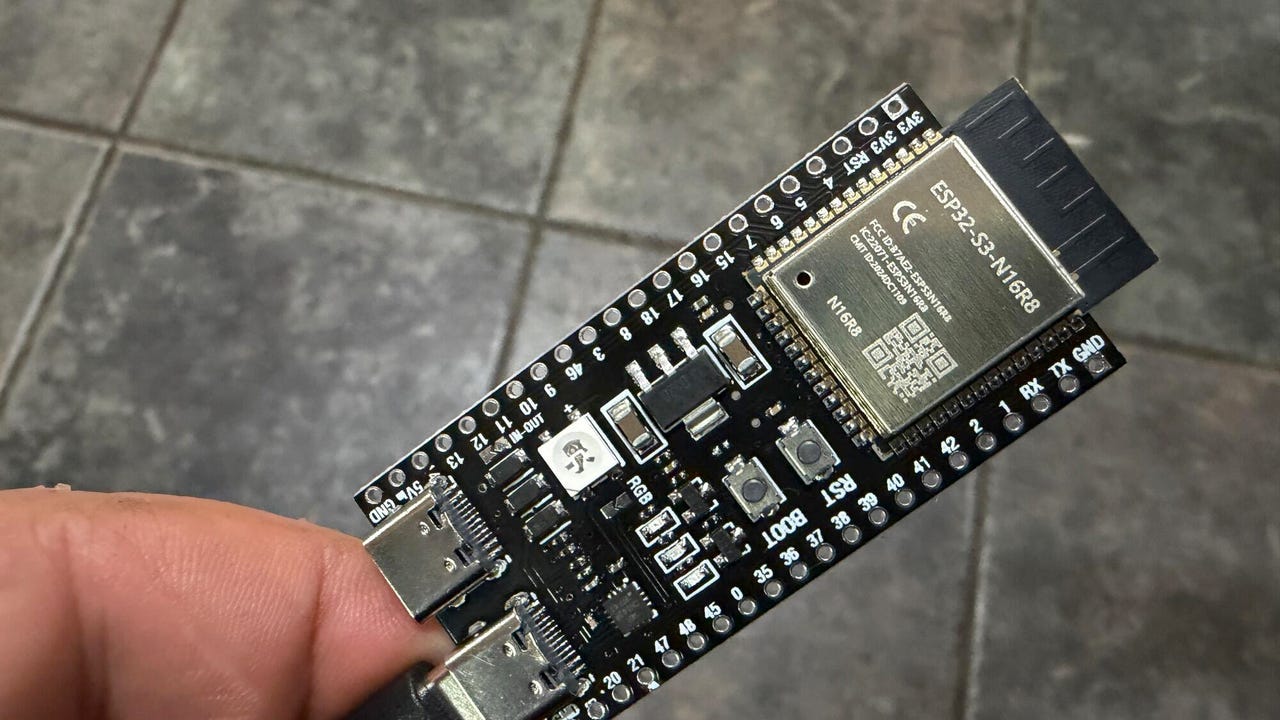
ESP32-S3 (left) vs ESP32 (right)

ESP32-S3 (left) vs ESP32 (right).

Adrian Kingsley-Hughes/ZDNET

Introducing the ESP32-S3

There’s a huge difference between a Raspberry Pi 5 and an ESP32 board (specifically the ESP32-S3 board). The Pi 5 is powered by a 2.4 GHz quad-core Arm Cortex-A76 64-bit chip, gigabytes of RAM, and the ability to use microSD or fast NVMe SSD storage, while the ESP32 makes use of a dual-core Tensilica Xtensa LX7 32-bit processor that can run at up to 240 MHz, 520 KB of RAM, and up to 16MB of flash storage. A Pi 5 can use as much as 12 W of power (and that’s before you hook up various HATs and such), while an ESP32 board uses milliwatts. 

For this project, I’m happy to go with the ESP32, but there are a few compromises that I’ll have to live with — more on those later.

What you need

First, you need an ESP32 board. Look for the ESP32-S3 with 8MB of PSRAM (there’s a 4MB version too, but using this board will result in compromises) rather than the classic ESP32. The ESP32-S3 is faster and more efficient, and you need this power to run the ad-block software. The cheapest way to buy these boards is in a 3-pack for $20

Also: I built my own Wi-Fi router with a Raspberry Pi for Starlink and solar control – here’s how

When you get an ESP32-S3 board for the first time, it’s normal to think, “Wow, this is tiny, there must be more to it,” but there isn’t. It really is a computer you can balance on a finger. 

Well, you will need a USB-C cable to transfer data and power the board. However, you don’t even need a microSD card for the board to work.

Also: I installed a $17 solar panel onto my doorbell camera, and it’s easily my best smart home investment

Talking of the software, you’ll also need to download ESP32_AdBlocker, which does all the hard work. You’ll also need the Arduino IDE utility to install the software onto the board. Installing the software is easy — configure the Arduino IDE application to work with the ESP32 board, open the product in the application, connect the board to your PC, and click upload. 

No coding needed -- you're just loading existing code onto the ESP32-S3.

No coding needed. Just load existing code onto the ESP32-S3.

Adrian Kingsley-Hughes/ZDNET

Note that when you connect the ESP32-S3 board to your computer, it has two USB ports. You want the one marked as COM or USB/Native (looking down at the board with the ports at the bottom, this is the port on the right). Alternatively, try a different port.

Also: I setup a $4 router reboot timer, and it’s made my internet reliably faster

If you get into trouble, there’s no end of help available. One of the biggest issues I find people run into is trying to connect the ESP32 to their computer using a charge-only USB-C cable. I also had to fiddle with the compile and board settings in the Arduino IDE software. I’ve added a screenshot below of the settings I used to get things working.  

ESP32-S3 (left) vs ESP32 (right)

Screenshot by Adrian Kingsley-Hughes/ZDNET

And finally, if you need a case for the ESP32-S3 board, you have options. You can buy one3D print one, or do a MacGyver and wrap it in a bit of electrical tape or large-diameter shrink-wrap tubing (about 1.5 inches across). 

Setting up the board

OK, so you’ve loaded the software onto the ESP32. Now it’s time for a first boot and to get the board set up. Your ESP32 board is now a network appliance.

On first boot, the ESP32 starts in Wi-Fi access point mode with an address that starts: ESP32_Adblocker_XXXXXXXXXXXX (where each X is an alphanumeric character). 

It lives.

Screenshot by Adrian Kingsley-Hughes/ZDNET

Once you’ve connected to the Wi-Fi, go to 192.168.4.1 and add the Wi-Fi SSID and password for your router. After another reboot, it’s time to specify the URL of the blocklist you want to use (you can find a massive repository of blocklists here), and then you’re pretty much done with the board.

We're in! ESP32_Adblocker successfully installed

We’re in. ESP32_Adblocker successfully installed.

Screenshot by Adrian Kingsley-Hughes/ZDNET

The only other thing to do is configure your devices to send DNS requests (more on this in a moment) to the ESP32 board. To do this, you need to take that earlier address — 192.168.4.1 — and use it as the DNS address. A good way to find out how to do this task is to check out CloudFlare’s excellent documentation for the platforms (remember to set the DNS to your ESP32’s address, not CloudFlare’s 1.1.1.1 address).

But how does it work? 

When you type a URL or click a link, your browser needs to know where on the internet that web page lives. To find this information, your browser consults an online directory called a DNS server via DNS lookup (DNS stands for Domain Naming System). 

Think of DNS as a phone directory, but for server addresses. The web page, and all the components of that web page — the images, any videos or sounds or animated under-construction GIFs, and, of course, the ads — can all be at the same location or come from different servers scattered all around the world. The browser looks up the addresses of where all these parts of the webpage are stored to build the page that it shows you. 

Now, here’s the clever bit. Because you now told your smartphone, PC, or router to ask the ESP32 board for DNS information (which is why you had to change the router’s DNS setting for this approach to work), every DNS lookup that happens is filtered by that tiny ESP32 board first. 

Also: My 7 essential laptop-bag items after decades of working remotely

The ESP32_AdBlocker software holds a blocklist of millions of addresses for internet ads, and, put simply, every time the browser requests something that’s in the blocklist, the software tells the browser that it can’t be found by pointing it to the 0.0.0.0 DNS address, and the blocked ad never loads, saving you a bit of internet bandwidth. If the address is not on that list, the board passes that DNS lookup to a proper DNS server. 

What you’ve built is a DNS sinkhole for the majority of the ads that you see on the internet.

There are limitations. For example, the strategy doesn’t work with YouTube ads because they’re served from the same server and at the same address as the videos you want to watch, so blocking these ads would block the videos. The approach also doesn’t work with newer IPv6 internet addresses. 

Also: I tested a $15 smart switch and found a coffee maker wasting $1,500 a year in electricity

But this project still shows what’s achievable with a tiny board costing under $10.

The ESP32-S3 in action filtering ads.

The ESP32-S3 in action, filtering ads.

Adrian Kingsley-Hughes/ZDNET

Not the only option

For the application I needed — a temporary solution to work with a limited-bandwidth internet connection — this approach works. And it was one of those interesting projects to play with. If I wanted a long-term solution, or I didn’t want to put a speed bump on a fast internet pipe, a Raspberry Pi Zero 2 W running PiHole is a good solution. But that approach already pushes the cost up to at least $15 for the bare board, plus a microSD card. Nothing that’s going to demand a second mortgage, but it’s a different level for sure. 

You could run PiHome on a totally separate computer, or in a virtual machine on a computer. Or buy an appliance that supports ad blocking out of the box. But what’s the fun in that? Different horses for different courses. 


Source link

Leave a Reply

Subscribe to Our Newsletter

Get our latest articles delivered straight to your inbox. No spam, we promise.

Recent Reviews


Alaskan cruising is big business, with nearly two million travelers boarding mega ships each year. These floating cities move through Southeast Alaska’s port towns ofJuneau, Sitka, and Ketchikan with long transits to and from Vancouver or Seattle. They must be doing something right. But the real question is: right for whom? Discover why UnCruise offers a more immersive Alaska experience—fewer crowds, closer wildlife encounters, guided adventures, and all-inclusive small-ship travel in Glacier Bay.

We recently sailed on UnCruise’s Wild, Woolly, and Wow with Glacier Bay itinerary and experienced Alaska at a human scale, up close, unscripted, and deeply immersive. What we found was a style of travel that felt less like a vacation and more like a shared expedition. Here’s why we chose UnCruise for Alaska and why we’d do it again without hesitation.

An All-Inclusive Model That Actually Includes You

Happy hour Champagne on UnCruise

All Inclusive-Uncruise Wilderness Explorer Alaska

Traditional cruising relies on a dual-revenue model: low-margin fares offset by high-margin onboard spending like drink packages, shops, specialty dining, and excursions. To make the math work, those ships need 3,000 to 6,000+ passengers and rigid itineraries built around ports and schedules.

UnCruise turns that model on its head. With fewer than 90 guests and truly all-inclusive pricing, the experience feels more like an adult summer camp than a floating resort. Their ships anchor in remote bays instead of lining up at docks, and exploration is led by an in-house team of naturalists and guides, not outsourced excursion operators.

You’re invited, not herded, to experience Alaska on its own terms. For us, that meant forming real connections with the crew, with fellow travelers, and with the place itself. We learned names quickly, swapped stories easily, and capped each day with shared meals and drinks that reflected the region we were sailing through.

When Alaska Is Your Window View

Waterfront Juneau Alaska

Vendors on dock Juneau Alaska

Mega ship anchored in harbour, Juneau Alaska

UnCruise Safari Endeavour Juneau Alaska

Our first morning in Juneau felt surreal. The harbor was wrapped in fog as we walked along an empty dock, with tens of thousands of cruise passengers still waiting behind raised gangways. As the mist lifted, the walkways dropped, and the quiet was instantly replaced by crowds racing toward shops and excursion buses.

I couldn’t help but wonder if anyone glanced out their cabin window and felt a flicker of FOMO. If only they knew what mornings on UnCruise looked like. Day after day, our views were of waterfalls spilling into secluded bays and glaciers calving in the stillness of early morning, no crowds, no commentary, just Alaska doing its thing.

Closer to the Heart (and the Ice)

Skiff Tour LeConte Bay Alaska

Skiff by large iceberg LeConte Bay Alaska

LeConte Bay Alaska

Ed licking ice at LeConte Bay Alaska

Growing up, Geddy Lee’s voice urging us to be “closer to the heart” felt like a creative manifesto. Forging our creativity, molding a new reality, and sowing a new mentality… Closer was better. Closer was where new ideas formed and deeper connections took hold. That philosophy plays out beautifully on UnCruise.

In Glacier Bay, we had an unobstructed view of Johns Hopkins Glacier, while a mega ship lingered somewhere farther out in the fog, barely visible. We could hear sea lions barking as we passed and orcas exhaling as they surfed our bow wake.

And when “close” still wasn’t close enough, we boarded skiffs. Close enough to feel the surge from calving ice at LeConte Glacier. Close enough to taste ice that had traveled decades from mountaintop to sea. Close enough to hear bears splashing as they fished below Pavlof Falls. As Rush put it, “There’s something here as strong as life.” We felt it.

Days Built Around Doing, Not Watching

Neka Bay Alaska

Waterfall Cove Alaska

Kayaking Glacier Bay Alaska

Evac Skiff - Heading Home Alaska

A typical UnCruise day included both a morning and afternoon adventure: skiff tours, kayaking, or bushwhacking through rainforest. Each option took us deeper than the ship alone ever could, with kayaking bringing us closer still.

Trading engines for paddles let us hear waterfalls crash into Waterfall Cove and study freshly calved blue ice glittering in the morning light. Bald eagles watched from high pine perches while harbor seals lounged on stray ice floes, eyeing us just as carefully as we watched them.

Where Boots Matter More Than Deck Chairs

Waterfall Cove Alaska

Waterfall Cove Alaska

Wack and a half -Chicken of the Forest UnCruise Alaska

Waterfall Thomas Bay Alaska

Some experiences require boots on the ground, and this is where UnCruise truly excels. They don’t just provide sturdy rubber boots for muddy landings, they bring the expertise to use them well.

Their skiffs deliver you to remote shorelines and return at just the right moment. On land, you’re guided by wilderness professionals with advanced medical training, GPS navigation, and safety protocols (and gear) for everything from bears to sudden weather shifts.

That preparation opened the door to unforgettable moments: wandering through old-growth forests spared by their isolation, snacking on wild blueberries still wet with morning dew, scrambling up rocky outcrops for sweeping views, and sinking ankle-deep into muskeg bogs. It felt unapologetically, unmistakably like wild Alaska.

Eating as Part of the Journey

Breakfast Uncruise Wilderness Explorer Alaska

Delicious gnocchi, salmon, and prime rib

UnCruise Crab Leg dinner

Desert Uncruise Wilderness Explorer Alaska

Twice-daily adventures worked up serious appetites, and the UnCruise culinary team rose to the challenge. Meals weren’t just filling, they were thoughtfully designed to reflect the region we were exploring.

Our onboard chef, Rachel, originally from the Northeast, described Alaska as New England elevated. She leaned into the freshness of local seafood, serving dishes like butter-poached, fresh-caught halibut. And of course, there was the crab feast featuring sweet, delicate Dungeness crab with tender, flaky meat that exceeded even our lofty Alaskan expectations.

Evenings That Deepen the Day

2 bears with a salmon Pavlovs Bay Alaska

Bears at Hidden Falls Hatchery Alaska

After full days of movement and fresh air, evenings onboard were about understanding what we’d seen. Instead of shows or casinos, UnCruise offers Arctic education that builds context and meaning.

On bear-watching days, we learned how salmon runs support the entire forest ecosystem, right down to the trees. Entering Glacier Bay, we explored how microscopic life on ice underpins one of the planet’s most complex ecosystems. It was the perfect complement to what we’d experienced firsthand.

Born of Alaska, Not Just Passing Through

Uncruise Alaska Northern Lights
Photo Credit: Jenn Coleman.

UnCruise is headquartered in Juneau, and founder Captain Dan Blanchard was adopted into the Tlingit tribe in 2013—a reflection of his deep, long-standing connection to Alaska. For more than 30 years, the company has focused on immersive, active travel with a strong commitment to environmental stewardship.

The “Un” in UnCruise is intentional: unplugging, unhurried, and undeniably different from traditional cruising. For us, choosing this road, or route, less traveled made all the difference. We may never be as truly Alaskan as Captain Dan, but that week in the wilderness left a connection that time won’t erase.

Disclosure: A big thank you to Uncruise Adventures for partnering with us! For more Uncruise travel inspiration, check out their InstagramFacebook, and YouTube accounts.

As always, the views and opinions expressed are entirely our own, and we only recommend brands and destinations that we 100% stand behind.

Ready to Book Your Trip? These Links Will Make It Easy:

Airfare:

Insurance:

  • Protect your trip and yourself with Squaremouth and Medjet
  • Safeguard your digital information by using a VPN. We love NordVPN as it is superfast for streaming Netflix
  • Stay safe on the go and stay connected with an eSim card through AloSIM

Our Packing Favs:

  • We LOVE Matador Equipment for their innovative products and sustainability focus. Their SEG45 is a game changer when you need large capacity while packing light.
  • Travel in style with a suitcase, carry-on, backpack, or handbag from Knack Bags
  • Packing cubes make organized packing a breeze! We love these from Eagle Creek

Like it? Pin it for later on Pinterest!

Hi! We are Jenn and Ed Coleman aka Coleman Concierge. In a nutshell, we are a Huntsville-based Gen X couple sharing our stories of amazing adventures through activity-driven transformational and experiential travel.


Source link