How I turned my old Android phone into a streaming stick for free – in 6 easy steps


How to turn your old Android phone into a streaming stick for free - in 6 easy steps

Elyse Betters Picaro / ZDNET

Follow ZDNET: Add us as a preferred source on Google.


ZDNET’s key takeaways

  • An old Android phone can work like a DIY streaming device.
  • Native casting is smoother than full-screen mirroring.
  • A TV-style launcher makes streaming apps easier to browse.

After 15 years of testing devices, I have far too much old tech sitting in totes and drawers around my house.

I keep things like phones longer than I should because there’s always a tiny voice in the back of my head wondering if they’ll be classics one day or, just maybe, if I could still find uses for them. Heck, I recently turned an old Android phone into a Wi-Fi extender. That little project got me thinking about some of my other phones and realizing I really should do something with them.

Then it hit me: Could I turn one into a DIY streaming stick, like a Roku or Fire TV?

Also: I started clearing my Roku cache, and it fixed my biggest TV complaint

To be clear, I’m talking about turning a phone into a wirless streaming device or command center. One place where all my streaming apps live, complete with a TV-style UI, video casted to the big screen, and my phone acting as the remote. Turns out, this is easy to do and takes only minutes to set up. You could even plug directly into HDMI for a wired connecton, if you want.

How to turn your Android phone into a Roku or Fire TV

What you’ll need: A spare Android phone, an internet-connected TV or display that supports casting or screen mirroring, a charger, a launcher, and maybe a dedicated casting app. The phone should run a relatively recent Android version, have Wi-Fi, enough storage for streaming apps, and a decent battery.

Also: I replaced my bedroom TV with this $170 Roku projector, and it’s a worthy alternative

First, I connected my Android phone to my home Wi-Fi and made sure my TV was on the same network.


Show more

Put the phone and TV on the same Wi-Fi

Elyse Betters Picaro / ZDNET
Clean up the phone

Elyse Betters Picaro / ZDNET
Download streaming apps

Elyse Betters Picaro / ZDNET

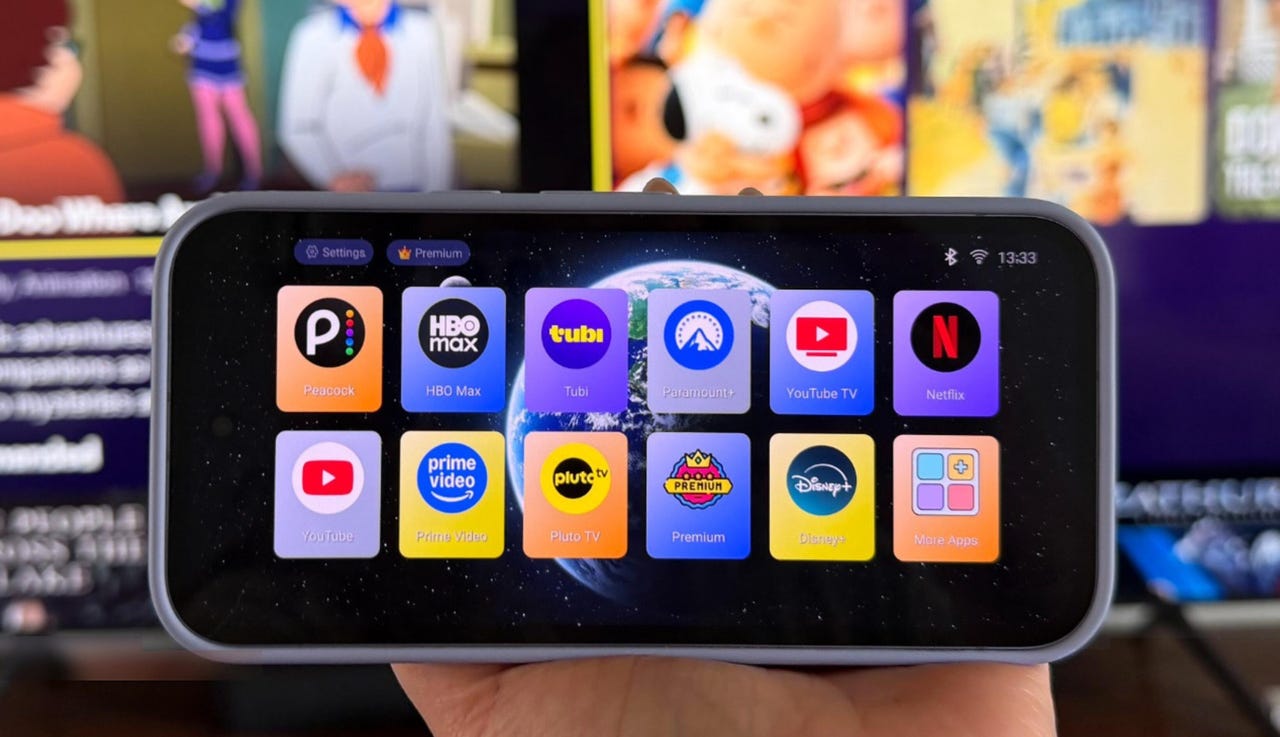
Here’s where things get interesting. I decided to use a launcher to replace the standard Android home screen on my phone with a more TV-like interface. This is what makes the streaming apps on my phone look like a Roku or Fire TV. I installed TV Launcher for free, but there are other launchers in the Play Store, such as Projectivy LauncherEasy TV Launcher, or ATV Launcher Pro for $2.99.

Once installed, I customized how my streaming apps were organized. TV Launcher is cool because the app icons appear as large, rounded tiles in a simple row or grid, with colorful artwork and a clean look that makes the apps much easier to spot from across the room. I can hide or arrange the apps and even make folders.

Also: Own a Fire TV? Changing these 10 settings made my system run like new again


Show more

Install a TV-style launcher

Elyse Betters Picaro / ZDNET

Since I’m using my phone to stream, I need to change its settings so the screen doesn’t time out or go dark while casting.

Go to Settings, then Display, and increase the screen timeout to 30 minutes or more. For a more permanent solution, I enable Developer options by going to Settings > About phone, then tapping Build number seven times. Then, under Developer options, I can turn on Stay awake so the screen remains on while charging.

Finally, I keep the phone plugged into a wall charger during playback so it doesn’t die halfway through a movie.


Show more

Keep the phone awake and charging

Elyse Betters Picaro / ZDNET

When I’m ready to stream, with my launcher open, I go to Quick Settings on my Android phone and tap Cast. (Some phones may call it Screen Cast or Smart View. If missing, tap the pencil icon to edit Quick Settings and add it.) With a launcher, my streaming apps are big. I can browse, pick something, tap play from my phone, and watch away on the big screen.

I found native casting often works better than full-screen mirroring. So, if a streaming app has a cast icon, I usually tap that to send the video to the TV and then use my phone as the remote. It results in smoother playback, less battery drain, and fewer audio delays.

There are dedicated casting apps that make it easy to cast videos and movies from a mobile device. Castify, for example, is free with ads, or there is an optional ad-free upgrade. Web Video Cast is another free option with a premium upgrade tier. It’s useful for any videos I want to watch from a site, like CNN, instead of in a major streaming app, and it supports local files and subtitles.

Also: Slow Fire TV? This quick 30-second fix made mine run like new again

Tip: A wired HDMI connection would make your phone-to-TV streaming experience more lag-free, by sending video directly through a cable instead of relying on Wi-Fi, but only some Android phones support it.


Show more

Start casting

Elyse Betters Picaro / ZDNET

How I use my Android phone like a streaming device

For my setup, I used a Pixel 9a, which was released in 2025 and has 128GB of storage and 8GB of RAM, paired with an 85-inch Samsung 4K TV. Once my launcher was set up, my streaming apps were installed, and I decided how I wanted to cast, I was good to go. I just grabbed my phone with the launcher open, picked an app and then show, casted, and controlled playback from my phone.

Some DRM-protected apps may block screen mirroring from Quick Settings but still allow casting from inside the app. Support varies by app and plan, but many services offer native casting, including Disney+, Max, Prime Video, Peacock, YouTube TV, and Tubi.

Also: How to clear your Android phone cache – the 30-second routine every user should be doing

In my experience, this setup is simple and pretty fun to try. Do I plan to use an Android phone as a streaming device all the time instead of an actual Roku or Fire TV? At home, probably not. But for travel, like in a hotel or Airbnb, I can see the appeal. If nothing else, it was interesting to dust off an old, spare phone, do something new with it, and give it a surprisingly useful second life.

Can my Android phone really replace a Roku or Fire TV?

Mostly, but not perfectly. It can act as a streaming device and remote and takes only a few minutes to set up. However, wireless casting can lag, and some streaming services support native casting but block full-screen mirroring. That’s why a streaming app may cast normally through its own Cast button but show a black screen, error message, or no video when mirrored.

Also: This silent Android feature scans your photos for ‘sensitive content’ – how to uninstall it

What is native casting vs. full-screen mirroring?

Native casting sends the video stream directly to the TV and lets the phone act as a remote, while full-screen mirroring duplicates everything on the phone screen onto the TV. That means using the phone while mirroring also shows those actions on the TV.

Is this setup really free?

Yes, if you already have the Android phone and TV, use a free launcher, and plan to stream from an ad-supported service such as Tubi. In that case, you won’t even need to pay for the movies and shows you want to watch.

Is wired HDMI better than wireless casting?

Wireless casting is easier, but wired HDMI can reduce or eliminate lag, especially if your connection is spotty.

How to turn your old Android phone or iPhone into a security camera – in 4 easy steps

To see if your Android phone supports video out, plug in a USB-C to HDMI adapter, connect it to your TV with an HDMI cable, and choose the correct TV input. If nothing appears, your phone probably doesn’t support wired video output. Many Samsung phones support wired HDMI, as do Pixel 8 and newer models, and some Motorola Edge phones.

Can my Android phone stay plugged in all the time?

It’s not great for the battery. I suggest using a well-reviewed charger, keep the phone ventilated, and unplug it when not in use.


Show more


Source link

Leave a Reply

Subscribe to Our Newsletter

Get our latest articles delivered straight to your inbox. No spam, we promise.

Recent Reviews


Deer Valley’s new terrain expansion is one of the most ambitious projects in modern skiing. The resort plans to nearly double its skiable terrain while maintaining the industry-leading standards it’s known for. We spent an extended trip in early 2026 skiing the new footprint alongside Deer Valley representatives and Olympic skier Fuzz Feddersen to see how it all came together.

Construction is still ongoing, and this season marked the worst snow year in Deer Valley’s history. Even so, we found the new terrain diverse and distinct, yet seamlessly integrated into the legacy Deer Valley experience.

This guide introduces the terrain, lifts, and base-area amenities in Deer Valley’s East Village so you can make the most of the Expanded Excellence initiative.

East Village: A Second Front Door

Keetley Express Opening Day
Photo Credit: Deer Valley Resort.

Deer Valley East Village is seamlessly connected on the slopes, but geographically separate from the main resort, and that separation works in its favor. Accessed via US-189, it bypasses Park City traffic entirely.

Yes, it’s still a work in progress. You’ll see active construction throughout the base area. But the core infrastructure is already in place, and it functions like a fully supported ski base. What’s here now works and what’s coming will only enhance it.

The East Village base area delivers the Deer Valley essentials: free parking, rental shop, ski valet, and East Village Restaurant, where a bowl of the resort’s signature chili tastes especially good on a cold afternoon.

Where to Stay in East Village (25/26 Season)

High hot chocolate at Grand Hyatt Deer Valley Utah
Photo Credit: Jenn Coleman.

For the 25/26 season, the clear lodging choice is the newly completed Grand Hyatt. It offers a signature restaurant, on-site Ski Butlers rentals, a full spa, and shuttle service to Park City and Snow Park. There’s no ski-in/ski-out access yet, but a short shuttle brings you directly to the East Village base.

Additional hotels are expected to open for 26/27, which will further transform East Village into a true walkable ski hub.

We found the Grand Hyatt welcoming and highly functional, particularly with Ski Butlers on-site and a massive locker room that makes gearing up painless. Their High Hot Chocolate service, modeled after high tea but featuring locally processed cocoa, may become a new tradition for us. It’s indulgent enough to stand in for a light meal or serve as a sweet reset between Park City’s famously rich dinners.

The only logistical wrinkle is shuttle coverage. Service does not extend to Empire Canyon (Fireside Dining) or Silver Lake (Stein Eriksen Lodge, Mariposa), so a bit of planning is required. Still, between Snow Park (St. Regis, Cast & Cut) and downtown Park City, dining options are abundant. With new hotels opening next season, you may soon be able to walk to a different restaurant every night and still not try them all.

Snow Science: The Engine Behind the Expansion

Expanded Terrain snowmaking gun
Photo Credit: Deer Valley Resort.

Deer Valley’s reputation has always been built on snow quality, from immaculate corduroy to sophisticated snowmaking. The expansion continues that legacy in a serious way.

The new terrain draws most of its water from Jordanelle Reservoir. Roughly 80 miles of new snowmaking pipe now support more than 1,200 high-efficiency snow guns. The reservoir isn’t just scenic, it’s foundational.

What’s more impressive is the sustainability loop. Deer Valley is allocated just 1% of the reservoir’s available water. Through dedicated irrigation channels, approximately 80% of that allotment is returned by season’s end. Combined with an expanded grooming fleet, that system allowed the resort to open a record number of runs during a historically hot and dry winter.

If you’re wondering how the terrain skied so well in a lean year, this is your answer.

East Village Gondola: The Spine of the New Terrain

East Village Gondola
Photo Credit: Deer Valley Resort.

The 10-passenger high-speed East Village Gondola is one of the two primary lifts out of the base area. It’s a 15-minute, 3,000-vertical-foot ride to Park Peak (9,350’), with a mid-station at Big Dutch Peak (8,170’).

From Park Peak, you access some of Utah’s longest runs along with terrain served by Pinyon Express and the Vulcan Express / Revelator Express lifts.

Green Monster is the headline act: a 4.85-mile green descent between Park Peak and Baldy Mountain, nearly 40% longer than Park City Mountain’s Home Run. It weaves between two blues: Carbonite, which drops along the ridge, and Age of Reason, which follows the valley floor.

Deer Valley partnered with longtime Mountain Host Michael O’Malley to name the new terrain in ways that honor both local mining history and the resort’s evolving identity. “Green Monster” references a Wasatch County copper mine, though you’ll never convince me there isn’t a double entendre for the 37-foot-tall wall in Fenway Park that has foiled many home runs. Common sense tells us that “Age of Reason” is an homage to Thomas Paine, and I could imagine cruising down the exposed ridge would freeze you like the compound that imprisoned Han Solo. However, “Carbonite” is a nod to Park City’s silver mining legacy. 

Names aside, the terrain progression is smart. Carbonite offers a manageable ridge experience before committing to Redemption Ridge. And if confidence wavers, Green Monster provides a bailout.

Another thoughtful touch is Corduroy Lunch. Select freshly groomed terrain off the gondola’s mid-station remains roped until noon. Carving fresh tracks midday is a true afternoon delight. 

Keetley Express: The Connector

Keetley Express lift Deer Valley Ski Resort Utah
Photo Credit: Deer Valley Resort.

Keetley Express is the other primary East Village lift and likely the fastest gateway back to legacy Deer Valley terrain. After the 1.25-mile ride up, a short ski down Road to Sultan brings you to Sultan Express.

Of course, you have to take Sultan up the mountain before you get back to skiing. That sets you up for over 5 continuous miles of green runs if you combine Homeward Bound with McHenry, or take a run on the classic black Stein’s Way. You could also use connectors to access the lower half of Green Monster or McHenry directly, or try the plethora of intermediate runs off Keetley Point.

Advanced skiers should keep Keetley on their radar as well. When conditions align, it’s a sneaky access point to Mayflower Bowl and its quiet pocket of expert terrain.

Aurora: Small but Essential

McHenry / Aurora area Deer Valley Ski Resort Utah
Photo Credit: Jenn Coleman.

Aurora is easy to underestimate. It’s only about 700 feet long and takes two minutes to ride, but it plays a crucial role.

It’s the return lift from McHenry, which connects directly to Silver Lake Lodge, and it services Keetley Point terrain. There’s also a confusing sign near the top of Aurora on Green Monster directing skiers left toward East Village. If you follow it, you’ll earn a short Aurora ride, and remember to hang right next time if you want to return directly to Keetley and the gondola.

Tiny lift. Big utility.

Vulcan Express & Revelator Express: Commitment Terrain

Woman carving Ridgeline at Deer Valley
Photo Credit: Deer Valley Resort.

These lifts rise from one of the steepest valleys in the Deer Valley footprint, so steep that lift towers had to be installed by helicopter.

Redemption Ridge is the signature descent, often described as Stein’s Way on steroids. At roughly twice the length of Stein’s, it drops 2,700 vertical feet over 2.5 miles. Once you commit, you’re in it, with steeper, more technical lines breaking off the ridgeline into the valley.

If that feels ambitious, start on Stein’s to calibrate. Carbonite also offers a similar exposed-ridge experience that’s much more forgiving. But If the snow is right and you can hang, Redemption could be your saving grace from the Bambi Basin blues.

Pinyon Express: High-Alpine Access for Everyone

Pinyon Express Chairlift
Photo Credit: Deer Valley Resort.

Pinyon Express and Revelator both reach Park Peak, but their personalities diverge from there.

Pinyon serves a beginner-friendly zone on the north side of Park Peak, allowing newer skiers to experience high-mountain terrain without intimidation. Clipper stands out because it also connects the East Village Gondola back into legacy Deer Valley terrain, but there are multiple easy route options.

Because Pinyon sits right at the boundary between old and new terrain, it functions as a seamless crossover point. Novice skiers and ski classes can access this alpine playground from either side of the resort.

The Future of Deer Valley Is Already Underfoot

Fuzz_Ski_with_a_Champion
Photo Credit: Deer Valley Resort.

It would be easy to judge an expansion like this on acreage alone. Nearly doubling skiable terrain is headline material in any snow year, let alone the driest season in resort history. But what impressed us most wasn’t the scale; it was the intention.

Expanded Excellence doesn’t feel bolted on. It feels studied. Deliberate. The lift placements make sense. The terrain progression makes sense. Even the names tell a story. You can ski a 4.85-mile green down Green Monster, test your mettle on Redemption Ridge, duck into legacy terrain off Keetley, and end the day with corduroy that rivals anything Deer Valley has ever groomed, all without feeling like you’ve left the original footprint of the resort.

That’s no small feat.

Skiing with Olympic veteran Fuzz Feddersen gave us an insider’s lens, but even without that access, the throughline is obvious: Deer Valley isn’t chasing growth for growth’s sake. They’re building a second front door that will eventually feel as iconic as Snow Park or Silver Lake, and they’re doing it with the same snow science, guest service, and meticulous grooming that built their reputation in the first place.

East Village still hums with construction equipment. You’ll see cranes on the skyline and fresh dirt where hotels will soon rise. But beneath that temporary noise is something permanent: infrastructure that works, terrain that skis well in lean years, and a blueprint that positions Deer Valley for the next several decades.

If this was Expanded Excellence in the worst snow year on record, it’s hard to imagine what it will feel like in a banner winter.

One thing is certain: the future of Deer Valley isn’t coming. It’s already here!

Ready to Book Your Trip? These Links Will Make It Easy:

Airfare:

Insurance:

  • Protect your trip and yourself with Squaremouth and Medjet


  • Safeguard your digital information by using a VPN. We love NordVPN as it is superfast for streaming Netflix


  • Stay safe on the go and stay connected with an eSim card through AloSIM

Our Packing Favs:

  • We LOVE Matador Equipment for their innovative products and sustainability focus. Their SEG45 is a game changer when you need large capacity while packing light.
  • Travel in style with a suitcase, carry-on, backpack, or handbag from Knack Bags
  • Packing cubes make organized packing a breeze! We love these from Eagle Creek

Disclosure: A big thank you to Deer Valley Resort for hosting us, setting up a fantastic itinerary, and usage of some of the images throughout (image credit in hover text ).

For more travel inspiration, check out Deer Valley Resort’s InstagramFacebookTwitter, and YouTube accounts.

As always, the views and opinions expressed are entirely our own, and we only recommend brands and destinations that we 100% stand behind.

Like it? Pin it for later on Pinterest!


Hi! We are Jenn and Ed Coleman aka Coleman Concierge. In a nutshell, we are a Huntsville-based Gen X couple sharing our stories of amazing adventures through activity-driven transformational and experiential travel.


Source link