I finally tried pairing headphones to my TV streaming stick, and I’m not going back


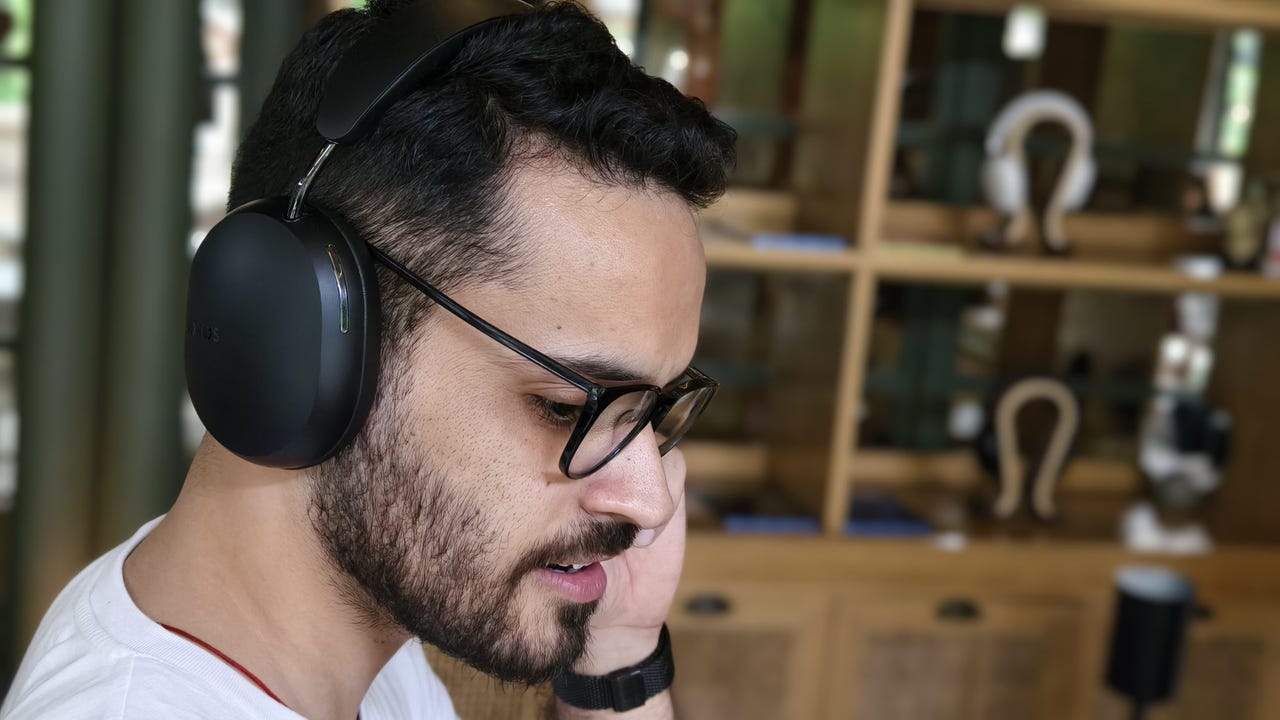
Prakhar Khanna wearing the Sonos Ace headphones.

Prakhar Khanna/ZDNET

Follow ZDNET: Add us as a preferred source on Google.


There comes a time when you want to watch TV, but someone else in your dwelling doesn’t want to be bothered by the noise. You could choose to stop watching every video in your YouTube recommended feed, or you could grab a pair of headphones and watch privately.

Many companies, such as Bose and Sonos, make headphones with specialized, proprietary connectivity to their soundbars, but you can connect any headphones to most streaming sticks via Bluetooth. Some TVs have native Bluetooth connectivity, though you’ll need to check your device settings; older and budget TVs may not.

Also: Roku TV vs. Fire Stick: Why I’m looking beyond streaming resolution when comparing the two

Connecting headphones directly to a TV or streaming stick is much more reliable than connecting to a soundbar. Workarounds exist, but if you want your soundbar and headphones to play audio simultaneously, you’ll likely need to make some magic happen with an optical cable or an A/V receiver. 

However, if your goal is to watch a movie late at night without disturbing anyone or spending extra money on special headphones, here’s how you can with the devices you already have.


How to connect headphones to your streaming stick

Roku Streaming Stick

The HD Roku Streaming Stick (purple letters).

Maria Diaz/ZDNET

What you need: A pair of headphones or earbuds and a Roku, Google, Amazon Fire, or Apple TV streaming device.

Navigate to your streaming device’s settings and find the category for Bluetooth devices. Depending on your device, the language may vary. However, it’s typically under “Remotes & Devices” or “Remotes & Bluetooth devices.”

You can typically also pair headphones, earbuds, remotes, and gaming controllers to these streaming sticks.


Show more

Before your streaming stick can connect to your headphones, you need to make your headphones discoverable. You can usually force over-ear headphones into pairing mode by holding down the headphones’ power button for at least five seconds. Usually, their status light will blink blue or amber, or pulsate white to signal that they’ve entered pairing mode.

Also: I connected a Bluetooth Auracast receiver to my TV, and it’s a worthwhile home audio upgrade

For earbuds, there’s usually a button on the back of the charging case. Press and hold that button, then check the case’s status light for a blinking or pulsating blue, amber, or white light to indicate pairing mode.


Show more

Once your headphones or earbuds have entered pairing mode, their product name should appear in the streaming stick’s list of available devices. Once you see your headphones appear, click on them to connect.


Show more

In some cases, the remotes that come with streaming sticks, like Roku’s, may have 3.5mm headphone jacks, allowing you to connect to them with a wire. 

While that may be less convenient, as you’re effectively tied to where your controller is (or need to keep it beside you), it also yields the lowest latency, reducing any delay between the audio you hear and the visuals you see.


Show more

One caveat to consider

These streaming sticks plug into your TV via HDMI, which uses a completely different method of encoding audio, sending it to your connected soundbar or TV speakers. Though Roku, Google, Amazon Fire, and Apple TV 4K support Dolby Atmos, you need either a compatible TV or an audio device connected to your TV’s eARC port to encode audio in Dolby Atmos or other high-quality, spatial audio formats.

Therefore, your headphones will not deliver Dolby Atmos audio when connected to a streaming stick or TV via Bluetooth. Instead, you’ll likely receive audio over Bluetooth using the standard SBC codec, which is associated with higher latency, less stable connections, and poorer audio quality.

Also: Why the ‘Subwoofer Crawl’ is the only way I found the bass sweet spot in my living room

Before the Sonos Ace existed, which connects to a Sonos soundbar via Wi-Fi (therefore mitigating the connectivity and latency issues), I regularly connected my headphones to my Amazon Fire TV Stick 4K and didn’t have many complaints. 

If you’re a real-deal audio nerd, there’s no doubt you’ll hear the difference between your Bluetooth-connected headphones and your carefully curated home theater. But if you just want to finish your movie in peace at 3 a.m., this trick saves money, time, and frustration with your housemates.





Source link

Leave a Reply

Subscribe to Our Newsletter

Get our latest articles delivered straight to your inbox. No spam, we promise.

Recent Reviews


Smooth international travel takes more than a valid passport and a well-packed suitcase. It’s about thinking ahead, knowing what to expect, and making choices that make the journey feel easier from the start. When you prepare with intention, you spend less time stressing and more time enjoying where you are. The goal is simple: make every trip memorable for the right reasons.

Traveling abroad becomes far more enjoyable when you rely on smart, practical tools like a travel data esim to stay connected without the usual hassles. Clear communication, flexible plans, and a bit of organization can turn potential headaches into seamless experiences. These essential tips are designed to help you cross borders with confidence and ease.

Plan Every Detail Ahead

Plan a Trip - Your Dream Vacation
Photo Credit: Deposit Photos.

A little preparation goes a long way. Before you go, check visa requirements, entry rules, and any travel advisories that could affect your plans. Confirm flights, accommodations, and transportation, and keep everything organized, both digitally and with a printed backup, just in case.

Having clarity before you leave makes every transition smoother. It minimizes last-minute surprises like schedule changes or unexpected fees. Even small things like saving airport maps or noting how to get from the airport to your hotel can make arrival day feel far less overwhelming.

Keep Your Documents Secure

Woman holding smartphone in horizontal orientation taking photo of papers, using a scanner app for taking copies of the documents.
Photo Credit: Deposit Photos.

Few things cause travel stress faster than misplaced documents. Keep your passport, ID, and insurance details in a secure, easy-to-access holder. Back them up with digital copies stored on your phone and in encrypted cloud storage.

Digital versions can also come in handy for everyday situations like hotel check-ins or booking confirmations. Knowing you have backups allows you to stay calm if plans change or something goes missing, while keeping sensitive information protected.

Stay Connected Without Disruptions

Close Up Of Businesswoman In Pyjamas Sitting On Bed With Laptop And Mobile Phone Working From Home
Photo Credit: Deposit Photos.

Reliable internet access is no longer a luxury—it’s a travel essential. Tools like a travel data esim make staying connected simple, without swapping SIM cards or relying on spotty public Wi-Fi. You can navigate new cities, manage bookings, and stay in touch effortlessly.

Consistent connectivity adds a layer of security as well. Whether you’re checking flight updates, messaging your accommodations, or finding your way through unfamiliar streets, dependable data keeps everything running smoothly.

Prioritize Health and Comfort

Happy couple doing exercises on quarantine at home, self-isolation together, stretching, exercise, health care at home. Young arab couple with closed eyes practices yoga, sitting on lotus at floor
Photo Credit: Deposit Photo.

Travel is always better when you feel good. Pack essential medications, along with a small first-aid kit for minor surprises. Bring a refillable water bottle and a few snacks to get you through long flights or layovers. Layered clothing is key, especially when moving between airports, planes, and changing climates.

Comfort doesn’t mean sacrificing style. Choose breathable fabrics and supportive shoes that can handle long days on your feet. When your body feels taken care of, you have more energy to explore, adapt, and enjoy the experience.

Understand Local Customs and Etiquette

Foreign Language. Concept - learning, speaking, travel
Photo Credit: Deposit Photos.

Respect goes a long way when traveling abroad. Learning a few basic phrases in the local language shows effort and appreciation. Pay attention to how locals greet one another, dine, and dress, and be mindful of cultural norms that may differ from your own.

Travelers who take time to understand local customs often experience deeper, more meaningful connections. These small gestures foster mutual respect and offer insights into daily life that you won’t find in guidebooks.

Manage Money and Expenses Wisely

money
Photo Credit: Deposit Photos.

Smart money planning keeps your trip stress-free. Let your bank know you’ll be traveling to avoid card issues, and carry a mix of payment options—cash and digital—so you’re covered if one fails. Avoid carrying large sums of cash and use secure methods whenever possible.

Tracking expenses helps you stay on budget and avoid surprises later. Apps that convert currency or organize receipts can simplify the process. Even jotting down daily spending can help you spot unnecessary costs and stay financially comfortable throughout your trip.

Stay Present and Enjoy the Journey

Two hikers with backpacks enjoying sunset view from top of a mountain
Photo Credit: Deposit Photos.

Every trip offers its own lessons and moments of wonder. Slow down when you can. Instead of rushing from one attraction to the next, savor the experiences that resonate with you, whether that’s wandering a quiet neighborhood, sampling street food, or lingering in a local café.

The most rewarding travel experiences strike a balance between planning and spontaneity. Leave room for unexpected moments, and approach each destination with curiosity and openness. Travel isn’t about checking boxes; it’s about being present for what unfolds.

Every international journey feels easier with thoughtful preparation and awareness. From protecting important documents to understanding local cultures, proactive travelers navigate challenges with confidence. Staying connected through reliable tools like a travel data esim ensures access to essential information whenever you need it, allowing you to focus fully on the experience. When planning, technology, and curiosity work together, the world feels more accessible and far more inviting.

Hi! We are Jenn and Ed Coleman aka Coleman Concierge. In a nutshell, we are a Huntsville-based Gen X couple sharing our stories of amazing adventures through activity-driven transformational and experiential travel.


Source link

