
Follow ZDNET: Add us as a preferred source on Google.
ZDNET key takeaways
- Trade old tech for gift cards and get a discount on new devices.
- Shipping is free with a prepaid UPS label from Amazon.
- Credit arrives within 10 business days after trade-in received.
Prime Day 2026 is less than a week away, and if you’re planning to shop as much as I am, don’t forget that Amazon offers a way to save even more while recycling your old tech.
Basically, it’ll give you Amazon gift cards to spend. Normally, you’d have to buy these, but if you trade in old, dust-collecting electronics that you no longer use through Amazon’s Trade-In Program, the company will reward you with gift card credit and even discounts like 20% off a qualifying Amazon device. That’s free spending money for you and less e-waste piling up.
Also: I found 6 useful Amazon gadgets that are up to 68% off – including a $100 TV
As much as I hate to admit this, old gadgets aren’t gaining value sitting in a drawer, especially with new models launching constantly. While other trade-in services might offer higher payouts or support more brands, Amazon’s program is worth considering because of its easy shipping process, extra discounts and rebates, and gift card credits applied straight to your account.
How Amazon’s Trade-In Program works
What you’ll need: Old tech you want to trade and an Amazon account.
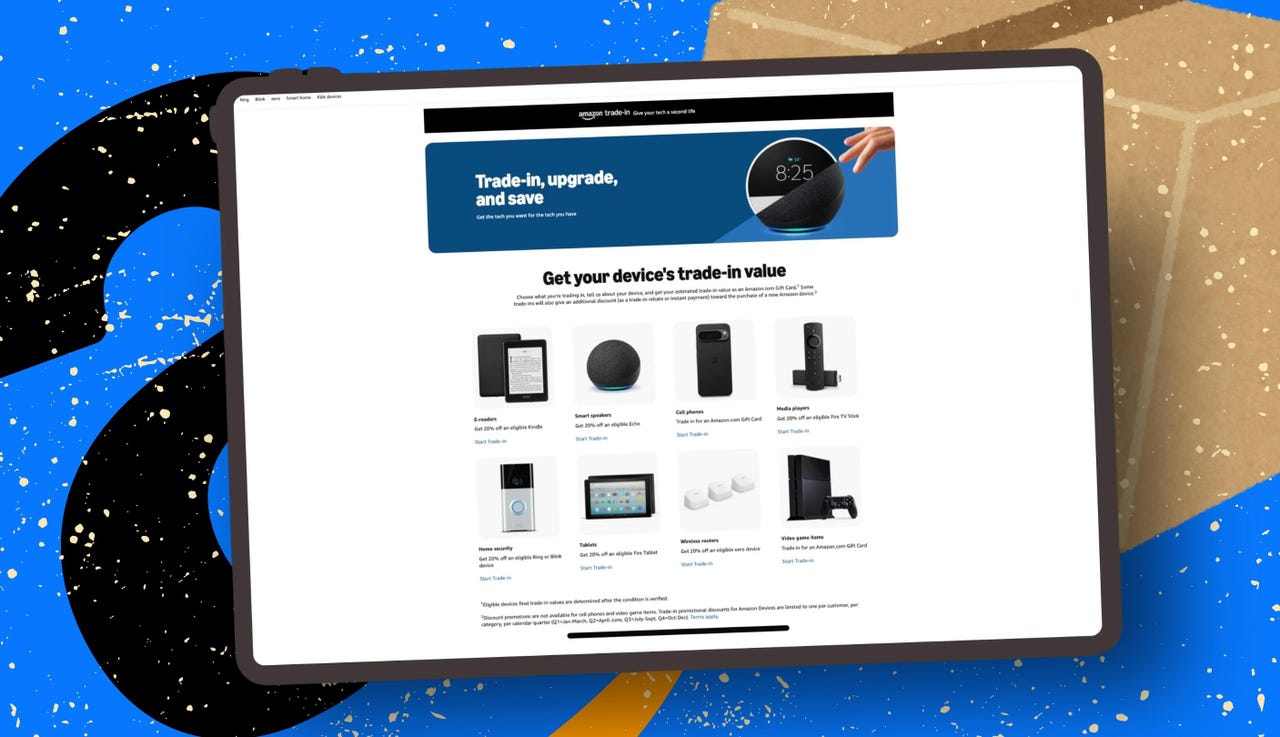
Go to Amazon’s Trade-In portal. From there, you can choose from Amazon’s own device categories (like Kindle e-readers, Fire tablets, Fire TV streaming devices, and Echo speakers), or you can select one of the categories that accept eligible electronics from other brands, such as Cell Phones and Video Game Systems.
Opening a category page will show you a search bar and a list of products associated with your Amazon account (if any). Select the items you’d like to trade in. Each product will display an estimated trade-in value, and if it’s an Amazon device, you might see an extra discount or rebate offer listed as well.
For example, Amazon is currently offering 20% off the purchase of a qualifying Amazon device, like Kindles, Fire TV Sticks, Fire Tablets, Ring and Blink devices, and Echo speakers, when you trade in an eligible device.
Also: Best early Amazon Prime Day deals under $25: Top deals on cheap gadgets I’ve tested
After selecting your device, Amazon will ask a few questions about its condition to provide an accurate appraisal. It may ask whether the device powers on and holds a charge, if all accessories are included, and whether there are any cracks or defects. You’ll also need to confirm the overall condition of the device.
Be as honest and accurate as possible, because Amazon’s inspectors will verify your answers. If the condition doesn’t match your description, Amazon will adjust the trade-in offer.
Once you’ve answered everything and clicked the appraisal button, you’ll receive an offer to review and accept.
The trade-in value and any additional discount depend on the device and its condition. Amazon currently advertises 20% off a qualifying Amazon device when you trade in an eligible device, in addition to any gift card value offered.
Also: The best early Walmart deals to compete with Prime Day: Laptops, TVs, smart glasses, and more
Once you’ve accepted an offer, Amazon will generate a prepaid UPS shipping label for you. You can find it in the confirmation email sent to the email address associated with your Amazon account or in Your Trade-In Account. Shipping is free — just print the label and slap it on your box (I usually reuse an old Amazon box for this). You’ll have up to 45 days to send your device.
You can drop off the package at any UPS store and be sure to get a receipt for tracking. In many areas, you may also be able to drop off eligible trade-in items at participating Amazon-affiliated locations, including select Whole Foods stores and Amazon Hub locations, if that’s more convenient.
Tip: Before trading in a phone, tablet, or any device with personal data, back it up, factory reset it, and sign out of all accounts. Also, take photos of its condition for proof in case of shipping issues or inspection discrepancies.
Also: These are the 11 best early Prime Day phone deals I’d actually buy myself
Now comes the easy part: sit back and let Amazon send you money.
Once your package arrives, Amazon says it typically verifies shipped trade-in items within 10 business days, although some can take up to 20 business days. The trade-in value will be added to your account as an Amazon gift card, and any rebate (like 20% off a qualifying Amazon device) will automatically apply at checkout for your next eligible purchase.
The email containing your shipping label also includes links to track your trade-in progress and shop for new devices eligible for your rebate.
Is Amazon’s Trade-In program a good deal?
It depends on what you’re looking to get out of the trade-in. If you just want to get rid of your electronics and not have to worry about buying shipping labels or paying listing fees, and you’re interested in extra discounts on a new purchase, then yes, Amazon’s program is a good deal. If you’re hoping for the highest return value, resale platforms like eBay and Swappa might be better.
Also: This 55-inch Fire TV on Amazon costs just $280 – and I can actually recommend it
Just remember, while you could sell your tech for more money, you’ll have to cover the service and shipping fees.
How long will it take to receive my trade-in credit?
According to Amazon, shipped trade-in items are typically verified within 10 business days after they arrive, although some items can take up to 20 business days to verify. Amazon may adjust trade-in rates over time, especially if newer models are released, so it’s best to start the process as soon as you’re happy with the quoted credit.
What condition do my items need to be in?
Amazon’s Trade-In Program accepts items that range from non-functional to good condition. Depending on how damaged or pristine the electronic is, you’ll receive less or more credit in return.
How long do I have to ship my device?
You have 45 days after creating your trade-in order to ship your device or devices. Your exact ship-by date will appear in your confirmation email. Your best bet is to drop off the shipment at a local UPS store as soon as possible and ask for a drop-off receipt to confirm its delivery. Eligible trade-ins can also be dropped off at some Amazon Hub and Whole Foods locations.
Can I get my trade-in device back if I change my mind?
Possibly. You can try to cancel your order by going to Your Trade-In Account and select “Cancel Order” under the trade-in order number. But if you change your mind after Amazon receives your device, canceling isn’t possible.
Where can I see my Amazon gift card balance?
You can find an Amazon gift card balance by logging in to your account on the website or app and heading to the “Gift Cards” or “Manage gift card balance” section. Or you can just go directly to this link.