
Verdict
An incredible update, Alexa+ throws away the stilted conversations of the old and introduces a voice assistant that simply understands what you’re asking. Better at general responses, able to disseminate information from emails and charts, and capable of building smart home routines quickly, Alexa+ is light years ahead of the competition. It can be a bit over-friendly at times and quite verbose, but the beauty of this system is that you can tell Alexa+ what you do and don’t like to get it working the way you want. The only real downside is that the local business search is terrible, but everything else is so much better that it’s got me talking more and using my phone less.
-
Understands context and learns your preferences
-
You can use natural language
-
Capable of building complicated routines
-
Can pull information from emails, photos and documents
-
Responses can be a long-winded until tweaked
-
Local business directory isn’t very good
Key Features
-
Free for now
No cost during the Early Access service, then bundled with Amazon Prime.
-
Works with most Echo speakers
All speakers bar some first generation models support Alexa+.
SQUIRREL_PLAYLIST_10208358
Introduction
Amazon Alexa was a magical concept at launch. It finally felt as though the future that Star Trek promised us was here, with a personal assistant you could talk to. As good as it was, clunky interactions via ‘Alexa Speak’ and several limitations ended up with Alexa (and its competition) feeling slightly more niche. Amazon Alexa+ fixes that.
The GenAI-powered voice assistant is miles ahead of the original, and miles ahead of the competition. I wrote about my initial thoughts after a week with the service, describing what Alexa+ was good at (and what it needed to improve), but I’ve had more time with the system, so read my full review to find out why it’s the best.
Availability and compatibility
To get Alexa+, you need to sign up for the Early Access programme, which is currently by invitation. The quickest way to jump up the queue is to get a new Alexa device, but eventually, the system will be rolled out to everyone. Most devices (bar a few first-generation ones) are supported, although the new versions have dedicated chips that help with the processing.
My guide on how to enable Alexa+ goes into more detail on how to get the system, and which devices are compatible. Currently, Alexa+ is free while on early access, and then it will be bundled with Amazon Prime, although you can pay £19.99 a month to have the service. Clearly, Amazon Prime is a much better way of getting it.
General conversations and information
- Understands general speech
- Much better at context
- Can be over-friendly
Although Alexa+ works in the same way as standard Alexa (you say, “Alexa”, followed by your request), the new system operates in a completely different way. Gone is the need for ‘Alexa Speak’ (saying things in a specific way to get Alexa to understand), replaced with natural conversation. And, the replies are more natural, too, with Alexa understanding and building context, as it goes.
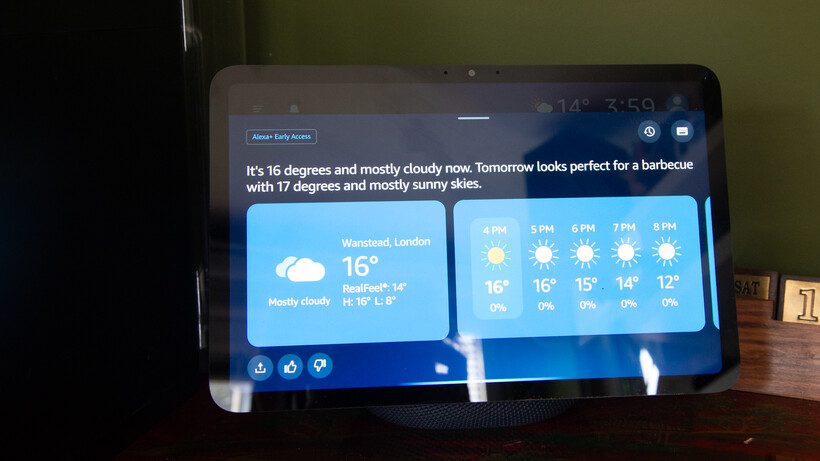
More natural conversations make it a lot easier to talk to Alexa. Sure, I can have the standard interaction, such as “Alexa, weather”, to find out what the upcoming weather is like. But, I can also ask, “When’s a good day to have a BBQ?” or, “Is the weather going to be consistently nice this week?” and not only does Alexa understand, but it gives sensible answers.

Alexa+ is also much better at context. By default, it stays listening after a reply, so you can follow up with another question. But if you go silent, you can follow up with another question at any point. In my example about the BBQ, I followed up 20 minutes later with, “Alexa, and what about next week?”
That’s limited context, but Alexa+ also builds up information about you, both explicitly (when you first get the service, it asks some basic questions, such as what your favourite type of music is) and through inference, such as by learning that you like a specific football team.
That’s surprisingly powerful. Once Alexa+, for example, has learned which of your friends are vegetarian, it will adjust the recipe ideas it suggests if any of them are coming around.
Alexa+ can also moderate its responses, adjusting emotion based on the news it gives you. As a Spurs fan, Alexa’s replies about the latest game are usually said with a slightly sad voice, although a recent win came with a more excited response.
It feels much more natural to talk to Alexa+ than to Alexa. Although there are still some oddities. Sometimes, when a reply consists of multiple sentences, the pause between each is a little off. Rather than flowing naturally, a second sentence starts abruptly, almost before the first sentence has finished. It sounds a little like Alexa+ is interrupting itself.
In terms of replies, it helps that the new service can retrieve information from a wider range of sources. All too often with standard Alexa (and pretty much all of the time with Siri), I’d hit the limit of capability, with questions that can’t be answered.
That doesn’t happen often at all with Alexa+. I asked if the recent tube strikes were going ahead, and Alexa+ told me they were, when they’d start, when they’d end and how trains could be affected after people started to return to work.
Generally, if you want to know the answer to something, Alexa+ can give you the answer in a way that makes sense.
But, it does need tweaking. Asking about the tube strike, Alexa+ was almost excited to tell me it was going ahead, and needed reminding that this was bad news and to tone it down.
Similarly, I don’t like some of the out-of-the-box responses, as they feel forced. Ask about football, and Alexa likes to say ‘mate’ a lot, a bit like it’s been programmed by watching poorly-written football beer adverts. I told Alexa+ not to call me ‘mate’ and it has stopped.
Often, Alexa+ can be too verbose, trying to be chatty, but in an unconvincing and slightly odd way. I’ve told it to be brief and to-the-point with answers, and it’s much better.
All of that’s important, as Alexa+ can be tweaked: what you get at the start and what you get weeks later are quite different. Just remember to keep tweaking and feeding back to get Alex+ to behave the way that you want it to.
For all the tweaking that you can do, there are some issues and obstacles that can’t be overcome. Asking Alexa+ about Spurs on my Echo Show 11 has the response on screen, along with some extra information that runs across the bottom. Only, the snippets of information are about the San Antonio Spurs, which isn’t very helpful.

Local business search is also, quite frankly, rubbish. Amazon says it’s working on it, and boy, does it need to. “Alexa, what’s the nearest French restaurant?” I asked. The answer was Le Marmiton, Wanstead. Not only is that restaurant an eight-minute walk from my house (so not the closest one), but, the main issue is that Le Marmiton shut down in 2023.
On my Echo Show, the response says, “It’s open today from 5pm to 9pm”, but the snippet below from TripAdvisor clearly shows that the restaurant is closed today (and, in fact, forever).

Restaurants that still exist and are on OpenTable can be booked via voice. It’s a neat system that makes Alexa+ do the hard work of finding a table for the number of people you want, at the time you want. One limitation is that you can’t book restaurants that require a credit card, although this is being worked on, too.
Documents, calendars and more
- Can read documents and create tasks and calendar entries
- Work accounts not supported
AI is very good at understanding structured data. That, combined with email and calendar management, means that Alexa+ can be a kind of personal assistant. Well, provided you don’t pay for your email. I use hosted Exchange for my personal email, but this type of account isn’t supported, nor is a Google Workspace account. That’s a little annoying, as it means creating a free Gmail or similar account for the time being.
What is very good is that via the app or by sending emails to [email protected] from a registered email address (set via the Alexa app), Alexa+ can pull out information, create reminders and calendar appointments.
Sending an email with a PDF containing information on my daughter’s upcoming DoFE expedition, the Alexa app pinged a few minutes later to tell me it had found some appointments and tasks, all spot-on, and all ready to go straight into the calendar.
Trying to go through the appallingly formatted term dates page on my daughter’s school is a nightmare, but I used the Alexa app to take a photo of it, and it quickly worked out when the inset days were and the holidays, letting me add them to my calendar. Cleverly, as we’re partway through a school year, Alexa+ ignored everything that’s already passed.
With full email support, I can see Alexa+ become core to managing everything – please, Amazon, hurry up and add work accounts!
Smart home control
- Smarter responses
- Can build Routines using voice
The same old basic commands work, such as turning on lights, or setting them to a specific temperature. But, Alexa+ is also smarter and makes it much easier to interact with.
Tell Alexa+ that it’s cold, and it will boost the heating around you. With standard Alexa, I’d need to ask what the temperature was and then ask again to set the heating to a temperature above that. Tell Alexa+ that it’s dark, and it can turn the lights on for you.
Thanks to better language processing, Alexa+ mostly understands what I want it to do, and I don’t have to phrase requests in a specific way.
Alexa+ can also build routines for you, via voice, which can be tweaked and edited in the app. I find that it’s often faster to do things this way, rather than the old app-based one.
More complicated commands can also be turned into one-time Routines. “Alexa, turn off the office lights in 10 minutes’ time” does just that.
It’s possible to string together a series of commands for a one-time run, too, such as turning the lights on, waiting for 10 minutes, and then turning them off again. These commands can often go a bit wrong.
“Alexa, set Dave officer heater to 25° and then after five minutes turn it off,” I said. This then got Alexa+ to create a routine that did what I’d described, only the command to trigger the routine was the exact, lengthy phrase that I’d said above. That’s clearly not what I wanted, but Alexa+ is getting there, making the complex much easier.

SQUIRREL_PLAYLIST_10208358
Should you buy it?
You want a smarter assistant
Much more powerful than its competition, Alexa+ is the voice assistant to use.
You don’t want a smart assistant
There’s no real comparison between this and its rivals, so only avoid if you don’t want a smart assistant.
Final Thoughts
I’d practically stopped using standard Alexa for anything more than basic requests: timers, turning a specific light on, or setting an alarm clock. Alexa+ changes that.
Yes, there are areas that need improvement (Routines and local business search are two good examples), but the general interactions are so much better. When I want the answer to a question, I now tend to ask Alexa+ rather than digging out my phone – and it helps me avoid getting trapped in doomscrolling along the way. The ability to tweak Alexa+ to understand your preferences and learn your context makes it even more powerful.
There’s simply no competition at the moment: when it comes to everyday life, general questions and smart home control, Alexa+ is so far ahead of the competition.
FAQs
Alexa+ is free during Early Access, but it will eventually be bundled with Amazon Prime, or it will alternatively cost £19.99 a month.
The short answer is yes, but you have to sign up for the invite, and people who have bought a more recent Echo speaker will get priority access.

Stephan is the sports journalist for the Maple Grove Report.