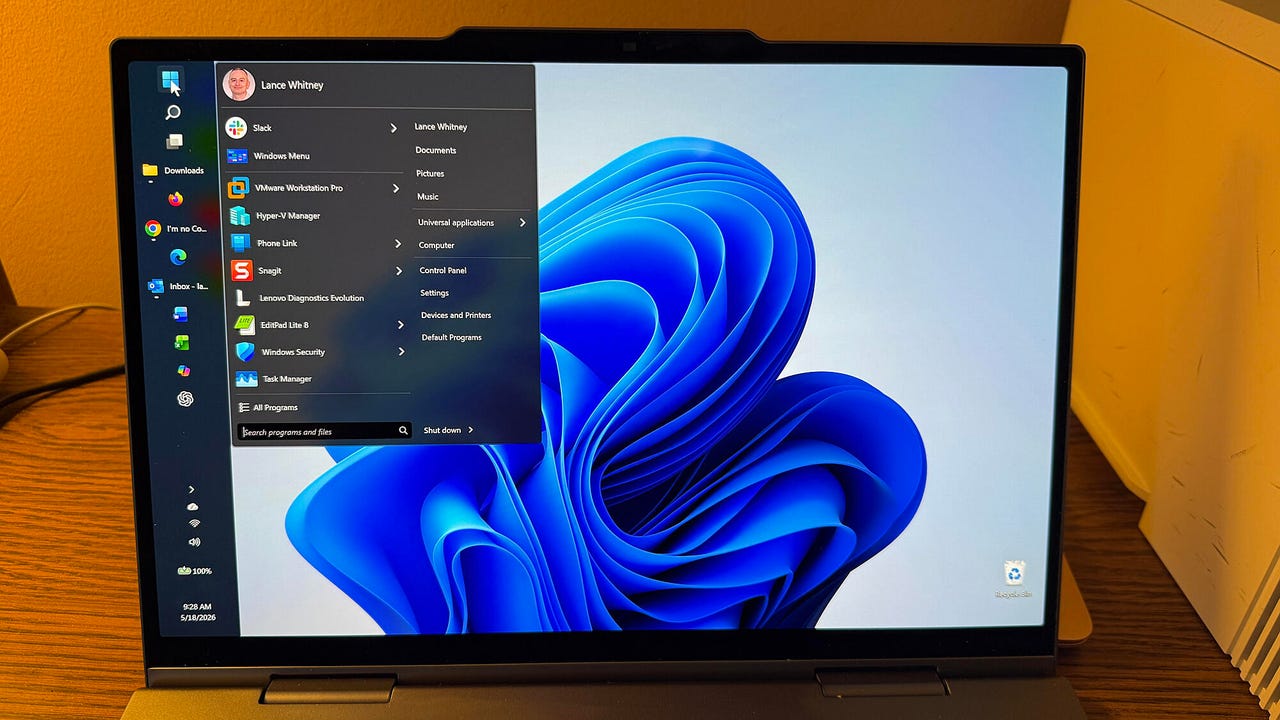
Microsoft is finally bringing the movable taskbar to Windows 11 – here’s who can try it now


Windows 11 moveable taskbar

Lance Whitney/ZDNET

ZDNET’s key takeaways

  • Microsoft will finally let you move the Windows 11 taskbar.
  • Changes to the taskbar are rolling out to Windows 11 insiders.
  • Microsoft also promises several tweaks to the Start menu.

Windows 11 users who have long wanted to move the taskbar to any edge of the screen are now being granted their wish. With the latest update rolling out to Windows insiders, you’ll be able to position the taskbar at the top, bottom, left, or right. 

Yep, just like in Windows 10.

Also: How I made my Windows 11 widgets truly useful: 8 simple tweaks to try before you hide them

To achieve this feat, you’ll need to be running the latest experimental build of Windows 11. Even then, you may have to wait a while for the capability to pop up. I updated one of my Windows 11 VMs with the latest insider build, but I don’t yet see the option to move the taskbar. Once the change arrives, here’s how it works.

Windows 11 users can finally move the taskbar

With the latest insider build installed, right-click on the taskbar and select Taskbar settings. Click the setting for Taskbar behaviors. You’ll see a new option for Taskbar position with four possible locations: Bottom, Top, Left, and Right. Select your favorite spot, and your taskbar will jump to that position.

“For people who value vertical screen space, like developers who want to see more of their code at once, moving the taskbar to the side can help reclaim precious room on the screen,” Microsoft Design Director Diego Baca said in a new blog post

Also: Windows 11 Home vs. Windows 11 Pro: I found the differences that truly matter

“If accessibility or ergonomics make the top of the screen easier to reach, you can place the taskbar there. If you rely on the taskbar to keep track of your work, a vertical layout with ungrouped icons can help you stay organized. The choice is yours.”

More changes

With the new location option comes a few other tweaks.

You can still choose how the Start button is aligned depending on the location of the taskbar. If the taskbar is on the top or bottom of the screen, you’re able to switch between left-aligned and centered. If the taskbar is on the left or right of the screen, you can opt for top-aligned or centered.

Taskbar icons such as Start and search will fly out based on the position of the taskbar. If the taskbar is at the top, the Start menu will open from the top.

You’ll still be able to see the name of each open window as it appears on the taskbar. For that, make sure the option for “Combine taskbar buttons and hide labels” is set to Never or When taskbar is full. This setting makes it much easier to switch between windows by viewing and clicking the taskbar icon.

Also: Windows changes are coming: Here’s how to get a sneak peek at what’s next

Further, Microsoft has enhanced the option to shrink the size of the taskbar. To check this out, go back to Taskbar behaviors under Taskbar settings. Click the drop-down menu for “Show smaller taskbar buttons” and set it to Always. Both the icons and the taskbar height become smaller with no restart or sign-out needed.

There are a few limitations, for now

The auto-hide and tablet-optimized taskbar settings aren’t yet supported in alternate top, left, or right positions. 

Touch gestures for these alternate spots are also a work in progress. Search boxes aren’t yet supported in these other positions and will appear as icons for the time being. Further, Microsoft is looking into other features such as different taskbar positions per monitor and dragging and dropping icons onto the taskbar in an alternate spot.

Start menu changes

But wait, there are more changes in store, namely four tweaks to the Windows 11 Start menu reaching Windows 11 insiders over the next few weeks.

Also: I tried this free Windows cleanup tool to see if it’d speed up my PC – and it worked

First, you’ll be able to separately show or hide the Pinned section, the Recommended section, or both of them in one shot.

Second, turning off the option to “Show recommended files in Start, recent files in File Explorer, and items in Jump Lists” currently affects all three. With an upcoming change, you’ll be able to disable file recommendations in the Start menu without affecting recent files in other places.

Third, the Start menu currently changes its size based on your display. Instead, you’ll be able to manually choose the size yourself, either Small or Large. Your choice then stays consistent.

Fourth, you’ll be able to hide your name and profile picture in the Start menu if you want to remain private when sharing your screen or displaying a presentation. And there are a few more changes. 

The Recommended section in the Start menu is being renamed to Recent to more accurately reflect its goal. Recently installed apps will remain visible. The recent files you see also promise to be more relevant based on your work.

How to try

To try the new taskbar and Start menu changes, you need to be enrolled in the Windows Insider Program and running the latest Experimental Windows 11 build. (If you don’t see the option yet, Microsoft may not have rolled it out to your PC.) The Start menu changes are also expected to roll out to Windows 11 insiders over the next few weeks.

When will these latest updates reach all Windows 11 users? That’s difficult to say. Since the changes are still in the new Experimental channel of the insider build, they need to transition to the Beta channel once they’re more stable. From there, they can then roll out to to the general public. Normally, that entire process can take anywhere from a few months to a year. But with Microsoft keen on cleaning up Windows 11, I think the company will try to expedite these and similar updates.

A more user-friendly Windows 11

Windows 11 users have been complaining that Microsoft has been focusing too much on AI and not enough on fixing the many flaws and quirks in the OS. In response, the company has vowed to address some of the long-standing problems in an attempt to make Windows 11 more reliable and user-friendly.

Also: If Microsoft really wants to fix Windows 11, it should do these four things ASAP

The Start menu and taskbar are certainly areas in need of much improvement. That’s especially true since those two features have been less effective and less customizable in Windows 11 than in its predecessor. Now that Windows 10 is no longer supported, Microsoft needs to focus on these and the many other issues that still affect Windows 11.





Source link

Leave a Reply

Subscribe to Our Newsletter

Get our latest articles delivered straight to your inbox. No spam, we promise.

Recent Reviews


If Game Two of their first-round playoff series with the Denver Nuggets saved the 2025-26 season for the Minnesota Timberwolves, Game Three showed why it should be saved. 

The Timberwolves were a different beast while decisively thumping the Nuggets, 113-96 Thursday night at Target Center, in a game that wasn’t nearly that close. These Wolves were the mythical creature we’d heard about in preseason lore, purposefully locked and loaded to be both marauding and staunch. They owned both ends of the court, gleefully transferring back and forth from irresistible force to immovable object. 

A quartet of Timberwolves deserve special mention, but it begins with Jaden McDaniels. After his team had toppled Denver to even the series at a game apiece Monday night, McDaniels used the sizable chip on his shoulder to etch some graffiti into the public discourse, casually castigating the most prominent Nuggets players by name as “bad defenders” in a matter-of-fact manner that had the media compelling him to confirm what he had just said. 

Trash talk is fleetingly fungible in the jaundiced social environment of 2026, functioning more like coupons than currency in that it needs to be rapidly leveraged before its expiration date. The common perception naturally was that McDaniels was calling out the Nuggets. But in a more subtle, profound way, he was also putting his teammates on notice. 

All season long the Timberwolves have procrastinated on their full potential, frequently demonstrating that their preseason talk about maturity and commitment was cheap. By contrast, those words uttered by McDaniels were expensive. He had just picked a fight with the opponent, leaving open the question of how many of his teammates would join him in the fray. 

That he would lead the charge was established early, after the Timberwolves’ top two scorers, Anthony Edwards and Julius Randle, had each missed a pair of open looks against Denver’s bad defenders in the game’s first 90 seconds.  

With the game still scoreless, the NBA’s best pick-and-roll combo, Nikola Jokic and Jamal Murray, were clustered around the foul line with Minnesota’s best defenders, McDaniels and Rudy Gobert. As they jammed up Jokic, McDaniels picked the ball loose and started sprint-dribbling the other way. To no one’s surprise, Donte “Ragu” DiVincenzo was also on his horse in transition, receiving a pass from McDaniels and then lobbing it back for a Jaden slam against a hapless Murray and Murray’s late-arriving teammate, Cam Johnson, who committed the foul that allowed McDaniels to finish with the “and-1” free throw. 

On the Timberwolves next offensive possession, McDaniels muscled his way to two offensive rebounds, feeding Ragu off the first one for a missed three-pointer, which he corralled for the second one and executed the putback in traffic. It was McDaniels 5, Nuggets 0, setting the tone for a game in which not only did the Wolves never trail, but never let the lead go under double digits after McDaniels made a consecutive pair of driving layups eight minutes into the game. 

“Spectacular. I thought his activity offensively in the first quarter was outstanding,” said Wolves coach Chris Finch after the game. “He was inspirational.” 

Among the most inspired were McDaniels fellow wing players, Ragu and Ayo Dosunmu. Ragu is exactly the kind of player who will have your back in a squabble, and his galvanized performance seemed borne of satisfaction that someone else had clarified the mission. As usual, the Timberwolves were at their best with him on the court: +20 in the 32:54 he played, -3 in the 15:06 he sat. 

“He makes so many hustle plays, momentum plays, different styles of plays.” Finch raved. “He’ll make a shot, get a transition bucket, he’ll rebound, get a steal, blow something up. So many different plays. He’s just a basketball player.”

Related: How the Timberwolves sparked a season-saving Game 2 comeback over the Nuggets in Denver

Then there was Ayo, whose fearless, blazing, bee-lines for the bucket were quicksilver kryptonite for a Nuggets defense that is neither swift nor rugged. “I’ve been waiting for him to wake up a little bit in this series,” Finch accurately observed. “The downhill mindset that he played with all season for us was back.”

Back with the sort of multipurpose propulsion that leaves witnesses with giddy whiplash. Ayo led the team with 25 points and 9 assists in 32 minutes of time-lapse hoops, the lone blemish being three clanks from long range. Why chuck treys when you can so easily undress players in the paint? Ayo was 10-for-12 on two-pointers and none of those dozen shots came from anywhere but beneath the rim. Five of his nine dimes likewise yielded layups or dunks, which means he personally accounted for 30 of the 68 points in the paint by the Timberwolves on Thursday, doubling up the Nuggets’ 34.

Which brings us to the non-wing in Game 3’s ring of honor, Rudy Gobert. For the third straight game, Gobert blunted the supposed advantage Denver had with the magical playmaker Nikola Jokic at the controls. Suffice to say that in the last five quarters, Jokic has shot 8-for-33 from the floor. If that continues, the Nuggets are toast in this series. 

When I asked Finch after the game if the herculean job Gobert was doing on Jokic made planning his defense simpler and better thus far, he replied, “Rudy is making all of us look good right now with his defense.” 

Amen.

If there is an asterisk on this game, it would be the absence of Denver’s brutishly versatile power forward Aaron Gordon. Nuggets coach David Adelman should be given a lot of credit for his honesty and transparency in dealing with the media during his first full season at the helm, but it came back to bite him and his team during the pregame presser, when he was clearly rattled and dejected by the sudden unavailability of Gordon, whose playing status went to “probable” to “out” in a period of a few hours due to a chronic calf strain. 

Gordon is far and away his team’s best defender, making the timing of his injury especially troublesome in the wake of McDaniels laying down his marker. Rattled is a good way to describe the entire team’s performance in the first quarter, an emotional wounding that needs to heal as fast as Gordon’s body if the Nuggets are going to be competitive in a series that had dramatically been flipped on its head over the past three days. 

That the Timberwolves played with such dominance despite mediocre outings from Ant and Randle would be a good thing for both of those current cornerstones to keep in mind. Ant was beset by foul trouble and Randle had a solid second quarter, but it stood out that neither player fully embraced what so often works on offense when the Wolves are at their best: Push the pace, move the ball, move without the ball, and make quick decisions. Ant and Randle can still be first among equals and blend into that catechism if they stay attuned to the possibilities of a greater good, one that all of sudden doesn’t have to end with them being postseason fodder for the Spurs or the Thunder. 

Not when you’ve got three wings at a collective peak, with a chaser of Rudy semi-clowning the Joker. 


Source link