
Follow ZDNET: Add us as a preferred source on Google.
ZDNET’s key takeaways
- Project NOMAD is an offline info database and AI tool.
- This platform could come in handy if you can’t get online.
- It can be installed on any Debian-based Linux distro.
Imagine that you’ve landed in some sort of post-apocalyptic, dystopian future. In that future, it’s not necessarily the strong that will survive, but rather those with access to information.
Information could wind up being the most sought-after commodity, the difference between survival and, well, not.
But how do you gain access to information? You might not have a network connection, which means no internet. And that means no search engine or AI.
Also: How my portable wind turbine compares to solar panels – 2 years of testing later
What do you do?
If you have already installed Project NOMAD, which stands for Node for Offline Media, Archives, and Data, and is a self-contained, offline “survival computer”, then no need to worry. This project’s tag line is “Knowledge That Never Goes Offline.”
Thanks to this tool, you have access to a knowledge base and offline AI that can keep you informed and empowered.
Sounds pretty useful, right?
NOMAD isn’t just for a potential future dystopia. Imagine you have to travel to parts unknown, where internet connections are iffy, but information is necessary. With Project NOMAD up and running, you have everything you need to keep you informed.
How does Project NOMAD work?
First, you have to install Project NOMAD, which can be done on any Debian-based Linux distribution with the command:
sudo apt-get update && sudo apt-get install -y curl && curl -fsSL https://raw.githubusercontent.com/Crosstalk-Solutions/project-nomad/refs/heads/main/install/install_nomad.sh -o install_nomad.sh && sudo bash install_nomad.sh
Once the packages are installed, you can start, stop, and update N.O.M.A.D with the commands:
- sudo bash /opt/project-nomade/start_nomad.sh
- sudo bash /opt/project-nomade/stop_nomad.sh
- sudo bash /opt/project-nomade/update_nomad.sh
This backend service works with the help of Docker containers. After spinning up Project NOMAD on Sparky Linux (which is Debian-based), I got curious to see what’s behind the curtain, which is how I figured out it used Docker containers. After running the install command, I checked to see if there were Docker containers running with:
docker ps -a
I was immediately greeted with a permission denied error (more on that in a bit). I then added sudo into the mix and was rewarded with a list of the currently running containers, which were:
- project-nomad:latest
- redis:7-alpine
- mysql:8.0
- amir20/dozzle:v10.0
- project-nomad-disk-collector:latest
- project-nomade-sidecar-updater:latest
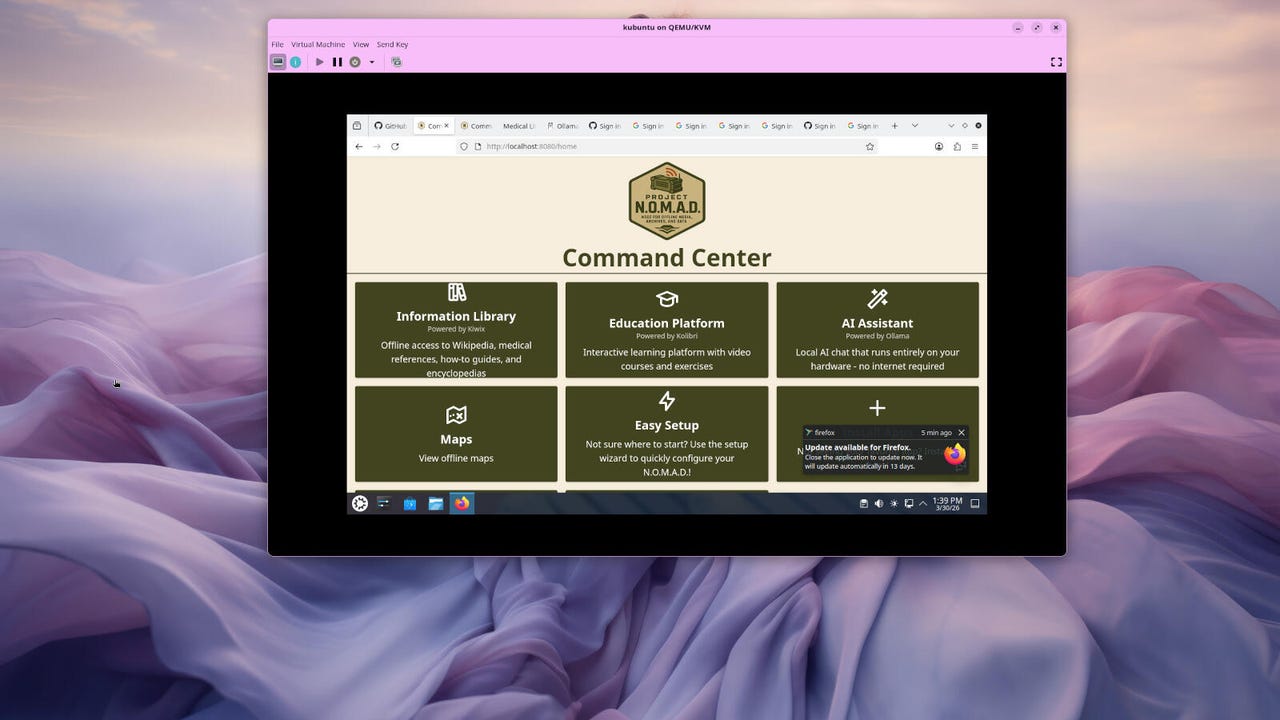
Thanks to those 6 containers, Project NOMAD is capable of delivering all of its information from within a handy website. Open a browser and point it to http://localhost:8080, and you’re ready to educate yourself on whatever you need.
Also: This single power station is keeping my off-grid cabin running – here’s why I picked it
The first thing that caught my attention was the Apps feature. After clicking that button, I was taken to the Apps “Store,” where I could install a few handy apps, such as the Information Library, Education Platform, AI Assistant, Notes, and Data Tools.
You won’t find a lot of apps, but those that are available are handy.
Jack Wallen/ZDNET
Out of curiosity, I installed the AI platform. When that was completed, I discovered that it didn’t work. OK, troubleshooting time. I went back to the home page and clicked Easy Setup. Here, NOMAD made it clear that certain capabilities were installed, but not enabled.
I attempted to select AI Assistant, but it refused. I could select the other options just fine, but not AI. Curiosity sent me to the command line to see if Ollama was installed. It was, but that was because I’d installed it for a previous review.
Also: The best portable power stations of 2026: Expert and lab tested
Hmm….
I went back to Apps and ran a Force Reinstall. No luck.
I decided to try another NOMAD installation, this time on Kubuntu. I figured that maybe the previous Ollama installation was causing problems. Good news: that did the trick. I could now run the easy setup for all of the necessary features.
Easy Setup for the Information Library, Education Platform, and AI Assistant makes finishing up the installation easy.
Jack Wallen/ZDNET
During that setup, I had to select a map region (you can select as many regions as you like), and content such as AI models, Wikipedia, medicine, survival and preparedness, education and reference, DIY & repair, agriculture & food, and computing & technology. Be careful with this section, as every information package you add takes up space. You don’t want to run out of internal storage.
With everything installed, I started to see the true benefit of Project NOMAD Imagine having some of the tools you normally use, with a network connection, available while you’re offline.
Also: I stuck this power station in a freezer to test its subzero claims
I ran AI queries, looked up medical information, and more.
This project is genius, and I hope I never have to use it. If I do… I’ll certainly be glad it’s there. I will say that some of the information was a bit unexpected (such as “Tongue Diagnosis in Chinese Medicine” and “Wilderness Medicine Course”), but even those handbooks could be useful to some.
All in all, Project NOMAD impressed me. I certainly hope the project continues to develop, because it could become quite important in the years to come (read into that what you will).
Find out more on the project’s GitHub page.