Ryobi’s New Microtech Cordless Screwdriver Charges Via USB-C (And Actually Looks Useful)


We may receive a commission on purchases made from links.

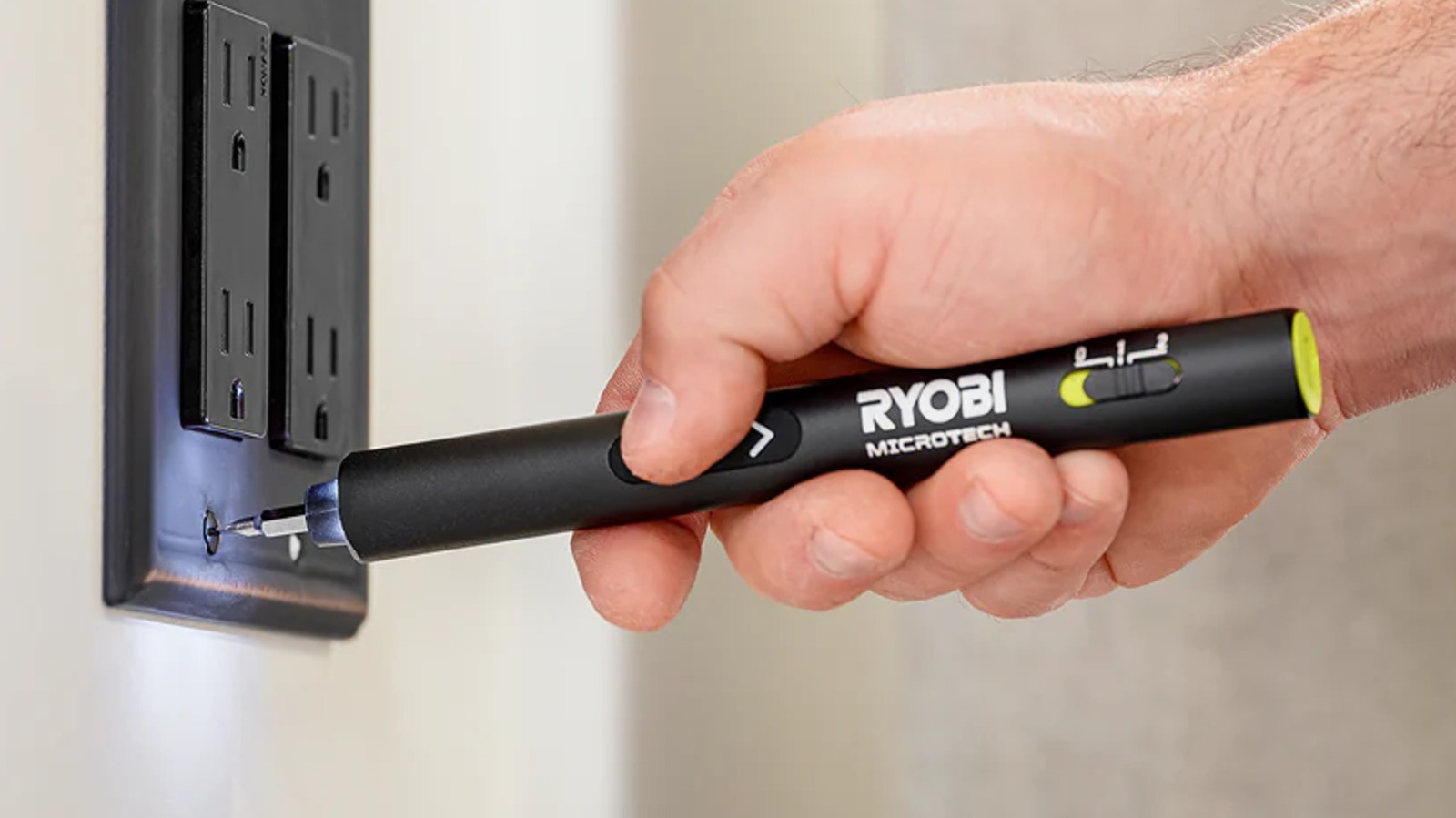
Home improvement jobs come in all sizes. Sometimes, you’ll need a big power tool, while other occasions may require more precision — crucially, without compromising on power. For example, if you have to contend with small yet tight screws and the Ryobi six-piece Precision Screwdriver Set isn’t enough, a possible solution could be the upcoming Ryobi Microtech Electric Precision Screwdriver — a small yet mighty tool that promises to move tiny fasteners with ease.

According to Ryobi’s product listing, this small electric screwdriver is designed to deliver control and accuracy, with a 0.2 Nm (roughly 0.15 lb-ft) of torque and a top speed of 200 rpm. The collet is magnetized to make bit changes easier, and there’s an LED light on the front to help with visibility. It charges via USB-C, with a Type-A-to-USB-C cable included with the tool. Also included are 50 bits and accessories as well as a carry case with a handy magnetization zone. Covering it all is a two-year Ryobi limited warranty, protecting purchasers from any workmanship defects.

On paper, there is a case to be made that this Ryobi cordless electric precision screwdriver will deserve a place among the great Ryobi tools homeowners should probably have on hand once it comes out, as it should come in handy in a host of situations.

Where this Ryobi Microtech cordless screwdriver can come in handy

With its wide selection of bits and straightforward charging, the Ryobi Microtech cordless electric precision screwdriver seems both convenient and versatile. It has three modes, including a manual mode, that will suit various jobs. Mode 0, or the manual mode, is best for fragile devices or fasteners, where total torque control is essential. Think rusted, easily damaged old screws or materials like brittle plastic, scratch-prone metals, or peeling paint.

Ryobi recommends the lower-speed Mode 1 for small hardware and fasteners. Examples provided include phone repairs, glasses, and drone internals. Mode 2 offers more power and is meant for devices such as laptops, video game controllers, and electrical sockets. No matter the mode, the tool’s directional switch lets you swap between clockwise and counterclockwise rotation.

Ryobi’s Microtech screwdriver is reportedly slated to release in July 2026 for around $49.97. It looks like it has the potential to do a lot around the house and at work, and it’s definitely one of the handful of new Ryobi USB lithium tools releasing in 2026 that we’re excited about.


Source link

Leave a Reply

Subscribe to Our Newsletter

Get our latest articles delivered straight to your inbox. No spam, we promise.

Recent Reviews


Testing desks is something of a subjective game. Much like office chairs, the tests are based on comfort, reliability and ease of setup rather than things you can test in electronics such as wattage and battery usage. I still tested each one rigorously and will continue to test them for longevity in the coming months.

I tested these desks by asking three people to try each one. Each of them used the desk for at least 16 hours and then gave me their impressions. The three people were 6 feet, 1 inch tall; 5 feet, 8 inches tall; and 5 feet, 4 inches tall respectively, to give me a good cross-section of average user height.

A busted up box containing a desk

James Bricknell/CNET

Setup time and package quality

Building desks can often be difficult and time-consuming. For each desk, I timed how long it took to unpack and assemble, and I noted whether the manual was easy to follow. I followed the instructions as closely as possible so that each build was performed as if I had never built one before. I also thoroughly checked the packaging, to make sure it wasn’t damaged, and if it was secure enough to carry the desk it had in it. Any damage was noted, and images were sent to the manufacturers for review.

Structural integrity

Modern desks need to be able to hold a good amount of weight. If you’re at a writing desk you might only have a small laptop, but if you’re using a gaming desk, it likely has two monitors and a giant gaming PC as well. For each desk, I checked the maximum load specification, and I tried to match that with the materials we actually use on our desks.

I used:

  • A heavy gaming PC tower
  • Two 27-inch gaming monitors on a dual monitor arm
  • A MacBook Pro
  • Two different keyboards and assorted mice and trackpads
  • My Oculus Quest 2
  • My phone stand and USB hub
  • A podcasting mic and headphones

Depending on the length and weight capacity of the desk, I mix and match these items, then check for any bowing of the top or inconsistencies in how the desk felt as I worked.

Giant black standing desk with rainbow lights

James Bricknell/CNET

The wibble-wobbles

This is a bit of a throwback from when my dad used to make furniture. Anything my dad built would be critiqued by my mum, and if it didn’t pass muster, she would say, “It’s a bit wibbly-wobbly, isn’t it, dear?” Once I’ve built each desk and loaded it for normal use, I would check it for the wibble-wobbles. This means rocking it from side to side and forward and backward to check that all the screws, bolts and fixtures kept everything rigid.


Source link